1. Producte acabatview
The ipega PG-9156 is a versatile wireless gamepad controller designed for an enhanced gaming experience on Android devices. It supports both Bluetooth 4.0 and 2.4G wireless connections, offering broad compatibility and ease of use.
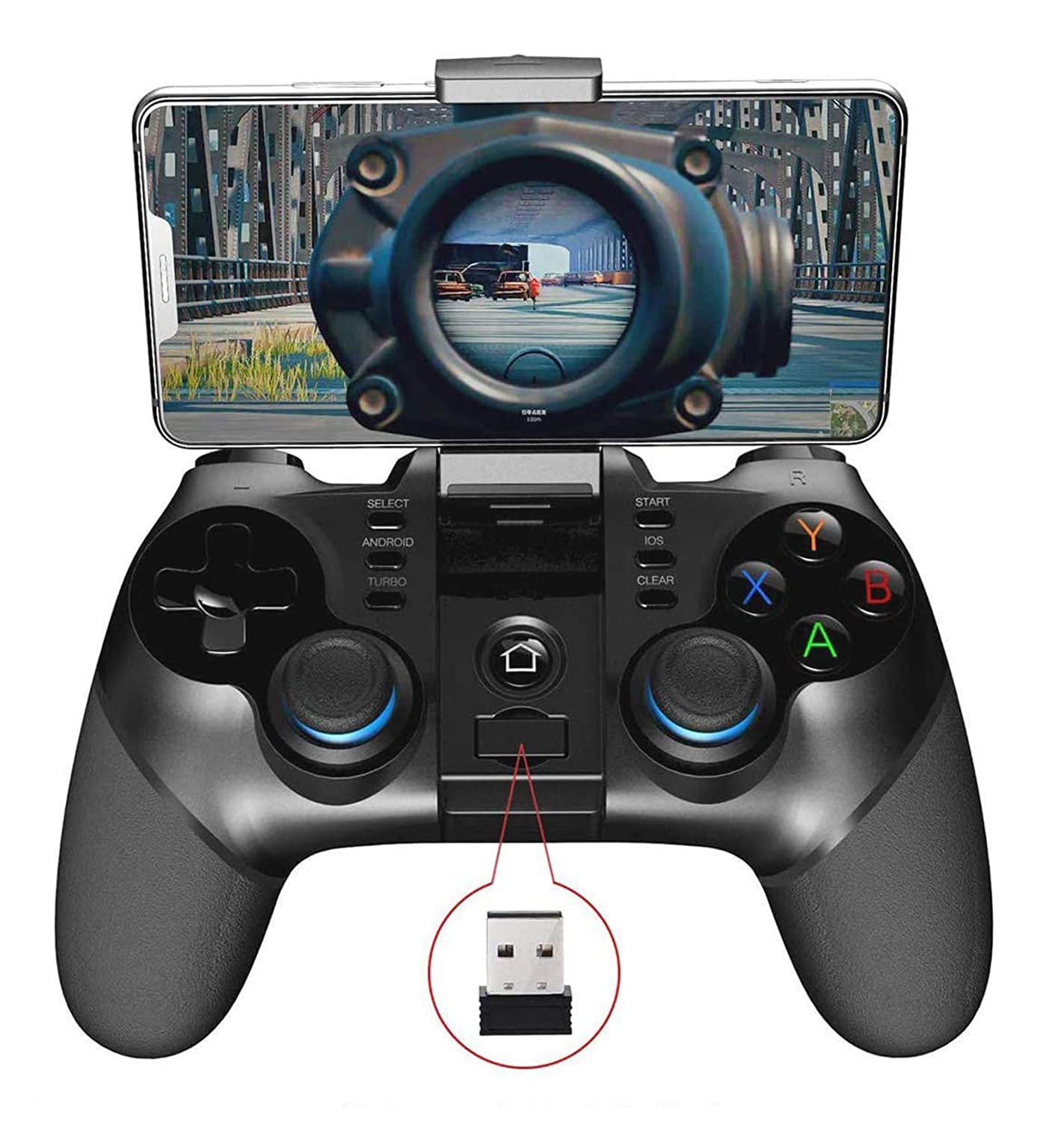
Figura 1: ipega PG-9156 Gamepad with a smartphone mounted, displaying a game. The image also highlights the 2.4G wireless receiver.
Característiques principals:
- Connectivitat dual: Supports Wireless 4.0 for mobile devices and 2.4G wireless for TV, TV boxes, set-top boxes, and PCs.
- Àmplia compatibilitat: Compatible with Android 6.0 and higher systems, including various smartphones and tablets. Note: Does not support MediaTek chip phones.
- Controls personalitzables: Utilizes the ShootingPlus V3 app for personalized button mapping.
- Suport de telèfon integrat: Adjustable holder suitable for 4-6 inch smartphones, with a stretching capacity of up to 85mm.
- Llarga vida útil de la bateria: Built-in 380mAh lithium battery provides over 15 hours of continuous play and up to 30 days of standby time.
- Disseny ergonòmic: Comfortable operation with high-precision rockers and a Turbo acceleration function.
2. Configuració i connexió
Before using the gamepad, ensure your device meets the compatibility requirements (Android 6.0 or higher). The PG-9156 offers two primary connection modes.
2.1. Modes de connexió
Select the appropriate startup mode for pairing based on your device and desired functionality:
- Mode directe d'Android V3: Manteniu premut el botó Android button + HOME button simultaneously for 2 seconds. This mode is for direct play with games supported by the ShootingPlus V3 protocol.
- Mode de joc estàndard d'Android: Manteniu premut el botó X button + HOME button simultaneously for 2 seconds. This mode is for standard Android games.

Figura 2: Illustration of the ipega PG-9156 gamepad highlighting the Android key, iOS key (for indication only), and the 2.4G wireless receiver for connection setup.
2.2. Emparellament inicial (Bluetooth)
- Choose the desired startup mode (e.g., Android V3 Direct Mode) by pressing the corresponding buttons on the gamepad.
- Al dispositiu mòbil, activeu el Bluetooth i cerqueu els dispositius disponibles.
- Select "PG-9156" from the list to pair.
- Once paired, the gamepad's indicator light will confirm the connection.
2.3. 2.4G Wireless Connection (for PC/TV Box)
- Insert the 2.4G wireless receiver into a USB port on your PC, TV box, or set-top box.
- Power on the gamepad. It should automatically connect to the receiver.
- Ensure your PC/TV box system is Android 6.0 or higher for optimal compatibility.
3. Instruccions de funcionament
3.1. Installing Your Smartphone

Figura 3: The ipega PG-9156 gamepad demonstrating its adjustable phone holder, suitable for 4-6 inch smartphones and capable of 160-degree adjustment and up to 85mm stretching.
The gamepad features an integrated phone holder:
- Gently pull up the phone holder located at the top of the gamepad.
- Adjust the holder to fit your smartphone (4-6 inches, up to 85mm stretch).
- The holder can be adjusted for angle to optimize viewdurant el joc.
3.2. Disposició i funcions dels botons
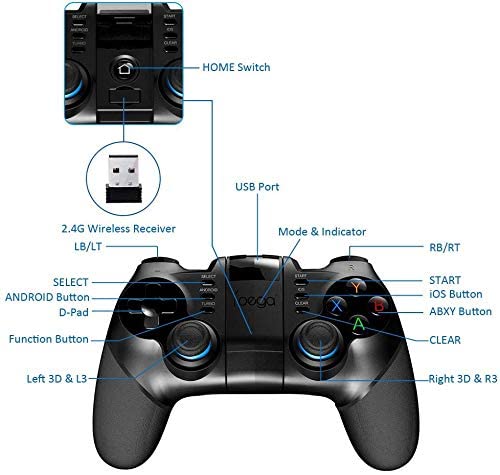
Figura 4: Detailed diagram of the ipega PG-9156 gamepad's button layout, including D-Pad, Left/Right 3D joysticks, ABXY buttons, Shoulder buttons (LB/LT, RB/RT), SELECT, START, TURBO, ANDROID, iOS (for indication only), CLEAR, HOME Switch, and USB Port for the 2.4G receiver.
Familiarize yourself with the gamepad's controls:
- D-Pad: Control direccional.
- Left/Right 3D Joysticks: Analog movement and camera control.
- Botons ABXY: Botons d'acció.
- Shoulder Buttons (LB/LT, RB/RT): Additional action buttons.
- SELECT/START: Game menu and pause functions.
- Botó TURBO: Activates turbo acceleration for rapid button presses.
- ANDROID Button: Used for Android V3 Direct Mode pairing.
- HOME Switch: Encès/apagat i selecció de mode.
- Botó ESBORRA: Used in conjunction with the ShootingPlus V3 app for button reset.
3.3. Using the ShootingPlus V3 App for Customization
For games not natively supported or to customize controls, download the ShootingPlus V3 app. You can find it by scanning the QR code in the physical manual or searching online.
- Connect the gamepad to your mobile phone via Bluetooth (Android V3 Direct Mode).
- Open the ShootingPlus V3 app. Ensure the gamepad is recognized.
- Launch your desired game.
- Tap the "V3" floating icon (or press the START button on the gamepad) to enter the custom button interface.
- Personalització de botons:
- Drag button icons to correspond with virtual buttons on your game screen.
- To remove an unwanted button icon, drag it to the [Dust Bucket] icon.
- To load a game screenshot for precise mapping, press and hold a blank area on the screen, then select "Select Picture". It's recommended to take a screenshot of the game's main interface beforehand.
- Resetting Buttons: Click the [New] button to clear all custom settings. Then, press buttons on the gamepad (e.g., A), and the corresponding icon will appear on screen, which you can drag to the desired virtual button.
- Desar la configuració: After customization, click the [Save] button (or press the START button) to exit and apply your settings.
- Joystick Settings: In the game's settings interface, align the virtual joystick with the gamepad's rocker to avoid deviation.
4. Manteniment
Proper care will extend the life of your ipega PG-9156 gamepad.
- Mantingueu el dispositiu sec. Eviteu l'exposició a la humitat o a líquids.
- No exposar a temperatures extremes.
- Clean with a soft, dry cloth. Avoid using harsh chemicals or abrasive cleaners.
- Emmagatzemar en un lloc fresc i sec quan no s'utilitzi.
- Eviteu deixar caure el gamepad ni sotmetre'l a impactes forts.
5. Solució De Problemes
If you encounter issues with your gamepad, refer to the following common solutions:
- El gamepad no es connecta:
- Assegureu-vos que el gamepad estigui carregat.
- Verify you are using the correct startup mode (Android V3 Direct or Android Standard).
- Desactiva i activa el Bluetooth del dispositiu i, a continuació, intenta emparellar-lo de nou.
- For 2.4G connection, ensure the receiver is properly inserted and your system is compatible.
- Botons que no responen correctament al joc:
- Ensure the gamepad is connected in the appropriate mode for the game.
- Open the ShootingPlus V3 app and verify your custom button settings. Adjust virtual joystick positions if necessary.
- Some games may require specific in-game controller settings. Check the game's options.
- Gamepad disconnects frequently:
- Assegureu-vos que el gamepad estigui completament carregat.
- Redueix la distància entre el gamepad i el dispositiu.
- Eviteu interferències d'altres dispositius sense fil.
- Does not work with MediaTek chip phones: This gamepad is not compatible with phones using MediaTek chips. Please verify your phone's processor.
For further assistance, you may search for "PG-9156 ShootingPlus V3 settings" video tutorials online or contact ipega customer support.
6. Especificacions
| Característica | Detall |
|---|---|
| Model | PG-9156 |
| Connectivitat | Wireless 4.0 (Bluetooth) + 2.4G Wireless |
| Compatibilitat | Android 6.0 and higher (Smartphones, Tablets, TV, TV box, Set-top box, PC). Not compatible with MediaTek chip phones. |
| Capacitat de la bateria | Bateria de liti de 380 mAh |
| Temps d'ús continu | >15 hores |
| Temps d'espera | Fins a 30 dies |
| Suport per a telèfon estirable | ≤85 mm |
| Dimensions del producte | 10 x 5 x 5 cm (Dimensions del paquet) |
| Pes de l'article | 200 g |
| Fabricant | IPEGA |
7. Garantia i Suport
For warranty information or technical support, please refer to the documentation included with your purchase or contact ipega customer service directly. You can often find support contact details on the manufacturer's official weblloc web o a través del vostre distribuïdor.
When contacting support, please have your product model (PG-9156) and purchase details ready.


