Introducció
Thank you for choosing the BONTEC Universal Floor TV Stand. This manual provides detailed instructions for the safe and proper assembly, operation, and maintenance of your new TV stand. Please read this manual thoroughly before beginning assembly and retain it for future reference.

Image: The BONTEC Universal Floor TV Stand, fully assembled with a television mounted, showcasing its sleek design and three tempered glass shelves.
Informació de seguretat
ADVERTIMENT: Si no llegiu i no seguiu totes les instruccions, podeu patir lesions personals o danys al producte. Guardeu aquest manual en un lloc segur per a futures consultes.
- Do not exceed the maximum load capacity of 40 kg (88 lbs) for the TV mount and 60 kg, 10 kg, 10 kg for the glass shelves respectively.
- Ensure all screws are securely tightened before use. Do not overtighten, especially screws on glass components.
- Do not use an electric drill for screws on glass components to prevent damage.
- Aquest producte està dissenyat només per a ús interior.
- Keep children and pets away during assembly. Small parts may be a choking hazard.
- Col·loqueu el suport del televisor sobre una superfície plana, estable i anivellada.
- Always ensure the TV is securely attached to the mount and balanced.
Contingut del paquet
Si us plau, verifiqueu que tots els components siguin presents i no estiguin danyats abans de començar el muntatge. Si hi ha alguna peça que falti o estigui danyada, poseu-vos en contacte amb el servei d'atenció al client.
Components principals:
- ✓ Base Plate (1)
- ✓ Central Support Column (1)
- ✓ Tempered Glass Shelves (3)
- ✓ TV Mounting Bracket (1 set)
- ✓ VESA Mounting Arms (2)
Maquinari i accessoris:
- ✓ Assorted Screws, Washers, Spacers for TV mounting
- ✓ Assembly Screws for stand components
- ✓ Allen Key / Wrench (for assembly)
- ✓ Cable Management Clips (2)
- ✓ Anti-slip Rubber Feet (6)
Instruccions de muntatge (Configuració)
Follow these steps carefully for proper assembly. It is recommended to have a second person assist with TV mounting.
- Step 1: Attach Rubber Feet to Base Plate.
Carefully attach the 6 anti-slip rubber feet to the designated spots on the underside of the base plate. This protects your floor and ensures stability.
- Step 2: Assemble Central Support Column.
Secure the central support column to the base plate using the provided screws. Ensure it is firmly attached and upright.
- Step 3: Install Tempered Glass Shelves.
Attach the three tempered glass shelves to the central column at your desired heights. Use the appropriate screws and washers. Remember: Do not use an electric drill for these screws. Hand-tighten only to prevent glass damage.

Imatge: Una imatge detallada view of the high-strength tempered glass shelves attached to the central support column, highlighting their robust construction.
- Step 4: Attach TV Mounting Bracket to Column.
Secure the main TV mounting bracket to the top of the central support column. Ensure it is level and tightly fastened.
- Step 5: Attach VESA Mounting Arms to TV.
Identify the correct VESA mounting holes on the back of your TV. Select the appropriate screws, washers, and spacers from the provided kit. Attach the two VESA mounting arms to the back of your TV. Ensure they are securely fastened and aligned.

Image: A visual guide illustrating the compatibility of the TV stand with various TV sizes (30"-70"), maximum weight capacity (40kg for TV, 60kg/10kg/10kg for shelves), and supported VESA patterns (Min: 75x75mm, Max: 600x400mm).
- Step 6: Mount TV onto Stand.
With assistance, carefully lift your TV and hook the VESA mounting arms onto the main TV mounting bracket on the stand. Secure the TV in place using the locking mechanisms or screws as per the instructions provided with the hardware kit.
- Pas 7: Gestió de cables.
Utilize the integrated cable management clips and holes on the support pillar to route and organize your TV and device cables for a neat and tidy appearance.

Image: An illustration demonstrating the effective cable management system, showing how cables can be neatly routed through the central column and secured with clips for a clean setup.
Funcions operatives
- Ajust d'alçada: The TV mount offers 6 levels of height adjustment. The central column can be adjusted in three levels, each by 4cm. The mounting arms provide two levels of height adjustment, each by 5mm, allowing for a total adjustment of 50mm on the arms. This allows you to customize the TV height to your preferred viewnivell.

Image: A visual representation of the six height adjustment settings available for the TV stand, detailing how both the central column and the mounting arms contribute to the overall height customization.
- Funció giratòria: The mount bracket can swivel left and right by 37 degrees in each direction (total 74 degrees). This feature provides a wide range of viewing angles, allowing you to optimize your viewing experience from different positions in the room.

Image: An illustration demonstrating the enhanced viewing flexibility provided by the TV stand's swivel function, allowing the television to rotate up to 37 degrees left or right.
- Emmagatzematge a les prestatgeries: The three tempered glass shelves provide ample space for audio-visual accessories such as DVD/Blu-ray players, cable boxes, gaming consoles, and soundbars. The bottom shelf has a capacity of 60 kg, while the two upper shelves each support up to 10 kg.
- Sistema de gestió de cables: Integrated clips and holes within the central support pillar allow for discreet routing and organization of power and AV cables, maintaining a clean and clutter-free entertainment area.
Manteniment
- Neteja: Utilitzeu un suau, damp cloth to clean the surfaces of the stand and glass shelves. Avoid abrasive cleaners or solvents that may damage the finish.
- Comprovacions periòdiques: Reviseu periòdicament tots els cargols i connexions per assegurar-vos que estiguin ben ajustats i segurs. Torneu a apretar-los si cal.
- Cura del vidre: Handle glass shelves with care to prevent chipping or breakage. Clean glass with a glass cleaner.
Resolució de problemes
| Problema | Causa possible | Solució |
|---|---|---|
| El suport és inestable/trenca. | Screws are loose; stand is on an uneven surface; weight capacity exceeded. | Ensure all assembly screws are tightened. Move stand to a level surface. Verify TV and shelf weights are within limits. |
| El televisor no encaixa amb el suport. | Incorrect VESA pattern; TV size outside range. | Check your TV's VESA pattern against the stand's compatibility (75x75mm to 600x400mm). Confirm TV size is between 30-70 inches. |
| Difficulty with cable management. | Too many cables; cables are too thick. | Bundle cables neatly. Use cable ties if necessary. Ensure cables are not forced through openings. |
Especificacions
| Característica | Detall |
|---|---|
| Model | B09N8HM9ZH |
| Marca | BONTEC |
| Mides de TV compatibles | 30 - 70 polzades |
| Max TV Load Capacity | 40 kg (88 lliures) |
| Compatibilitat VESA | 75x75, 100x100, 200x100, 200x200, 200x300, 300x300, 300x400, 400x200, 400x300, 400x400, 600x400 mm |
| Angle de gir | ±37 graus |
| Ajust d'alçada | 6 levels (column: 3x4cm, arms: 2x5mm) |
| Material de la prestatgeria | Vidre temperat |
| Capacitat de càrrega del prestatge | Bottom: 60 kg; Middle/Top: 10 kg each |
| Dimensions del producte | 0.06 x 35 x 131 cm (approx. assembled height 118cm-131cm) |
| Pes del producte | 11.9 kg |
| Material | Metall, Vidre temperat |
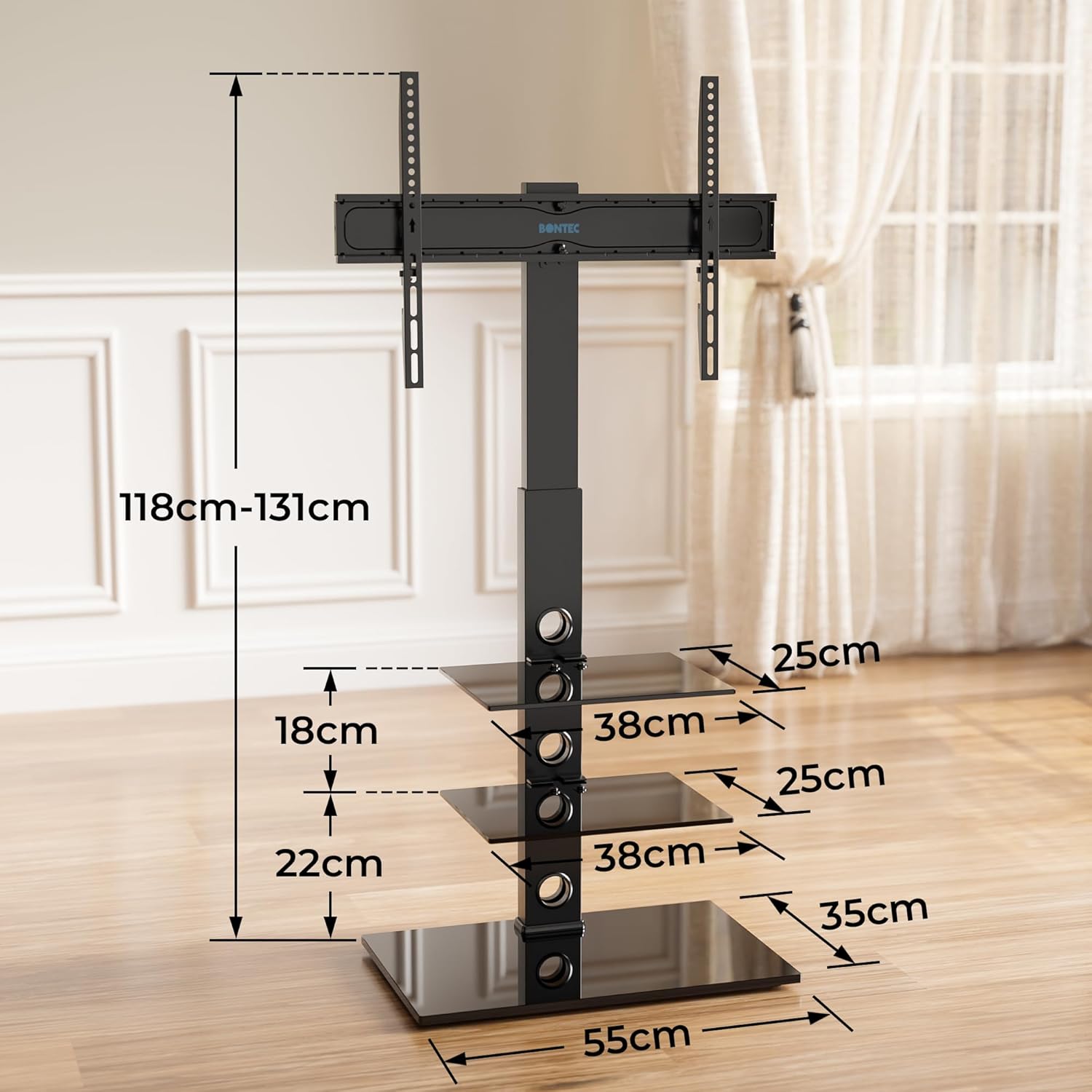
Image: A comprehensive diagram illustrating the various dimensions of the assembled TV stand, including overall height range (118cm-131cm), shelf dimensions, and distances between shelves.
Garantia i Suport
For warranty information or technical support, please contact BONTEC customer service directly. Refer to your purchase documentation for specific warranty terms and contact details. You can also visit the official BONTEC store on Amazon for more information: Botiga d'Amazon BONTEC.


