1. Producte acabatview
The KZ AZ09Pro Bluetooth Earbuds Hook transforms compatible wired in-ear monitors (IEMs) into true wireless Bluetooth earphones. Featuring Bluetooth V5.2, aptX HD audio, and TWS+ dual transmission technology, it offers a high-quality wireless listening experience with extended battery life and CVC call noise reduction.


2. Contingut del paquet
- KZ AZ09Pro Bluetooth Ear Hooks (Left and Right)
- Estoig de càrrega
- USB-C Charging Cable (not explicitly listed but implied by charging case)
- Manual d'usuari (aquest document)
3. Especificacions
| Característica | Especificació |
|---|---|
| Model | AZ09Pro |
| Versió Bluetooth | V5.2 |
| Interval Bluetooth | 15 metres |
| Ear Hook Weight (single) | 4.5 g |
| Pes de la caixa de càrrega | 85 g |
| Ear Hook Battery Capacity | 50 mA |
| Caixa de càrrega Capacitat de la bateria | 800 mA |
| Temps total de reproducció | Fins a 48 hores (amb estoig de càrrega) |
| Interfície de càrrega | USB-C |
| Còdecs d'àudio | aptX HD, AAC, SBC |
| Reducció de soroll | CVC Call Noise Reduction |
| Tipus de connector | 2PIN (0.75mm/0.78mm, C PIN compatible) |
| Mètode de control | Physical Buttons, App Control |
| Material | Silicona (ganxos per a les orelles) |

4. Configuració
4.1 Càrrega del dispositiu
Before initial use, fully charge the KZ AZ09Pro ear hooks and their charging case. Connect the charging case to a USB power source using a USB-C cable. The charging case indicator will show charging status.
- Indicador de caixa de càrrega: Red light indicates charging; green light indicates fully charged.
- Indicador d'auriculars: Red light flashes when ear hooks are charging inside the case.

4.2 Connecting IEMs to Ear Hooks
The KZ AZ09Pro ear hooks are designed for IEMs with 0.75mm/0.78mm 2PIN connectors, specifically C PIN compatible models. Carefully align the 2PIN connector of your IEM with the socket on the ear hook and push gently until it is securely connected.
- Compatible Models (C PIN): KZ ZSN/ZSN PRO/ZSN PRO X/ZS10 PRO/ZSX/AS12/AS16/ZAX/ASF/ASX/DQ6/AST/EDX Pro/ZEX/ZEXPro/ZAS, CCA CA4/CA16/C12/A10/CKX/CS16/CSN/C10PRO.

4.3 Vinculació Bluetooth
- Ensure the ear hooks are charged and your IEMs are securely attached.
- Open the charging case. The ear hooks will automatically enter pairing mode.
- Al dispositiu Bluetooth (telèfon intel·ligent, tauleta, etc.), aneu a la configuració de Bluetooth i cerqueu els dispositius disponibles.
- Select "KZ AZ09Pro" from the list to connect.
- Un cop connectat, un missatge de veu confirmarà l'emparellament correcte.
The TWS+ Dual Transmission Technology allows for independent use of either ear hook after initial pairing.
5. Instruccions de funcionament
5.1 Encès/Apagat
- Encès: Open the charging case, or long-press the button on each ear hook.
- Apagar: Place the ear hooks back into the charging case and close the lid, or long-press the button on each ear hook until the indicator light turns off.
5.2 Controls bàsics
Each ear hook features a multi-function button for controlling playback and calls.
- Reproduir/pausa: Feu clic al botó una vegada.
- Següent cançó: Double-click the right ear hook button.
- Cançó anterior: Double-click the left ear hook button.
- Respondre/penjar la trucada: Click the button once during an incoming call or active call.
- Rebutja la trucada: Long-press the button during an incoming call.
- Activar l'assistent de veu (Siri, Assistent de Google): Long-press the button for 2 seconds. (Features may vary by device).
5.3 Dual Mode Function (Full Power / Gaming Mode)
The AZ09Pro offers two distinct operating modes:
- Full Power Output Mode: Provides maximum audio fidelity and power.
- Mode de joc: Reduces audio latency for an improved gaming experience.
Per canviar entre els modes:
- Activa el mode de joc: Feu triple clic a dret ear hook button.
- Activate Full Power Output Mode: Feu triple clic a esquerra ear hook button.
6. Característiques
- aptX HD Pure Sound Quality: High-definition audio analysis restores a detailed sound field. Note: Some devices may not support aptX mode and will use AAC/SBC mode.
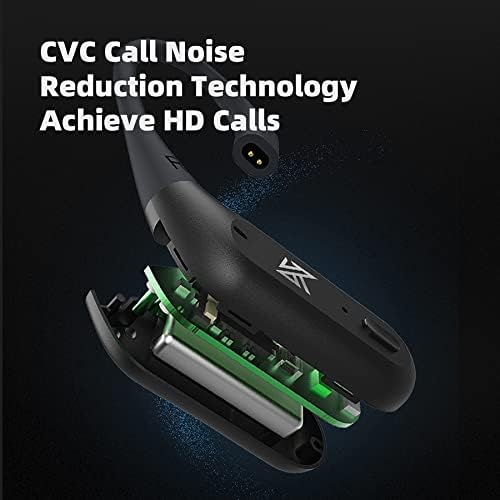
- CVC Call Noise Reduction Technology: Enhances call clarity by reducing ambient noise for HD calls.
- TWS+ Dual Transmission Technology: Allows for independent use of each ear hook, providing flexibility and stable connection.
- Durada de la bateria ampliada: Up to 48 hours of playback with the portable charging case.
- Disseny còmode: Memory shaping liquid silicone ear hooks provide a comfortable and skin-friendly fit.

7. Manteniment
- Neteja: Use a soft, dry cloth to clean the ear hooks and charging case. Avoid using liquids or abrasive cleaners.
- Emmagatzematge: When not in use, store the ear hooks in their charging case to protect them and ensure they remain charged.
- Resistència a l'aigua: The product is water resistant. Avoid prolonged exposure to water or submersion.
- Càrrega: Only use the provided USB-C cable or a certified equivalent for charging.
8. Solució De Problemes
- Sense energia: Ensure the ear hooks and charging case are fully charged.
- No es pot emparellar: Make sure the ear hooks are in pairing mode (indicator light flashing). Turn off and on Bluetooth on your device, then try pairing again. Ensure the ear hooks are not connected to another device.
- Connexió intermitent/Caigudes d'àudio: Ensure your device is within the 15-meter Bluetooth range. Avoid strong electromagnetic interference. Try resetting the ear hooks by placing them in the charging case and closing the lid for a few seconds.
- One Ear Hook Not Working: Ensure both ear hooks are charged. Try re-pairing them with your device.
- Qualitat de trucada baixa: Ensure the microphone is not obstructed. Check for strong background noise. CVC noise reduction is active, but extreme noise may still affect clarity.
9. Garantia i Suport
For warranty information, please refer to the documentation provided at the time of purchase or contact your retailer. For technical support, please visit the official KZ weblloc o poseu-vos en contacte amb el seu departament d'atenció al client.
Fabricant: Shenzhen Yuanze Electronic Co., Ltd