Introducció
This manual provides detailed instructions for setting up and operating your Avantree HF2039 Universal Compatible Wired TV Headphones. These headphones are designed to provide a clear audio experience for television viewing, especially for users who require direct audio connection and volume control. The included Digital to Analog Converter (DAC) ensures compatibility with a wide range of televisions, supporting both digital optical and analog audio outputs.
Què hi ha a la caixa
Si us plau, verifiqueu que tots els elements que s'enumeren a continuació estiguin inclosos al vostre paquet:
- Avantree HF2039 Wired Headphones
- Digital to Analog Audio Converter (DAC)
- 5M (16FT) Coiled Cable with In-line Controls
- 2M (7FT) Extension Cable
- Cable d'alimentació micro USB
- Cable d'àudio òptic
- Cable d'àudio RCA a 3.5 mm

Configuració
The Avantree HF2039 headphones offer flexible connectivity options to suit various television models.
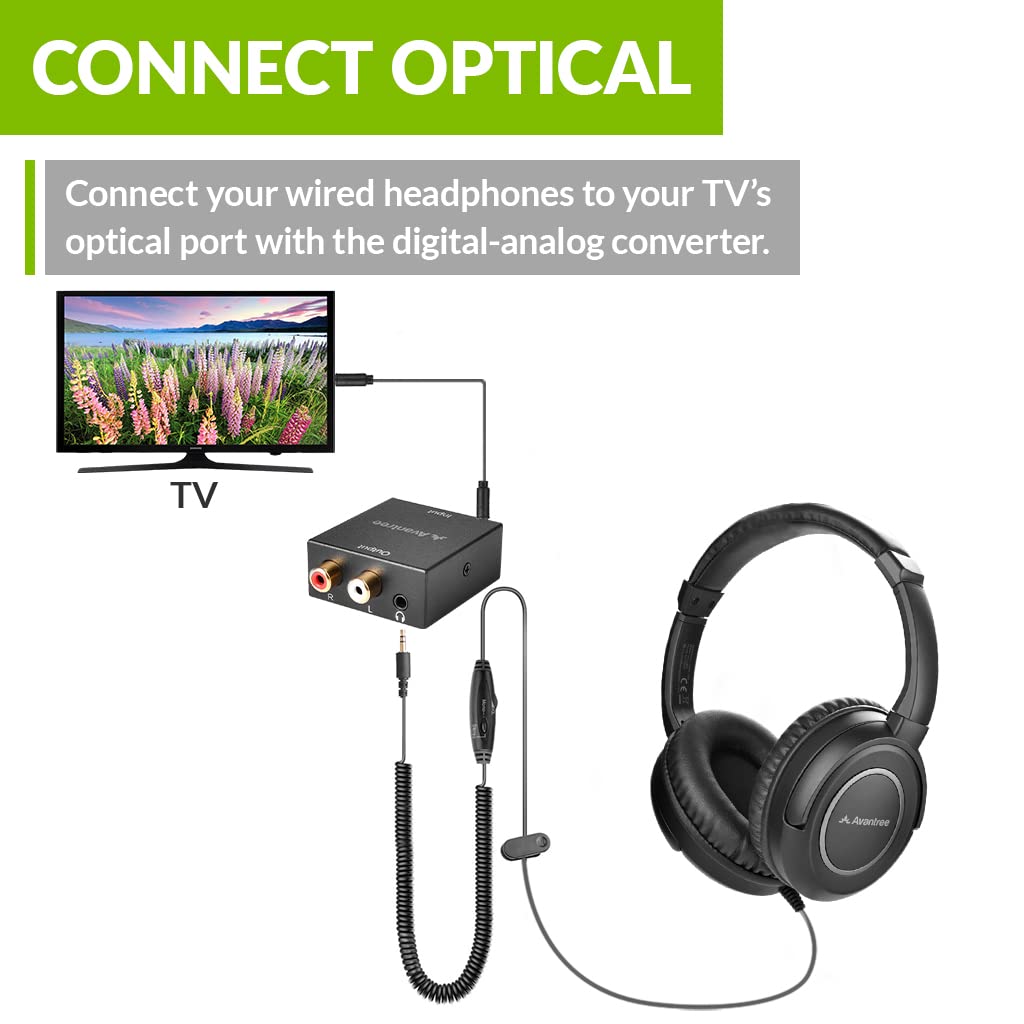
1. Connecting to your TV (Optical Audio)
This method is recommended for TVs with a digital optical audio output.
- Connecteu un extrem de la Cable d'àudio òptic to your TV's 'Optical Out' port.
- Connecteu l'altre extrem del Cable d'àudio òptic to the 'Optical In' port on the Convertidor digital a analògic (DAC).
- Connecteu el Cable d'alimentació micro USB to the DAC and plug the USB end into a USB power source (e.g., TV USB port, USB wall adapter).
- Plug the 3.5mm jack of the Cable en espiral (from the headphones) into the 'Headphone Out' port on the DAC.
- Ensure your TV's audio output settings are configured to 'PCM' or 'Stereo' for the optical output. Refer to your TV's manual for specific instructions.
2. Connecting to your TV (Aux/RCA Analog Audio)
Use this method for TVs with 3.5mm AUX or RCA (red/white) audio outputs.
- For 3.5mm AUX Out: Plug the 3.5mm jack of the Cable en espiral directly into your TV's 'Headphone Out' or 'AUX Out' port.
- For RCA Out: Connecteu el Cable d'àudio RCA a 3.5 mm to your TV's 'RCA Audio Out' (red and white ports). Then, plug the 3.5mm end of this cable into the 'AUX In' port on the Convertidor digital a analògic (DAC). Connecteu el fitxer Cable d'alimentació micro USB to the DAC and a USB power source. Finally, plug the 3.5mm jack of the Cable en espiral (from the headphones) into the 'Headphone Out' port on the DAC.
Nota: If your TV has a 3.5mm headphone jack, you may not need the DAC. However, the DAC provides additional flexibility and ensures compatibility with optical-only TVs.
Video: An instructional video demonstrating the setup process for the Avantree HF2039 wired TV headphones, including various connection methods.
Instruccions de funcionament
Control de volum
The headphones feature an easily accessible volume dial located on the in-line remote of the coiled cable. Simply roll your thumb along the dial to adjust the audio volume to your preferred level.

Commutador mono / estèreo
The in-line remote also includes a switch to toggle between mono and stereo audio modes. This feature is particularly useful for individuals with single-sided deafness, allowing them to hear all audio content in one ear.

Portant els auriculars
The HF2039 headphones are designed for comfort during extended use:
- Diadema ajustable: Extend or retract the headband to achieve a secure and comfortable fit on your head.
- Rotating Earcups: The pleather earcups can rotate 90 degrees, allowing for a customized fit and easy storage.
- Cordó extrallarg: The combination of the 5M (16FT) coiled cable and the 2M (7FT) extension cord provides a total length of 7M (22FT), offering ample freedom to relax comfortably while watching TV. A securing clip is also included to manage the cable.


Manteniment
To ensure the longevity and optimal performance of your Avantree HF2039 headphones, follow these maintenance guidelines:
- Neteja: Wipe the earcups and headband with a soft, dry cloth. Avoid using harsh chemicals or abrasive materials.
- Emmagatzematge: Store the headphones in a cool, dry place when not in use. Avoid extreme temperatures.
- Cura del cable: Handle the cables gently. Avoid sharp bends or excessive pulling, which can damage the internal wiring.
Resolució de problemes
Si teniu algun problema amb els auriculars, consulteu les solucions habituals següents:
- Sense so:
- Ensure all cables are securely connected to both the TV and the DAC/headphones.
- Verify the DAC is powered on (if used).
- Check your TV's audio output settings. For optical connections, ensure 'PCM' or 'Stereo' is selected.
- Adjust the volume dial on the headphone cable.
- So distorsionat:
- Lower the volume on both the TV and the headphone's in-line control.
- Ensure the audio source is not overdriven.
- Comproveu si hi ha connexions soltes.
- Mono/Stereo Issue:
- Confirm the mono/stereo switch on the in-line remote is set to your desired mode.
Especificacions
| Número de model | TVHF-2039 |
| Col·locació de l'orella | Sobre l'orella |
| Factor de forma | Sobre l'orella |
| Conector d'auriculars | 3.5 mm Jack |
| Dimensions del producte | 4.72 x 1.38 x 1.02 polzades |
| Pes | 0.96 unces |
Garantia i Suport
Avantree products come with a manufacturer's warranty. For detailed warranty information, product registration, or technical support, please visit the official Avantree weblloc web o poseu-vos en contacte amb el servei d'atenció al client. Conserveu el rebut de compra per a reclamacions de garantia.


