1. Introducció
El Negreweb BWA21HO008C 1440p 5 megapíxels USB WebLa càmera està dissenyada per proporcionar captura de vídeo i imatges fixes d'alta qualitat per al vostre ordinador personal. Compta amb un anell de llum ajustable integrat per garantir una il·luminació òptima en diversos entorns, millorant la vostra experiència de comunicació i gravació. Aquest manual proporciona instruccions per configurar, operar, mantenir i solucionar problemes del vostre weblleva.
2. Característiques del producte
- Resolució de fins a 1440p a 30 fotogrames per segon (fps) per a un vídeo nítid.
- Resolució d'imatge fixa de 5 megapíxels per a fotos d'alta qualitat.
- Anell de llum LED ajustable de 3 nivells integrat per proporcionar una il·luminació òptima.
- Base ajustable dissenyada per adaptar-se a monitors d'ordinador de diverses mides, pantalles d'ordinador portàtil o per suportar-se sobre superfícies planes.
- Funcionalitat USB plug and play per a una fàcil configuració sense controladors addicionals.
3. Contingut del paquet
Si us plau, comproveu el paquet per veure si hi ha els elements següents:
- 1 x Negreweb USB de 1440p i 5 megapíxels Weblleva (Model: BWA21HO008C)
- 1 x Manual d'usuari
4. Guia de configuració
4.1 Configuració física
- Posicionament del Weblleva: Obriu la base ajustable de la weblleva. Col·loca la webcàmera a sobre del monitor de l'ordinador o de la pantalla del portàtil, assegurant-vos que la vora frontal de la base descansi fermament sobre la part frontal de la pantalla i que el clip posterior subjecti la part posterior. Alternativament, la base es pot plegar per permetre que webcàmera per col·locar-la sobre una superfície plana com ara un escriptori.
- Connexió al vostre ordinador: Inseriu el cable USB des del webcàmera a un port USB disponible de l'ordinador.

Imatge: Lateral view del Negreweb webcàmera que demostra la seva base ajustable per muntar-la en un monitor o pantalla d'ordinador portàtil.
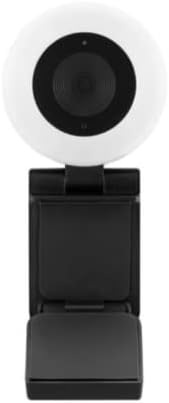
Imatge: Frontal view del Negreweb webcàmera, destacant la lent central i l'anell de llum ajustable que l'envolta.
4.2 Configuració del programari
El Negreweb BWA21HO008C webLa càmera és un dispositiu plug-and-play que no requereix instal·lació de controladors addicionals per a la majoria de sistemes operatius (Windows, macOS, Chrome OS). En connectar-se, l'ordinador hauria de detectar i configurar automàticament el weblleva.
- Detecció automàtica: Un cop connectat, el sistema operatiu hauria de reconèixer el webcàmera com a nou dispositiu de vídeo.
- Selecció d'aplicacions: Per utilitzar el webcàmera, obriu el vostre programari de videoconferència preferit (per exemple, Zoom, Microsoft Teams, Skype) o l'aplicació de gravació. Navegueu fins a la configuració de vídeo/càmera dins de l'aplicació i seleccioneu "Negre"web BWA21HO008C" (o un nom similar) com a dispositiu d'entrada de vídeo.
5. Instruccions de funcionament
5.1 Utilitzant el Weblleva
Un cop connectat i reconegut pel vostre sistema i escollit a la vostra aplicació, el webLa càmera està llesta per utilitzar-la en videotrucades, transmissions en directe o gravacions.
- Assegureu-vos que l'aplicació escollida estigui oberta i que webLa càmera està seleccionada com a font de càmera activa.
- Ajusteu el webl'angle de la càmera manualment per emmarcar el que desitgeu view.
5.2 Ajust de l'anell de llum
El webLa càmera compta amb un anell de llum LED ajustable de 3 nivells integrat per millorar la il·luminació en condicions de poca llum.
- Localitzeu el botó de control de la llum, que normalment es troba a la part superior o lateral de la webcos de la lleva.
- Premeu el botó repetidament per anar canviant els nivells de brillantor: Baix, Mitjà, Alt i Desactivat. Seleccioneu el nivell que millor s'adapti a les vostres necessitats d'il·luminació.

Imatge: Anglesa view del Negreweb webcàmera, destacant l'anell de llum prominent i la lent de la càmera.
6. Manteniment
- Neteja: Per netejar el webPer a la lent i el cos de la càmera, utilitzeu un drap suau, sec i sense borrissol. Eviteu utilitzar productes químics agressius, materials abrasius o humitat excessiva, ja que poden danyar el dispositiu. Assegureu-vos que el dispositiu estigui desconnectat de l'ordinador abans de netejar-lo.
- Emmagatzematge: Quan no s’utilitzi, emmagatzemeu el fitxer webguardeu-ho en un lloc fresc i sec, allunyat de la llum solar directa, de temperatures extremes i d'alta humitat.
7. Solució De Problemes
- Sense imatge/vídeo:
- Assegureu-vos que el cable USB estigui connectat correctament a tots dos webla càmera i el teu ordinador.
- Intenta connectar el webcàmera a un port USB diferent de l'ordinador.
- Comproveu que el webLa càmera està seleccionada com a dispositiu d'entrada de vídeo actiu a la configuració de l'aplicació.
- Reinicieu l'ordinador.
- Poca qualitat de vídeo:
- Assegureu-vos que hi hagi una il·luminació adequada al vostre entorn; feu servir l'anell de llum integrat si cal.
- Netegeu el weblent de la càmera amb un drap suau i sec.
- Si ho desitges, confirma que la configuració de l'aplicació estigui configurada per a una resolució de 1440p i que la connexió a Internet sigui estable si fas streaming.
- L'anell de llum no funciona:
- Assegureu-vos el webLa càmera està connectada a un port USB alimentat.
- Premeu el botó de control de la llum diverses vegades per canviar per tots els paràmetres de brillantor.
- Si el problema persisteix, proveu de connectar el webcàmera a un port USB o ordinador diferent.
8. Especificacions
| Número de model | BWA21HO008C |
| Resolució de vídeo | Fins a 1440p a 30 fps |
| Resolució d'imatge fixa | 5 megapíxels |
| Connectivitat | USB |
| Característiques especials | Anell de llum LED ajustable de 3 nivells, capacitat de poca llum |
| Dispositius compatibles | Ordinador personal |
| Color | Negre |
| Dimensions (L x A x A) | 16.2 x 10.5 x 5.9 cm (dimensions aproximades del paquet) |
| Pes | 170 g (pes aproximat del paquet) |
9. Informació de seguretat
- No exposeu el dispositiu a l'aigua, la pluja o la humitat excessiva.
- No intenteu desmuntar, modificar o reparar el dispositiu vosaltres mateixos. Envieu totes les tasques de manteniment a personal qualificat.
- Mantingueu el dispositiu fora de l'abast dels nens i les mascotes.
- Feu servir només amb dispositius i fonts d'alimentació compatibles segons les especificacions.
- Eviteu col·locar el webcàmera a la llum solar directa o a prop de fonts de calor.
10. Garantia i Suport
Per a informació sobre la garantia, assistència tècnica o consultes d'atenció al client relacionades amb el vostre Blackweb BWA21HO008C webcàmera, consulteu la documentació proporcionada en el moment de la compra o poseu-vos en contacte amb el vostre distribuïdor. També podeu visitar el lloc web oficial de Blackweb suport weblloc web per obtenir més ajuda, si n'hi ha.


