1. Introducció i finalview
This manual provides essential information for setting up, operating, and maintaining your Apple Watch Series 7 GPS 41mm. The Apple Watch Series 7 features an advanced display, comprehensive health monitoring capabilities, and robust fitness tracking, designed to integrate seamlessly into your daily life.

Figure 1: Apple Watch Series 7 GPS 41mm in Starlight Aluminum with Starlight Sport Band.
2. Què hi ha a la caixa
En desembalar l'Apple Watch Series 7, comproveu que hi hagi tots els components:
- Apple Watch Series 7 Case (Starlight Aluminum)
- Sport Band (Starlight)
- Cable de càrrega magnètic d'1 m
3. Configuració
3.1 Càrrec inicial
Before first use, fully charge your Apple Watch. Connect the 1m Magnetic Charging Cable to a USB power adapter (sold separately) and plug it into a power outlet. Place the back of your Apple Watch on the magnetic charger. The watch will display a charging indicator.
3.2 Emparellament amb iPhone
- Ensure your iPhone is updated to the latest iOS version and Bluetooth is enabled.
- Enceneu el vostre Apple Watch mantenint premut el botó lateral fins que aparegui el logotip d'Apple.
- Apropa l'iPhone a l'Apple Watch. Apareixerà una pantalla d'emparellament a l'iPhone. Toca "Continua".
- Col·loca l'iPhone de manera que l'Apple Watch aparegui a la viewcercador a l'aplicació Apple Watch.
- Seguiu les instruccions que apareixen a la pantalla per completar el procés d'emparellament, inclosa la configuració d'un codi d'accés i l'elecció de la vostra configuració preferida.
3.3 Navegació bàsica
- Corona digital: Rotate to scroll, zoom, or adjust values. Press to go to the watch face or open the App View. Double-press to switch between recently used apps.
- Botó lateral: Press to open the Dock (recently used apps) or access Apple Pay. Press and hold for emergency services or to power off.
- Pantalla tàctil: Tap to select, swipe to navigate, and force touch for additional options.
4. Funcionament i característiques clau
4.1 Pantalla
The Apple Watch Series 7 features an Always-on Retina display, offering nearly 20% more screen area than Series 6 for enhanced visibility. The front crystal is designed to be highly crack-resistant, providing increased durability.

Figure 2: The larger, more durable display of the Apple Watch Series 7.
4.2 Vigilància de la salut
The device includes advanced sensors for comprehensive health insights:
- Aplicació d'ECG: Take an electrocardiogram anytime, anywhere to check for signs of atrial fibrillation.
- Notificacions de freqüència cardíaca: Receive alerts for high, low, and irregular heart rhythms.
- Blood Oxygen App: Measure your blood oxygen levels with a powerful sensor.
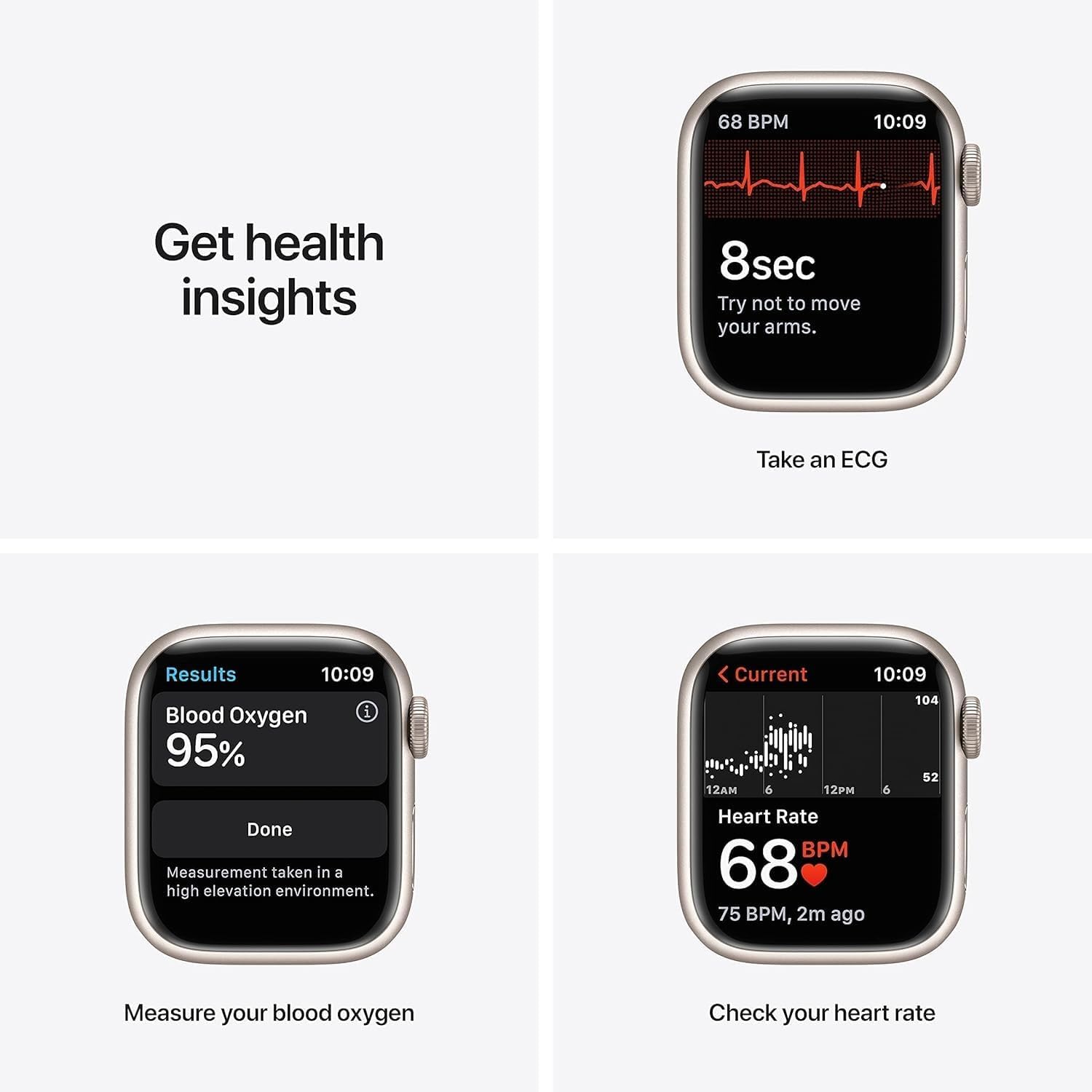
Figure 3: Health monitoring features including ECG, Blood Oxygen, and Heart Rate.
4.3 Seguiment de l'aptitud física
Fes un seguiment de la teva activitat diària i dels teus entrenaments amb precisió:
- Seguiment de l'activitat: Monitor your daily movement, exercise, and stand goals in the Fitness app.
- Modes d'entrenament: Track various workouts including running, yoga, swimming, dance, Tai Chi, and Pilates.
- Aplicació per dormir: Set sleep goals and track your sleep patterns.
- Aplicació de Mindfulness: Stay present and reduce stress with guided meditations and reflections.
4.4 Connectivity & Payments
The GPS model provides location tracking for workouts and navigation. Utilize Apple Pay for secure and convenient payments directly from your wrist.
Vídeo 1: Un overview of the Apple Watch Series 7 GPS 41mm, demonstrating its features and design.
4.5 Altres funcions
Beyond health and fitness, the Apple Watch Series 7 offers additional functionalities:
- Media Sync: Sync your favorite music, podcasts, and audiobooks for on-the-go listening.
- Notificacions: Receive notifications from your iPhone directly on your wrist.
- Esferes de rellotge personalitzables: Personalize your watch face with various complications and styles.
Video 2: A brief 7-second preview espectacleasing the Apple Watch Series 7, highlighting its display and physical appearance.
5. Manteniment
To ensure the longevity and optimal performance of your Apple Watch, follow these maintenance guidelines:
- Neteja: Regularly clean your Apple Watch and band with a soft, lint-free cloth. For stubborn dirt, slightly dampRenta el drap amb aigua neta. Evita utilitzar productes químics agressius o materials abrasius.
- Exposició a l'aigua: The Apple Watch Series 7 is swimproof. After swimming, rinse the watch with fresh water and dry it thoroughly.
- Actualitzacions de programari: Keep your Apple Watch software (watchOS) updated to ensure access to the latest features, security enhancements, and performance improvements. Updates can be managed through the Apple Watch app on your iPhone.
- Cura de la bateria: To maximize battery lifespan, avoid exposing the watch to extreme temperatures. Charge the device regularly, but avoid leaving it fully charged or fully discharged for extended periods.
6. Solució De Problemes
If you encounter issues with your Apple Watch, consider the following common troubleshooting steps:
- El rellotge no s'encén: Ensure the watch is sufficiently charged. Connect it to the magnetic charging cable and allow it to charge for at least 30 minutes.
- Problemes d'aparellament: Verify that Bluetooth is enabled on your iPhone and both devices are within range. Restart both your iPhone and Apple Watch, then attempt pairing again.
- Aplicacions que no responen: Force quit the app by pressing the side button, then swipe the app to the left and tap the 'X' button. Reopen the app. If the issue persists, restart your Apple Watch.
- Lectures inexactes (freqüència cardíaca/activitat): Ensure the watch is worn snugly on your wrist, not too tight or too loose. Clean the back of the watch to ensure sensors are unobstructed.
- Esgotament ràpid de la bateria: Check for background app refresh settings and disable unnecessary notifications. Ensure watchOS is updated. If the issue persists, contact Apple Support.
7. Especificacions
| Característica | Detall |
|---|---|
| Dimensions del producte | 1.61 x 1.97 x 0.42 polzades |
| Pes de l'article | 1.13 unces (32 grams) |
| Número de model de l'article | Mira la sèrie 7 |
| Bateries | Necessites 1 bateries de ions de liti |
| Mida de la pantalla de peu | 1.8 polzades |
| Capacitat d'emmagatzematge de memòria | 32 GB |
| Sistema operatiu | WatchOS |
| Característiques especials | Seguiment d'activitat, monitor de freqüència cardíaca, monitor de son, oxigen en sang |
| Capacitat de la bateria | 284 milionsamp Hores |
| Tecnologia de connectivitat | Sense fil |
| Comunicació sense fils estàndard | Bluetooth |
| GPS | GPS integrat |
| Fabricant | Ordinador Apple |
| Data de primera disponibilitat | 20 de desembre de 2021 |
8. Garantia i Suport
For information regarding warranty coverage, technical support, and service options for your Apple Watch Series 7, please refer to the official Apple support website or contact Apple customer service directly. Details about the Amazon Renewed Guarantee for this product can be found on the product's purchase page.


