Introducció
El Amplicomms BigTel 1502 Duo is a DECT cordless phone system designed for users seeking amplified sound and enhanced accessibility. This dual-handset system features large buttons, an audio-boost function, powerful ringtones, and hearing aid compatibility, making it ideal for individuals with hearing impairments or those who prefer a louder, clearer phone experience. It also includes a call blocking function to prevent unwanted calls.

Imatge: El/La Amplicomms BigTel 1502 Duo system, showing two black cordless handsets in their respective charging cradles. The handsets feature large, easy-to-read displays and prominent buttons.
Contingut del paquet
Abans de començar, assegureu-vos que tots els elements estiguin presents al paquet:
- 2 x Amplicomms BigTel 1502 Handsets
- 2 bases de càrrega
- 2 x AAA Rechargeable Batteries (per handset)
- 1 x adaptador de corrent
- 1 x Cable de línia telefònica
- Manual d'usuari (aquest document)
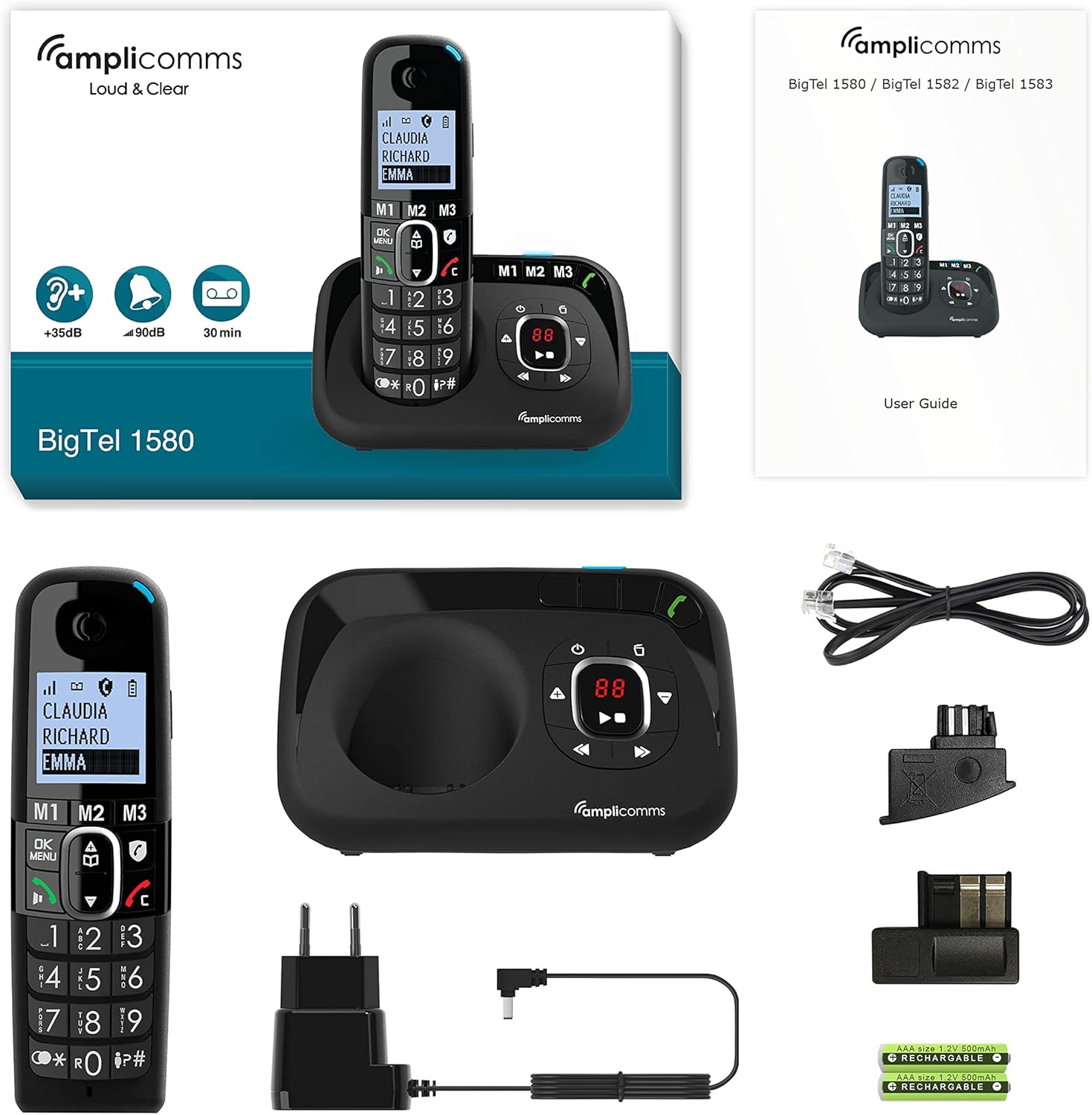
Imatge: Una completa view de la Amplicomms BigTel 1580 (similar model) package contents, including a handset, main base unit, power adapter, telephone line cord, and rechargeable AAA batteries, alongside the user guide.
Guia de configuració
1. Instal·lació de la bateria
- Localitzeu la tapa del compartiment de la bateria a la part posterior de cada auricular.
- Feu lliscar la tapa cap avall per obrir-la.
- Inseriu les dues piles recarregables AAA, observant la polaritat correcta (+ i -).
- Substituïu la tapa del compartiment de la bateria.
2. Connexió de l'estació base
- Connect one end of the telephone line cord to the LINE port on the main base station.
- Connecteu l'altre extrem del cable de la línia telefònica a la presa de corrent de la paret.
- Connect the small end of the power adapter to the DC IN port on the main base station.
- Connecteu l'extrem gran de l'adaptador de corrent a una presa de corrent estàndard.
- For the additional charging base, connect its power adapter to an electrical outlet.
3. Càrrega inicial
Place each handset onto its respective charging base. The display will indicate charging. For optimal battery performance, allow the handsets to charge continuously for at least 16 hours before first use, even if the display shows a full charge sooner.
Instruccions de funcionament
Fer i rebre trucades
- Per fer una trucada: Agafeu el telèfon o premeu Green Call Button. Dial the desired phone number using the large keypad. Press the Green Call Button de nou per iniciar la trucada.
- Per rebre una trucada: Quan soni el telèfon, agafeu l'auricular o premeu la tecla Green Call Button. The visual ring indicator will also flash.
- Per finalitzar una trucada: Premeu el botó Red End Call Button or place the handset back on its charging base.
Audio-Boost Function
The BigTel 1502 features a dedicated Audio-Boost button on the side of the handset to amplify the sound during a call by up to +35dB. This is particularly useful for users with hearing difficulties.
- Durant una trucada, premeu el botó Audio-Boost Button (often marked with a speaker icon or "+35dB") on the side of the handset to activate or deactivate the amplificació.

Imatge: Un costat view de la Amplicomms handset, highlighting the dedicated Audio-Boost button, typically located on the side for easy access during a call.
Funció de bloqueig de trucades
This feature helps prevent unwanted calls. There are two modes:
- Mode manual: Block numbers easily during or after a call by pressing the dedicated call blocking button (often marked with a shield or "STOP" icon).
- Mode automàtic: Only allows numbers stored in your phonebook or VIP numbers to ring through. All other calls are blocked. Refer to the handset menu for detailed setup of this mode.

Imatge: Un primer pla de la Amplicomms handset, showing the large keypad, clear display, and various feature icons, including the call blocking symbol (a shield with "STOP").
Direct Memory Keys (M1, M2, M3)
The handset features three direct memory keys (M1, M2, M3) for quick dialing of your most important or frequently called contacts.
- Per emmagatzemar un número:
- Press and hold the desired memory key (M1, M2, or M3) until the display prompts you.
- Introduïu el número de telèfon amb el teclat.
- Enter the name (if supported by the model).
- Premeu el botó OK/Save botó per confirmar.
- Per marcar un número desat: Simply press the desired memory key (M1, M2, or M3). The phone will automatically dial the stored number.
Guia telefònica (Directori)
The phone has a directory for up to 100 names and numbers.
- Accessing the Phonebook: Premeu el botó Menú / D'acord button and navigate to the "Phonebook" or "Directory" option.
- Afegir un contacte: Select "Add New" and follow the on-screen prompts to enter the name and number.
- Marcació des de la llibreta telefònica: Scroll through the contacts using the navigation keys and press the Green Call Button per marcar.
Funció mans lliures
The hands-free function allows you to talk without holding the handset, with adjustable volume.
- Durant una trucada, premeu el botó Hands-Free/Speaker button (often marked with a speaker icon) to activate or deactivate speakerphone mode.
- Use the volume up/down keys to adjust the speaker volume.
Manteniment
- Neteja: Utilitzeu un suau, damp cloth to clean the handset and base unit. Do not use abrasive cleaners or solvents.
- Cura de la bateria:
- Always use the supplied rechargeable batteries.
- Si no heu d'utilitzar el telèfon durant un període prolongat, traieu-ne les piles per evitar fuites.
- No exposeu les piles a temperatures extremes.
- Col·locació: Place the base unit in a central location away from other electronic devices that may cause interference (e.g., microwaves, Wi-Fi routers).
Resolució de problemes
| Problema | Causa possible | Solució |
|---|---|---|
| No hi ha to de marcatge / No es poden fer ni rebre trucades. | Cable de línia telefònica no connectat correctament. L'adaptador de corrent no està connectat. Handset out of range or not registered. | Assegureu-vos que tots els cables estiguin ben connectats. Comproveu la presa de corrent. Move closer to the base unit. Re-register handset if necessary (refer to full manual). |
| Low or no sound during a call. | Volum massa baix. Audio-Boost not activated. | Adjust call volume using the side keys. Press the Audio-Boost button on the side of the handset. |
| La pantalla del telèfon està en blanc. | Batteries are depleted or not inserted correctly. | Place handset on the charging base. Ensure batteries are correctly inserted and charged for at least 16 hours initially. |
| Unwanted calls still coming through. | Call blocking not configured correctly. | Ensure call blocking is activated and numbers are added to the block list. Check if "Automatic Mode" is enabled for VIP-only calls. |
Especificacions
| Característica | Detall |
|---|---|
| Marca | Amplicomms |
| Número de model | ATL1423334 (BigTel 1502 Duo) |
| Color | Negre |
| Tipus de telèfon | Telèfon DECT sense fil |
| Característiques especials | Large keys, Audio-Boost (+35dB), Hearing aid compatible, Call blocking, Adjustable ringer volume (up to 90dB), Hands-free function |
| Dispositius compatibles | Audiòfons |
| Bateries | 2 x AAA rechargeable batteries (included) per handset |
| Temps de conversa | Fins a 10 hores |
| Capacitat de l'agenda | 100 noms i números |
| Mostra | Large backlit display with large characters |
Garantia i Suport
Amplicomms products are designed for reliability and performance. For information regarding warranty coverage, technical support, or spare parts availability, please refer to the warranty card included in your product packaging or visit the official Amplicomms weblloc web. També podeu contactar amb el vostre distribuïdor per obtenir ajuda.


