Introducció
This instruction manual provides detailed information on how to set up, operate, and maintain your TTfone TT190 mobile phone. Please read this manual carefully to ensure proper use and to maximize the phone's features.
Contingut del paquet
Abans de començar, comproveu que el paquet contingui els elements següents:
- Telèfon mòbil TTfone TT190
- Bateria
- Cable de càrrega USB
- Manual d'usuari
Producte acabatview
The TTfone TT190 is an unlocked mobile phone designed with ease of use in mind, particularly for seniors. It features large, separated buttons, a clear display, and essential functions like an SOS emergency button and a loud speaker.
Característiques clau
- Botó d'emergència SOS: Un botó dedicat per accedir ràpidament als contactes d'emergència.
- Simple Keypad: Large, separated buttons for easy dialing and navigation.
- Altaveu: Enhanced volume for calls and speakerphone function.
- Esborra la pantalla: User-friendly menu with large fonts and clear icons.
- Llanterna pràctica: Integrated flashlight with a dedicated switch.
Disseny del telèfon

Imatge: Anvers i revers view of the TTfone TT190 mobile phone, showing the large keypad and the SOS button on the rear.
Configuració
Inserció de la targeta SIM i la bateria
- Traieu la tapa posterior del telèfon fent palanca suaument per obrir-la des de l'osca.
- Insert your SIM card(s) into the designated slot(s) with the gold contacts facing down. Ensure it is correctly seated.
- Insert the battery into the battery compartment, aligning the contacts.
- Torneu a col·locar la coberta posterior, prement fermament fins que encaixi al seu lloc.
Carregant el telèfon
Abans del primer ús, carregueu completament la bateria del telèfon.

Image: The TTfone TT190 mobile phone connected to a USB charging cable, indicating the charging process.
- Connect the small end of the USB charging cable to the phone's charging port (Micro USB).
- Connect the other end of the USB cable to a compatible USB power adapter or a computer's USB port.
- The battery indicator on the screen will show the charging status. Disconnect the charger once the battery is full.
Instruccions de funcionament
Encès/Apagat
Per engegar, premeu i manteniu premut el botó vermell Finalitzar trucada/Engegar button until the screen lights up. To power off, press and hold the same button until the power off option appears, then confirm.
Realització de trucades
Enter the phone number using the keypad. Press the green Truca button to initiate the call. To end a call, press the red Finalitzar la trucada botó.

Image: A hand holding the TTfone TT190, highlighting its large, easy-to-use keypad for simple operation.
Recepció de trucades
When an incoming call rings, press the green Truca button to answer. To reject a call, press the red Finalitzar la trucada botó.
Enviament i recepció de missatges
Navigate to the 'Messages' menu. Select 'Write message' to compose a new SMS. Enter the recipient's number and your message. To read received messages, select 'Inbox'.
Using the SOS Emergency Button
The SOS button is located on the back of the phone. In an emergency, press and hold this button for a few seconds. The phone will automatically call and send an emergency SMS to pre-set contacts.

Image: The back of the TTfone TT190 showing the prominent red SOS button, with an illustration of a person in distress, indicating its emergency function.
Loud Speaker Function
The TT190 features an extra loud speaker for clear audio during calls. During a call, you can activate the speakerphone function for even louder volume.
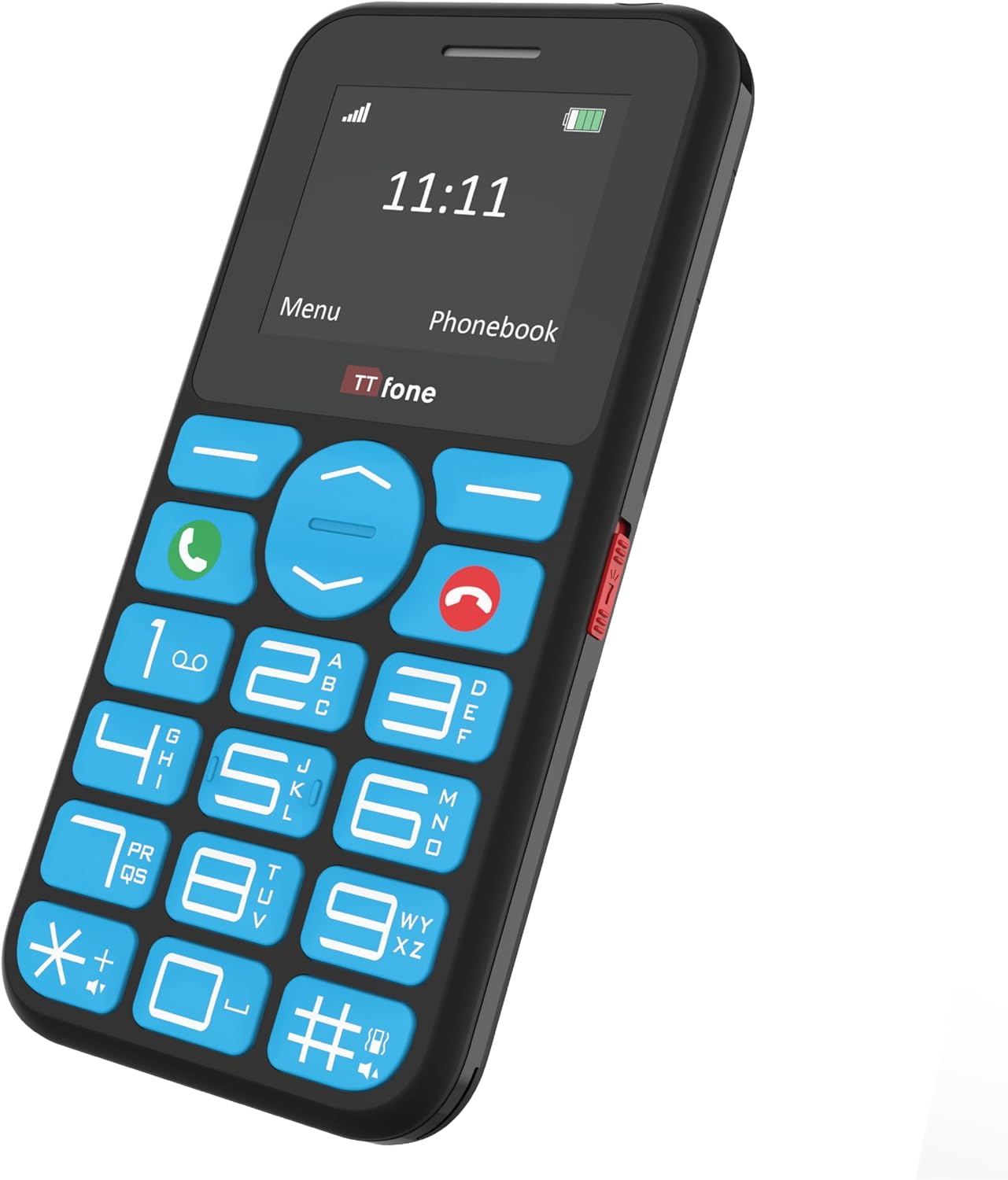
Image: An elderly person using the TTfone TT190, with visual cues indicating the loud speaker output from the phone's earpiece and rear speaker.
Utilitzant la llanterna
A dedicated switch on the side of the phone controls the built-in flashlight. Slide the switch to turn the flashlight on or off.

Image: The TTfone TT190 phone emitting a beam of light from its top, illustrating its handy flashlight feature in a dark setting.
Phonebook / Contacts
To save a new contact, navigate to the 'Phonebook' or 'Contacts' menu, select 'Add new contact', and enter the name and number. To call a saved contact, select their name from the phonebook and press the green Truca botó.
Navegació pel menú
Use the navigation keys (up, down, left, right) to move through the menu options. Press the 'OK' or 'Select' button (usually the center button) to confirm a selection. Press the 'Back' or 'Clear' button to return to the previous screen.
Manteniment
Neteja
Wipe the phone with a soft, dry cloth. Do not use liquid cleaners or aerosols. Keep the charging port free of dust and debris.
Cura de la bateria
To prolong battery life, avoid exposing the phone to extreme temperatures. Do not leave the battery fully discharged for extended periods. Use only the original or approved charging accessories.
Resolució de problemes
| Problema | Possible solució |
|---|---|
| El telèfon no s'encén. | Assegureu-vos que la bateria estigui correctament inserida i carregada. Intenteu carregar el telèfon durant almenys 30 minuts. |
| No es poden fer ni rebre trucades. | Check if the SIM card is properly inserted and activated. Ensure you have network signal. Contact your service provider if issues persist. |
| No hi ha so durant les trucades. | Check the volume settings. Ensure the speaker is not blocked. |
| El botó SOS no funciona. | Verify that emergency contacts are correctly set up in the phone's settings. |
Especificacions
| Característica | Detall |
|---|---|
| Marca | TTfone |
| Color | Negre |
| Tipus de producte | Bar |
| Sistema operatiu | TTfone |
| Mida de la pantalla | 1.7 polzades |
| Connectivitat | Bluetooth Cellular |
| Port de càrrega | Micro USB |
| Ranura de memòria | 1 ranura |
| Característiques especials | Large buttons, SOS emergency key, Phone for Seniors, USB |
| Composició de la bateria | Ió de liti |
| Garantia del fabricant | 2 Anys |
| Disponibilitat de peces de recanvi | 2 Anys |
| Actualitzacions de programari garantides fins a | Informació no disponible |
| Número de model de l'article | TT970 |
| Bateria(es) | 1 bateria de liti-ió inclosa |
| Fabricant | TTfone |
| País d'origen | Xina |
| Mida de la RAM instal·lada | 32 MB |
| Model de CPU | Altres |
| Velocitat de la CPU | 1 Hz |
| Resolució | 128*160 |
| Nom del model | TT190 |
| Operador sense fil | Tots els transportistes |
| Tecnologia cel·lular | 2G |
Garantia i Suport
Garantia del fabricant
The TTfone TT190 comes with a Garantia del fabricant de 2 anysAquesta garantia cobreix els defectes de materials i de fabricació en condicions d'ús normal. Si us plau, conserveu el comprovant de compra per a reclamacions de garantia.
Atenció al client
For technical assistance, troubleshooting, or warranty inquiries, please visit the official TTfone website or contact their customer support. Refer to the packaging or the official weblloc web per obtenir la informació de contacte més actualitzada.
Note: Availability of spare parts is guaranteed for 2 years.


