Introducció
The MIFA WildBox is a portable Bluetooth speaker designed for robust outdoor and indoor use. It features powerful audio output, dynamic LED lighting, and a durable waterproof and dustproof design. This manual provides essential information for setting up, operating, maintaining, and troubleshooting your MIFA WildBox speaker to ensure optimal performance and longevity.

Figure 1: MIFA WildBox Bluetooth Speaker showcasing its waterproof design and power bank feature.
Què hi ha a la caixa
Upon unboxing your MIFA WildBox, please ensure all the following items are present:
- 1 x MIFA WildBox Bluetooth Speaker
- 1 x cable de càrrega USB-C
- 1 x User Guide Manual
Característiques
- Sortida d'àudio potent: 60W total output with 2x20W RMS woofers and 2x10W RMS tweeters for loud sound and deep bass.
- IP67 impermeable i resistent a la pols: Designed to withstand immersion in water up to 1 meter for 30 minutes and fully protected against dust ingress. The speaker is also floatable.
- Llums LED dinàmiques: Features 16 million dynamic LED lights with multiple modes to enhance your listening experience.
- TWS & Partyadd Function: Allows pairing of two MIFA WildBox speakers for true stereo sound, or connecting over 100 MIFA WildBox speakers for a synchronized party experience.
- Connectivitat versàtil: Supports Bluetooth 5.3 for stable wireless connection up to 197ft, Aux input, and Micro SD card slot for various audio sources.
- Banc d'energia integrat: Equipped with a 10000mAh battery that can charge external devices via its USB-A output port.
- Temps de joc llarg: Fins a 24 hores de reproducció de música contínua amb una sola càrrega.
- Disseny portàtil: Integrated carrying handle for easy transport.

Figura 2: Mésview of MIFA WildBox key features.
Configuració
1. Càrrega inicial
Before first use, fully charge your MIFA WildBox speaker. Connect the provided USB-C cable to the speaker's USB-C input port (labeled 'IN') and the other end to a compatible USB power adapter (not included). The charging indicator will show the charging status. A full charge takes approximately 4 hours.
2. Encès / apagat
- Per encendre: Manteniu premut el botó Botó d'encesa (
 ) durant 2-3 segons fins que sentiu un avís audible i s'activin els llums LED.
 - Per apagar: Manteniu premut el botó Botó d'encesa de nou durant 2-3 segons.
3. Emparellament Bluetooth
- Power on the MIFA WildBox speaker. It will automatically enter Bluetooth pairing mode, indicated by a flashing blue LED.
- Al dispositiu mòbil (telèfon intel·ligent, tauleta, etc.), activeu el Bluetooth i cerqueu els dispositius disponibles.
- Select "MIFA WildBox" from the list of devices.
- Once successfully paired, the blue LED will remain solid, and you will hear a confirmation tone.
4. Emparellatge TWS (True Wireless Stereo)
To pair two MIFA WildBox speakers for a stereo experience:
- Ensure both MIFA WildBox speakers are powered on and not connected to any Bluetooth device.
- En un altaveu, premeu el botó Botó TWS (
 ). It will search for the second speaker.
 - The speakers will automatically connect to each other. Once connected, the main speaker's LED will flash blue (ready to pair with a device), and the secondary speaker's LED will be solid blue.
- Connect your mobile device to the main speaker via Bluetooth as described in step 3. Audio will now play in stereo through both speakers.

Figure 3: Multiple speakers connected via Partyadd for an immersive audio experience.
5. Aux Input & Micro SD Card Usage
The MIFA WildBox supports audio playback via a 3.5mm AUX cable and a Micro SD card.
- Entrada auxiliar: Connect a 3.5mm audio cable (not included) from your audio source to the AUX-in port on the speaker. The speaker will automatically switch to AUX mode.
- Targeta micro SD: Insert a Micro SD card (up to 32GB, not included) with your music files into the Micro SD card slot. The speaker will automatically switch to Micro SD mode and begin playback.

Figure 4: Connectivity options including Bluetooth, Micro SD, and AUX.
Instruccions de funcionament
1. Funcions del botó
The control panel on top of the speaker provides easy access to various functions:
- Botó d'encendre (): Manteniu premut per encendre/apagar.
- Botó de mode (M): Short press to switch between Bluetooth, AUX, and Micro SD card modes.
- Baixar el volum (-): Premeu breument per reduir el volum.
- Botó Reproduir/Pausa (
 ): Short press to play or pause music. Long press for next track.
 - Puja el volum (+): Premeu breument per augmentar el volum.
- Botó de llum (
 ): Short press to cycle through different LED light modes. Long press to turn lights off/on.
 - Botó de baix: Press to activate or deactivate the extra bass effect.
- TWS Button (): Press to initiate TWS or Partyadd pairing.
2. Modes de llum LED
The MIFA WildBox features 6 distinct RGB light modes. Use the Light button to switch between them or turn the lights off completely.
3. Funció de bateria externa
To use the speaker as a power bank:
- Open the rubber flap on the back of the speaker to access the ports.
- Connect your device's charging cable to the USB-A output port (labeled 'OUT') on the MIFA WildBox.
- La càrrega començarà automàticament.

Figure 5: The MIFA WildBox functioning as a power bank.
Manteniment
- Waterproof & Dustproof Care: Ensure the rubber flap covering the ports is securely closed before exposing the speaker to water or dust. While IP67 rated, avoid prolonged submersion or exposure to high-pressure water jets.
- Neteja: Utilitzeu un suau, damp drap per netejar l'exterior de l'altaveu. No utilitzeu productes químics agressius ni netejadors abrasius.
- Emmagatzematge: Guardeu l'altaveu en un lloc fresc i sec, allunyat de la llum solar directa i de temperatures extremes quan no l'utilitzeu durant períodes prolongats.
- Cura de la bateria: Per allargar la durada de la bateria, eviteu descarregar completament l'altaveu amb freqüència. Carregueu-lo regularment, fins i tot si no l'utilitzeu constantment.

Figure 6: The MIFA WildBox is designed to be waterproof and floatable.
Resolució de problemes
| Problema | Causa possible | Solució |
|---|---|---|
| L'altaveu no s'encén. | Bateria baixa. | Charge the speaker fully (approx. 4 hours). |
| No es pot emparellar per Bluetooth. | Speaker is already connected to another device or out of range. | Ensure the speaker is in pairing mode (flashing blue LED). Disconnect from other devices. Move speaker closer to your device. |
| No hi ha so de l'altaveu. | Volume too low, incorrect mode, or audio source issue. | Increase speaker and device volume. Check if the correct input mode (Bluetooth, AUX, SD card) is selected. Ensure audio source is playing. |
| L'emparellament TWS falla. | Speakers are too far apart or already connected to other devices. | Ensure both speakers are disconnected from other devices. Place them close to each other during TWS pairing. |
| Els llums LED no funcionen. | Els llums estan apagats o en mode estàtic. | Short press the Light button to cycle modes. Long press to turn lights on/off. |
Especificacions
| Característica | Detall |
|---|---|
| Nom del model | MIFA WildBox |
| Tipus d'altaveu | Outdoor / Portable Bluetooth Speaker |
| Potència de sortida màxima dels altaveus | 60 watts |
| Diàmetre del woofer | 2.75 Inches (70mm) x 2 |
| Diàmetre del Tweeter | 0.79 Inches (20mm) x 2 |
| Radiadors passius | 85mm x 2 |
| Tecnologia de connectivitat | Bluetooth 5.3, Auxiliary (3.5mm), USB (for power bank) |
| abast sense fils | Fins a 197 peus (60 metres) |
| Nivell de resistència a l'aigua | IP67 (impermeable i a prova de pols) |
| Capacitat de la bateria | 10000 mAh |
| Hora de joc | Fins a 24 hores |
| Temps de càrrega | Aprox. 4 hores |
| Dimensions del producte (L x A x A) | 12" x 7" x 5" |
| Pes de l'article | 4 lliures |
| Material | Plàstic |
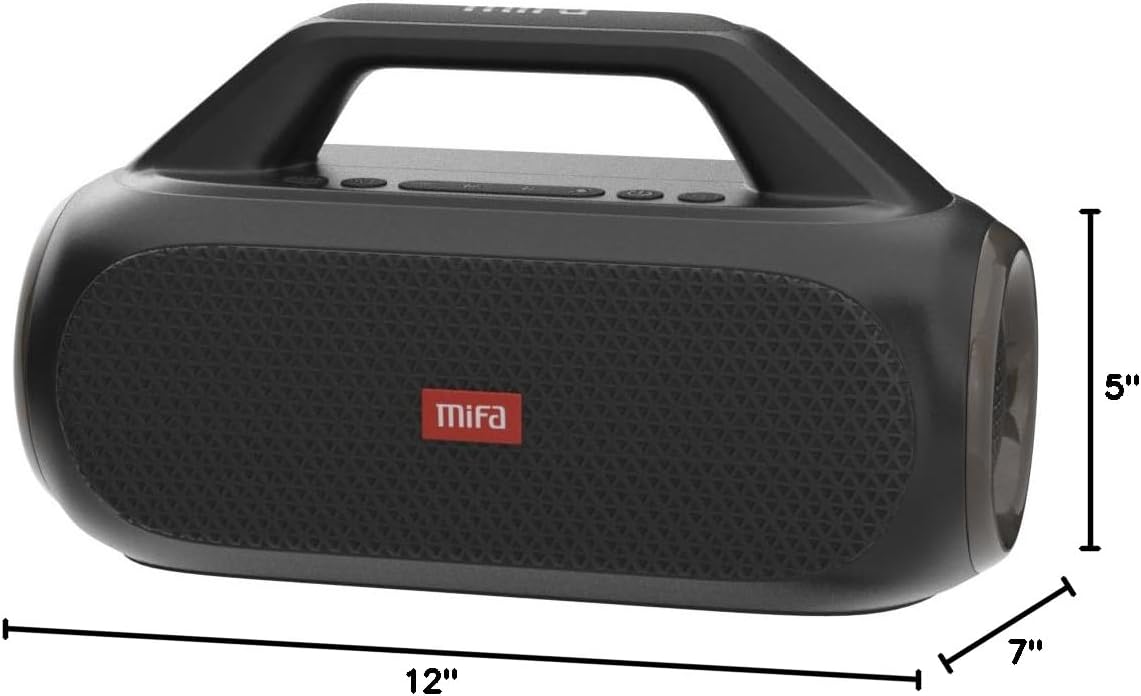
Figure 7: MIFA WildBox dimensions.
Garantia i Suport
The MIFA WildBox Bluetooth Speaker comes with a limited warranty. For specific details regarding warranty coverage, duration, and terms, please refer to the warranty information provided in the packaging or contact MIFA customer support directly.
For technical assistance, troubleshooting beyond this manual, or warranty claims, please visit the official MIFA website or contact their customer service team. Contact information can typically be found on the product packaging or the MIFA brand store on Amazon.


