Introducció
The Xiaomi Redmi Note 11 is a feature-rich smartphone designed for a seamless user experience. It combines an industrial aesthetic with powerful performance and a vibrant display.
Les característiques clau inclouen:
- 6.43" FHD+ AMOLED DotDisplay with 90Hz refresh rate for smooth visuals.
- Qualcomm Snapdragon 680 processor for efficient performance.
- 50MP Quad Camera system for versatile photography.
- 5000mAh battery with 33W Pro fast charging.
- Altaveus estèreo duals per a un àudio ric.
- 128GB storage and 6GB RAM.
- Dual SIM support with expandable storage up to 1TB via Micro SD (not included).

Imatge: Anvers i revers view of the Xiaomi Redmi Note 11 smartphone, showcasinel seu disseny elegant i el mòdul de càmera.
Configuració
1. Inserció de la targeta SIM i la targeta MicroSD
The Redmi Note 11 supports dual Nano SIM cards and a MicroSD card for expandable storage. Use the provided SIM tray ejector tool to open the SIM tray.
- Localitza la safata de la targeta SIM al lateral del dispositiu.
- Introduïu l'eina d'expulsió de la safata de la SIM al forat petit que hi ha al costat de la safata i premeu suaument fins que la safata surti.
- Place your Nano SIM card(s) into the designated slots with the gold contacts facing down. If using a MicroSD card, place it in its dedicated slot.
- Empenyeu amb cura la safata cap a dins del dispositiu fins que quedi alineada amb el lateral.
Note: Ensure the SIM card is correctly oriented to avoid damage. This model is an international version and may not be compatible with all CDMA carriers in the US (e.g., Verizon, Sprint, Boost, Cricket, AT&T). For T-Mobile/Metro PCS users, the phone may only work with a previously activated SIM card.
2. Assistent d'encesa inicial i configuració
- Premeu i manteniu premut el botó d'engegada (situat al lateral) fins que aparegui el logotip de Xiaomi.
- Follow the on-screen instructions to complete the initial setup. This typically includes selecting your language, connecting to a Wi-Fi network, setting up your Google account, and configuring security features like fingerprint or AI Face Unlock.

Imatge: Detallada view of the Redmi Note 11's camera array and the side of the phone, showing the power button (which integrates the fingerprint sensor) and volume rocker.
Funcionament del dispositiu
Visualització i navegació
The 6.43-inch FHD+ AMOLED DotDisplay offers vibrant colors and deep blacks. Navigation is primarily done through touch gestures or on-screen navigation buttons, configurable in settings. The 90Hz refresh rate provides a smooth scrolling experience.
Funcions de la càmera
The Redmi Note 11 features a versatile quad-camera system:
- 50MP Main Camera (f/1.8): For high-resolution photos in various lighting conditions, including Night Mode.
- Càmera ultra gran angular de 8 MP: Captures a broader field of view for landscapes and group shots.
- Càmera macro de 2MP: For close-up photography of small objects.
- Sensor de profunditat de 2MP: Assists in creating portrait mode effects with blurred backgrounds.
- 13MP Front Camera (f/2.4): Per a selfies i videotrucades.
Access the camera app from the home screen or lock screen. Explore various modes like Photo, Portrait, Video, Pro, and Night Mode for different shooting scenarios.
Performance and Gaming
Powered by the Qualcomm Snapdragon 680 processor, the device offers robust performance for daily tasks and gaming. The Adreno 610 GPU handles graphics, providing a responsive gaming experience, especially with the 90Hz display.

Image: A user holding the Redmi Note 11 horizontally, engaged in a racing game, demonstrating the phone's display capabilities for entertainment.
Bateria i càrrega
The 5000mAh battery provides extended usage. The device supports 33W Pro fast charging, allowing for rapid recharging. Use the included Adaptador d'alimentació and a compatible USB-C cable for optimal charging speeds. A Carregador de cotxes ràpid is also included for convenient charging on the go.
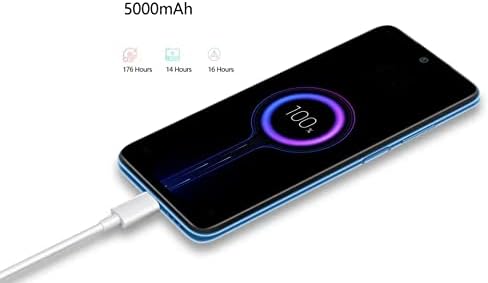
Image: The Redmi Note 11 connected to a charging cable, with the screen displaying a 100% battery charge indicator, highlighting its fast charging capability.
Manteniment
Actualitzacions de programari
Regular software updates are released to improve system stability, enhance features, and apply security patches. It is recommended to keep your device's software up to date. You can check for updates in Configuració > Quant al telèfon > Versió MIUI.
Neteja i cura
- Use a soft, lint-free cloth to clean the screen and back of the device.
- Eviteu utilitzar productes químics o materials abrasius.
- Mantingueu el dispositiu allunyat de temperatures extremes i de la llum solar directa.
- Protegiu la pantalla amb un protector de pantalla i la carcassa amb una funda protectora per evitar ratllades i danys.
Resolució de problemes
| Problema | Possible causa/solució |
|---|---|
| El dispositiu no s'encén | Assegureu-vos que la bateria estigui carregada. Connecteu el carregador i espereu uns minuts abans d'intentar engegar-lo. Si no respon, proveu un reinici forçat mantenint premut el botó d'engegada durant 10-15 segons. |
| Slow performance / Lag | Close unused apps running in the background. Clear cache from apps. Check for system updates. Consider freeing up storage space. |
| La bateria s'esgota ràpidament | Redueix la brillantor de la pantalla. Desactiva les funcions no utilitzades com el GPS, el Bluetooth i el Wi-Fi quan no les necessitis. Limita l'actualització de les aplicacions en segon pla. Comprova l'ús de la bateria a la configuració per identificar les aplicacions que consumeixen molta energia. |
| Network connectivity issues (No signal/No data) | Ensure SIM card is properly inserted. Check if Airplane Mode is off. Restart the device. Verify your mobile data plan is active. Contact your carrier for network issues. |
| El sensor d'empremtes dactilars no funciona | Ensure your finger is clean and dry. Re-register your fingerprints in settings. Ensure the sensor area is clean. |
Especificacions
| Característica | Detall |
|---|---|
| Nom del model | Nota 11 |
| Mostra | 6.43" FHD+ AMOLED DotDisplay, 1080 x 2400 Resolution, 90Hz Refresh Rate |
| Processador | Qualcomm Snapdragon 680, Octa-core, 2.4 GHz |
| RAM | 6 GB |
| Emmagatzematge intern | 128 GB |
| Emmagatzematge ampliable | Micro SD up to 1TB (not included) |
| Càmera posterior | 50MP (f/1.8) Main + 8MP Ultra-Wide + 2MP Macro + 2MP Depth Sensor |
| Càmera frontal | 13MP (f/2.4) |
| Capacitat de la bateria | 5000 mAh (typ) / 5020 mAh |
| Carregant | 33W Pro Fast Charging |
| Sistema operatiu | MIUI 13 basat en Android 11 |
| Connectivitat | 4G LTE, Wi-Fi (2.4G/5G), Bluetooth 5.0, GPS |
| Sensors | Sensor d'empremta digital lateral, Desbloqueig facial amb IA, Sensor de proximitat, Sensor de llum ambiental, Acceleròmetre, Brúixola electrònica, Receptor d'infrarojos, Giroscopi |
| Dimensions | 6.3 x 2.91 x 0.32 polzades |
| Pes | 1.05 lliures |
| Àudio | Dual stereo speakers, No headphone jack |
| A la Caixa | Power Adapter, Fast Car Charger, SIM Tray Ejector |
Garantia i Suport
This product is an international model. Please note that there is sense garantia als EUA for this specific international model. For support, please refer to the seller or the official Xiaomi global support channels for assistance with product inquiries or technical issues.
For further assistance, you may visit the official Xiaomi weblloc web o poseu-vos en contacte amb el seu servei d'atenció al client. Conserveu el rebut de compra per a qualsevol possible necessitat de servei.