Introducció
Thank you for choosing the AZDOME M01 Pro Dashcam. This manual provides detailed instructions to help you install, operate, and maintain your device effectively. Please read this manual thoroughly before using the product to ensure proper functionality and safety.
Producte acabatview
The AZDOME M01 Pro is a high-definition dashcam designed to record your driving journey. It features a compact design, a 3-inch IPS screen, a 150-degree wide-angle lens, G-sensor, loop recording, and 24-hour parking monitoring capabilities. This bundle includes a 128GB Micro SD card for extended storage.

Image: The AZDOME M01 Pro dashcam, showing the main unit with its suction cup mount, a separate rear camera, and a Micro SD card.
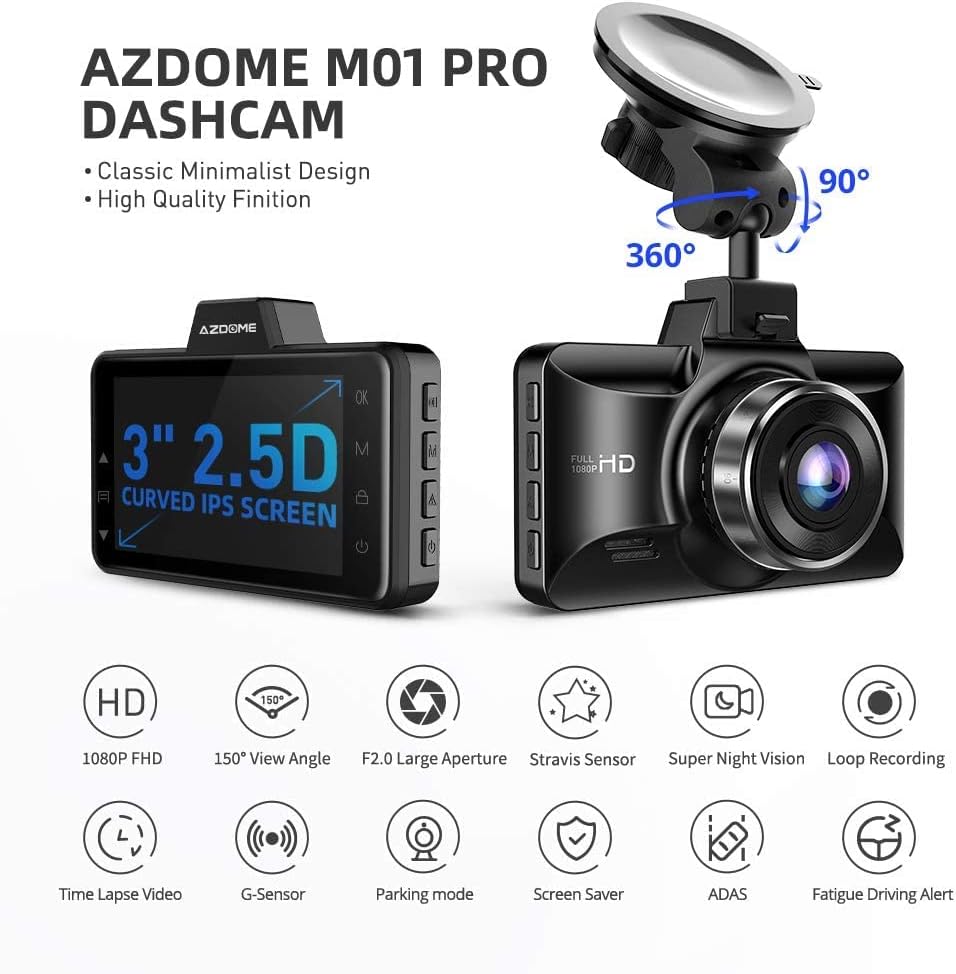
Image: Diagram highlighting key features of the AZDOME M01 Pro Dashcam, including 1080p FHD, 150° View Angle, F2.0 Large Aperture, Stravision Sensor, Super Night Vision, Loop Recording, Time Lapse Video, G-Sensor, Parking Mode, Screen Saver, ADAS, and Fatigue Driving Alert.
Configuració i instal·lació
1. Inserció de la targeta de memòria
The AZDOME M01 Pro supports Micro SD cards up to 128GB. A 128GB card is included with this bundle. Ensure the card is inserted correctly into the designated slot until it clicks into place. For optimal performance, it is recommended to format the memory card within the dashcam before first use and periodically thereafter.

Image: Features of the AZDOME 128GB Micro SD Card, emphasizing wide compatibility, ultra-fast speeds (up to 100MB/s read, 70MB/s write), and lasting reliability (shockproof, IPX6 waterproof, magnetic-proof, temperature-proof).
2. Muntatge de la Dashcam
- Clean the windshield area where you intend to mount the dashcam.
- Attach the suction cup mount to the dashcam.
- Premeu la ventosa fermament contra el parabrisa i gireu la palanca per fixar-la.
- Ajusta l'angle de la càmera per garantir una visió clara view de la carretera que teniu al davant, evitant que us obstrueixi la conducció view.
3. Instal·lació de la càmera posterior
The rear camera is designed for convenient installation on the rear window glass. Connect the rear camera cable to the main dashcam unit. Route the cable neatly along the vehicle's interior trim to avoid interference with driving. Secure the rear camera to the rear window using its adhesive or mounting bracket, ensuring a clear view de la part posterior.
4. Connexió d'alimentació
Connect the dashcam to your vehicle's power outlet (cigarette lighter socket) using the provided car charger. Route the power cable discreetly to avoid obstructing your view or interfering with vehicle controls. The dashcam will typically power on and begin recording automatically when the vehicle starts.
Instruccions de funcionament
1. Enregistrament bàsic
Once powered on, the dashcam will automatically start recording. The recording indicator will typically flash on the screen. Videos are saved in segments to the Micro SD card.

Imatge: Examples of video footage captured by the dashcam, demonstrating clear recording quality during both daytime and nighttime driving conditions.
2. Enregistrament en bucle
The dashcam utilizes loop recording, which continuously records video. When the memory card reaches its capacity, the oldest unlocked footage will be overwritten by new recordings. This ensures continuous recording without manual intervention.
3. Funcionalitat del sensor G
The built-in G-sensor detects sudden impacts or collisions. When an event is detected, the current video segment is automatically locked and protected from being overwritten by loop recording. This preserves critical footage of accidents.
4. Monitorització d'aparcament les 24 hores
For 24-hour parking monitoring, the dashcam requires a continuous external power source, typically provided by a hardwire kit (not included). If an impact is detected by the G-sensor while parked, the camera will automatically turn on, record a 1-minute video, lock it, and save it. This feature helps monitor your vehicle when it is unattended.
5. Visió nocturna
The AZDOME M01 Pro is equipped with a special feature for enhanced night vision, allowing for clearer video capture in low-light conditions.
Manteniment
1. Cura de la targeta de memòria
- Format: Regularly format the Micro SD card (at least once a month) within the dashcam's settings to maintain optimal performance and prevent data corruption.
- Substitució: Memory cards have a limited lifespan due to continuous read/write cycles. If you experience recording errors or data loss, consider replacing the Micro SD card.
- Resistència: The included AZDOME 128GB Micro SD card is designed to be temperature resistant (-10°C to 80°C), water resistant (IPX6), shock resistant, and magnetic resistant, enhancing its durability.

Image: Diagram illustrating the high resistance features of the AZDOME 128GB Micro SD Card, including temperature resistance, water resistance (IPX6), shock resistance, and magnetic resistance.
2. Cleaning the Dashcam
Use a soft, dry cloth to clean the dashcam's lens and screen. Avoid using abrasive cleaners or solvents, which can damage the device. Ensure the suction cup mount is clean for secure attachment.
Resolució de problemes
- La càmera del salpicader no s'encén:
- Check the power connection to ensure it is securely plugged into both the dashcam and the vehicle's power outlet.
- Verify that the vehicle's power outlet is functioning.
- No s'inicia la gravació:
- Ensure a Micro SD card is inserted correctly and is not full.
- Format the Micro SD card within the dashcam's settings.
- Check if the loop recording function is enabled.
- Parking monitor not working:
- Confirm that the dashcam is connected to a continuous external power source (hardwire kit required).
- Adjust the G-sensor sensitivity settings.
- Problemes de qualitat de vídeo:
- Netegeu la lent de la càmera.
- Assegureu-vos que s'hagi tret la pel·lícula protectora de la lent.
- Check the video resolution settings.
Especificacions
| Marca | AZDOME |
| Nom del model | M01 Pro |
| Tecnologia de connectivitat | USB, sense fil |
| Característica especial | Night Vision, G-Sensor, Loop Recording, Parking Monitor |
| Resolució de captura de vídeo | 1080p |
| Components inclosos | Dashcam, Rear Camera, Suction Mount, Car Charger, 128GB Memory Card |
| Tipus de muntatge | Muntatge de succió |
| Camp de View | 150 graus (càmera frontal) |
| Color | Negre |
| Suport per a targetes de memòria | Fins a 128 GB (128 GB inclosos) |
| Memory Card Read Speed | Fins a 100 MB/s |
| Memory Card Write Speed | Fins a 70 MB/s |
Garantia i Suport
For warranty information and technical support, please refer to the official AZDOME weblloc web o contacteu directament amb el seu servei d'atenció al client. També podeu visitar el AZDOME Store on Amazon per obtenir més informació sobre el producte i recursos d'assistència.


