1. Introducció
This manual provides comprehensive instructions for the installation, configuration, operation, and maintenance of the Hanwha XNP-6321H 2MP Outdoor Network PTZ Dome Camera. Please read this manual thoroughly before using the product to ensure correct and safe operation.
The Hanwha XNP-6321H is a high-performance 2-megapixel network PTZ (Pan/Tilt/Zoom) dome camera designed for outdoor surveillance applications. It features a 32x optical zoom lens (4.44~142.6mm), Wide Dynamic Range (WDR) for clear images in challenging lighting, and robust construction with an IP66 rating for environmental protection.
2. Informació de seguretat
Seguiu sempre les següents pautes de seguretat per evitar lesions o danys al producte:
- Font d'alimentació: Use only the specified AC/DC power adapter. Incorrect voltage can damage the device and pose a fire hazard.
- Instal·lació: Installation should be performed by qualified personnel in accordance with all local electrical codes and regulations. Ensure the mounting surface can support the camera's weight.
- Aigua i humitat: This camera is IP66 rated for outdoor use, but avoid submerging it in water or exposing it to high-pressure water jets.
- Neteja: Disconnect power before cleaning. Use a soft, dry cloth. Avoid harsh chemicals or abrasive cleaners.
- Temperatura de funcionament: Operate the camera within its specified temperature range.
3. Contingut del paquet
Verifiqueu que tots els elements siguin presents al paquet:
- Hanwha XNP-6321H PTZ Dome Camera
- Plantilla de muntatge
- Cargols i ancoratges de muntatge
- Guia d'inici ràpid
- RJ45 Connector Cover (if applicable)
4. Configuració i instal·lació
4.1 Instal·lació física
The XNP-6321H is designed for ceiling mount installation. Ensure the mounting location provides a clear field of view and is structurally sound.
- Prepareu la superfície de muntatge: Use the provided mounting template to mark drilling points on the ceiling.
- Forats: Drill pilot holes according to the template. Insert wall anchors if necessary.
- Assegureu el suport de muntatge: Fixeu el suport de muntatge de la càmera a la superfície amb els cargols subministrats.
- Connecteu el cablejat: Route the network (RJ45) and power cables through the designated openings in the bracket.
- Adjuntar la càmera: Secure the camera body to the mounting bracket. Ensure it is firmly locked in place.
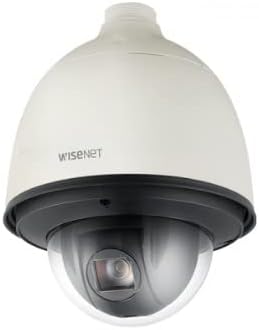
Figura 1: Frontal view of the Hanwha XNP-6321H PTZ Dome Camera. This image shows the camera's dome housing and the lens assembly within, indicating its robust design for outdoor surveillance.

Figura 2: lateral view of the Hanwha XNP-6321H PTZ Dome Camera. This angle highlights the camera's profile and the connection point at the top for mounting and cable routing.
4.2 Connexió de xarxa i alimentació
The camera supports both wired (RJ45) and wireless (Wi-Fi) connectivity, and requires an AC/DC power source.
- Connexió de xarxa (RJ45): Connect a standard Ethernet cable to the RJ45 port on the camera. Ensure a secure connection. If using Power over Ethernet (PoE), a separate power adapter may not be needed.
- Connexió d'alimentació: Connect the appropriate AC/DC power adapter to the camera's power input. Verify the power indicator light illuminates.
- Wireless Setup (Optional): For Wi-Fi connectivity, refer to the 'Operating' section for initial network configuration via the web interfície.

Figura 3: Example of an RJ45 Ethernet cable. This cable is used to establish a wired network connection for the camera, enabling data transmission and potentially Power over Ethernet (PoE).
5. Instruccions de funcionament
5.1 Configuració inicial
After physical installation and power-up, access the camera's web interfície per a la configuració inicial.
- Descobreix la càmera: Use the manufacturer's network discovery tool or your network router to find the camera's IP address.
- Accés Web Interfície: Obre a web navegador i introduïu l'adreça IP de la càmera.
- Inici de sessió: Enter the default username and password (refer to the Quick Start Guide for defaults). Change these immediately for security.
- Configuració de la xarxa: Configure network settings (e.g., static IP, DHCP, Wi-Fi credentials if applicable).
- Data i hora: Set the correct date and time, preferably using NTP (Network Time Protocol).
5.2 PTZ Control and Video Monitoring
The XNP-6321H offers Pan, Tilt, and Zoom functionalities for dynamic surveillance.
- Control PTZ: Use the PTZ controls within the web interface or compatible VMS (Video Management Software) to adjust the camera's view.
- Zoom òptic: Utilize the 32x optical zoom to focus on distant objects without loss of image quality.
- Ampli rang dinàmic (WDR): Enable WDR in settings to improve image clarity in scenes with both very bright and very dark areas.
- Resolució de vídeo: The camera supports 2MP (1080p) video capture resolution. Adjust stream settings for optimal balance between quality and bandwidth.
- Visió nocturna: The camera features day/night low light technology for continuous monitoring in varying light conditions.
5.3 Enregistrament i reproducció
Configure recording settings and access recorded footage.
- Opcions de gravació: Set up continuous recording, motion-triggered recording, or scheduled recording via the camera's web interfície o VMS.
- Emmagatzematge: Recordings can be stored on a network video recorder (NVR), a local SD card (if supported by model), or network-attached storage (NAS).
- Reproducció: Accés gravat footage a través del web interface, VMS, or dedicated mobile applications.
6. Manteniment
6.1 Neteja
Una neteja regular ajuda a mantenir una qualitat d'imatge òptima i allarga la vida útil de la càmera.
- Lent: Gently wipe the lens with a soft, lint-free cloth. For stubborn dirt, use a lens cleaning solution specifically designed for optical surfaces.
- Habitatge: Clean the camera housing with a soft, damp cloth. Avoid using abrasive materials or strong chemical cleaners.
6.2 actualitzacions de microprogramari
Reviseu periòdicament el fabricant weblloc web per a actualitzacions de firmware. Les actualitzacions de firmware poden proporcionar noves funcions, millores de rendiment i millores de seguretat.
- Descarrega: Baixeu l'últim firmware file from the official Hanwha weblloc.
- Actualització: Seguiu les instruccions que s'inclouen amb el paquet d'actualització del firmware, que normalment es realitzen a través de la càmera. web interface. Do not power off the camera during the update process.
7. Solució De Problemes
Consulteu la taula següent per veure els problemes habituals i les seves solucions.
| Problema | Causa possible | Solució |
|---|---|---|
| Sense canal d'imatges/vídeos | No power; Network cable disconnected; Incorrect IP address | Check power connection; Verify network cable is securely connected; Confirm IP address and network settings. |
| Mala qualitat d'imatge | Dirty lens; Incorrect focus; Low bandwidth; Lighting issues | Clean the lens; Adjust focus via web interface; Check network bandwidth; Enable WDR or adjust exposure settings. |
| Els controls PTZ no responen | Network latency; Firmware issue; Mechanical obstruction | Check network connection; Restart camera; Update firmware; Inspect for physical obstructions. |
| No es pot accedir web interfície | Incorrect IP address; Network connectivity issue; Firewall blocking access | Verify IP address; Ping the camera's IP; Check firewall settings on your computer/network. |
8. Especificacions
Key technical specifications for the Hanwha XNP-6321H camera:
- Model: XNP-6321H
- Resolució de captura de vídeo: 2MP (1080p)
- Lent: 4.44~142.6mm (Optical 32x Zoom)
- Tecnologia de connectivitat: Sense fil (Wi-Fi), amb cable (RJ45)
- Font d'alimentació: AC/DC
- Factor de forma: Cúpula
- Ús interior/exterior: A l'aire lliure
- Classificació de protecció internacional: IP66
- Característiques especials: Night Vision, PTZ Technology, Wide Dynamic Range (WDR)
- Format de captura de vídeo: MJPEG, MP4
- Tipus de muntatge: Muntatge al sostre
9. Garantia i Suport
For warranty information and technical support, please refer to the official Hanwha weblloc web o poseu-vos en contacte amb el vostre distribuïdor autoritzat. Conserveu el rebut de compra com a comprovant de compra per a reclamacions de garantia.


