1. Introducció
Thank you for choosing the Jadfezy WiFi Action Camera. This camera is designed to capture high-quality videos and photos of your adventures, whether on land or underwater. With its compact design, 1080P video recording, 12MP photo capabilities, and built-in WiFi, it is an ideal companion for sports enthusiasts and travelers. Please read this manual carefully before use to ensure proper operation and to maximize the camera's performance.
2. Informació de seguretat
- No exposeu la càmera a temperatures extremes ni a la llum solar directa durant períodes prolongats.
- Ensure the waterproof case is properly sealed before submerging the camera in water.
- Use only specified batteries and chargers. Improper use may lead to fire, explosion, or other hazards.
- Mantingueu la càmera i els accessoris fora de l'abast dels nens.
- Eviteu deixar caure la càmera ni sotmetre-la a impactes forts.
- No intenteu desmuntar ni modificar la càmera.
3. Contingut del paquet
El paquet estàndard inclou els següents elements:
- Jadfezy 1080P Action Camera
- Estoig impermeable
- 2 x 1050mAh Rechargeable Lithium-Ion Batteries
- Helmet Mounting Kit
- Bicycle Mounting Kit
- Cable de càrrega USB
- Various Mounting Accessories and Straps

Image: Contents of the Jadfezy Action Camera accessories kit, including the camera, waterproof housing, two batteries, various mounts, and a USB cable.
4. Producte acabatview
The Jadfezy Action Camera features a compact design with a 2-inch LCD screen for easy viewing and navigation. It is capable of recording Ultra HD 1080P video at 30 frames per second and capturing 12-megapixel still photos. The camera comes with a durable waterproof case, allowing for underwater use up to 30 meters (98 feet).

Image: The Jadfezy WiFi Action Camera shown with its transparent waterproof case, two rechargeable batteries, and a display screen illustrating a skydiving scene.

Imatge: Un cop mésview of the Jadfezy Action Camera highlighting its key features: FHD 1080P/30FPS video, Wi-Fi connectivity, Time-lapse/Loop video modes, 2x 1050mAh batteries, 30m/98ft waterproof capability, and a wide-angle lens.
5. Configuració
5.1. Instal·lació i càrrega de la bateria
The camera uses 1050mAh rechargeable Lithium-Ion batteries. Ensure batteries are fully charged before first use.
- Obriu la tapa del compartiment de la bateria a la part inferior de la càmera.
- Insert the battery according to the polarity indicators.
- Tanqueu bé la tapa del compartiment de la bateria.
- Connect the camera to a USB power source using the provided USB cable to charge. The charging indicator will show the charging status.

Image: Two Jadfezy rechargeable Lithium-Ion batteries, highlighting their compact size and design.
5.2. Inserció de la targeta Micro SD
A Micro SD card (not included) is required for storing videos and photos. The camera supports Micro SD cards up to 32GB (though some users report success with 64GB cards, 32GB is officially supported).
- Localitza la ranura per a targetes Micro SD al lateral de la càmera.
- Introduïu la targeta Micro SD amb els contactes daurats mirant cap a la part posterior de la càmera fins que encaixi al seu lloc.
- Per treure-la, premeu suaument la targeta fins que surti.
5.3. Ús de la funda impermeable
The waterproof case allows the camera to be used underwater up to 30 meters (98 feet).
- Assegureu-vos que la càmera estigui seca abans de col·locar-la dins de la funda impermeable.
- Place the camera firmly into the case.
- Close the latch securely to ensure a watertight seal.
- Before first use in water, it is recommended to test the waterproof case without the camera inside to ensure no leaks are present.

Image: The Jadfezy Action Camera enclosed in its waterproof case, submerged in clear blue water with colorful fish and coral, demonstrating its 30m/98ft waterproof capability.
5.4. Attaching Mounting Accessories
The camera comes with various mounts for different activities, including helmet and bicycle mounting kits.
- Identify the appropriate mount for your intended use (e.g., helmet mount, bicycle mount).
- Attach the camera (with or without the waterproof case, depending on the activity) to the chosen mount using the provided screws and adapters.
- Securely fasten the mount to your helmet, bicycle, or other desired surface. Ensure all connections are tight to prevent the camera from falling during activity.
6. Funcionament de la càmera
6.1. Encendre/apagar
- Per engegar: premeu i manteniu premut el botó d'engegada/mode durant uns segons.
- Per apagar: premeu i manteniu premut el botó d'engegada/mode de nou fins que la pantalla s'apagui.
6.2. Selecció de mode
Press the Power/Mode button repeatedly to cycle through different modes: Video Recording, Photo Mode, Playback Mode, and Settings.
6.3. Gravació de vídeo
- In Video Recording mode, press the OK button to start recording. A red indicator light will flash, and a timer will appear on the screen.
- Torneu a prémer el botó D'acord per aturar la gravació.
6.4. Captura de fotos
- In Photo Mode, press the OK button to take a photo.
6.5. Reproducció
- In Playback Mode, use the Up/Down buttons to navigate through your recorded videos and photos.
- Press the OK button to play a video or view una foto a pantalla completa.
6.6. WiFi Connection and App Control
The built-in WiFi allows you to connect the camera to your smartphone for remote control, live view, i file transferència.
- Download the designated app (refer to the camera's screen or packaging for the app name) from your smartphone's app store.
- On the camera, enter WiFi mode (usually by pressing a dedicated WiFi button or cycling through modes). The WiFi icon will appear on the screen.
- On your smartphone, go to WiFi settings and connect to the camera's WiFi network (SSID and password will be displayed on the camera screen).
- Open the app on your smartphone. You can now control the camera, view viu footage, i descarregar files. The WiFi signal range is up to 33 feet.

Image: A smartphone displaying a live view from the Jadfezy Action Camera, with a skier in the background, illustrating the camera's WiFi connectivity feature for remote control and sharing.
6.7. Special Features: Time-Lapse, Dash Cam, Burst Photo
The camera supports various shooting modes to enhance your recording experience.
- Time-lapse: Capture a series of photos at set intervals to create a time-lapse video.
- Dash Cam: Funciona com una càmera de quadre de comandament d'un cotxe, sovint amb gravació en bucle.
- Foto de ràfega: Take multiple photos in quick succession, ideal for fast-moving action.
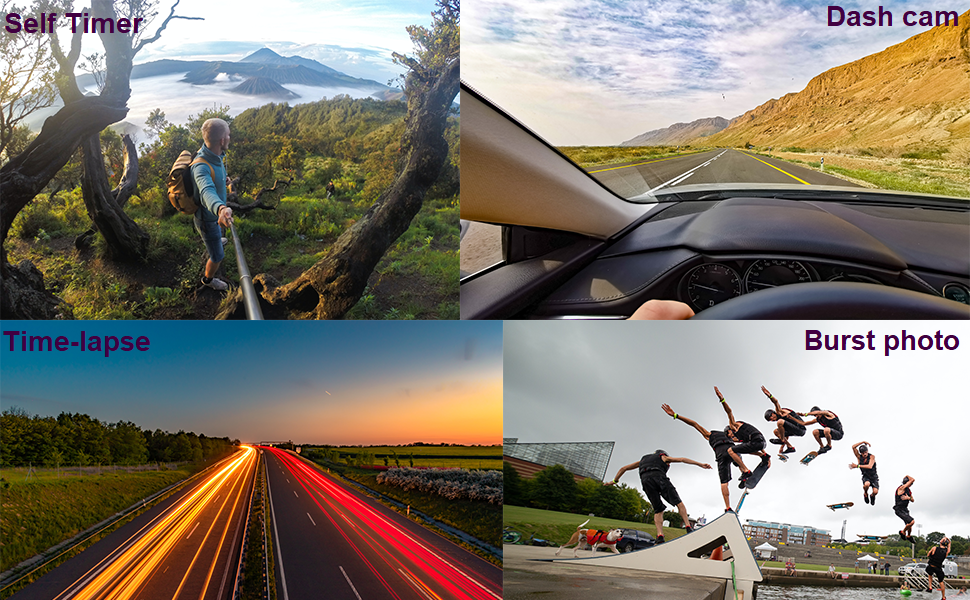
Image: Four panels demonstrating the camera's versatile features: a self-timer shot of a person on a mountain, a dash cam view from inside a car, a time-lapse image of city lights at night, and a burst photo sequence of a skateboarder.
7. Manteniment
- Neteja: Feu servir un drap suau i sense borrissol per netejar la lent i la pantalla de la càmera. Per a la carcassa impermeable, esbandiu-la amb aigua neta després d'utilitzar-la amb aigua salada i deixeu-la assecar a l'aire.
- Cura de la bateria: Store batteries in a cool, dry place. If not using the camera for an extended period, remove the batteries.
- Emmagatzematge: Store the camera in a dry, dust-free environment away from direct sunlight and extreme temperatures.
8. Solució De Problemes
If you encounter issues with your Jadfezy Action Camera, please refer to the following common solutions:
| Problema | Possible solució |
|---|---|
| La càmera no s'encén. | Assegureu-vos que la bateria estigui completament carregada i inserida correctament. Proveu d'utilitzar una altra bateria carregada. |
| No es pot gravar vídeo ni fer fotos. | Check if a Micro SD card is inserted and has sufficient free space. Ensure the card is formatted correctly (FAT32 recommended). The camera may stop recording after 15-minute segments; ensure loop recording is enabled if continuous recording is desired. |
| Mala qualitat de vídeo/fotos. | Ensure the lens is clean. Check the selected resolution settings in the camera menu. Ensure adequate lighting conditions. |
| Problemes de connexió Wi-Fi. | Ensure the camera's WiFi is enabled. Restart both the camera and your smartphone. Ensure you are within the 33-foot WiFi range. Check that the correct app is installed and updated. |
| Water leakage in waterproof case. | Ensure the case is properly sealed and the latch is fully closed. Check the rubber gasket for any debris or damage. Replace the gasket if necessary. |
9. Especificacions
| Característica | Detall |
|---|---|
| Marca | Jadfezy |
| Número de model | J-03series |
| Resolució de vídeo | Up to 1080P / 30fps |
| Resolució fotogràfica | 12MP |
| Mida de la pantalla | 2 polzades |
| Profunditat impermeable | Up to 30m (98ft) with waterproof case |
| Tipus de bateria | 2 x 1050mAh de ió de liti (incloses) |
| Emmagatzematge | Micro SD (es recomana fins a 32 GB) |
| Connectivitat | Wi-Fi, USB |
| Dimensions | 2.35 x 1.55 x 1.2 polzades |
| Pes de l'article | 12.3 unces |
10. Garantia i Suport
Per obtenir informació sobre la garantia i assistència tècnica, consulteu la documentació que s'inclou amb la compra o poseu-vos en contacte directament amb el venedor. Conserveu el comprovant de compra per a reclamacions de garantia.


