1. Introducció
The Insta360 Quick Release Mount is designed to provide a fast and convenient way to attach and detach your Insta360 camera from various accessories. Its robust locking mechanism ensures secure attachment, while the ultra-thin design helps keep the mount invisible in 360-degree footage.
1.1 Contingut del paquet
- 1x Quick Release Base
- 1x Quick Release Plate
- 1x clau anglesa

Figure 1: The Insta360 Quick Release Mount, showing both the Quick Release Base and Quick Release Plate.
2. Configuració i instal·lació
Follow these steps to properly set up your Insta360 Quick Release Mount:
2.1 Attaching the Quick Release Plate to your Camera
- Locate the 1/4" screw on the Quick Release Plate.
- Align the 1/4" screw with the tripod thread on the bottom of your Insta360 camera.
- Screw the Quick Release Plate onto your camera until it is finger-tight.
- Use the provided wrench to securely tighten the Quick Release Plate to prevent loosening during use. Do not overtighten.

Figure 2: The Quick Release Base with a 1/4" screw thread for attachment to accessories.
2.2 Attaching the Quick Release Base to an Accessory
The Quick Release Base offers versatile attachment options:
- 1/4" Screw Mount: For accessories with a 1/4" screw, simply screw the Quick Release Base onto the accessory.
- 2-Prong Mount: For accessories with a 2-prong mount (e.g., GoPro-style mounts), align the prongs of the Quick Release Base with the accessory and secure it using a thumbscrew (not included).
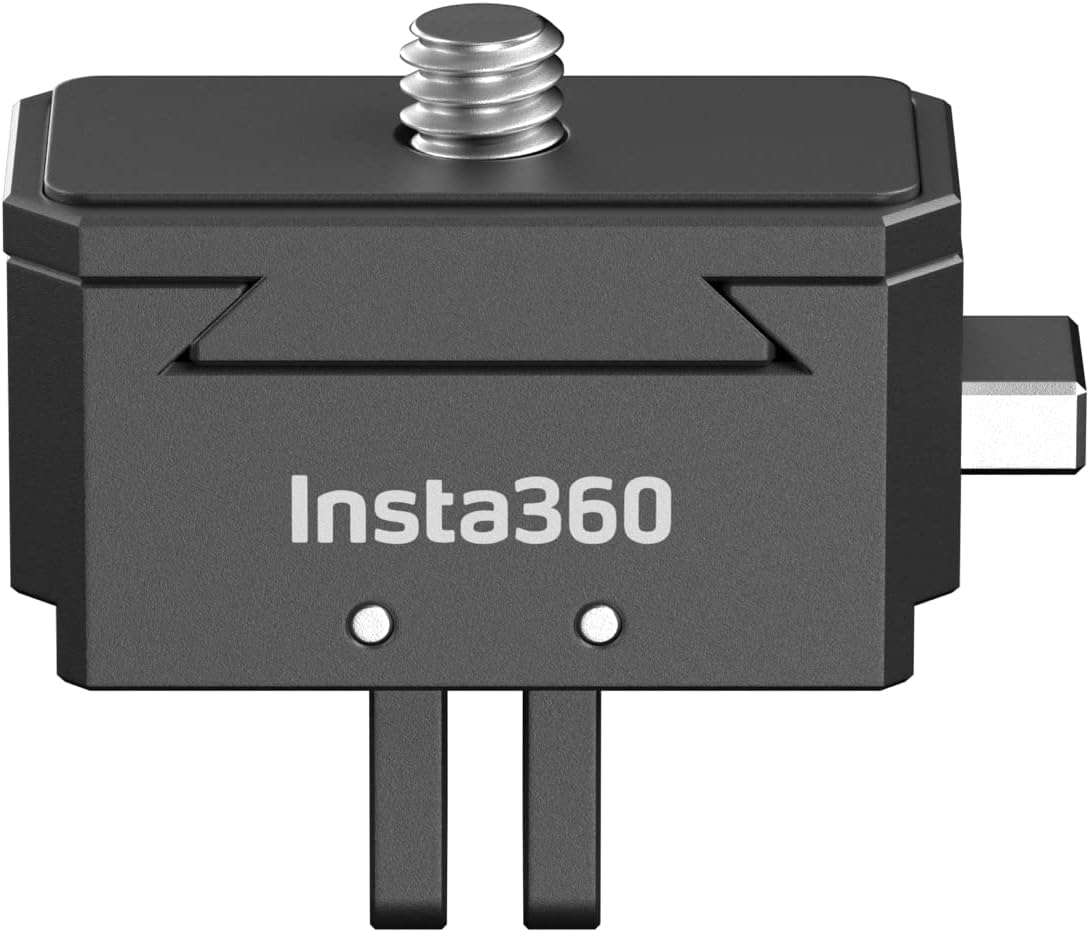
Figure 3: The Quick Release Mount separated into its base and plate components.

Figure 4: An Insta360 camera mounted on a selfie stick using the Quick Release Mount, demonstrating its compact profile.
3. Funcionament
The Quick Release Mount allows for rapid attachment and detachment of your camera.
3.1 Attaching the Camera to the Base
- Ensure the Quick Release Plate is securely attached to your camera and the Quick Release Base is attached to your desired accessory.
- Align the Quick Release Plate (attached to your camera) with the Quick Release Base.
- Gently push the camera downwards onto the base until you hear a distinct "click." This indicates the secure locking mechanism has engaged.
- Verify the camera is firmly attached by gently pulling upwards. It should not detach without pressing the release button.
3.2 Detaching the Camera from the Base
- Locate the release button on the side of the Quick Release Base.
- Manteniu premut el botó d'alliberament.
- While holding the button, lift the camera upwards to detach it from the Quick Release Base.
The ultra-thin design of the mount ensures it remains invisible in 360-degree camera shots, providing an unobstructed view.
4. Manteniment
To ensure the longevity and optimal performance of your Quick Release Mount:
- Keep the mount clean and free from dust, dirt, and debris. Use a soft, dry cloth for cleaning.
- Regularly inspect the locking mechanism for any signs of wear or damage.
- Ensure all screws are tightened appropriately, especially the 1/4" screw connecting the plate to your camera.
5. Solució De Problemes
If you encounter issues with your Quick Release Mount, refer to the following common problems and solutions:
5.1 Camera Not Locking Securely
- Comproveu si hi ha obstruccions: Ensure there is no dirt, sand, or other debris preventing the locking mechanism from fully engaging. Clean the contact surfaces of both the plate and the base.
- Alineació correcta: Confirm that the Quick Release Plate is correctly aligned with the Quick Release Base before pushing down.
- Plate Tightness: Ensure the Quick Release Plate is tightly screwed onto your camera. A loose plate can affect the locking mechanism.
5.2 Quick Release Plate Loosening from Camera
- Re-tighten with Wrench: Use the included wrench to firmly tighten the 1/4" screw connecting the Quick Release Plate to your camera.
- High Vibration Environments: For use in environments with significant vibration (e.g., on vehicles), consider applying a small amount of removable threadlock (e.g., Loctite Blue 242) to the 1/4" screw threads for added security.
6. Especificacions
| Dimensions del producte | 4.72 x 3.15 x 1.77 polzades |
| Pes de l'article | 1.23 unces (35 g) |
| Material | Aluminum, Stainless Steel, Silicone |
| Color | Negre |
| Tipus de muntatge | 1/4" Screw Mount, 2-Prong Mount |
7. Garantia i Suport
For detailed warranty information and technical support, please refer to the official Insta360 weblloc web o contacteu directament amb el servei d'atenció al client. Conserveu el comprovant de compra per a reclamacions de garantia.
Official Insta360 Weblloc: www.insta360.com


