Introducció
Aquest manual proporciona instruccions completes per a la configuració, el funcionament i el manteniment del vostre alimentador intel·ligent per a mascotes Tesla (model TSL-PC-BL4). Llegiu atentament aquest manual abans d'utilitzar el dispositiu per garantir el funcionament i la seguretat adequats per a la vostra mascota.
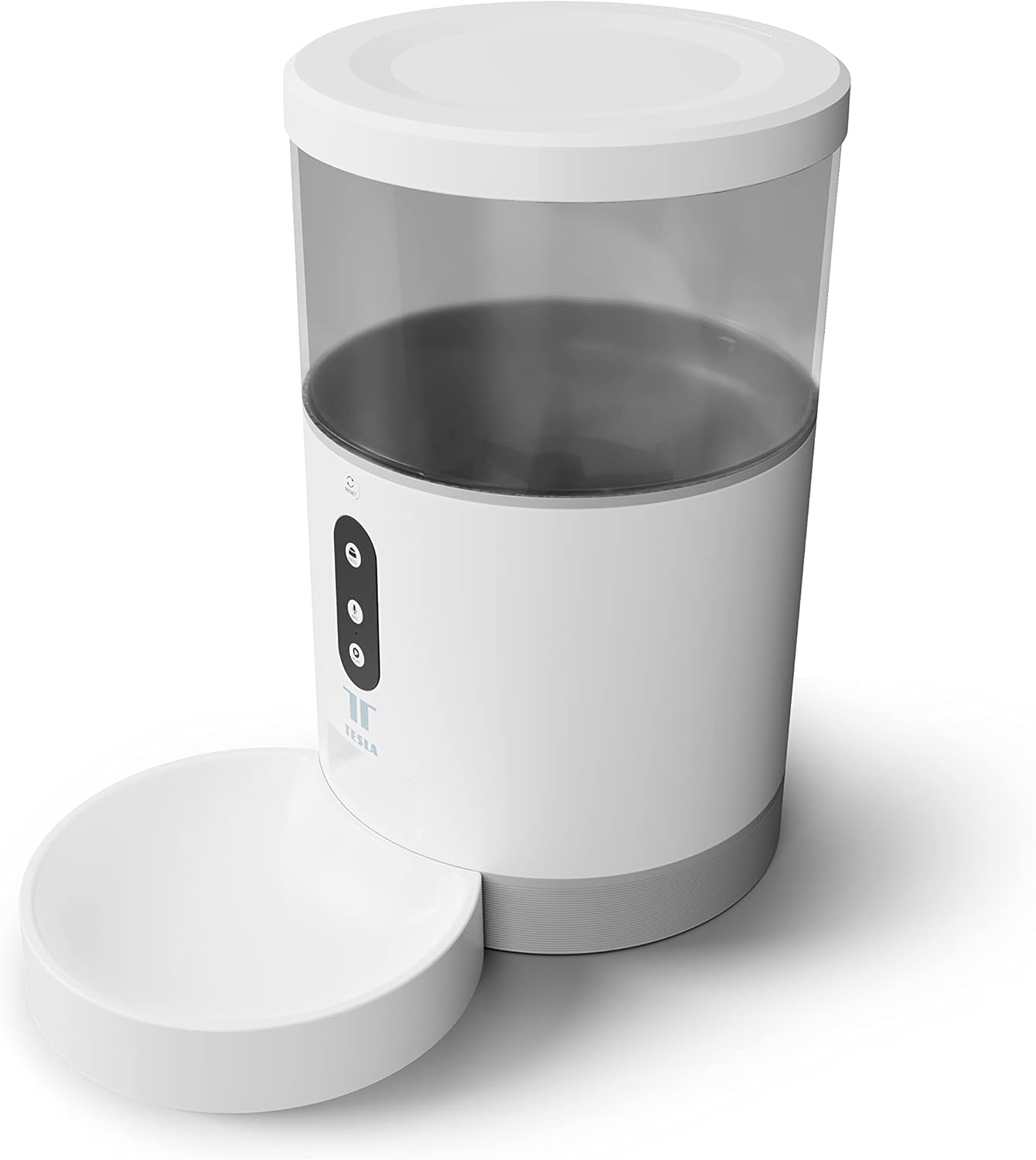
Imatge: Frontal view del Tesla Smart Pet Feeder, que mostra la unitat principal amb un dipòsit d'aliment transparent, botons de control i un bol de menjar blanc adjunt.
Informació important de seguretat
Si us plau, observeu les següents precaucions de seguretat per evitar lesions o danys al dispositiu:
- No submergiu la unitat principal en aigua o altres líquids.
- Assegureu-vos que el menjador estigui col·locat sobre una superfície estable i anivellada.
- Mantingueu-ho fora de l'abast dels nens petits i de les mascotes quan no estigui en ús o durant el muntatge.
- Feu servir només pinso sec per a mascotes amb una mida de croqueta de fins a 10 mm.
- No intenteu desmuntar o reparar el dispositiu vosaltres mateixos. Contacteu amb l'assistència al client per obtenir assistència.
- Desendolleu sempre l'alimentador abans de netejar-lo.
Contingut del paquet
Verifiqueu que tots els components siguin presents al paquet:
- Unitat principal d'alimentació intel·ligent per a mascotes de Tesla
- Bol de menjar
- Adaptador d'alimentació
- Manual d'usuari (aquest document)
Guia de configuració
1. Muntatge
- Col·loqueu la unitat d'alimentació principal sobre una superfície plana i estable.
- Fixeu el bol de menjar a la ranura designada a la base de la unitat principal. Assegureu-vos que encaixi correctament al seu lloc.

Imatge: Frontal view de l'alimentador que destaca el panell de control amb els botons d'alimentació, gravació i reproducció.
2. Alimentació del dispositiu
- Alimentació CA: Connecteu l'adaptador de corrent al port d'entrada d'alimentació de l'alimentador i endolleu-lo a una presa de corrent estàndard.
- Bateria de reserva (opcional): Per a un funcionament ininterromput durant l'apagadatagés a dir, inseriu tres piles LR20 (de tipus D) al compartiment de les piles que es troba a la part inferior de la unitat. Les piles no estan incloses i s'han de comprar per separat.

Imatge: Part posterior view del Tesla Smart Pet Feeder, que mostra l'entrada d'alimentació i la ubicació del compartiment de la bateria.
3. Omplir el recipient d'aliments
- Traieu la tapa de la part superior de l'alimentador.
- Aboqueu el menjar sec per a mascotes al recipient transparent. El menjador té una capacitat de 4 litres. Assegureu-vos que la mida de la croqueta no superi els 10 mm per evitar que s'encalli.
- Col·loqueu la tapa amb seguretat.

Imatge: Un primer pla view de croquetes d'aliment sec per a mascotes al bol del menjador, cosa que demostra el tipus d'aliment adequat per al dispositiu.
4. Descàrrega de l'aplicació i connexió Wi-Fi
- Baixeu l'aplicació Tesla Smart des de l'App Store (iOS) o Google Play Store (Android).
- Obre l'aplicació i segueix les instruccions que apareixen a la pantalla per crear un compte i afegir el teu alimentador intel·ligent per a mascotes Tesla.
- Assegureu-vos que la vostra xarxa Wi-Fi sigui de 2.4 GHz per a una connexió correcta.
Instruccions de funcionament
1. Programació de canals a través de l'aplicació
El mètode principal per controlar l'alimentador és a través de l'aplicació Tesla Smart. L'aplicació us permet:
- Establir horaris d'alimentació: definir horaris específics per al subministrament d'aliments.
- Ajusta la mida de les porcions: Controla la quantitat d'aliment dispensada per cada àpat. L'alimentador pot dispensar fins a 10 porcions per àpat.
- View història de l'alimentació.

Imatge: Un gat taronja descansant al costat del Tesla Smart Pet Feeder, que il·lustra l'alimentador en un entorn domèstic.
2. Alimentació manual
Per dispensar menjar manualment, premeu el botó "Alimentar" al tauler de control de l'alimentador. Cada pulsació dispensarà una porció de menjar.
3. Enregistrament i reproducció de veu
El menjador inclou un micròfon i un altaveu integrats, cosa que permet gravar un missatge curt per trucar a la teva mascota a l'hora de menjar.
- Registre: Premeu i manteniu premut el botó "Grava" (icona del micròfon) al tauler de control. Digueu el missatge. Deixeu anar el botó per desar-lo.
- Jugar: Premeu el botó "Reprodueix" (icona d'altaveu) per reproduir el missatge gravat. El missatge també es reproduirà automàticament a les hores programades per menjar.
4. Integració de la llar intel·ligent
El Tesla Smart Pet Feeder és compatible amb Google Assistant i Amazon Alexa. Pots controlar el menjador mitjançant ordres de veu després d'enllaçar-lo a través de les aplicacions de llar intel·ligent respectives.
Manteniment i Neteja
Una neteja regular garanteix la longevitat i el funcionament higiènic del menjador de la teva mascota.
- Bol de menjar: El bol de menjar es pot desmuntar i rentar a mà amb aigua i sabó suau. Esbandiu-lo bé i eixugueu-lo completament abans de tornar-lo a col·locar.
- Contenidor d'aliments: El recipient transparent per a aliments es pot netejar amb anuncis.amp drap. Assegureu-vos que estigui completament sec abans de tornar a omplir amb menjar.
- Unitat principal: Netegeu l'exterior de la unitat principal amb un drap suau i sec. No utilitzeu productes de neteja abrasius ni submergiu la unitat principal en aigua.
- Botiga d'alimentació: Reviseu periòdicament la sortida d'aliments per si hi ha obstruccions o residus d'aliments i netegeu-la si cal.
Important: Desendolleu sempre l'alimentador de la font d'alimentació abans de netejar-lo.
Resolució de problemes
| Problema | Causa possible | Solució |
|---|---|---|
| L'alimentador no s'encén. | No hi ha alimentació a la presa de corrent; les piles estan esgotades o instal·lades incorrectament. | Comproveu la connexió de l'adaptador de corrent i la presa de corrent. Substituïu o instal·leu les piles de tipus D correctament. |
| No es dispensa menjar. | Menjar encallat; recipient buit; mida de croqueta incorrecta; alimentador fora de línia. | Comproveu si hi ha bloquejos d'aliment a la presa de corrent. Torneu a omplir el recipient. Assegureu-vos que el pinso tingui un gruix màxim de 10 mm. Comproveu la connexió Wi-Fi i l'estat de l'aplicació. |
| No es pot connectar a la Wi-Fi. | Contrasenya Wi-Fi incorrecta; xarxa de 5 GHz; alimentador massa lluny del router. | Verifiqueu la contrasenya del Wi-Fi. Assegureu-vos que us esteu connectant a una xarxa de 2.4 GHz. Acosteu l'alimentador a l'encaminador. Reinicieu l'alimentador i l'encaminador. |
| La gravació de veu no funciona. | Problema amb el micròfon; procediment d'enregistrament incorrecte. | Assegureu-vos que manteniu premut el botó d'enregistrament correctament. Intenteu reiniciar l'alimentador. |
Especificacions
| Característica | Detall |
|---|---|
| Número de model | TSL-PC-BL4 |
| Dimensions (L x A x A) | 30 x 30 x 20 cm |
| Pes | 1.92 quilos |
| Material | Plàstic |
| Color | Blanc |
| Capacitat | 4 litres |
| Mida de la croqueta | Fins a 10 mm |
| Font d'alimentació | Adaptador de corrent altern, 3 piles LR20 (piles D) (no incloses) |
| Connectivitat | Wi-Fi (2.4 GHz) |
| Característiques especials | Control per Wi-Fi i aplicacions, gravació de veu, compatible amb Google Assistant/Amazon Alexa |
Garantia i Suport
Per obtenir informació sobre la garantia, assistència tècnica o consultes de servei, consulteu la pàgina oficial de Tesla Smart. weblloc web o poseu-vos en contacte amb el seu departament d'atenció al client. Conserveu el rebut de compra com a comprovant de compra.
Per obtenir la informació i els recursos de suport més actualitzats, visiteu: www.teslasmart.com


