Introducció
This manual provides comprehensive instructions for the Angrox XRT140 Universal Remote Control, designed as a replacement for various VIZIO Smart TV models. It covers setup, operation, and troubleshooting to ensure optimal performance and ease of use.
Producte acabatview

Imatge: Anvers i revers view of the Angrox XRT140 Universal Remote Control.
Característiques clau
- One-Touch Access: Dedicated buttons for popular streaming services including Vudu, Netflix, Prime Video, Xumo, Hulu, and Redbox, plus a WatchFree button.
- Botons de resposta: Engineered for quick response times (less than 0.5 seconds) and durability (over 11,000 clicks).
- Interval estès: Offers a transmitting distance of over 42 feet for flexible use.
- Construcció duradora: Made from high-quality ABS material with a glossy finish for enhanced durability and soft, tactile buttons.
- No es requereix programació: Ready to use immediately after battery installation.
Compatibilitat
The Angrox XRT140 remote control is designed for broad compatibility with VIZIO Smart TV models and can replace several VIZIO remote models.
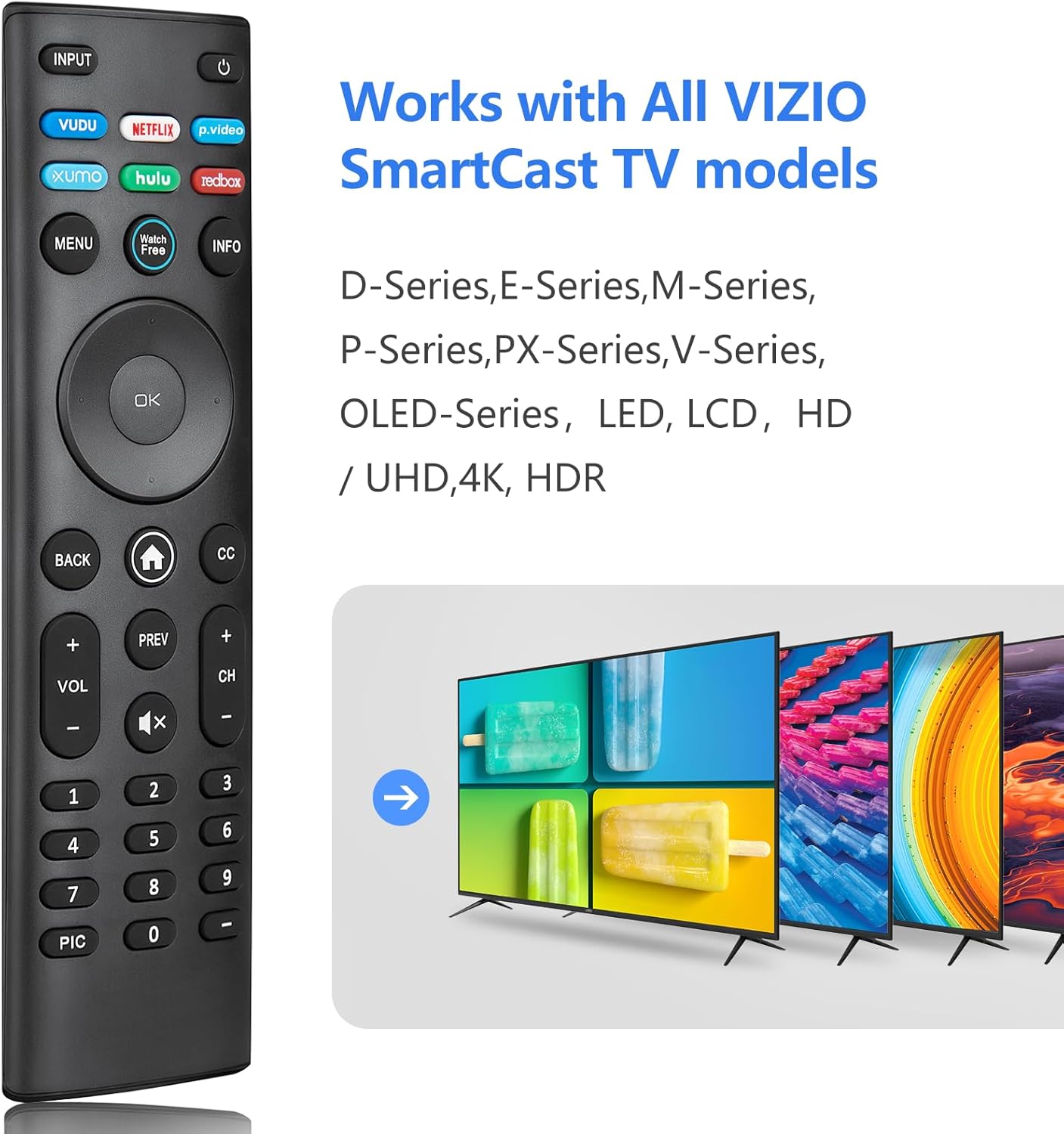
Image: The Angrox XRT140 remote control is compatible with various VIZIO SmartCast TV models, including D-Series, E-Series, M-Series, P-Series, PX-Series, V-Series, and OLED-Series.
- Compatible VIZIO TV Models: D-Series, E-Series, M-Series, P-Series, PX-Series, V-Series, OLED-Series, and other LED, LCD, HD, 4K UHD, HDR Smart TVs.
- Replaces VIZIO Remote Models: XRT136, XRT135, XRT510, XRT500, XRT100, XRT112, XRT122, XRT302, VR1, VR2, VR10, VR15.
Instruccions de configuració
Instal·lació de la bateria
- Localitzeu el compartiment de la bateria a la part posterior del comandament a distància.
- Feu lliscar la tapa de la bateria cap avall per obrir-la.
- Insert two (2) 1.5V AAA batteries, ensuring the positive (+) and negative (-) terminals align correctly with the markings inside the compartment.
- Feu lliscar la coberta de la bateria al seu lloc fins que faci un clic de manera segura.
Nota: Feu servir sempre piles noves i substituïu-les totes dues alhora. No barregeu piles velles i noves ni piles de tipus diferents.
Ús inicial
The Angrox XRT140 remote control requires no programming. Once batteries are installed, it is ready for immediate use with compatible VIZIO Smart TVs.
- Ensure your VIZIO Smart TV is powered on.
- Point the remote control directly towards the TV's infrared (IR) sensor.
- Press any button (e.g., Power, Volume Up) to test functionality.
If the remote does not respond, verify battery installation and ensure there are no obstructions between the remote and the TV sensor.
Instruccions de funcionament
Funcions del botó
The following diagram and descriptions detail the functions of each button on the Angrox XRT140 remote control.

Image: Detailed diagram illustrating the function of each button on the Angrox XRT140 remote control.
| Botó | Funció |
|---|---|
| ENTRADA | Changes the currently displayed input source. |
| Poder (⏻) | Turns the television ON or OFF. |
| VUDU | Accesses VUDU channels/application. |
| NETFLIX | Accesses NETFLIX channels/application. |
| p.video (Prime Video) | Accesses Prime Video channels/application. |
| XUMO | Accesses XUMO channels/application. |
| HULU | Accesses HULU channels/application. |
| REDBOX | Accesses REDBOX channels/application. |
| MENÚ | Mostra el menú de configuració. |
| Rellotge gratuït | Accesses WatchFree channels (availability may vary by region). |
| INFO | Displays the information window. |
| Navigation Buttons (Up/Down/Left/Right) | Navigates on-screen menus. |
| D'acord / Reproduir / Pausa | Selects the highlighted menu option and plays or pauses content. |
| TORNAR | Goes to the previous on-screen menu. |
| Home Button (⌂) | Launches SmartCast Home or returns to the SmartCast Home Screen. |
| CC (Subtítols) | Enables or disables closed captions. Long press to open the Accessibility menu. |
| VOL +/- (Volume Up/Down) | Increases or decreases the loudness of the audio. |
| PREV | Returns to the channel last viewed. |
| CH +/- (Channel Up/Down) | Canvia el canal. |
| Silenciar (🔇) | Turns the audio ON or OFF. |
| Teclat numèric (0-9) | Manually enters a channel number. |
| PIC | Cycles through different picture setting modes. Long press to enable/disable talk back feature. |
| Guió (-) | Used with the number pad to manually enter a digital sub-channel (e.g., 18-4 or 18-5). |
Resolució de problemes
If you encounter issues with your Angrox XRT140 remote control, please refer to the following common troubleshooting steps:
- El comandament a distància no respon:
- Ensure batteries are correctly installed with proper polarity (+/-).
- Replace old batteries with two new 1.5V AAA batteries.
- Confirm there are no obstructions between the remote's IR emitter and the TV's IR receiver.
- Apunta el comandament a distància directament al sensor d'infrarojos del televisor.
- Interval limitat:
- Ensure batteries are fresh. Low battery power can reduce signal strength.
- Remove any objects that might be blocking the signal path between the remote and the TV.
- The remote operates via infrared (IR) and requires a direct line of sight to the TV.

Image: The remote control offers an extended transmitting distance of over 42 feet, but requires a clear line of sight.
- Botons específics que no funcionen:
- Clean the remote control buttons and surface with a soft, dry cloth to remove any dirt or residue that might be interfering with button presses.
- If only certain buttons are unresponsive, the remote may be damaged. Consider replacing the remote.
Especificacions
| Característica | Detall |
|---|---|
| Número de model | XRT140 |
| Marca | Angrox |
| Dimensions del producte | 6.3 x 1.57 x 0.39 polzades (16.0 x 4.0 x 1.0 cm) |
| Pes de l'article | 1.76 unces (50 grams) |
| Piles necessàries | 2 piles AAA (1.5 V) |
| Característiques especials | Ergonomic design, No Programming Required, Universal compatibility with specified VIZIO TVs |
| Fabricant | ENJOYLink Direct |

Image: Physical dimensions of the Angrox XRT140 remote control.
Manteniment
- Neteja: Feu servir un drap suau i sec per netejar el comandament a distància. No utilitzeu netejadors líquids ni materials abrasius.
- Cura de la bateria: Traieu les piles si no heu d'utilitzar el comandament a distància durant un període prolongat per evitar fuites. Desfeu-vos de les piles usades de manera responsable d'acord amb la normativa local.
- Emmagatzematge: Guardeu el comandament a distància en un lloc fresc i sec, allunyat de la llum solar directa i de temperatures extremes.
Garantia i Suport
Specific warranty details for the Angrox XRT140 remote control may vary. Please refer to the product packaging or contact the retailer where the product was purchased for detailed warranty information.
For technical support or further assistance, please contact Angrox customer service through their official channels or the retailer's support services.
