1. Introducció
Thank you for choosing the BLOW RA2 Portable Analog AM/FM Radio. This device combines classic analog radio functionality with modern features such as Bluetooth connectivity, USB and SD card playback, and an AUX input. It also includes a clock and alarm function for added convenience. This manual provides essential information for the safe and efficient operation of your radio.
2. Configuració
2.1 Desembalatge
Carefully remove the radio from its packaging. Ensure all components are present: the BLOW RA2 radio and the power cable.
2.2 Connexió d'alimentació
Connect the power cable to the AC 230V ~ 50Hz power input located at the rear of the radio. Plug the other end into a standard wall outlet. The radio is designed for AC power operation.
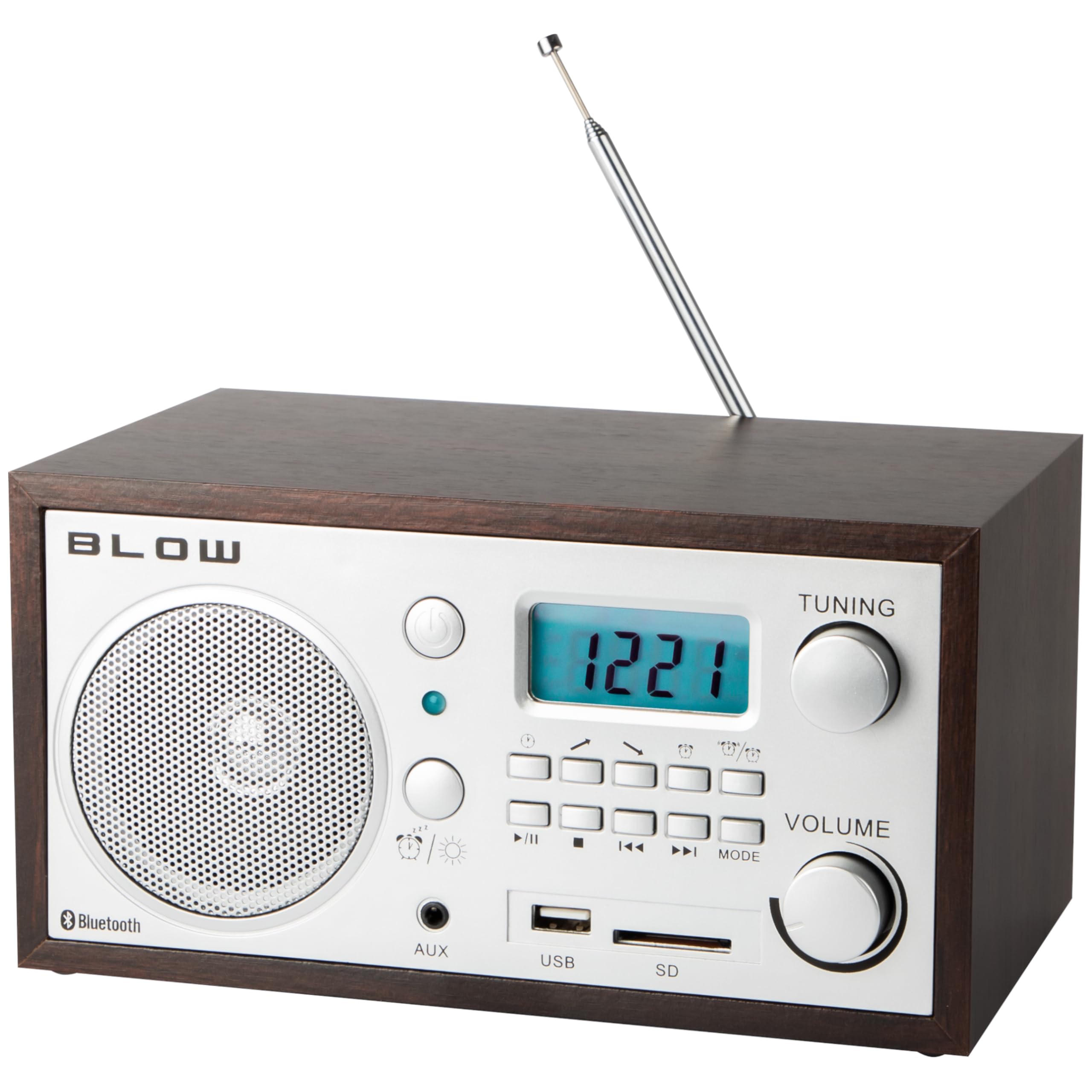
Figura 1: posterior view of the BLOW RA2 radio, illustrating the power input, main power switch, and the telescopic antenna.
2.3 Ajust de l'antena
For optimal AM/FM radio reception, extend the telescopic antenna fully. Adjust its position for the clearest signal. For AM reception, rotating the unit itself may also improve signal quality.
3. Instruccions de funcionament
3.1 Encès/Apagat
Locate the main power switch, typically on the rear or side of the unit. Flip the switch to the 'ON' position to power on the radio. Flip to 'OFF' to power down.

Figura 2: Front panel of the BLOW RA2 radio, showing the LCD display, control knobs, and input ports.
3.2 Radio Tuning (AM/FM)
- Press the 'MODE' button to select either AM or FM radio band. The selected band will be shown on the LCD display.
- Rotate the 'TUNING' knob to scan for radio stations. The frequency will be displayed on the LCD.
- Adjust the 'VOLUME' knob to your desired listening level.
3.3 Funcionament Bluetooth
- Press the 'MODE' button until 'Bluetooth' or 'BT' is displayed on the LCD. The radio will enter pairing mode.
- Al dispositiu mòbil (telèfon intel·ligent, tauleta, etc.), activeu el Bluetooth i cerqueu els dispositius disponibles.
- Select 'BLOW RA2' from the list of devices to pair. A confirmation sound may indicate successful pairing.
- Play audio from your device, and it will stream through the radio's speaker.
Reproducció 3.4 USB i targeta SD
- Inseriu una unitat flaix USB al port USB o una targeta SD a la ranura per a targetes SD.
- Press the 'MODE' button until 'USB' or 'SD' is displayed. The radio will automatically begin playing compatible audio files.
- Use the playback control buttons (Play/Pause, Next, Previous) to manage your audio.
3.5 Entrada AUX
- Connect an external audio device (e.g., MP3 player, laptop) to the 'AUX' input jack using a 3.5mm audio cable (not included).
- Press the 'MODE' button until 'AUX' is displayed.
- Reprodueix àudio des del teu dispositiu extern. El so s'emetrà per l'altaveu de la ràdio.
3.6 Clock and Alarm Function
The BLOW RA2 features an integrated clock and alarm. Refer to the specific instructions in the included owner's manual for detailed steps on setting the time and configuring the alarm, as these functions typically involve specific button combinations not detailed here.
4. Manteniment
4.1 Neteja
To clean the radio, use a soft, dry cloth. Do not use abrasive cleaners, waxes, or solvents, as these can damage the finish and internal components. Ensure the unit is unplugged before cleaning.
4.2 Antenna Care
Handle the telescopic antenna with care to prevent bending or breaking. When not in use, retract the antenna to protect it.
4.3 Emmagatzematge
If the radio will not be used for an extended period, unplug it from the power outlet and store it in a cool, dry place away from direct sunlight and extreme temperatures.
5. Solució De Problemes
| Problema | Causa possible | Solució |
|---|---|---|
| Sense poder | Power cable not connected; Main switch off | Ensure power cable is securely plugged in; Turn main power switch to 'ON' |
| Mala recepció de ràdio | Antenna not extended/positioned correctly; Weak signal area | Extend and adjust telescopic antenna; Try relocating the radio for better signal |
| Bluetooth no connectat | Radio not in Bluetooth mode; Device not in pairing mode; Already paired to another device | Ensure radio is in Bluetooth mode; Put your device in pairing mode; Disconnect from other devices |
| La targeta USB/SD no es reprodueix | Incorrect mode selected; Incompatible file format; Corrupted media | Select 'USB' or 'SD' mode; Ensure files are compatible (e.g., MP3); Try another USB/SD card |
| Sense so | Volume too low; Mute activated; Incorrect source selected | Increase volume; Check for mute function; Ensure correct input mode is selected |
6. Especificacions
- Model: 77-531
- Tecnologia del sintonitzador: AM/FM analògic
- Interval de freqüència AM: 522-1620 kHz
- Rang de freqüència de FM: 88-108 MHz
- Ponent: 2.5 polzades
- Antena: Telescòpic
- Connectivitat: Bluetooth, USB, SD Card Reader, AUX Input
- Visualització: LCD
- Característiques especials: Built-in Clock, Alarm Clock, Portable
- Font d'alimentació: AC 230V ~ 50Hz (Corded Electric)
- Dimensions: 21 x 11 x 14 cm (L x A x A)
- Pes: 1.39 kg
- Material: Plàstic
7. Garantia i Suport
For warranty information and technical support, please refer to the documentation included with your purchase or contact your retailer. The owner's manual is included as a component with the product.


