1. Introducció
Thank you for choosing the Omega OM0520WB 1600 dpi Wireless Optical Mouse. This manual provides detailed instructions for setting up, operating, maintaining, and troubleshooting your new device. Please read this manual carefully before use to ensure optimal performance and longevity of your mouse.
2. Contingut del paquet
Si us plau, comproveu el paquet per veure si hi ha els elements següents:
- Omega OM0520WB Wireless Optical Mouse
- Manual d'usuari
- 1 x AA Battery (may be pre-installed or included separately)
3. Producte acabatview
Familiarize yourself with the components of your Omega OM0520WB mouse:
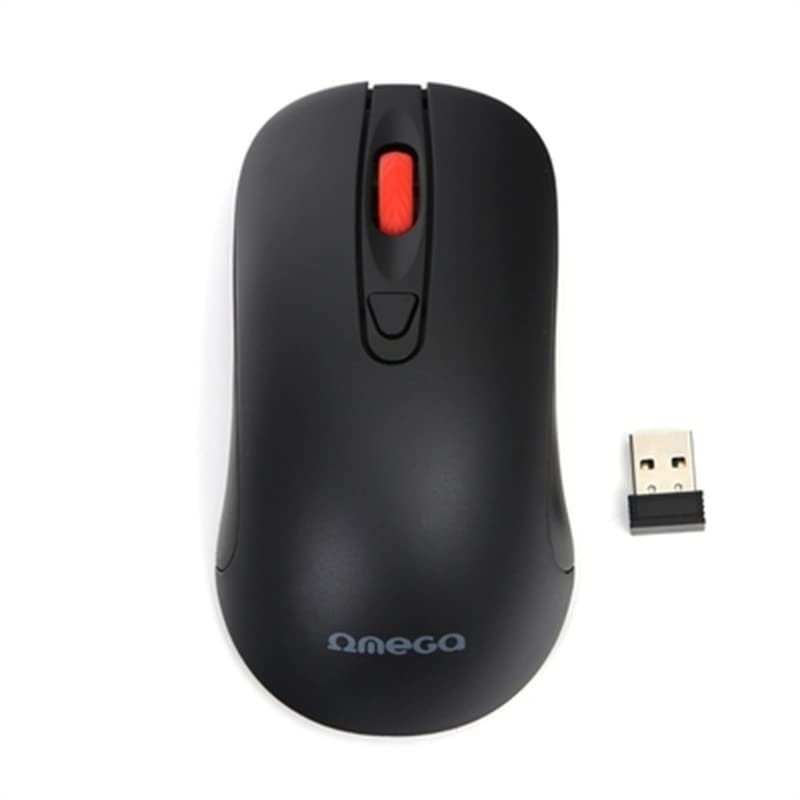
Image: The Omega OM0520WB Wireless Optical Mouse, shown in black. It features a sleek, ergonomic design with standard left and right click buttons, a scroll wheel, and a smooth finish.
- Botó esquerre de clic: Funció de clic principal estàndard.
- Botó dret: Funció de clic secundari estàndard.
- Roda de desplaçament: Per a la funció de desplaçament vertical i clic amb el botó central.
- Sensor òptic: Located on the underside, for precise tracking.
- Compartiment de la bateria: Located on the underside, for inserting the AA battery.
- Interruptor d'alimentació: On/Off switch, usually on the underside of the mouse.
4. Instruccions de configuració
Follow these steps to set up your Omega OM0520WB mouse:
- Instal·la la bateria: Open the battery compartment cover on the underside of the mouse. Insert one AA battery, ensuring the polarity (+/-) matches the diagram inside the compartment. Close the cover securely.
- Activa el ratolí: Locate the power switch on the underside of the mouse and slide it to the 'ON' position.
- Connecteu-vos mitjançant Bluetooth:
- On your computer or laptop, navigate to the Bluetooth settings.
- Assegureu-vos que el Bluetooth estigui habilitat.
- Cerca new devices. The mouse should appear as 'Omega OM0520WB' or similar.
- Select the mouse to pair. Once paired, your mouse is ready for use.
5. Instruccions de funcionament
Your Omega OM0520WB mouse is designed for intuitive use:
- Navegació bàsica: Moveu el ratolí sobre una superfície plana per controlar el cursor a la pantalla.
- Fent clic: Use the left button for primary clicks (e.g., selecting items) and the right button for secondary clicks (e.g., opening context menus).
- Desplaçament: Gireu la roda de desplaçament amunt o avall per navegar pels documents i web pages. Press the scroll wheel for a middle-click function, if supported by your application.
- Configuració de DPI: The mouse operates at a fixed 1600 dpi, providing a balance of speed and precision for most tasks.
- Disseny ambidextre: The symmetrical design allows comfortable use for both left-handed and right-handed users.
6. Manteniment
Per garantir la longevitat i el rendiment òptim del ratolí, seguiu aquestes pautes de manteniment:
- Neteja: Feu servir un drap suau i sec per netejar la superfície del ratolí. Per a la brutícia persistent, netegeu lleugerament.ampRenta el drap amb aigua. Evita utilitzar productes químics agressius o netejadors abrasius.
- Sensor òptic: Keep the optical sensor on the underside clean and free from dust or debris.
- Substitució de la bateria: When the mouse performance degrades or it stops responding, replace the AA battery. Always use a fresh, high-quality battery.
- Emmagatzematge: When not in use for extended periods, turn off the mouse using the power switch to conserve battery life. Store it in a cool, dry place.
7. Solució De Problemes
If you encounter issues with your Omega OM0520WB mouse, refer to the following solutions:
- El ratolí no respon:
- Assegureu-vos que el ratolí estigui encès.
- Comproveu la bateria. Substituïu-la si cal.
- Verify that Bluetooth is enabled on your computer and the mouse is paired. Try re-pairing the mouse.
- Move the mouse closer to your computer to ensure a strong Bluetooth signal.
- Moviment erràtic del cursor:
- Netegeu el sensor òptic de la part inferior del ratolí.
- Feu servir el ratolí sobre una superfície neta, no reflectant i uniforme. Es recomanen les estores de ratolí.
- Problemes de connexió:
- Reinicieu l'ordinador i proveu de connectar-vos de nou.
- Remove the mouse from your computer's Bluetooth device list and then re-pair it.
- Ensure there are no other devices interfering with the Bluetooth signal.
8. Especificacions
| Nom del model | OM0520WB |
| Tecnologia de connectivitat | Sense fil (Bluetooth) |
| Tecnologia de detecció de moviment | Òptic |
| DPI | 1600 ppp |
| Nombre de botons | 3 (esquerra, dreta, roda de desplaçament) |
| Orientació de la mà | Ambidextre |
| Font d'alimentació | 1 x AA Lithium-ion battery (required) |
| Dispositius compatibles | Ordinador personal, portàtil |
| Pes | Aproximadament 73 g |
| Color | Negre |
9. Garantia i Suport
Omega products are designed for reliability and performance. For information regarding warranty coverage, technical support, or service, please refer to the warranty card included with your product or visit the official Omega weblloc web. Conserveu el rebut de compra com a comprovant de compra.


