1. Introducció
This manual provides detailed instructions for the installation, configuration, and operation of your Hikvision DS-7104HGHI-K1 4-Channel Digital Video Recorder (DVR). Please read this manual thoroughly before using the product to ensure correct and safe operation. Keep this manual for future reference.
2. Producte acabatview i Característiques
The Hikvision DS-7104HGHI-K1 is a 4-channel 1080p Lite DVR designed for reliable surveillance recording. It supports various camera types and features advanced video compression technology.

Figura 2.1: A dalt view of the Hikvision DS-7104HGHI-K1 DVR, showing its compact design and branding.
Característiques principals:
- 4-Channel Video Input: Supports up to 4 analog cameras.
- 1080p Lite Recording: Provides high-definition recording at 1080p Lite resolution.
- Compressió H.265+: Advanced video compression technology for efficient storage and reduced bandwidth usage.
- Multi-format Input: Compatible with HDTVI, AHD, CVI, CVBS, and up to 5 IP camera inputs (up to 2MP).
- HDMI/VGA Output: For local monitoring.
- Accés remot: Admet el control remot viewing via Hik-Connect app.

Figura 2.2: Davant i posterior views of the Hikvision DVR, highlighting various ports and connectivity options, along with icons representing H.265 Pro, Mobile access, 5-in-1 compatibility, and IP/Analog XVR capabilities.
H.265+ Compression Benefits:
H.265+ compression significantly reduces the required storage space and bandwidth compared to older compression standards like H.264, without compromising video quality.

Figura 2.3: A bar graph illustrating the reduction in 24-hour recording file size (GB) when using H.265+ compression compared to H.264 and H.265, showing up to an 83% gap in storage requirements.
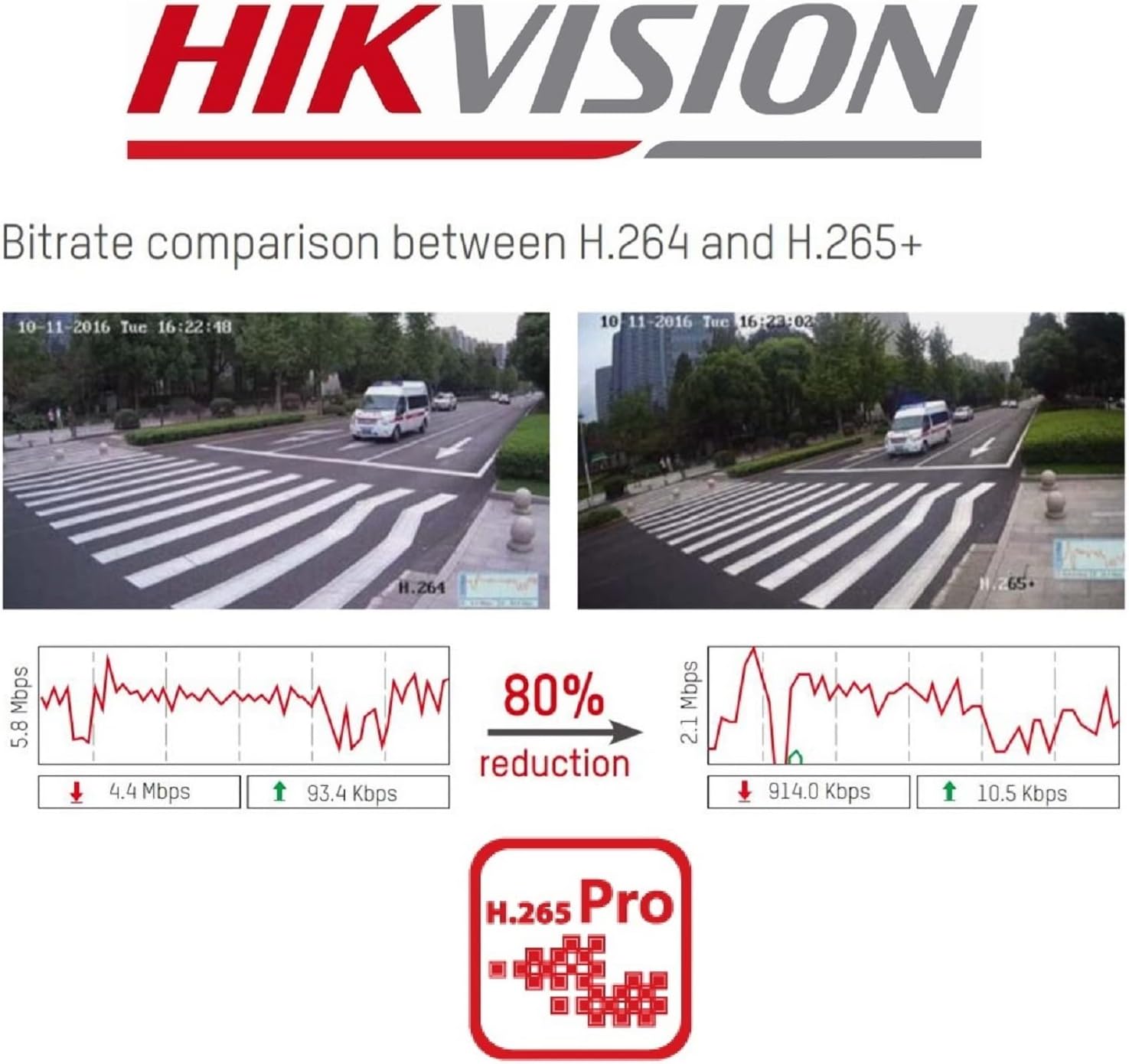
Figura 2.4: A visual comparison of bitrate usage between H.264 and H.265+ compression, demonstrating an 80% reduction in bitrate with H.265+ while maintaining similar video quality in sample surveillance footage.
3. Contingut del paquet
Verifiqueu que tots els elements siguin presents al vostre paquet:
- Hikvision DS-7104HGHI-K1 DVR Unit
- Adaptador d'alimentació
- Ratolí USB
- SATA Cables (for HDD connection)
- Guia d'inici ràpid
- Note: Hard drive is not included and must be purchased separately.
4. Informació de seguretat
- Ensure the power supply matches the DVR's requirements.
- No exposeu el DVR a l'aigua ni a la humitat.
- Avoid placing the DVR in direct sunlight or near heat sources.
- Assegureu-vos una ventilació adequada per evitar el sobreescalfament.
- Utilitzeu només accessoris especificats pel fabricant.
5. Configuració
5.1 Instal·lació de maquinari
- Hard Drive Installation (HDD not included):
- Desenrosqueu i retireu la coberta superior del DVR.
- Connect the SATA power and data cables from the DVR to the hard drive.
- Secure the hard drive inside the DVR using the provided screws.
- Torneu a col·locar la coberta superior i fixeu-la amb cargols.
- Connectar càmeres: Connect your analog cameras to the BNC video input ports on the rear panel of the DVR.
- Connecta el monitor: Connecteu un monitor al port de sortida HDMI o VGA.
- Connectar la xarxa: Connect an Ethernet cable from the DVR's LAN port to your router or network switch.
- Connecteu el ratolí USB: Connecteu el ratolí USB a un port USB del DVR.
- Encès: Connecteu l'adaptador de corrent al DVR i després a una presa de corrent. El DVR s'encendrà automàticament.
5.2 Configuració inicial
- First-Time Startup: Upon first boot, the DVR will guide you through a setup wizard.
- Estableix la contrasenya: Create a strong password for the admin user. This is crucial for security.
- Configuració de la xarxa: Configure network settings (DHCP is usually sufficient for most home networks).
- HDD Initialization: The DVR will prompt you to initialize the newly installed hard drive. This step is necessary for recording.
- Data i hora: Estableix la data i l'hora correctes.
6. Funcionament
6.1 Viu View
Després de la configuració inicial, el DVR mostrarà la imatge en directe view from connected cameras on the monitor. You can switch between single-camera view i una graella multicàmera view using the on-screen controls or mouse.
6.2 Enregistrament
The DVR is typically configured to record continuously by default once the HDD is initialized. You can customize recording schedules, motion detection recording, and alarm recording settings through the DVR's menu:
- Vés a Menú > Gravació > Programació to adjust recording times.
- Vés a Menu > Alarm > Motion Detection to configure motion-triggered recording.
6.3 Reproducció
A view foo gravattage:
- Vés a Menú > Reproducció.
- Select the camera(s) and the date/time range you wish to review.
- Use the playback controls (play, pause, fast forward, rewind) to navigate through the footage.
6.4 Remote Access (Hik-Connect)
The Hik-Connect app allows you to view viu footage, play back recordings, and receive alerts on your smartphone or tablet from anywhere with an internet connection.

Figura 6.1: The Hik-Connect application icon alongside a smartphone displaying a multi-camera live view, illustrating the remote monitoring capabilities of the DVR system.
- Download the Hik-Connect app from your device's app store.
- Create a Hik-Connect account.
- Add your DVR to the app by scanning the QR code on the DVR or manually entering its serial number.
- Ensure your DVR is connected to the internet and Hik-Connect service is enabled in the DVR's network settings.
7. Manteniment
- Neteja regular: Keep the DVR free from dust. Use a soft, dry cloth for cleaning.
- Actualitzacions de firmware: Consulteu periòdicament el lloc web oficial de Hikvision. weblloc web per a actualitzacions de firmware per garantir un rendiment i una seguretat òptims.
- Còpia de seguretat de dades: Regularly back up important recordings to an external storage device.
- Seguretat de contrasenya: Change your DVR password periodically to enhance security.
8. Solució De Problemes
- Sense sortida de vídeo:
- Comproveu les connexions del cable HDMI/VGA.
- Ensure the monitor is powered on and set to the correct input.
- Sense gravació:
- Verify that a hard drive is installed and initialized.
- Check recording schedules and ensure they are active.
- Ensure cameras are properly connected and functioning.
- Cannot Access Remotely:
- Ensure the DVR is connected to the internet.
- Check network settings and Hik-Connect status on the DVR.
- Verify your Hik-Connect account and device binding in the app.
- DVR Unresponsive:
- Restart the DVR by disconnecting and reconnecting the power.
- If issues persist, consider a factory reset (note: this will erase configurations).
9. Especificacions
| Característica | Detall |
|---|---|
| Número de model | DS-7104HGHI-K1 |
| Entrada de vídeo | 4-channel BNC (HDTVI/AHD/CVI/CVBS) + up to 5 IP channels (up to 2MP) |
| Compressió de vídeo | H.265 Pro+/H.265+/H.265/H.264+/H.264 |
| Resolució de codificació | 1080p Lite @ 25/30 fps |
| Sortida de vídeo | 1 HDMI, 1 VGA (simultaneous output) |
| Entrada d'àudio | RCA d'1 canal |
| Sortida d'àudio | RCA d'1 canal |
| Suport de disc dur | 1 SATA interface, up to 4 TB capacity |
| Interfície de xarxa | 1 RJ45 10M/100M self-adaptive Ethernet interface |
| Interfície USB | 2 interfícies USB 2.0 |
| Dimensions (L x A x A) | 20 x 20 x 4.5 cm |
| Pes | 1.01 kg (sense disc dur) |
10. Garantia i Suport
Per obtenir informació sobre la garantia i assistència tècnica, consulteu la pàgina oficial de Hikvision. website or contact your authorized Hikvision dealer. Keep your purchase receipt as proof of purchase.


