Introducció
This manual provides detailed instructions for the setup, operation, maintenance, and troubleshooting of your Fnatic BOLT Wireless Gaming Mouse. Please read this manual thoroughly before using the product to ensure optimal performance and longevity.
Producte acabatview
The Fnatic BOLT is a lightweight wireless gaming mouse designed for high performance. It features a durable construction and versatile connectivity options.
Components
- Botons de clic esquerre i dret
- Roda de desplaçament
- DPI Cycle Button (typically located on the bottom or top)
- Botons laterals (davant/enrere)
- Port de càrrega USB-C
- Wireless Receiver (dongle)

Figura 1: superior view of the Fnatic BOLT Wireless Gaming Mouse, showing the main click buttons and scroll wheel.

Figura 2: Angle view of the Fnatic BOLT Wireless Gaming Mouse, highlighting the two programmable side buttons.

Figura 3: Frontal view of the Fnatic BOLT Wireless Gaming Mouse, displaying the USB-C charging port.
Configuració
1. Càrrega inicial
Before first use, it is recommended to fully charge the Fnatic BOLT mouse.
- Connect the provided USB-C cable to the charging port on the front of the mouse.
- Connecteu l'altre extrem del cable USB-C a un port USB amb alimentació de l'ordinador o a un adaptador de paret USB.
- The mouse's indicator light will show charging status (refer to product documentation for specific light patterns). A full charge typically takes a few hours.
2. Connexió a l'ordinador
The Fnatic BOLT supports two wireless connection modes: 2.4 GHz wireless (via USB dongle) and Bluetooth.
2.1. Connexió sense fil de 2.4 GHz
- Locate the USB wireless receiver (dongle) that came with your mouse.
- Connecteu el receptor USB a un port USB disponible de l'ordinador.
- Engegueu el ratolí amb l'interruptor d'engegada que es troba a la part inferior del ratolí.
- The mouse should automatically connect to the receiver. The indicator light will confirm a successful connection.
2.2. Connexió Bluetooth
- Assegureu-vos que el Bluetooth de l'ordinador estigui activat.
- Turn on the mouse and switch it to Bluetooth mode (refer to the mouse's bottom switch or button for mode selection).
- A l'ordinador, vés a la configuració de Bluetooth i busca dispositius nous.
- Select "Fnatic BOLT" from the list of available devices to pair.
- El llum indicador del ratolí confirmarà l'emparellament correcte.
Instruccions de funcionament
Ajust de DPI
The Fnatic BOLT mouse allows you to adjust its Dots Per Inch (DPI) sensitivity. This mouse features 4 preset DPI levels.
- Locate the DPI cycle button, typically on the bottom of the mouse.
- Press the DPI button to cycle through the available sensitivity settings.
- An indicator light (often on the scroll wheel or top of the mouse) may change color or flash to indicate the current DPI level.
Funcions del botó
- Clic esquerre: Acció primària, selecció.
- Clic dret: Menú contextual, acció secundària.
- Clic amb la roda de desplaçament: Middle click, often used for opening links in new tabs or specific in-game functions.
- Scroll Up/Down: Navigating documents or web pàgines.
- Botons laterals: Default to Forward/Back in web browsers. These can often be customized via software (if available).
Gestió d'energia
- To conserve battery life, turn off the mouse using the power switch when not in use for extended periods.
- The mouse may enter a sleep mode after a period of inactivity. Move the mouse or click a button to wake it up.
- Monitor the battery indicator (if available) to know when to recharge.
Manteniment
Neteja
- Regularly clean the mouse surface with a soft, dry, lint-free cloth.
- Per a la brutícia persistent, lleugerament dampNetegeu el drap amb aigua o una solució de neteja suau. Eviteu productes químics agressius.
- Clean the optical sensor on the bottom of the mouse with a cotton swab to ensure accurate tracking.
- No permeteu que els líquids entrin als components interns del ratolí.
Cura de la bateria
- Eviteu descarregar completament la bateria amb freqüència.
- Guardeu el ratolí en un lloc fresc i sec quan no l'utilitzeu durant períodes prolongats.
- No exposeu el ratolí a temperatures extremes.
Resolució de problemes
El ratolí no respon
- Comproveu la bateria: Ensure the mouse is charged. Connect it to the USB-C cable and allow it to charge for a period.
- Interruptor d'alimentació: Verify the mouse's power switch is in the "ON" position.
- Wireless Connection (2.4 GHz):
- Assegureu-vos que el receptor USB estigui ben connectat a un port USB que funcioni. Proveu-ho amb un altre port USB.
- Ensure the mouse is within range of the receiver.
- Eviteu fonts d'interferència (per exemple, altres dispositius sense fil, objectes metàl·lics grans).
- Connexió Bluetooth:
- Assegureu-vos que el Bluetooth de l'ordinador estigui activat.
- Check if the mouse is in Bluetooth pairing mode or already paired. Re-pair if necessary.
- Remove and re-add the device in your computer's Bluetooth settings.
- Reinicia: Reinicieu l'ordinador.
Inaccurate Tracking
- Neteja el sensor: Netegeu el sensor òptic de la part inferior del ratolí.
- Superfície: Ensure you are using the mouse on a suitable surface. Highly reflective or uneven surfaces can affect tracking. A mouse pad is recommended.
- Configuració de DPI: Adjust the DPI setting to a level that suits your preference and task.
Durada de la bateria curta
- Càrrega: Assegureu-vos que el ratolí estigui completament carregat.
- Apagar: Remember to turn off the mouse when not in use.
- Ús: High-intensity usage or certain settings might consume more power.
Especificacions
| Característica | Detall |
|---|---|
| Marca | Fnatic |
| Nom del model | FnaticGear BOLT |
| Número de model de l'article | CARNOL |
| Color | blanc |
| Tecnologia de connectivitat | Bluetooth, Wi-Fi (2.4 GHz Wireless) |
| Tecnologia de detecció de moviment | Òptic |
| Nombre de botons | 6 |
| Orientació de la mà | D'acord |
| Característiques especials | Lleuger |
| Tipus de font d'alimentació | Wireless (Rechargeable Battery) |
| Piles incloses | Sí (1 bateria de liti metàl·lic) |
| Contingut d'energia de la bateria de liti | 470 milionsamp Hores (mAh) |
| Dimensions del producte | 12.5 x 6.5 x 0.1 cm; 69 g |
| Dispositius compatibles | Ordinador portàtil, ordinador personal |
| Sistemes operatius | Linux, Windows 7, Windows XP (and newer) |
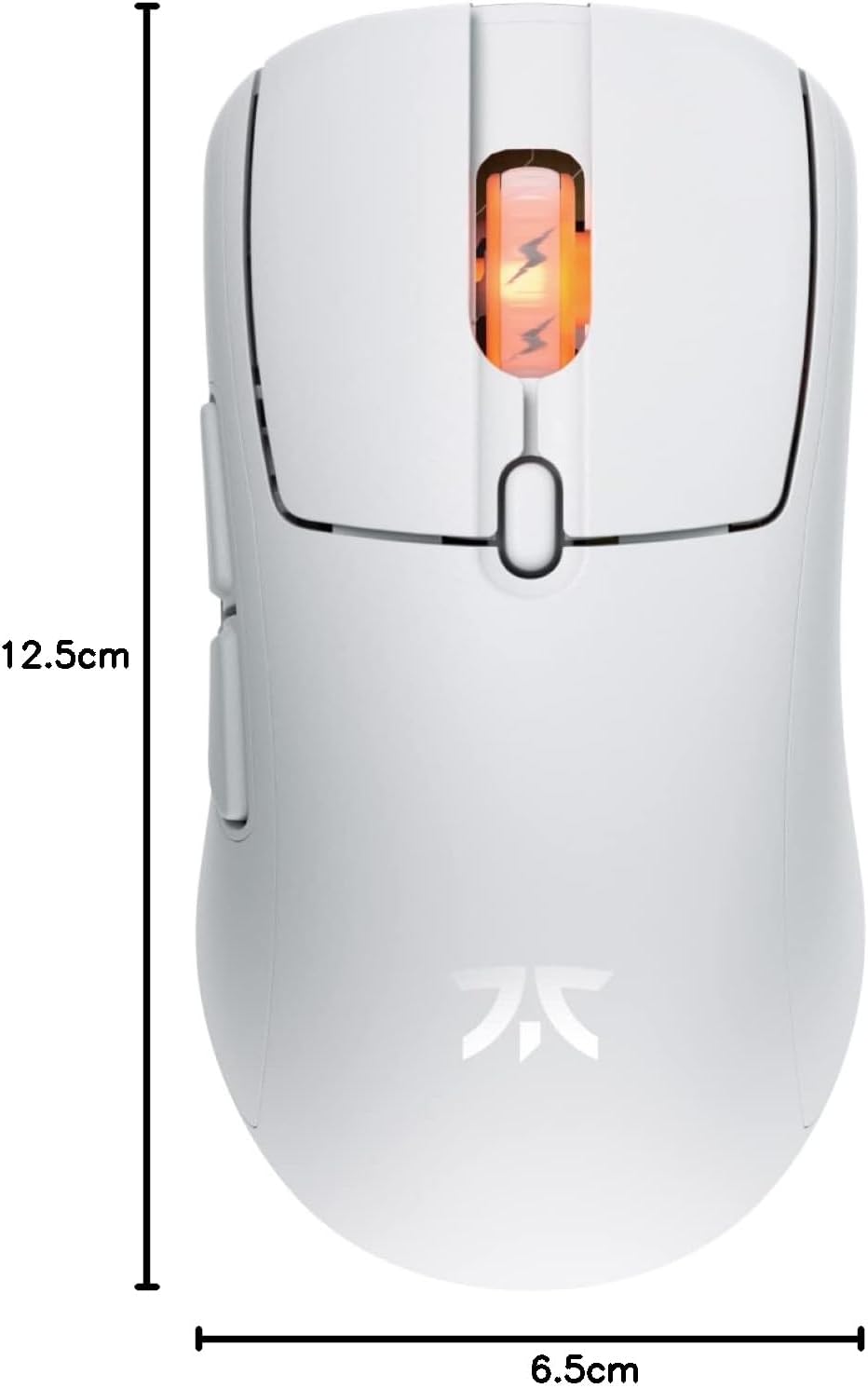
Figure 4: Diagram showing the dimensions of the Fnatic BOLT Wireless Gaming Mouse.
Garantia i Suport
For information regarding warranty coverage and technical support, please refer to the official Fnatic weblloc web o la targeta de garantia inclosa amb el producte.
You can typically find support resources, FAQs, and contact information on the manufacturer's official support pages.


