Introducció
Aquest manual proporciona instruccions completes per a la instal·lació, el funcionament i el manteniment del vostre termòstat Vimar 02913 Connected 4G LTE. Aquest dispositiu permet el control local i remot de la temperatura per a sistemes de calefacció i aire condicionat, oferint modes ON/OFF i PID. Compta amb connectivitat 4G LTE, compatibilitat amb assistents de veu com Amazon Alexa i Google Assistant, i gestió a través del Vimar. View aplicació.

Imatge: Frontal view del termòstat Vimar 02913 Connected 4G LTE, que mostra una temperatura de 21.5 graus Celsius a la seva pantalla LED.
Informació de seguretat
Abans de continuar amb la instal·lació o el funcionament, llegiu atentament tots els avisos i instruccions de seguretat. Una instal·lació o un ús incorrectes poden provocar descàrregues elèctriques, incendis o danys al producte. La instal·lació només l'ha de dur a terme personal qualificat d'acord amb les normes elèctriques locals.
- Desconnecteu sempre l'alimentació a l'interruptor automàtic abans d'instal·lar o fer el manteniment del termòstat.
- Assegureu-vos que totes les connexions del cablejat siguin segures i que compleixin les normatives locals.
- No exposeu el termòstat a l'aigua ni a una humitat excessiva.
- Mantingueu el dispositiu allunyat de la llum solar directa o de fonts de calor per garantir lectures de temperatura precises.
Configuració
1. Instal·lació física
El termòstat Vimar 02913 està dissenyat per a muntatge superficial. Assegureu-vos que el lloc d'instal·lació estigui lliure de corrents d'aire, llum solar directa o altres fonts de calor que puguin afectar la precisió de la temperatura.
- Desconnexió d'alimentació: Desconnecteu l'alimentació principal del sistema de calefacció/refrigeració al disjuntor abans de començar la instal·lació.
- Muntatge de la base: Fixeu la base de muntatge del termòstat a la paret amb els cargols i les ancoratges adequats. Assegureu-vos que la base estigui anivellada.
- Cablejat: Connecteu els cables elèctrics del vostre sistema de calefacció/refrigeració als terminals adequats de la base del termòstat. Consulteu el diagrama de cablejat que es proporciona al manual complet del producte del Vimar. weblloc per a connexions específiques. El termòstat requereix una font d'alimentació de 100-240 V~ 50/60 Hz.
- Connectant el termòstat: Un cop el cablejat estigui complet i segur, fixeu amb cura la unitat principal del termòstat a la base muntada.
- Restauració d'energia: Restableix l'alimentació a l'interruptor. La pantalla del termòstat s'hauria d'il·luminar.

Imatge: Diagrama que il·lustra el procés de muntatge superficial de la base del termòstat a una paret, que mostra la col·locació dels cargols i el cablejat.
Per a instal·lacions encastades, assegureu-vos que la caixa elèctrica adequada estigui instal·lada a la paret abans de muntar la base del termòstat.

Imatge: Diagrama que il·lustra el procés de muntatge encastat de la base del termòstat en una caixa elèctrica encastada a la paret.
2. Configuració inicial (Vimar View aplicació)
El termòstat Vimar 02913 es configura i gestiona principalment a través del controlador Vimar. View aplicació.
- Descarrega l'aplicació: Descarrega el "Vimar" View"aplicació de la botiga d'aplicacions del teu telèfon intel·ligent (iOS o Android).
- Crea un compte: Obriu l'aplicació i seguiu les instruccions que apareixen a la pantalla per crear un compte d'usuari nou o iniciar la sessió si ja en teniu un.
- Afegeix un dispositiu: A l'aplicació, selecciona l'opció per afegir un dispositiu nou. L'aplicació et guiarà pel procés de connexió al termòstat mitjançant la tecnologia sense fil Bluetooth per a la configuració inicial.
- Connexió de xarxa: Configura la connexió 4G LTE del termòstat dins l'aplicació. Això requereix una targeta SIM compatible (no inclosa) amb un pla de dades actiu.
- Configuració bàsica: Configureu les unitats de temperatura desitjades (Celsius/Fahrenheit), els modes de funcionament (calefacció/refrigeració) i la programació inicial.

Imatge: Logotips per al Vimar View Aplicació, IFTTT, Amazon Alexa i Google Assistant, cosa que indica compatibilitat.

Imatge: Tres pantalles de telèfons intel·ligents que mostren el Vimar View interfície de l'aplicació, que mostra la programació, la temperatura actual i la configuració.
Funcionament del termòstat
1. Control local
El termòstat compta amb una pantalla LED intuïtiva i controls tàctils per a ajustos bàsics directament al dispositiu.
- Ajust de temperatura: Utilitzeu el cap amunt (^) i cap avall (v) fletxes a la cara del termòstat per ajustar manualment el punt de consigna de temperatura desitjat.
- Visualització: La pantalla LED central mostra la temperatura o el punt de consigna actual. Els LED laterals poden indicar l'estat de funcionament.
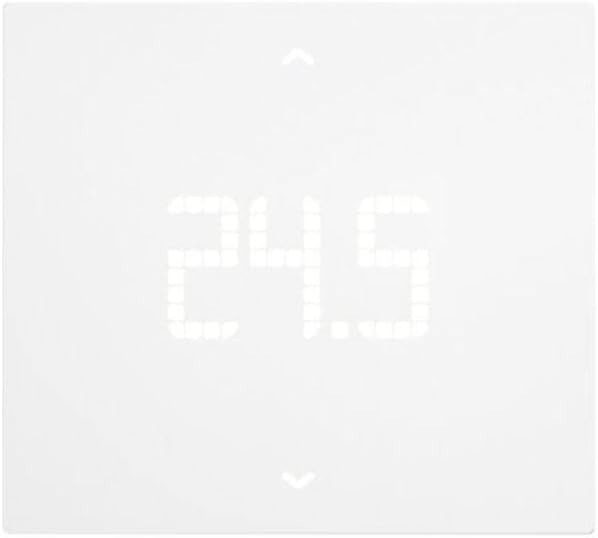
Imatge: Primer pla de la pantalla LED del termòstat Vimar 02913 que mostra una temperatura de 24.5 graus Celsius.

Imatge: La pantalla del termòstat que mostra l'ajust de la temperatura, amb una fletxa que indica una disminució de la temperatura de 21.0 a 20.5 graus Celsius.
2. Control d'aplicacions (Vimar) View)
El Vimar View L'aplicació ofereix funcions completes de control i monitorització del termòstat des de qualsevol lloc amb connexió a Internet.
- Ajust remot de la temperatura: Canvia el punt de consigna des del teu telèfon intel·ligent.
- Programació: Crea i gestiona programacions de calefacció/refrigeració personalitzades per a diferents hores del dia i de la setmana.
- Modes de funcionament: Canvieu entre els modes de control ON/OFF i PID i seleccioneu calefacció o refrigeració.
- Gestió multizona/multihabitatge: Si tens diversos termòstats Vimar, gestiona'ls tots des d'una única interfície d'aplicació.
- Secció d'Energia: Monitoritza el temps de funcionament del termòstat per obtenir informació sobre el consum d'energia.
- Entrada digital/Sortida auxiliar: Utilitzeu l'entrada digital personalitzable per a la senyalització d'alarma mitjançant notificacions push i controleu la sortida auxiliar.
3. Integració de l'assistent de veu
El termòstat Vimar 02913 és compatible amb Amazon Alexa i Google Assistant, cosa que permet el control activat per veu.
- Habilita l'habilitat/acció: A l'aplicació Alexa o Google Home, activa l'habilitat o l'acció Vimar.
- Enllaça el compte: Enllaça el teu Vimar View compte al teu compte d'assistent de veu.
- Comandaments de veu: Utilitzeu ordres com ara:
- "Alexa, configura [Nom del termòstat] a 22 graus."
- "Ei Google, quina és la temperatura a [Nom del termòstat]?"
- "Alexa, activa [Nom del termòstat]."
Manteniment
El termòstat Vimar 02913 requereix un manteniment mínim.
- Neteja: Netegeu suaument la superfície del termòstat amb un drap suau i sec. No utilitzeu productes de neteja abrasius, dissolvents ni ruixeu directament sobre el dispositiu.
- Actualitzacions de programari: Assegureu-vos del Vimar View L'aplicació s'actualitza a la darrera versió per rebre millores de rendiment i noves funcions. Les actualitzacions de firmware del termòstat també poden estar disponibles a través de l'aplicació.
- Targeta SIM: Comproveu periòdicament l'estat de la vostra targeta SIM 4G LTE i el pla de dades per garantir una connectivitat remota contínua.
Resolució de problemes
Si teniu problemes amb el termòstat Vimar 02913, consulteu els següents problemes i solucions habituals:
| Problema | Causa possible | Solució |
|---|---|---|
| La pantalla del termòstat està apagada. | Sense font d'alimentació. | Comproveu l'interruptor i assegureu-vos que s'hagi restablert l'alimentació. Verifiqueu les connexions del cablejat. |
| No es pot connectar al Vimar View aplicació. | No hi ha senyal 4G LTE; configuració incorrecta de l'aplicació; problema amb la targeta SIM. | Assegureu-vos que la targeta SIM estigui inserida correctament i que tingui un pla de dades actiu. Comproveu la cobertura de la xarxa. Reinicieu el termòstat i el telèfon intel·ligent. Torneu a emparellar el dispositiu a l'aplicació si cal. |
| Les lectures de temperatura semblen inexactes. | Ubicació del termòstat afectada per corrents d'aire, llum solar directa o fonts de calor. | Si és possible, canvieu la posició del termòstat o protegiu-lo d'influències externes. Deixeu que el sensor s'estabilitzi després de la instal·lació. |
| Les ordres de veu no funcionen. | Habilitat/acció de l'assistent de veu no habilitada o compte no enllaçat. | Verifiqueu que l'habilitat/acció Vimar estigui habilitada a l'aplicació Alexa o Google Home i que el vostre Vimar View El compte està correctament vinculat. Assegureu-vos que el dispositiu d'assistent de veu estigui connectat a Internet. |
Per a més ajuda, consulteu Vimar. weblloc o contacteu amb el servei d'atenció al client.
Especificacions
| Característica | Detall |
|---|---|
| Número de model | 02913 |
| Marca | VIMAR |
| Connectivitat | 4G LTE, tecnologia sense fil Bluetooth (per a la configuració), Wi-Fi |
| Font d'alimentació | 100-240 V ~ 50/60 Hz |
| Modes de control | ON/OFF, PID (Proporcional-Integral-Derivada) |
| Tipus de control de temperatura | Calefacció, refrigeració |
| Compatibilitat de l'Assistent de veu | Amazon Alexa, Google Assistant |
| Control d'aplicacions | Vimar View App |
| Mostra | Pantalla retroil·luminada LED |
| Material | Plàstic |
| Color | Blanc |
| Dimensions (L x A x A) | 11.8 x 10.6 x 2.22 cm |
| Pes | 170 g |
| Sortida auxiliar | 1 sortida de relé 5(2) A 240 V~ |
| Entrada digital | 1 entrada digital personalitzable |
| Origen | Itàlia |

Imatge: Diagrama que mostra les dimensions del termòstat Vimar 02913: 118 mm d'amplada, 106 mm d'alçada i 21.15 mm de profunditat.
Garantia i Suport
Informació de la garantia: Els detalls específics de la garantia del termòstat Vimar 02913 se solen proporcionar en el moment de la compra o es poden trobar a la pàgina oficial de Vimar. weblloc web. Si us plau, conserveu el comprovant de compra per a reclamacions de garantia.
Atenció al client: Per a assistència tècnica, manuals detallats o més consultes, visiteu el lloc web oficial de Vimar. weblloc web o poseu-vos en contacte amb el seu departament d'atenció al client. El Vimar webEl lloc web és el recurs principal per obtenir instruccions i suport complets.
Recursos en línia:
- Vimar oficial Weblloc: www.vimar.com (per a manuals i suport)
- Vimar View Assistència de l'aplicació: consulteu la secció d'ajuda de Vimar. View aplicació.


