1. Introducció
This manual provides essential information for the setup, operation, and maintenance of your RCA 58-Inch Class 4K 2160p Smart LED TV, Model RWOSU5847. This television features a WebOS smart platform, HDR10 support, a 60Hz refresh rate, Bluetooth connectivity, and compatibility with ThinQ AI for an enhanced viewexperiència.
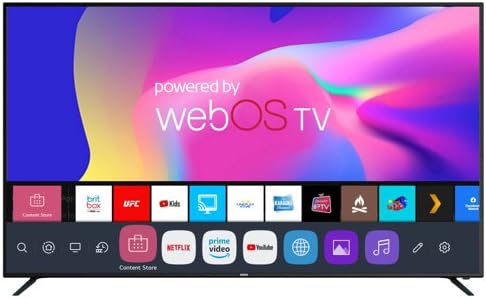
Figura 1.1: Frontal view of the RCA 58-inch 4K Smart LED TV with WebInterfície del sistema operatiu.
This image displays the front of the RCA 58-inch 4K Smart LED TV. The screen shows the 'powered by webOS TV' logo at the top, and a row of application icons at the bottom, including Netflix, Prime Video, and YouTube, indicating its smart TV capabilities.
Key features of your television include:
- 4K Ultra HD (2160p) Resolution: Delivers four times the resolution of Full HD, with upscaling for lower-resolution content.
- WebPlataforma intel·ligent OS: Provides access to a wide selection of streaming services and applications.
- Suport HDR10: Millora el contrast i la precisió del color per a una imatge més realista.
- Freqüència de refresc de 60 Hz: Ensures smooth motion for gaming and fast-paced content.
- Bluetooth 5.0 and Wi-Fi Connectivity: Enables wireless internet access and connection to Bluetooth devices.
- ThinQ AI Compatibility: Allows for voice control functionality.
2. Configuració
2.1 Desembalatge i inspecció
Carefully remove the TV from its packaging. Inspect the TV and all included accessories for any signs of damage. Retain the packaging materials for future transport or if service is required.
2.2 Col·locació del suport
Place the TV screen-down on a soft, flat surface to prevent scratches. Align the included stands with the mounting holes on the bottom of the TV. Secure the stands using the provided screws. Ensure the stands are firmly attached before placing the TV upright.
2.3 Muntatge a la paret (opcional)
If you choose to wall-mount your TV, refer to the instructions provided with your wall-mount kit. Ensure the wall mount is compatible with the TV's VESA mounting pattern (not specified in product data, consult TV back panel or manufacturer for details) and can support the TV's weight (approximately 26.5 pounds).
2.4 Connexió de dispositius externs
Your TV offers various ports for connecting external devices. Refer to the diagrams below for port locations and types.

Figura 2.1: Ports d'entrada posteriors
This image shows the rear panel connections of the TV. From left to right, these include a USB port (USB2), an RJ45 Ethernet port, composite video (CVBS) and stereo audio (L/R) inputs, a headphone jack, an HDMI port (HDMI3), and an RF antenna/cable input (TV IN).

Figura 2.2: Ports d'entrada laterals
This image displays the side panel connections of the TV. From left to right, these include an Optical Digital Audio Out port, two HDMI ports (HDMI2 with HDCP2.2/ARC support, and HDMI1 with HDCP2.2), and a USB port (USB1).
- HDMI: Connect Blu-ray players, game consoles, cable/satellite boxes, or other HDMI-enabled devices. Your TV has multiple HDMI inputs, including one with ARC (Audio Return Channel) for simplified audio connections to soundbars or AV receivers.
- USB: Connecteu els dispositius d'emmagatzematge USB a view fotos, reproduir música o mirar vídeos.
- Ethernet (RJ45): Per a una connexió a Internet per cable.
- Antenna/Cable (RF): Connecteu una antena per a emissions per aire o una connexió de televisió per cable.
- Composite Video (CVBS): For older devices using yellow, white, and red RCA cables.
- Sortida d'àudio digital òptica: For connecting to external audio systems with optical input.
- Auriculars Jack: Per a una escolta privada.
2.5 Engegada i configuració inicial
After connecting all desired devices and the power cord, press the power button on the TV or remote control. The TV will guide you through an initial setup wizard, which typically includes:
- Selecció de la llengua.
- Connexió de xarxa (Wi-Fi o Ethernet).
- Escaneig de canals (per a connexions d'antena/cable).
- Configuració de la data i la zona horària.
3. Funcionament del televisor
3.1 Funcions de control remot
Use the provided remote control to navigate the TV's menus and functions. Common buttons include Power, Volume Up/Down, Channel Up/Down, Input Source, Home (for WebOS), Navigation (directional arrows and OK), and dedicated app buttons (if present).
3.2 WebPlataforma intel·ligent OS
El WebOS platform provides a user-friendly interface for accessing streaming services, apps, and other smart features. Press the 'Home' button on your remote to bring up the launcher bar at the bottom of the screen. From here, you can:
- Launch pre-installed apps like Netflix, YouTube, Prime Video, and more.
- Access the Content Store to download additional applications.
- Canvia entre les fonts d'entrada.
- Adjust TV settings.
3.3 Configuració d'imatge i so
Navigate to the TV's settings menu to customize picture and sound. You can adjust brightness, contrast, color, sharpness, and select picture modes (e.g., Standard, Vivid, Cinema). For audio, adjust bass, treble, balance, and select sound modes (e.g., Standard, Music, Movie).
3.4 Connectivitat Bluetooth
To connect Bluetooth devices such as headphones or speakers:
- Aneu al menú de configuració del televisor.
- Select 'Sound' or 'Connectivity' and then 'Bluetooth'.
- Enable Bluetooth on the TV and put your device into pairing mode.
- Select your device from the list on the TV screen to pair.
3.5 ThinQ AI Voice Control
Your TV works with ThinQ AI for voice control. To use this feature, you typically need to download the ThinQ AI app on your smartphone and connect it to your TV. Follow the instructions within the app to set up voice commands for controlling your TV.
4. Manteniment
4.1 Neteja de la pantalla
Before cleaning, ensure the TV is turned off and unplugged from the power outlet. Use a soft, lint-free cloth, slightly dampened with water or a screen-cleaning solution specifically designed for electronics. Do not spray liquid directly onto the screen.
4.2 Neteja de la carcassa del televisor
Wipe the TV's frame and back panel with a soft, dry cloth. For stubborn marks, a slightly damp cloth can be used, followed by a dry cloth. Avoid using abrasive cleaners, waxes, or solvents as they can damage the finish.
4.3 Atenció general
- Eviteu col·locar el televisor sota la llum solar directa o a prop de fonts de calor.
- Assegureu-vos que hi hagi una ventilació adequada al voltant del televisor per evitar el sobreescalfament.
- Protegiu el televisor de la humitat i la pols.
- Unplug the TV during lightning storms or when it will be unused for extended periods.
5. Solució De Problemes
If you encounter issues with your TV, refer to the following common troubleshooting steps before contacting support.
5.1 Sense poder
- Comproveu si el cable d'alimentació està ben connectat tant al televisor com a una presa de corrent que funcioni.
- Prova la presa de corrent amb un altre dispositiu per assegurar-te que té corrent.
- Premeu el botó d'engegada del televisor, no només del comandament a distància, per descartar un problema amb el comandament a distància.
5.2 Sense imatge ni so
- Assegureu-vos que heu seleccionat la font d'entrada correcta (per exemple, HDMI 1, TV).
- Comproveu totes les connexions de cable entre el televisor i els dispositius externs.
- Adjust the volume and ensure the TV is not muted.
- If using an antenna, perform a channel scan.
5.3 Smart Features Not Working / Network Issues
- Verify that your Wi-Fi router is on and functioning correctly.
- Check the TV's network settings to ensure it is connected to the correct Wi-Fi network or that the Ethernet cable is properly connected.
- Prova de reiniciar el router i el mòdem.
- Perform a network connection test in the TV's settings.
5.4 El comandament a distància no respon
- Substituïu les piles del comandament a distància.
- Assegureu-vos que no hi hagi obstacles entre el comandament a distància i el sensor d'infrarojos del televisor.
- Apunta el comandament a distància directament al televisor.
6. Especificacions
The following specifications apply to the RCA 58-Inch Class 4K Smart LED TV, Model RWOSU5847:
- Marca: RCA
- Model: RWOSU5847
- Mida de la pantalla: 58 polzades (148 cm diagonal visible)
- Tecnologia de visualització: LED
- Resolució: 4K (3840 x 2160)
- Freqüència d'actualització: 60 Hz
- Relació d'aspecte: 16:9
- Característica especial: Flat Screen, HDR10
- Tecnologia de connectivitat: Bluetooth 5.0, Wi-Fi, Ethernet, HDMI, USB, Composite, Optical Audio Out, Headphone
- Color: Negre
- Dimensions del producte (P x A x A): 9.6 x 55.2 x 33 polzades (amb suport)
- Pes de l'article: 26.5 lliures
- Components inclosos: TV, suport

Figura 6.1: Dimensions del televisor
This diagram illustrates the physical dimensions of the RCA 58-inch 4K Smart LED TV. The width is shown as 55.2 inches, the height as 33 inches, and the depth as 9.6 inches, likely including the stand.
7. Garantia i Suport
As a renewed product, the warranty terms for your RCA 58-Inch Class 4K Smart LED TV (RWOSU5847) may differ from new products. Please refer to the specific warranty information provided by the seller or the Amazon Renewed program at the time of purchase. For technical support or service inquiries, please contact RCA customer service or the seller directly.
For further assistance, you may visit the official RCA support website or the Amazon Renewed Store for product-specific information and FAQs.


