1. Introducció
This manual provides detailed instructions for the installation, operation, maintenance, and troubleshooting of your Everycom EC-901 Thermal POS Receipt Printer. Please read this manual thoroughly before using the printer to ensure proper functionality and longevity.

Figura 1: Everycom EC-901 Thermal POS Receipt Printer. This image displays the compact design of the printer with a sample receipt emerging from the top.
Característiques principals:
- Velocitat d'impressió ràpida: Up to 160mm per second for efficient receipt generation.
- Càrrega fàcil de paper: Drop-in paper loading mechanism for quick and simple media changes.
- Disseny compacte: Integrated power supply for a clean and space-saving workstation.
- Variable Paper Width: Supports both 58mm and 80mm thermal paper rolls.
- Built-In Buzzer: Provides audible notifications for various printer statuses.
- Talladora automàtica: Automatically cuts receipts after printing for convenience.
- Connectivitat: USB and LAN interfaces for versatile integration.
2. Configuració i instal·lació
2.1 Desembalatge i verificació del contingut
Carefully unpack the printer and verify that all components are present. The package should contain:
- Everycom EC-901 Thermal POS Receipt Printer
- Roll paper × 1 (for initial testing)
- CD-ROM (containing drivers, utility software, and digital manuals)
- Guia de paper
- Paper Bearing
- Cable USB
- Cable d'adaptador d'alimentació
2.2 Connexió de la impressora
- Connexió d'alimentació: Connect the power adapter cable to the printer's power port and then to a suitable power outlet.
- Connexió de dades:
- Interfície USB: Connect the provided USB cable from the printer's USB port to an available USB port on your computer or POS system.
- Interfície LAN: For network printing, connect an Ethernet cable from the printer's LAN port to your network router or switch.
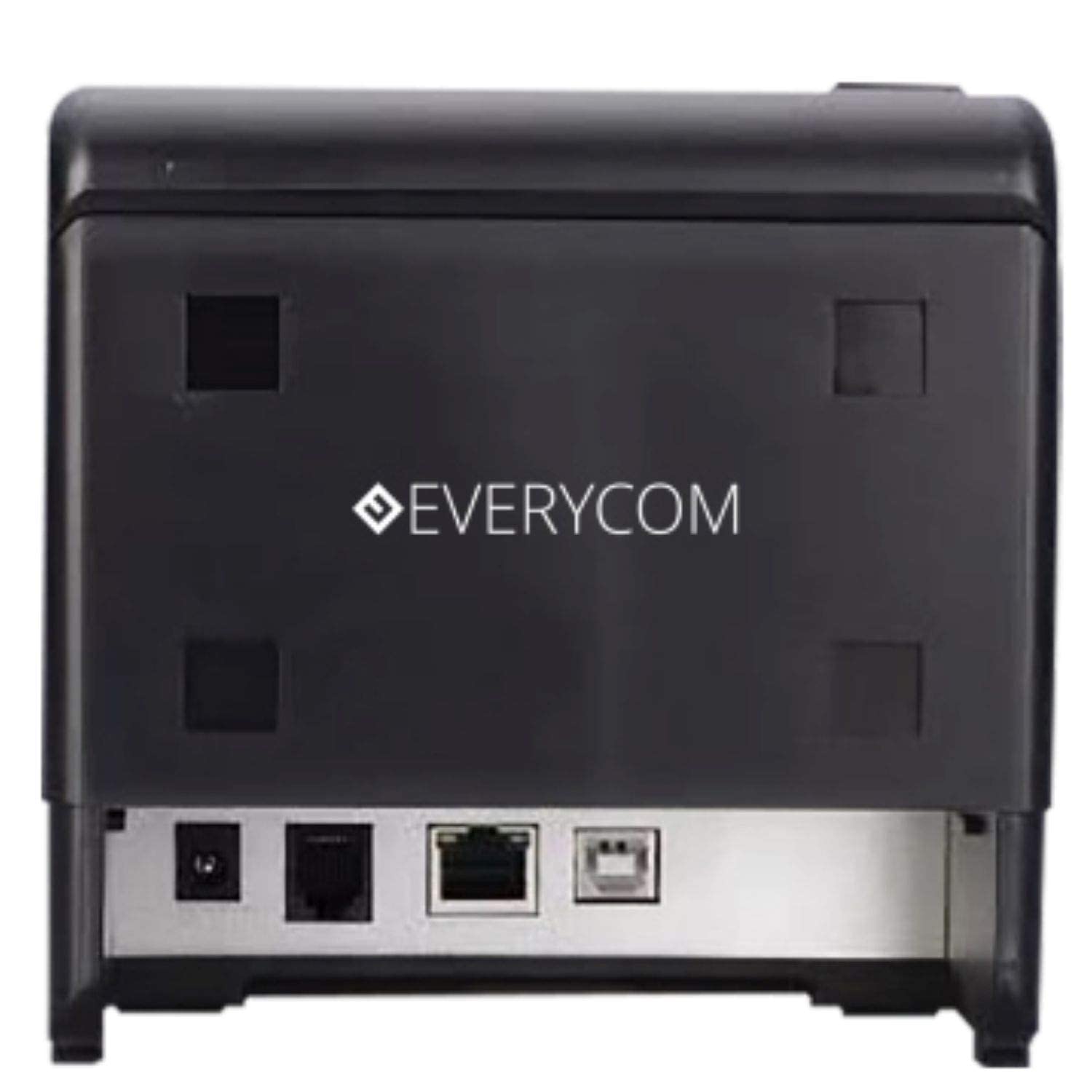
Figura 2: posterior view of the Everycom EC-901 printer. This image highlights the various connectivity ports including USB, LAN, and the power input.
2.3 Càrrega de paper tèrmic
The EC-901 printer features a convenient drop-in paper loading system.
- Assegureu-vos que la impressora estigui apagada o en mode d'espera.
- Press the cover open button (usually located on the side or front) to open the top cover of the printer.
- Insert the thermal paper roll into the paper compartment with the printing side facing the print head. Ensure the roll is seated correctly and feeds smoothly.
- Estireu una petita quantitat de paper per treure-la del tallador.
- Close the top cover firmly until it latches securely. The printer will automatically feed the paper to the correct position.

Figura 3: Everycom EC-901 printer with the top cover open. This image illustrates the internal compartment where the thermal paper roll is loaded.
2.4 Instal·lació del controlador
Insert the provided CD-ROM into your computer's optical drive and follow the on-screen instructions to install the printer drivers and utility software. Alternatively, drivers can be downloaded from the Everycom official weblloc.
3. Funcionament de la impressora
3.1 Engegada/apagada
To power on the printer, press the power switch located on the front or side of the unit. The power indicator light will illuminate. To power off, press the switch again.
3.2 Impressió de rebuts
Once the printer is connected and drivers are installed, you can print receipts from your POS software or application. The printer supports fast printing at up to 160mm per second.
3.3 Funció de tallador automàtic
The EC-901 is equipped with an auto cutter that automatically cuts the receipt paper after each print job, ensuring clean and professional-looking receipts.
3.4 Buzzer Notifications
The built-in buzzer provides audible alerts for various printer statuses, such as paper out, cover open, or error conditions. Refer to the utility software for configuring buzzer settings.
3.5 Funcionament amb baix soroll
Thermal printers generally operate with reduced noise levels, making the EC-901 suitable for various work environments where quiet operation is desired. The printer uses heat for printing, eliminating the need for ink cartridges and contributing to lower operating noise.
4. Manteniment
Regular maintenance ensures optimal performance and extends the lifespan of your Everycom EC-901 printer.
4.1 Neteja del capçal d'impressió
The thermal print head should be cleaned periodically to maintain print quality. Use a soft, lint-free cloth dampened with isopropyl alcohol. Gently wipe the print head surface. Ensure the printer is powered off and cooled down before cleaning.
4.2 Neteja del rodet de la platina
The platen roller can accumulate paper dust. Clean it with a soft cloth dampened with isopropyl alcohol. Rotate the roller manually to clean its entire surface.
4.3 Neteja exterior
Netegeu l'exterior de la impressora amb un drap suau i sec. Eviteu utilitzar productes químics agressius o netejadors abrasius.
5. Solució De Problemes
If you encounter issues with your printer, refer to the following common troubleshooting steps:
- Sense energia: Ensure the power cable is securely connected to both the printer and the power outlet. Check if the power switch is in the 'On' position.
- Sense sortida d'impressió:
- Verify that the paper roll is loaded correctly and there is sufficient paper.
- Check the data cable connection (USB or LAN) to your computer/POS system.
- Ensure the printer drivers are correctly installed and the printer is selected as the default printer in your software.
- Check for any error indicator lights or buzzer sounds.
- Mala qualitat d'impressió:
- Netegeu el capçal d'impressió tal com es descriu a la secció Manteniment.
- Ensure you are using high-quality thermal paper.
- Adjust print density settings through the printer driver if available.
- Embussos de paper:
- Open the top cover and carefully remove any jammed paper.
- Ensure the paper roll is installed correctly and not too tight or loose.
- Clean the paper path and platen roller.
For persistent issues, please contact Everycom customer support.
6. Especificacions
The following table details the technical specifications of the Everycom EC-901 Thermal POS Receipt Printer:
| Característica | Especificació |
|---|---|
| Model | EC-901 |
| Tecnologia d'impressió | Impressió de línia tèrmica |
| Velocitat d'impressió | Fins a 160 mm/segon |
| Resolució d'impressió | 203 x 203 DPI |
| Amplada del paper | 80mm (3 inches), supports 58mm |
| Interfície | USB, LAN |
| Tallador automàtic | Sí |
| Dimensions del producte | 19.8P x 14.8A x 14.8H centímetres |
| Pes de l'article | 1.8 quilos |
| Components inclosos | Printer, 1 Roll Paper, CD-ROM, Paper Guide, Paper Bearing, USB Cable, Power Adapter Cable |
7. Garantia i Suport
7.1 Informació de la garantia
The Everycom EC-901 Thermal POS Receipt Printer comes with a 1 any de garantia from the date of purchase. Please retain your purchase receipt as proof of warranty. The warranty covers manufacturing defects under normal use conditions. It does not cover damage caused by misuse, accidents, unauthorized repairs, or consumables.
7.2 Atenció al client
For technical assistance, warranty claims, or any product-related inquiries, please contact Everycom Customer Care:
- Número gratuït: 1800 121 4480
- Horari de treball: Monday - Saturday, 10:00 AM - 6:30 PM (Except on Public Holidays)

Figura 4: Everycom Customer Service details. This image provides the toll-free number and working hours for customer support.


