1. Introducció
The Cherry MW 8C Ergo is an ergonomic, right-handed wireless mouse designed for comfort and precision. It offers flexible connectivity options via Bluetooth or a 2.4 GHz wireless USB dongle, ensuring a stable and secure connection with AES-128 encryption. This rechargeable mouse features a high-precision sensor for accurate tracking and is built for durability and extended use. This manual provides detailed instructions for setting up, operating, maintaining, and troubleshooting your MW 8C Ergo mouse.
2. Contingut del paquet
Si us plau, comproveu el paquet per veure si hi ha els elements següents:
- Ratolí sense fil Cherry MW 8C Ergo
- Cable de càrrega USB-A a USB-C
- 2.4 GHz Wireless USB Receiver (dongle)
- Storage Pouch (fabric carry pouch)
- Manual d'instruccions (aquest document)
3. Característiques del producte
- Disseny ergonòmic: Shaped for comfortable right-handed use, reducing strain during long periods.
- Connectivitat sense fil dual: Seamlessly switch between Bluetooth and 2.4 GHz wireless modes.
- Bateria recarregable: Integrated battery provides long-lasting power and can be charged via USB-C.
- Sensor òptic d'alta precisió: Ensures accurate and smooth cursor control.
- Xifratge AES-128: Secure wireless transmission for data protection.
- DPI ajustable: Customize cursor speed to suit your preferences.
- Construcció duradora: High-quality materials for reliability and longevity.
4. Configuració
4.1. Càrrega del ratolí
Before first use, it is recommended to fully charge the mouse. Connect the supplied USB-A to USB-C charging cable to the USB-C port on the front of the mouse and to a USB-A port on your computer or a USB power adapter.
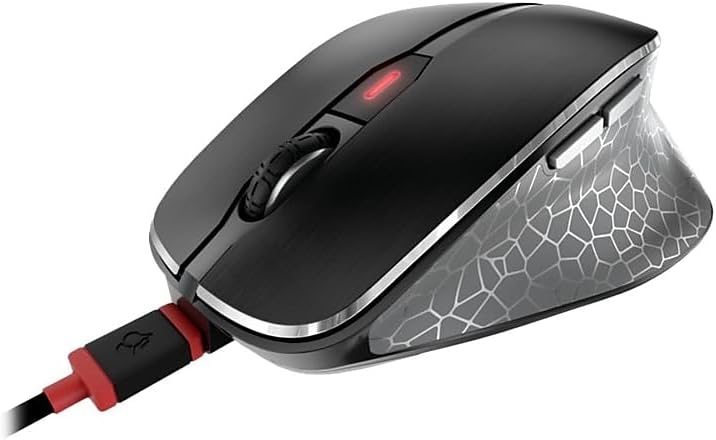
Image: The Cherry MW 8C Ergo mouse connected to its USB-C charging cable, showing the charging port and the mouse's top view.
The LED indicator on the mouse will show charging status. Once fully charged, the LED will change or turn off depending on the model's specific indicator behavior.
4.2. Connexió mitjançant una xarxa sense fil de 2.4 GHz (receptor USB)
- Locate the 2.4 GHz USB receiver (dongle), usually stored magnetically in a compartment on the bottom of the mouse.
- Connecteu el receptor USB a un port USB-A disponible de l'ordinador.
- On the bottom of the mouse, slide the 3-position switch to the "2.4 GHz" position (often indicated by a small wireless icon).
- Your computer should automatically detect and install the necessary drivers. The mouse will be ready for use.
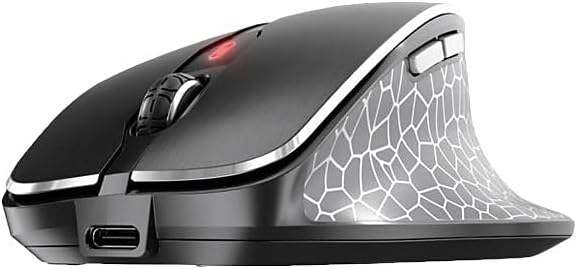
Imatge: Una part frontal view of the Cherry MW 8C Ergo mouse, highlighting the USB-C charging port and the scroll wheel.
4.3. Connexió mitjançant Bluetooth
- On the bottom of the mouse, slide the 3-position switch to the "Bluetooth" position (often indicated by a Bluetooth icon).
- Press and hold the Bluetooth detection button on the bottom of the mouse for a few seconds until the LED indicator starts blinking, indicating pairing mode.
- A l'ordinador, obriu la configuració de Bluetooth:
- Windows: Go to Settings > Devices > Bluetooth & other devices. Click "Add Bluetooth or other device" and select "Bluetooth".
- macOS: Go to System Preferences > Bluetooth.
- Select "Cherry MW 8C Ergo" from the list of available devices.
- Follow any on-screen prompts to complete the pairing process. The LED indicator on the mouse will stop blinking once successfully paired.
5. Funcionament del ratolí
5.1. Funcions del botó
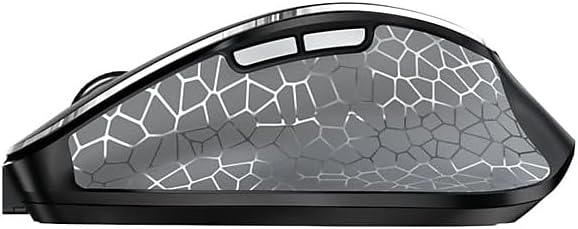
Imatge: Un costat view of the Cherry MW 8C Ergo mouse, highlighting the two programmable side buttons.
- Botó esquerre de clic: Funció de clic principal.
- Botó dret: Secondary click function, typically opens context menus.
- Roda de desplaçament: Desplaça't amunt/avall pels documents i web pages. Can also be pressed for a middle-click function.
- Botó DPI: Located behind the scroll wheel, this button allows you to cycle through different DPI (Dots Per Inch) sensitivity settings.
- Botons laterals: Two buttons located on the thumb side of the mouse. By default, these often function as "Forward" and "Back" in web navegadors i file explorers. Their functions may be customizable via software (if available).
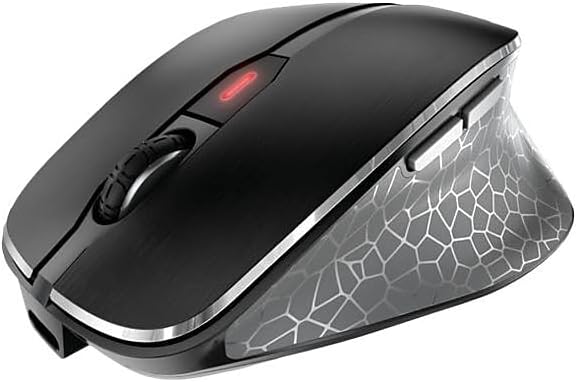
Imatge: Vista de dalt a baix view of the Cherry MW 8C Ergo mouse, clearly showing the scroll wheel and the DPI adjustment button.
5.2. Ajust de la sensibilitat dels DPI
Press the DPI button (located behind the scroll wheel) to cycle through the available sensitivity settings. Each press will change the cursor speed, allowing you to find the optimal setting for your tasks. The mouse typically has multiple preset DPI levels.
5.3. Canvi de modes de connectivitat
To switch between 2.4 GHz wireless and Bluetooth modes, use the 3-position switch on the bottom of the mouse. Ensure the correct mode is selected for your desired connection type.
6. Manteniment
6.1. Neteja del ratolí
- Disconnect the mouse from any charging cables and turn it off using the switch on the bottom.
- Utilitzeu un drap suau i sense pelusa lleugerament dampEsbandiu amb aigua o una solució netejadora suau per netejar la superfície del ratolí.
- Eviteu utilitzar productes químics agressius, netejadors abrasius o ruixar líquids directament sobre el ratolí.
- Per al sensor òptic, feu servir un bastonet de cotó sec per netejar suaument la pols o les restes.
6.2. Cura de la bateria
- Per allargar la durada de la bateria, eviteu descarregar completament el ratolí amb freqüència.
- Charge the mouse regularly, especially when the low battery indicator appears.
- If storing the mouse for an extended period, charge it to about 50% and turn it off. Recharge every few months to prevent deep discharge.
7. Solució De Problemes
7.1. El ratolí no respon
- Comproveu la potència: Assegureu-vos que el ratolí estigui encès i que tingui prou bateria.
- Check Connectivity Mode: Verify the switch on the bottom of the mouse is set to the correct mode (2.4 GHz or Bluetooth) for your connection type.
- Connexió de 2.4 GHz:
- Assegureu-vos que el receptor USB estigui ben connectat a un port USB que funcioni.
- Prova de connectar el receptor a un port USB diferent.
- Ensure the receiver is within range of the mouse (typically up to 10 meters).
- Connexió Bluetooth:
- Assegureu-vos que el Bluetooth estigui habilitat al vostre ordinador.
- Try re-pairing the mouse with your computer (refer to Section 4.3).
- Ensure the mouse is within range of your computer's Bluetooth receiver.
- Reinicia: Turn the mouse off and then on again. Restart your computer if necessary.
7.2. El moviment del cursor és erràtic o inexacte
- Neteja el sensor: Clean the optical sensor on the bottom of the mouse (refer to Section 6.1).
- Superfície: Feu servir el ratolí sobre una superfície neta, no reflectant i uniforme. Eviteu el vidre o les superfícies molt reflectants.
- Configuració de DPI: Adjust the DPI sensitivity using the DPI button to see if a different setting improves performance.
7.3. Mouse Not Charging
- Connexió per cable: Ensure the USB-C cable is securely connected to both the mouse and the power source.
- Font d'alimentació: Try a different USB port on your computer or a different USB power adapter.
- Integritat del cable: Inspect the charging cable for any damage. Try using a different USB-C charging cable if available.
8. Especificacions
| Característica | Detall |
|---|---|
| Nom del model | MW 8C Ergo |
| Número de model de l'article | JW-8600US |
| Marca | Cirera |
| Tecnologia de connectivitat | Bluetooth, sense fil de 2.4 GHz |
| Detecció de moviment | Òptic |
| Font d'alimentació | Funciona amb bateria (recarregable) |
| Compatibilitat de sistemes operatius | Windows 7, Windows 8, Windows 10, Windows 11 |
| Pes de l'article | 8 unces (aproximadament 227 grams) |
| Dimensions del producte (LxWxH) | 4.72 x 3.11 x 1.75 polzades (aprox. 120 x 79 x 44 mm) |
| Color | Negre |
| Xifratge | AES-128 (for 2.4 GHz wireless) |
9. Garantia i Suport
9.1. Informació de la garantia
Cherry products are manufactured to high-quality standards. This product is covered by a limited warranty against defects in materials and workmanship. Please refer to the official Cherry website or your purchase documentation for specific warranty terms and conditions applicable to your region. Keep your proof of purchase for warranty claims.
9.2. Suport tècnic
If you encounter any issues not covered in the troubleshooting section or require further assistance, please contact Cherry customer support. You can find contact information, FAQs, and additional resources on the official Cherry weblloc:
Cherry oficial Weblloc: www.cherry.de/en/
Please have your product model number (JW-8600US) and proof of purchase ready when contacting support.


