1. Introducció
This manual provides essential information for the operation and maintenance of your Smartby Universal Samsung TV Remote, model BN59-01315J. This high-grade remote control is designed as a direct replacement for various Samsung LCD, LED, HDTV, and 3D Smart TVs, including models compatible with BN59-01315A, BN59-01315B, BN59-01315D, BN59-01315E, BN59-01199F, AA59-00666, and AA59-00741A.
It features dedicated shortcut buttons for popular streaming services like Netflix, Prime Video, and Samsung TV Plus, offering convenient access to your favorite content. The remote incorporates an upgraded chip for durable lifespan and stable performance, ensuring a reliable user experience.
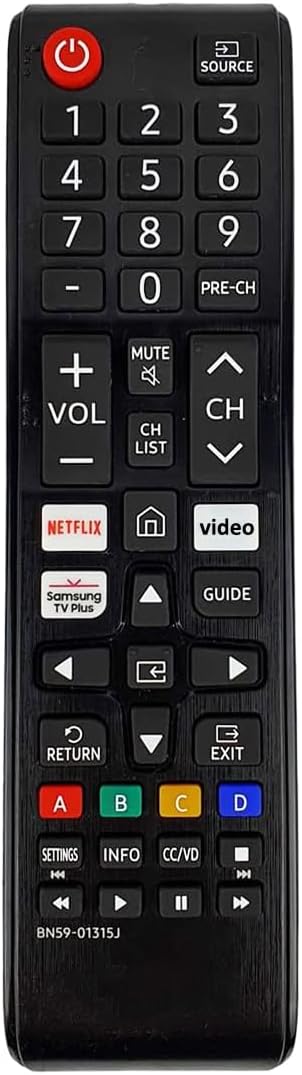
Figura 1: Frontal view of the Smartby Universal Samsung TV Remote, showing all buttons including power, number pad, volume, channel, navigation, and dedicated streaming service buttons.
2. Configuració i instal·lació
The Smartby Universal Samsung TV Remote is designed for immediate use without any complex programming or setup procedures. Simply insert the required batteries, and it will be ready to operate your compatible Samsung TV.
2.1 Instal·lació de la bateria
- Localitzeu el compartiment de la bateria a la part posterior del comandament a distància.
- Feu lliscar la tapa de la bateria cap avall o premeu el pestell i aixequeu-lo per obrir el compartiment.
- Introduïu dues (2) piles AAA, assegurant-vos que els terminals positiu (+) i negatiu (-) s'alineïn correctament amb els indicadors de l'interior del compartiment. Nota: les piles no estan incloses.
- Tanqueu la tapa de la bateria fent-la lliscar de nou al seu lloc fins que sentiu un clic.

Figura 2: posterior view of the remote control with the battery cover removed, illustrating the correct orientation for inserting two AAA batteries.
Once batteries are installed, the remote is ready for use. No pairing or code entry is required for compatible Samsung TVs.
3. Instruccions de funcionament
This remote provides full functionality for your Samsung Smart TV. Below is a guide to its primary buttons and their functions:
| Botó | Funció |
|---|---|
| Poder | Encén o apaga el televisor. |
| Font | Selecciona la font d'entrada (HDMI, AV, etc.). |
| Teclat numèric (0-9) | Selecció directa de canals o entrada numèrica. |
| VOL +/- | Ajusta el nivell de volum. |
| CH ^/v | Canvia el canal cap amunt o cap avall. |
| Netflix | Accés directe a l'aplicació Netflix. |
| Prime Video | Direct access to the Prime Video application. |
| Samsung TV Plus | Direct access to the Samsung TV Plus application. |
| Fletxes de navegació | Navega pels menús i les seleccions. |
| Introduïu/D'acord | Confirma les seleccions. |
| Tornar | Torna a la pantalla o al menú anterior. |
| Sortida | Surt del menú o de l'aplicació actual. |
| Guia | Displays the TV program guide. |
| Configuració | Accesses TV settings menu. |
| Informació | Mostra informació sobre el programa o l'entrada actual. |
| CC/VD | Toggles Closed Captions/Video Description. |
| Controls de reproducció multimèdia | Reproduir, Pausa, Aturar, Avançar ràpidament, Rebobinar. |
For optimal performance, ensure a clear line of sight between the remote control and your Samsung TV's infrared receiver.
4. Manteniment
Proper maintenance will extend the lifespan of your remote control.
- Neteja: Use a soft, dry cloth to clean the remote's surface. Do not use liquid cleaners or abrasive materials, as they may damage the remote.
- Substitució de la bateria: Replace batteries when the remote's response becomes sluggish or stops working. Always replace both batteries at the same time with new ones of the same type (AAA). Do not mix old and new batteries, or different types of batteries.
- Emmagatzematge: If the remote will not be used for an extended period, remove the batteries to prevent leakage and potential damage. Store the remote in a cool, dry place.
5. Solució De Problemes
If you experience issues with your remote control, please refer to the following common solutions:
- El comandament a distància no respon:
- Ensure batteries are inserted correctly with the proper polarity (+/-).
- Substitueix les piles velles per piles AAA noves.
- Comproveu si hi ha alguna obstrucció entre el comandament a distància i el sensor d'infrarojos del televisor.
- Assegureu-vos que esteu dins de l'abast efectiu del sensor del televisor.
- Els botons no funcionen:
- Premeu el botó amb fermesa.
- Clean the remote's surface, especially around the buttons, to remove any dirt or debris that might be obstructing them.
- If only specific buttons are not working, the remote might be damaged and require replacement.
- Funcionament intermitent:
- Això sovint indica que la bateria està baixa. Canvieu les piles.
- Ensure no strong light sources (like direct sunlight or bright fluorescent lights) are interfering with the TV's IR sensor.
Si el problema persisteix després d'intentar aquests passos, poseu-vos en contacte amb l'atenció al client per obtenir més ajuda.
6. Especificacions
| Característica | Detall |
|---|---|
| Número de model | SMTB-BN59-01315J |
| Dimensions del producte | 7 x 1.7 x 0.7 polzades |
| Pes de l'article | 3 unces |
| Color | Negre |
| Font d'alimentació | 2 piles AAA (no incloses) |
| Dispositius compatibles | All Samsung LCD LED HDTV 3D Smart TVs (including 7 Series and models compatible with BN59-01315A/B/D/E, BN59-01199F, AA59-00666, AA59-00741A) |
| Característiques especials | Universal, Ergonomic, No Programming Required, Netflix/Prime Video/Samsung TV Plus Shortcut Buttons |
7. Garantia i Suport
For information regarding warranty coverage or technical support, please refer to the product packaging or contact the manufacturer, Smartby, directly through their official website or the retailer from whom the product was purchased. Keep your purchase receipt as proof of purchase.
This product is designed for easy replacement and operation, aiming to provide a seamless experience for Samsung TV users.


