1. Introducció
This manual provides detailed instructions for the FUDONI P1 Projector. It covers essential information for safe and efficient use, including setup, operation, maintenance, and troubleshooting. Please read this manual thoroughly before using the projector and retain it for future reference.

Image 1.1: The FUDONI P1 Projector, showcasinel seu disseny compacte i les seves opcions de connectivitat.

Image 1.2: The FUDONI P1 Projector is suitable for home entertainment, creating an immersive viewexperiència.
2. Informació de seguretat
Observeu les següents precaucions de seguretat per evitar danys al projector i garantir la seguretat de l'usuari:
- No bloquegeu les obertures de ventilació. Assegureu-vos que hi hagi prou espai al voltant del projector per a un flux d'aire adequat.
- No exposeu el projector a la pluja, la humitat ni a temperatures extremes.
- Eviteu mirar directament a la lent del projector quan lamp està activat.
- Feu servir només el cable d'alimentació i els accessoris proporcionats pel fabricant.
- Disconnect the power cord during lightning storms or when unused for extended periods.
3. Contingut del paquet
Verifiqueu que tots els elements siguin presents al paquet:
- FUDONI P1 Projector
- Cable HDMI
- Cable d'alimentació
- Cable AV
- Control remot
- Coberta de la lent del projector
- Manual d'usuari
4. Producte acabatview
Característiques clau
- Dual-band 5G+2.4G WiFi: Ensures stable and fast wireless streaming.
- Bluetooth 5.3: For connecting external audio devices like speakers or headphones.
- Resolució nativa de 1080p: Delivers clear and sharp images, with 4K decoding support via HDMI.
- High Brightness & Contrast: 14000L (manufacturer rating) and 10000:1 contrast ratio for vibrant visuals.
- Altaveus estèreo duals: Built-in 5W SRS surround sound speakers.
- Funcionament silenciós: Fan noise below 35dB for minimal distraction.
- Mida de pantalla gran: Projects screens from 33 to 300 inches.
- Funció de zoom: Adjustable screen size from 100% to 50%.
- Llargaamp Vida: Fins a 100,000 hores.
- Protecció ocular: Utilizes diffused light to reduce eye strain.
- Multiple Connectivity Ports: HDMI, USB, VGA for various devices.

Image 4.1: Visual comparison highlighting the FUDONI P1 Projector's superior resolution and brightness.

Image 4.2: The projector features integrated dual stereo speakers for audio output.

Image 4.3: The projector's diffused light technology is designed to protect viewers' eyes.

Image 4.4: The projector is equipped with a durable lamp dissenyat per a un màxim de 100,000 hores d'ús.
5. Configuració
5.1 Connexió d'alimentació
- Connecteu el cable d'alimentació al port d'entrada d'alimentació del projector.
- Connecteu l'altre extrem del cable d'alimentació a una presa de corrent estàndard.
5.2 Col·locació i mida de la pantalla
Position the projector on a stable, flat surface. The projection distance determines the screen size. Adjust the distance to achieve your desired screen size, ranging from 33 to 300 inches.
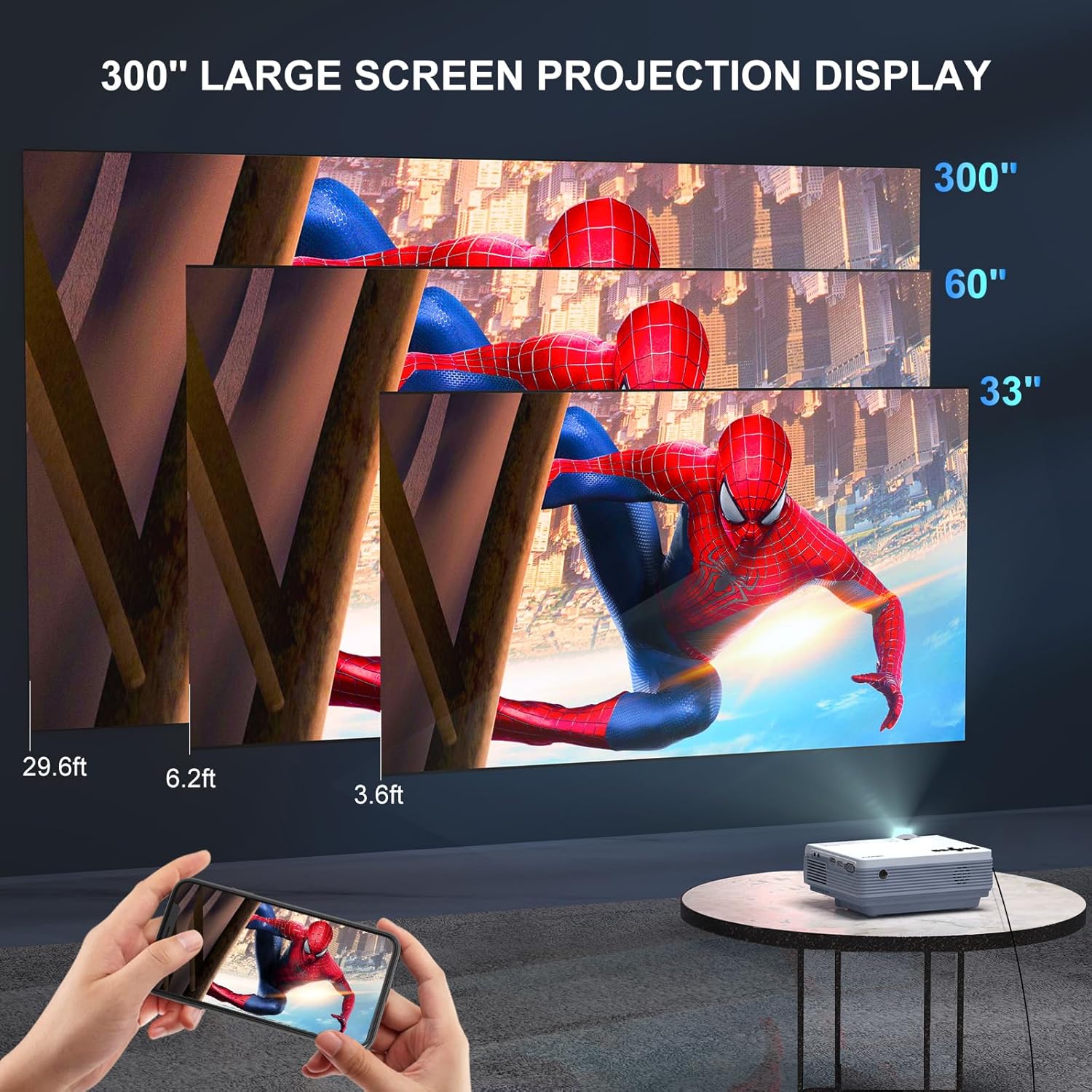
Image 5.1: The projector supports a large screen projection display, adaptable to various room sizes.
6. Connectivitat
6.1 WiFi Connection (2.4G/5G)
The FUDONI P1 Projector supports dual-band 2.4G and 5G WiFi for wireless screen mirroring from compatible devices.
- Navigate to the projector's settings menu and select 'WiFi'.
- Enable WiFi and select your desired network (2.4G or 5G).
- Enter the WiFi password if prompted.
- Once connected, select the 'Screen Mirroring' or 'Wireless Projection' option on the projector.
- On your smartphone or tablet, enable screen mirroring (e.g., 'Screen Cast' for Android, 'AirPlay' for iOS) and select the projector from the list of available devices.

Image 6.1: The projector supports 2.4G and 5G WiFi for seamless wireless screening from iOS, Android, and Windows devices.
6.2 Connexió Bluetooth
Connecteu altaveus o auriculars Bluetooth externs per a un àudio millorat.
- Assegureu-vos que el dispositiu d'àudio Bluetooth estigui en mode d'emparellament.
- On the projector, go to the settings menu and select 'Bluetooth'.
- Activa el Bluetooth i busca dispositius.
- Select your audio device from the list to pair.

Image 6.2: The projector can connect to external Bluetooth speakers or headphones for improved audio.

Image 6.3: Using Bluetooth to connect to external speakers enhances the audio experience for outdoor events.
6.3 Wired Connections (HDMI, USB, VGA)
The projector offers various wired input options for different devices.
- HDMI: Connect laptops, gaming consoles (PS5), TV sticks (Roku, Chromecast), and other HDMI-enabled devices.
- USB: Plug in USB drives for direct media playback.
- VGA: Connect older computers or devices with a VGA output.
- DE: Use the included AV cable for devices with composite video and stereo audio outputs.

Image 6.4: The projector is compatible with a wide range of devices via its multiple input ports.

Image 6.5: The projector supports both wired connections (HDMI) and wireless screen mirroring for various devices.
7. Funcionament
7.1 Encès/Apagat
- Encès: Premeu el botó d'encesa del projector o del comandament a distància.
- Apagar: Press the power button again. The projector will enter standby mode.
7.2 Correcció de focus i trapezoide
- Focus: Rotate the focus ring on the projector lens until the image is clear.
- Correcció Keystone: Use the keystone adjustment ring or menu option to correct trapezoidal distortion if the projector is not perfectly perpendicular to the screen.
7.3 Funció de zoom
Adjust the screen size without moving the projector using the digital zoom function.
- Access the 'Picture' or 'Display' settings in the projector menu.
- Locate the 'Zoom' or 'Screen Size' option.
- Adjust the value to scale the image from 100% down to 50%.

Image 7.1: The projector features a 100%-50% zoom function for flexible screen sizing.
7.4 Sortida d'àudio
The projector has built-in speakers. For external audio, connect via Bluetooth (Section 6.2) or use the 3.5mm audio output jack to connect wired speakers or headphones.
8. Manteniment
8.1 Neteja de la lent
Feu servir un drap suau i sense borrissol dissenyat específicament per a lents òptiques per netejar suaument la lent del projector. Eviteu utilitzar productes de neteja abrasius ni força excessiva.
8.2 Dustproof Design
The projector features a dustproof design to minimize internal dust accumulation, contributing to a longer lifespan and consistent image quality. Regular external cleaning is still recommended.

Image 8.1: The projector's dustproof design helps maintain performance over time.
8.3 Emmagatzematge
When not in use, store the projector in a cool, dry place. Use the provided lens cover to protect the lens from dust and scratches.
9. Solució De Problemes
If you encounter issues with your FUDONI P1 Projector, refer to the following common problems and solutions:
| Problema | Causa possible | Solució |
|---|---|---|
| No es mostra cap imatge | Power not connected; Input source incorrect; Cable loose | Check power connection; Select correct input source (HDMI, USB, etc.); Ensure cables are securely connected. |
| La imatge és borrosa | Enfocament no ajustat; Projector massa a prop/llunyà | Ajusteu l'anell d'enfocament; Ajusteu la distància de projecció. |
| La imatge és trapezoïdal | Keystone not adjusted | Ajusteu la correcció trapezoidal. |
| Sense so | Volume too low; External audio not connected; Muted | Increase volume; Connect external speakers via Bluetooth or audio cable; Unmute the projector. |
| Connexió WiFi inestable | Distance from router; Interference | Move projector closer to router; Ensure no obstructions; Try 5G WiFi if available. |
| Cannot mirror streaming apps (Netflix, Hulu, etc.) | DRM protection | Due to copyright protection (DRM), some streaming services do not allow screen mirroring. Use an HDMI cable with a compatible streaming stick (e.g., Fire TV Stick, Roku) for these services. |
10. Especificacions tècniques
| Característica | Detall |
|---|---|
| Dimensions del producte | 6 x 2 x 7 polzades |
| Pes de l'article | 3.03 lliures |
| Número de model de l'article | P1 |
| Resolució de visualització | Native 1920 x 1080 (4K Supported via HDMI) |
| Tecnologia de connectivitat | WiFi (5G+2.4G), Bluetooth 5.3, HDMI, USB, VGA, AV |
| Usos recomanats | Interior/Exterior |
| Diagonal de pantalla visible | 33" - 300" (508 cm màx.) |
| Característiques especials | 100%-50% Zoom, Auto sleep timer, Dustproof design |
11. Garantia i Suport
11.1 Informació de la garantia
The FUDONI P1 Projector comes with a 3 any de garantia that protects against manufacturing defects. This warranty ensures long-term reliability for frequent use in various environments.
11.2 Atenció al client
For any questions, technical assistance, or warranty claims, please contact FUDONI customer support. We are committed to providing high-quality service and support.
- Suport de per vida: Ongoing assistance for your product.
- Servei 24 hores: Quick service via phone or email.
- Política de devolució de 30 dies: Hassle-free returns within 30 days of purchase.
- 36-Month Free Replacement: Replacement for eligible issues within 36 months.

Image 11.1: FUDONI is dedicated to providing comprehensive customer support.

Image 11.2: FUDONI offers extensive support and warranty coverage for its products.


