Introducció
The Zoom F8n Pro is a professional-grade field recorder and mixer designed for demanding audio capture scenarios, particularly in film, television, and sound design. Featuring advanced 32-bit float recording technology, it ensures pristine audio quality with an extended dynamic range, eliminating the need for gain adjustments and preventing clipping. With 8 inputs and 10 tracks, robust timecode capabilities, and versatile power options, the F8n Pro is an indispensable tool for audio professionals.

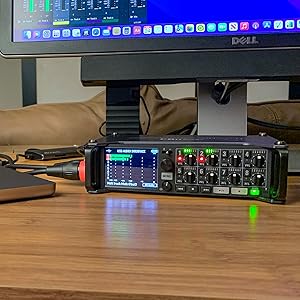
Davant view of the Zoom F8n Pro, showcasing its display, input controls, and transport buttons.
Característiques clau
- 32-bit Float Recording Technology: Captures audio with an incredibly wide dynamic range, preventing clipping and allowing for post-production gain adjustments without quality loss.
- 8-Channel/10-Track Field Audio Recorder/Mixer: Simultaneously records up to 8 discrete input channels and 2 stereo mix tracks.
- Gravació d'alta resolució: Records in BWF-compliant WAV format up to 192kHz/32-bit float.
- Entrades versàtils: Features 8 discrete inputs with locking Neutrik XLR/TRS combo connectors for secure connections.
- Premium Preamps: Equipped with high-quality mic preamps offering up to 75 dB gain and less than -127 dBu EIN for clean, low-noise amplificació.
- Ranures dobles per a targetes SD: Allows for simultaneous recording to two SD cards for instant backup and extended recording times.
- Accurate Timecode: Supports various timecode formats (Jam Sync, Free Run, Rec Run, etc.) for seamless synchronization with video.
- Ambisonics Mode: Dedicated mode for recording 360-degree audio for VR, AR, and other immersive applications.
- Interfície d'àudio USB: Functions as an 8-in/4-out USB audio interface for direct connection to a computer.
- Funciona amb bateria: Can be powered by 8 AA batteries, a DC power pack, or a 12V AC adapter for flexible field use.
Configuració
1. Alimentació de la unitat
The F8n Pro offers multiple power options:
- Piles AA: Insert 8 AA batteries into the battery compartment on the underside of the unit. Ensure correct polarity.
- DC Power Pack: Connect a compatible 12V DC power pack to the DC IN port.
- Adaptador de CA: Use the included Zoom AD-19 AC adapter for continuous power from a wall outlet.

posterior view of the F8n Pro, highlighting the various input and power connection points.
3. Inserting SD Cards
The F8n Pro features dual SD card slots. Insert two SD/SDHC/SDXC cards (Class 10 or higher recommended) into the designated slots. This allows for simultaneous recording to both cards for data redundancy.
4. Connecting Microphones/Inputs
Connect your microphones or line-level sources to the 8 XLR/TRS combo inputs. The locking connectors ensure secure attachment. For condenser microphones, enable phantom power (+24V or +48V) as needed via the menu settings.

The F8n Pro connected with multiple XLR cables, demonstrating its 8-input capability.
Instruccions de funcionament
1. Enregistrament bàsic
- Encès: Press and hold the POWER button to turn on the unit.
- Ajust del nivell d'entrada: Use the individual gain knobs for each input to set appropriate recording levels. Monitor the on-screen meters to avoid clipping.
- Arm Tracks: Press the 'REC' button for each track you wish to record. The track indicator will illuminate red.
- Comença a gravar: Press the main 'REC' button (large red button) to begin recording. Press it again to stop.
- Reproducció: Use the transport controls (PLAY, STOP, REW, FF) to navigate and play back recorded files.
2. 32-bit Float Recording
The F8n Pro's 32-bit float recording capability provides an extremely wide dynamic range, making it virtually impossible to clip your audio. This means you can record without constantly monitoring and adjusting gain levels, and then normalize or adjust levels in post-production without introducing noise or distortion.

The F8n Pro's display indicating the 32-bit float recording mode, which allows for clip-free audio capture.
3. Sincronització de codi de temps
For film and video production, accurate timecode is crucial. The F8n Pro supports various timecode modes and can be synchronized with external devices via its BNC connectors. Navigate to the Timecode menu to set the desired mode (e.g., Free Run, Rec Run, Jam Sync) and frame rate.
A user interacting with the timecode settings on the F8n Pro's screen.
4. USB Audio Interface Mode
Connect the F8n Pro to your computer via USB to use it as an 8-input, 4-output audio interface. This allows you to record directly into your Digital Audio Workstation (DAW) with the F8n Pro's high-quality preamps i convertidors.

The F8n Pro operating as a USB audio interface, connected to a computer setup.
5. Ambisonics Recording
The F8n Pro includes a dedicated Ambisonics mode for recording 360-degree audio. This is ideal for virtual reality (VR) and augmented reality (AR) content creation. Connect an Ambisonics microphone (e.g., Zoom H3-VR) to the inputs and select the Ambisonics mode in the menu.
Media Integration Examples
Professional Sound Design with Watson Wu
This video features sound designer Watson Wu demonstrating how he uses the Zoom F8n Pro for capturing complex audio, including multi-microphone setups for car sounds, leveraging the 32-bit float recording for optimal dynamic range and flexibility in post-production. He highlights the ability to record simultaneously from multiple sources and manage levels effectively.
Manteniment
- Neteja: Feu servir un drap suau i sec per netejar la unitat. Eviteu productes de neteja o dissolvents abrasius.
- Emmagatzematge: Store the F8n Pro in a cool, dry place away from direct sunlight and extreme temperatures. Remove batteries if storing for extended periods.
- Actualitzacions de firmware: Periodically check the Zoom weblloc web per a actualitzacions de firmware per garantir un rendiment òptim i l'accés a noves funcions.
Resolució de problemes
- La unitat no s'encén: Check battery levels or AC adapter connection. Ensure batteries are inserted correctly.
- Sense entrada d'àudio: Verify microphone connections, phantom power settings (if applicable), and input gain levels. Ensure tracks are armed for recording.
- Problemes de gravació: Check SD card capacity and speed. Ensure cards are properly formatted (FAT32 for cards up to 32GB, exFAT for cards over 32GB).
- Timecode Sync Problems: Verify timecode source connection and settings (frame rate, mode).
Especificacions
| Característica | Detall |
|---|---|
| Pes de l'article | 3.96 lliures (1.8 quilograms) |
| Dimensions del producte | 11.85 x 10.4 x 4.2 polzades (7" de profunditat x 5" d'amplada x 2" d'alçada) |
| País d'origen | Xina |
| Número de model de l'article | F8n Pro |
| Nom del color | Negre |
| Interfície del maquinari | Targeta digital segura |
| Format dels mitjans | WAV |
| Font d'alimentació | Funciona amb bateria |
| Marca | Zoom |
| Factor de forma del micròfon | Integrat |
| UPC | 884354026158 |
Garantia i Suport
Per obtenir informació detallada sobre la garantia i assistència tècnica, consulteu la pàgina oficial de Zoom. weblloc web o poseu-vos en contacte amb el seu servei d'atenció al client. Conserveu el rebut de compra com a comprovant de compra per a reclamacions de garantia.


