1. Introducció
The My Arcade Gamer V Classic is a portable gaming system designed for on-the-go entertainment. This device comes preloaded with 220 classic video games, offering a wide variety of genres including entertainment, sports, and adventure. Its compact size and 2.5-inch color display make it suitable for use at home, during travel, or at social gatherings. This manual provides essential information for setting up, operating, maintaining, and troubleshooting your Gamer V Classic.
2. Què hi ha a la caixa
- Gamer V Classic Portable Gaming System
- Guia de l'usuari (aquest document)
3. Característiques del producte
- Disseny per a nens: No console or controllers required.
- Excellent Gaming Experience: Perfect for travel, birthday parties, gifts, and more.
- Rich Collection of Classic Games: Includes 220 preloaded video games including various types such as entertainment, sports, and adventure.
- Convenient: 2.5" color display, suitable for playing portable games outdoors.
- Control de volum: Integrated volume control for adjustable audio.
- Petit i lleuger: Designed for easy portability.
- Font d'alimentació: Funciona amb 3 piles AAA (no incloses).
4. Configuració
4.1 Instal·lació de la bateria
- Locate the battery compartment on the back of the Gamer V Classic unit.
- Obriu la tapa del compartiment de la bateria.
- Introduïu 3 piles AAA noves, assegurant-vos de la polaritat correcta (+/-) tal com s'indica a l'interior del compartiment.
- Tanqueu bé la tapa del compartiment de la bateria.
Nota: Batteries are not included. Alternatively, the unit can be powered via a USB-C cable (not included) connected to a 5V power source.
4.2 Encès
Press and hold the power button (usually located on the top left of the device) for a few seconds until the screen illuminates and the My Arcade logo appears.

Image: The Gamer V Classic in use, showing its compact design and screen.
5. Instruccions de funcionament
5.1 Controlsview
- D-Pad (coixinet direccional): Located on the left, used for movement and menu navigation.
- A/B Buttons: Action buttons located on the right, used for jumping, firing, selecting, etc.
- Botó d'inici: Initiates games and pauses gameplay.
- Botó de restabliment: Returns to the main menu or restarts the current game.
- Botó d'inici: Returns to the game selection screen.
- Control de volum: Adjusts the audio level of the device.
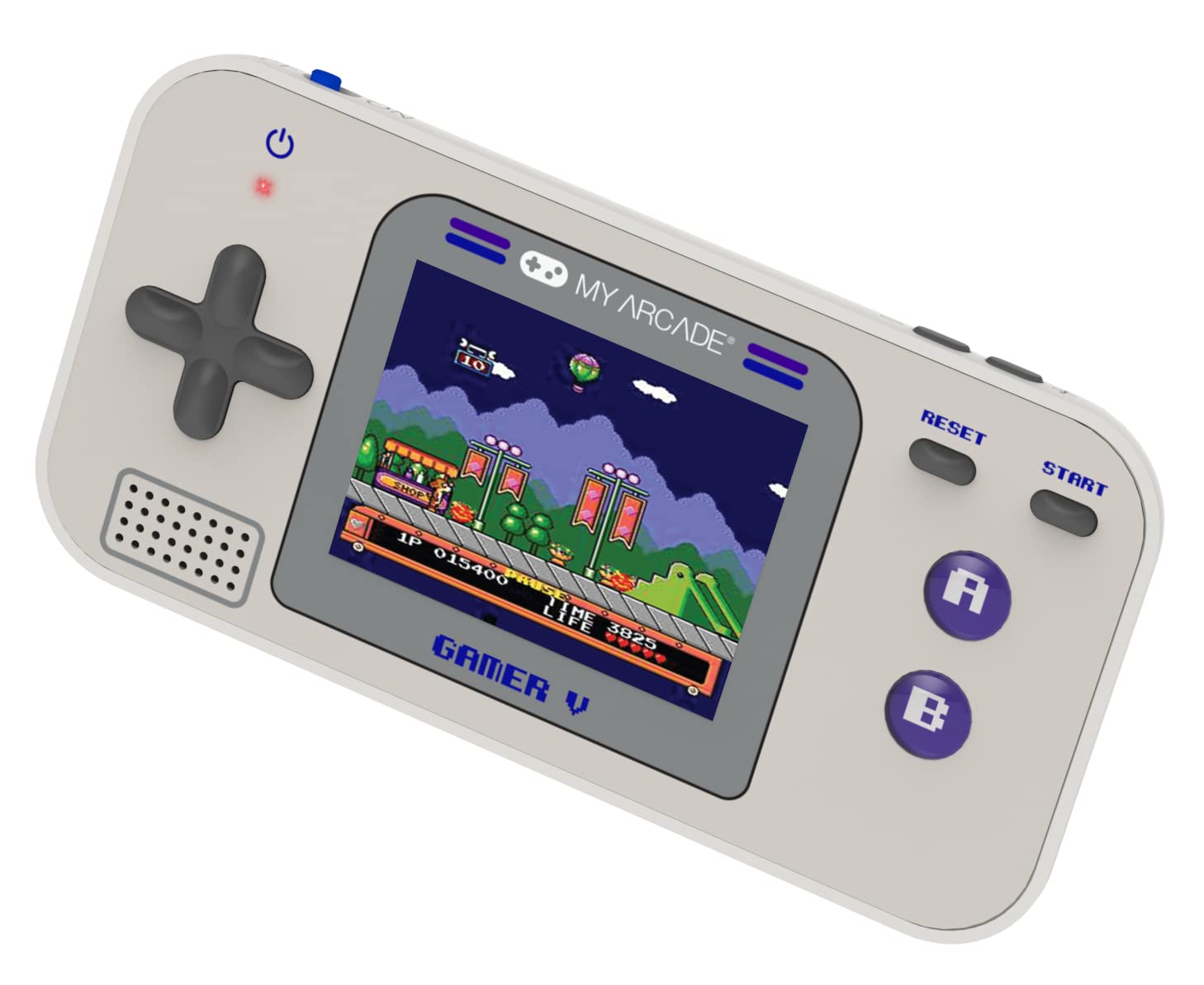
Imatge: Detallada view of the Gamer V Classic controls.
5.2 Game Selection and Play
- After powering on, the device will display the main game selection menu.
- Feu servir el D-Pad per desplaçar-vos per la llista de jocs disponibles.
- Press the 'A' button or 'Start' button to select and launch a game.
- Follow on-screen instructions for specific game controls.
- To return to the game selection menu, press the 'Home' button.
5.3 Ajust del volum
Use the dedicated volume control buttons or switch (location may vary slightly by unit) to increase or decrease the sound output.
6. Manteniment
- Neteja: Feu servir un drap suau i sec per netejar el dispositiu. No utilitzeu netejadors líquids ni aerosols.
- Emmagatzematge: Store the device in a cool, dry place away from direct sunlight and extreme temperatures. If storing for an extended period, remove the batteries.
- Cura de la bateria: Replace all batteries at the same time. Do not mix old and new batteries or different types of batteries. Dispose of used batteries responsibly.
- Evitar l'impacte: Do not drop or subject the device to strong impacts, as this may damage internal components or the screen.
7. Solució De Problemes
| Problema | Causa possible | Solució |
|---|---|---|
| El dispositiu no s’encén. | Piles baixes o esgotades. Instal·lació incorrecta de la bateria. | Replace batteries with new ones, ensuring correct polarity. Try powering via USB-C cable. |
| La pantalla està en blanc o distorsionada. | Low battery power. Device malfunction. | Replace batteries or connect to USB-C power. If problem persists, contact customer support. |
| Sense so o amb un volum baix. | Volume set too low. Mute function activated. | Adjust volume using the volume controls. Ensure no external headphones are connected if not intended. |
| Els botons no responen. | Device frozen. Low battery power. | Try pressing the 'Reset' button. Replace batteries. Power cycle the device (turn off and on). |
8. Especificacions
- Dimensions del producte: 5 cm de llargada x 2.5 cm d'amplada x 0.75 cm d'alçada
- Tipus de controlador: Control de botons
- Pes de l'article: 0.15 quilograms (5.3 unces)
- Mida de la pantalla: 2.5 polzades
- Font d'alimentació: Funciona amb piles (necessiten 3 piles AAA, no incloses)
- Interfície de maquinari: Internal with removable media
- Interval d'edat (descripció): Kid, Teen
- Tipus de visualització: LCD o LED
- Material: Plàstic
- Factor de forma: Portàtil
- Número de model de l'article: DGUN-3920
- Fabricant: El meu Arcade
9. Garantia i Suport
For warranty information and customer support, please refer to the official My Arcade weblloc web o poseu-vos en contacte amb el seu departament d'atenció al client. Conserveu el rebut de compra com a comprovant de compra.


