1. Introducció
Thank you for choosing the Clean Air Optima CA-704 SMART Dehumidifier and Air Purifier. This device is designed to improve your indoor air quality by effectively removing excess moisture and filtering airborne pollutants. It combines powerful dehumidification with advanced air purification technology, including a HEPA filter, ionizer, and UV-C lamp, to create a healthier and more comfortable living environment. Please read this manual thoroughly before operating the device to ensure safe and optimal performance.

Image 1.1: The Clean Air Optima CA-704 SMART Dehumidifier and Air Purifier, shown with a smartphone displaying the companion app.
2. Instruccions de seguretat
Per reduir el risc d'incendi, descàrrega elèctrica o lesions, seguiu sempre aquestes precaucions de seguretat bàsiques:
- Llegiu totes les instruccions abans d'utilitzar l'aparell.
- Assegureu-vos que la font d'alimentació voltagcoincideix amb l'etiqueta de classificació de l'aparell.
- No feu servir l'aparell amb un cable o un endoll danyats.
- Mantingueu l'aparell allunyat de l'aigua i altres líquids.
- No introduïu objectes en cap obertura.
- Desendolleu l'aparell abans de netejar-lo o fer-ne cap manteniment.
- Aquest aparell només és per a ús interior.
- No bloquegeu les entrades o sortides d'aire.
- Mantenir fora de l'abast dels nens.
3. Producte acabatview
3.1 Components
The Clean Air Optima CA-704 SMART Dehumidifier and Air Purifier features a multi-stage filtration system and intuitive controls.

Image 3.1: Diagram illustrating the 5-stage filtration system. (1) Activated Carbon Filter, (2) Pre-filter, (3) TRUE HEPA H13 filter + Nano silver coating, (4) UV-C lamp, (5) Ionizer.
The device incorporates the following key components:
- Tauler de control: Located on the top, it allows manual operation and displays current settings.
- Entrada/sortida d'aire: For air circulation and purification.
- Dipòsit d'aigua: Collects condensed moisture.
- Compartiment del filtre: Houses the multi-stage filtres.
- Rodes de rodes: Per a una fàcil mobilitat.

Imatge 3.2: Part superior view of the control panel with digital display and buttons, alongside a smartphone showing the Clean Air Optima app interface.

Imatge 3.3: Frontal view of the device highlighting the circular air quality indicator light, which changes color based on air quality.
4. Configuració
Segueix aquests passos per configurar el teu deshumidificador i purificador d'aire:
- Desembalatge: Carefully remove the device from its packaging. Retain packaging for future storage or transport.
- Posicionament: Place the device on a flat, stable surface. Ensure there is at least 20 cm (8 inches) of clear space around all sides for proper airflow.
- Instal·lació del filtre: Open the filter compartment (usually located at the back or side). Remove all protective plastic packaging from the filters. Insert the filters in the correct order as indicated by the device or diagram (refer to Image 3.1). Close the compartment securely.
- Connexió d'alimentació: Connecteu el cable d'alimentació a una presa elèctrica amb connexió a terra.
- Encesa inicial: Press the power button on the control panel. The device will perform a self-check.
- Smart Function Setup (Optional): Download the Clean Air Optima app from your smartphone's app store. Follow the in-app instructions to connect your device to your Wi-Fi network for remote control and monitoring.

Imatge 4.1: Part inferior view showing integrated caster wheels for easy movement, and a side view highlighting the recessed handle.
5. Instruccions de funcionament
5.1 Funcions del tauler de control
The control panel allows you to manage all device functions:
- Botó d'encesa: Encén o apaga el dispositiu.
- Botó de mode: Cycles through operating modes (e.g., Dehumidify, Air Purify, Auto).
- Configuració d'humitat: Adjusts the desired humidity level (e.g., 30% to 80%). The device will operate until this level is reached.
- Velocitat del ventilador: Selecciona la velocitat del ventilador (Baixa, Mitjana, Alta).
- Temporitzador: Sets an operating duration (e.g., 1-24 hours).
- UV-C Lamp: Activates or deactivates the UV-C sterilization function.
- Ionitzador: Activates or deactivates the ionizer function.
- Mode de repòs: Redueix la velocitat del ventilador i atenua les llums de la pantalla per a un funcionament silenciós.
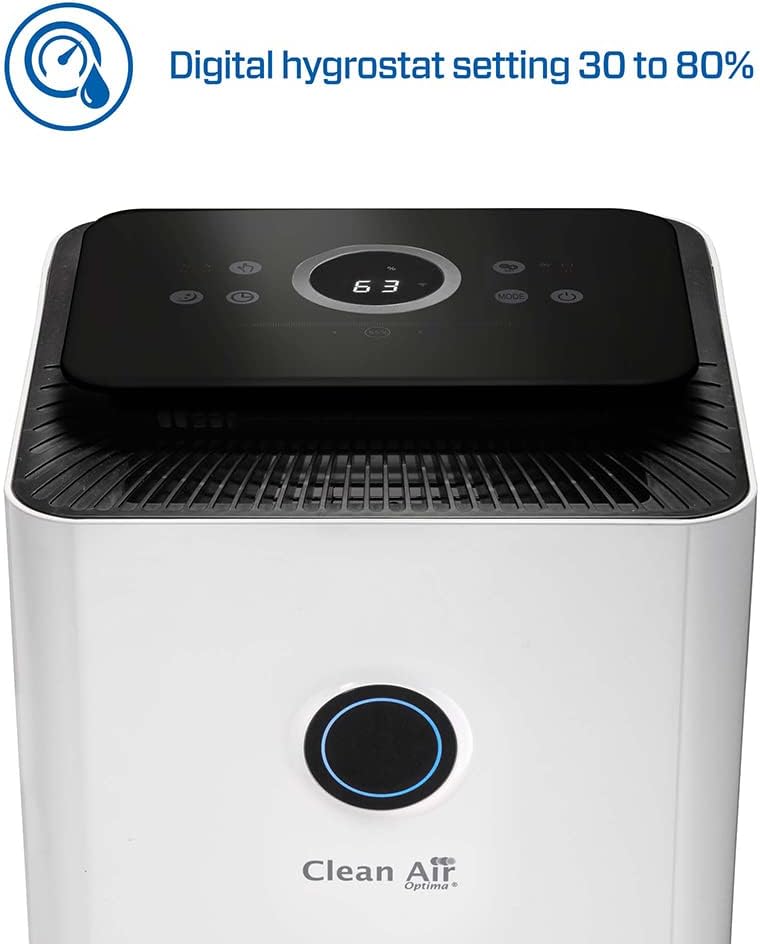
Image 5.1: Close-up of the control panel display showing a digital humidity setting, indicating the adjustable range from 30% to 80%.
5.2 Modes de funcionament
- Mode de deshumidificació: The device will actively remove moisture from the air until the set humidity level is achieved.
- Mode de purificació d'aire: The device will continuously filter the air using its multi-stage sistema.
- Mode automàtic: The device automatically adjusts its operation based on detected humidity and air quality levels.
5.3 Dipòsit d'aigua
When the water tank is full, the device will automatically stop operating and an indicator light will illuminate. Carefully remove the water tank, empty it, and reinsert it securely to resume operation.
6. Manteniment
Regular maintenance ensures optimal performance and extends the lifespan of your device.
6.1 Neteja de l'exterior
Netegeu l'exterior del dispositiu amb un damp tela. No utilitzeu netejadors abrasius ni dissolvents.
6.2 Cleaning the Pre-filter
The pre-filter should be cleaned every 2-4 weeks, depending on air quality. Remove the pre-filter and rinse it under running water. Allow it to air dry completely before reinserting.
6.3 Substitució del filtre
The HEPA and Activated Carbon filters have a limited lifespan and should be replaced every 6-12 months, or when the filter indicator light illuminates. Refer to the product packaging or manufacturer's website for replacement filter models. Always unplug the device before replacing filters.
6.4 Neteja del dipòsit d'aigua
Clean the water tank regularly to prevent mold and bacterial growth. Rinse with clean water and, if necessary, use a mild detergent. Ensure it is thoroughly rinsed and dried before reinserting.
7. Solució De Problemes
Si teniu problemes, consulteu la taula següent:
| Problema | Causa possible | Solució |
|---|---|---|
| El dispositiu no s’encén. | Sense font d'alimentació. | Comproveu si el cable d'alimentació està ben connectat i si la presa de corrent funciona. |
| Sense deshumidificació. | Water tank full or not properly inserted. Humidity setting too high. | Empty and reinsert water tank. Lower the desired humidity setting. |
| Flux d'aire feble o soroll inusual. | Clogged filters. Obstruction in air inlet/outlet. | Clean or replace filters. Remove any obstructions. |
| Smart function not connecting. | Incorrect Wi-Fi password. Device too far from router. | Verify Wi-Fi credentials. Move device closer to router or check router settings. |
Si el problema persisteix després d'intentar aquestes solucions, poseu-vos en contacte amb l'atenció al client.
8. Especificacions
Key technical specifications for the Clean Air Optima CA-704 SMART Dehumidifier and Air Purifier:
- Marca: Clean Air Optima
- Número de model: CA-704 Smart
- Capacitat de deshumidificació: Up to 10 Litres/day
- Potència: 160 watts
- Dimensions (L x A x A): 25 x 25 x 50 cm
- Pes: 5.66 quilos
- Superfície recomanada: Fins a 40 metres quadrats
- Volum del dipòsit d'aigua: 10 litres
- Nombre de velocitats: 2
- Característiques especials: Integrated Hygrostat, Air Purifier Function (5-stage filtration: Activated Carbon, Pre-filter, TRUE HEPA H13 + Nano silver coating, UV-C lamp, Ionizer)

Image 8.1: Diagram illustrating the dimensions of the device: 250 mm (width), 250 mm (depth), and 480 mm (height).
9. Garantia i Suport
For warranty information, please refer to the documentation provided with your purchase or contact Clean Air Optima customer service directly. Information regarding the availability of spare parts is not provided in this manual. For any technical support or service inquiries, please reach out to the manufacturer or your retailer.


