1. Introducció
This manual provides essential information for the proper installation and maintenance of your TECKNET H13 HEPA Replacement Filter, designed exclusively for the TECKNET TK-AP007 Air Purifier. Following these instructions will help ensure the optimal performance and longevity of your air purification system.
2. Producte acabatview
The TECKNET H13 HEPA Replacement Filter is a crucial component for maintaining the air quality in your home or office. It features a multi-layer filtration system designed to capture a wide range of airborne particles and odors.

Image 1: The TECKNET H13 HEPA Replacement Filter, a cylindrical filter with a black rubber seal on top.

Image 2: The TECKNET H13 HEPA filter shown alongside the TECKNET TK-AP007 air purifier, indicating compatibility.

Image 3: The TECKNET H13 HEPA filter positioned next to the compatible TECKNET TK-AP007 air purifier, highlighting it as a genuine replacement part.
3. Característiques clau
- H13 HEPA Technology: This filter meets the H13 HEPA standard, effectively capturing 99.97% of airborne particles as small as 0.3 microns. This includes pollen, dust mites, pet dander, and other allergens, helping to alleviate allergy symptoms.
- Pre-filtre: An ultra-fine nylon pre-filter captures larger particles such as dust, lint, fibers, hair, and pet fur. This initial layer helps extend the lifespan of the subsequent filter stages.
- Filtre de carbó activat: A high-quality granular activated carbon layer physically absorbs unwanted household odors. This includes smoke, cooking smells, and pet odors, making it ideal for homes with pets, cooking activities, or smokers. It also filters volatile organic compounds (VOCs).

Image 4: A diagram illustrating the triple-layer filtration system (Fine Preliminary Filter, PET Filter, H13 True HEPA Filter) and the types of particles it captures, such as dust, pet dander, viruses, cooking odors, smoke, pollen, lint, and mold.
4. Filter Replacement (Setup)
To ensure your TECKNET TK-AP007 Air Purifier operates at its best, replace the filter regularly. Follow these steps for a simple and correct filter replacement:
- Step 1: Unplug and Remove Cover. Unplug the air purifier from the power outlet. Gently remove the filter cover from the bottom of the unit.
- Step 2: Remove Old Filter. Carefully pull out the used filter from the air purifier.
- Step 3: Unwrap and Insert New Filter. Remove the new filter from its plastic packaging. Place the new filter into the air purifier, ensuring it fits securely.
- Step 4: Replace Cover and Lock. Reattach the filter cover to the air purifier and twist it clockwise to lock it into place.
Important: Always remove the plastic packaging from the new filter before installation.

Image 5: A visual guide showing the four steps for filter replacement: 1) Unplug and remove cover, 2) Remove old filter, 3) Unwrap and insert new filter, 4) Replace cover and lock.
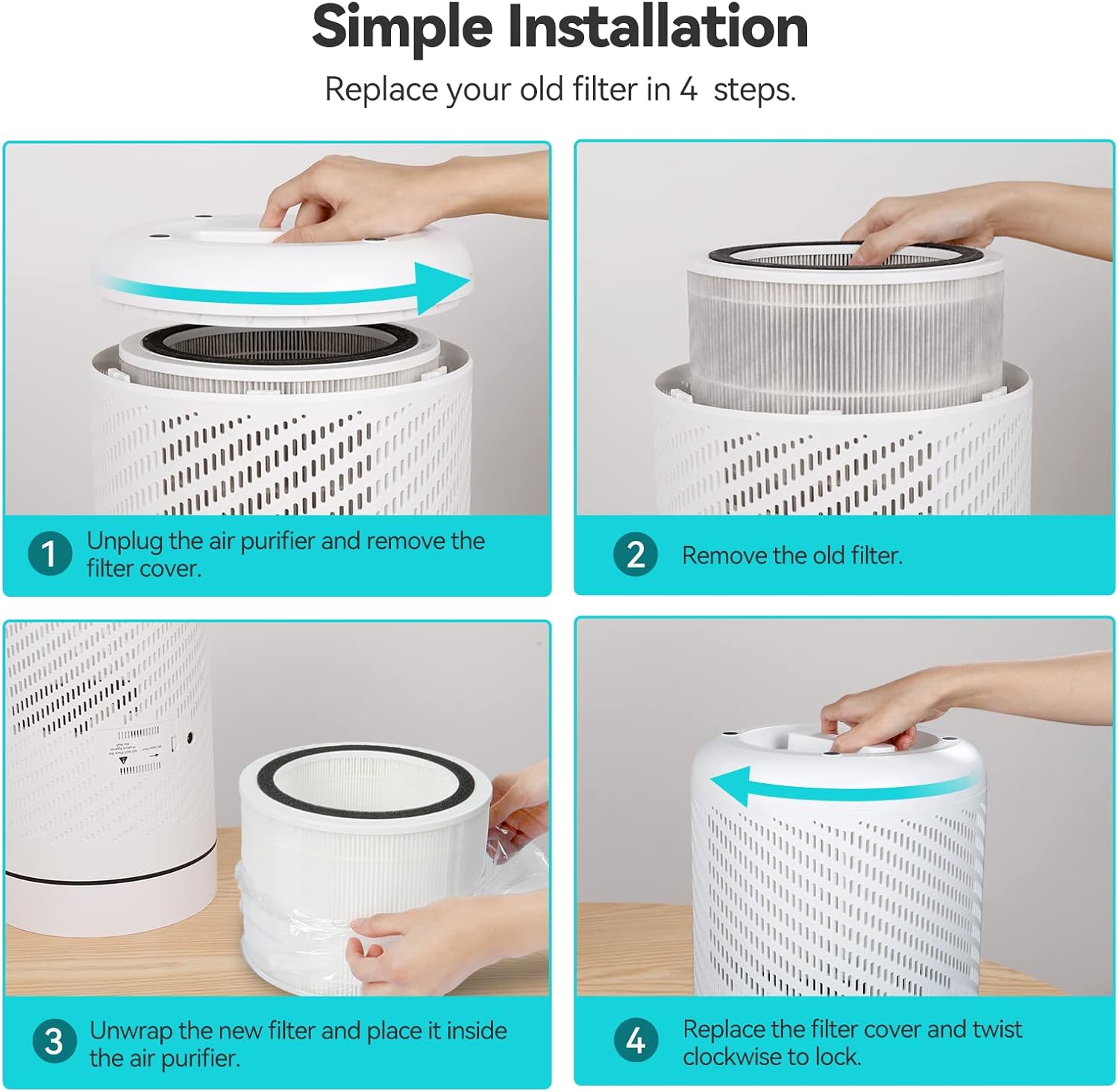
Image 6: A comparison image showing a genuine TECKNET filter with "Perfect Size, Reliable Quality" versus an unofficial filter labeled "Wrong Size, Poor Performance," emphasizing the importance of using official replacement parts.
5. Manteniment
For continuous optimal performance of your air purifier, it is recommended to replace the filter every 5 months. This interval may vary depending on air quality and usage frequency.

Image 7: An air purifier in a bedroom setting, with an inset showing a side-by-side comparison of a new filter and a filter after 3 months of use, illustrating the accumulation of particles and the need for replacement.
6. Especificacions
| Marca | TECNET |
| Tipus de filtre | H13 HEPA with Triple Filtration |
| Compatibilitat | TECKNET TK-AP007 Air Purifier |
| Dimensions del paquet | 22.9 x 22.7 x 18.2 cm |
| Pes de l'article | 620 g |
| Característica especial | H13 HEPA filtration and triple filtration for optimal air purification |
7. Suport
Should you require any assistance or have questions regarding your TECKNET H13 HEPA Replacement Filter, please do not hesitate to contact the TECKNET customer service team. Refer to your air purifier's main manual or the TECKNET official weblloc per obtenir dades de contacte.


