Introducció
The Clean Air Optima CA-705 Smart is a versatile 2-in-1 appliance designed to improve indoor air quality by both dehumidifying and purifying the air. This condensation dehumidifier effectively removes excess moisture from rooms up to 50m² / 125m³, with a capacity of up to 16 liters per day (at 30°C/80% RH). It actively prevents the development of mold, stains, corrosion, and musty odors, thereby protecting building materials and promoting a healthier environment. The CA-705 Smart operates efficiently in temperatures ranging from 5°C to 32°C, utilizing a compressor to cool ambient air, condense moisture, and collect it in a water tank or drain it directly via the included hose. Additionally, its integrated air purifier features a five-stage filtration technology to remove pet dander, pollen, and dust.

Image: The Clean Air Optima CA-705 Smart unit, a white rectangular appliance with a black control panel and a vertical indicator light.
Instruccions de seguretat
- Col·loqueu sempre la unitat sobre una superfície estable i anivellada per evitar que es bolqui i que es vessi aigua.
- Assegureu-vos que el cable d'alimentació no estigui danyat i que estigui correctament connectat a una presa de corrent amb connexió a terra.
- Do not block the air inlets or outlets of the appliance. Maintain adequate clearance around the unit for proper airflow.
- Mantingueu l'aparell allunyat de fonts de calor, de la llum solar directa i de materials inflamables.
- Do not operate the unit with wet hands or in excessively humid environments like bathrooms without proper ventilation.
- Unplug the appliance before cleaning, maintenance, or when not in use for extended periods.
- Aquest aparell no està pensat per ser utilitzat per persones (inclosos nens) amb capacitats físiques, sensorials o mentals reduïdes, o amb manca d'experiència i coneixements, tret que hagin rebut la supervisió o instruccions sobre l'ús de l'aparell per una persona responsable de la seva seguretat.
- Do not attempt to repair or disassemble the unit yourself. Contact qualified service personnel for any repairs.
Components del producte i sistema de filtració
The CA-705 Smart features a comprehensive five-stage filtration system for effective air purification alongside its dehumidification function. Understanding these components is key to optimal performance.

Imatge: Explosió view diagram showing the five filter layers and their functions: (1) Activated Carbon Filter, (2) Pre-filter, (3) TRUE HEPA H13 filter, (4) UV-C lamp, (5) Ionizer. Icons below illustrate what the filter spectrum removes, including dust, pet hair, bacteria, mites, pollen, smoke, and odors.
- Filtre de carbó activat: Absorbs odors, gases, and volatile organic compounds.
- Prefiltre: Captures larger particles such as dust, pet hair, and lint.
- TRUE HEPA H13 Filter: Traps 99.97% of airborne particles as small as 0.3 microns, including pollen, dust mites, and mold spores.
- UV-C Lamp: Neutralizes bacteria, viruses, and other microorganisms.
- Ionitzador: Releases negative ions to bind with airborne pollutants, making them easier to filter out.
Configuració
- Desembalatge: Traieu amb cura el deshumidificador del seu embalatge. Conserveu els materials d'embalatge per a futurs emmagatzematges o transports.
- Col·locació: Place the unit on a firm, level surface in the desired room. Ensure there is at least 20 cm (8 inches) of space around all sides for optimal air circulation. Avoid placing it directly against walls or furniture.
- Connexió d'alimentació: Plug the power cord into a standard, grounded electrical outlet.
- Water Drainage (Optional): For continuous drainage, connect the provided drainage hose to the continuous drainage port on the back of the unit. Ensure the hose is directed downwards to a suitable drain or container. If not using continuous drainage, the water will collect in the internal water tank.
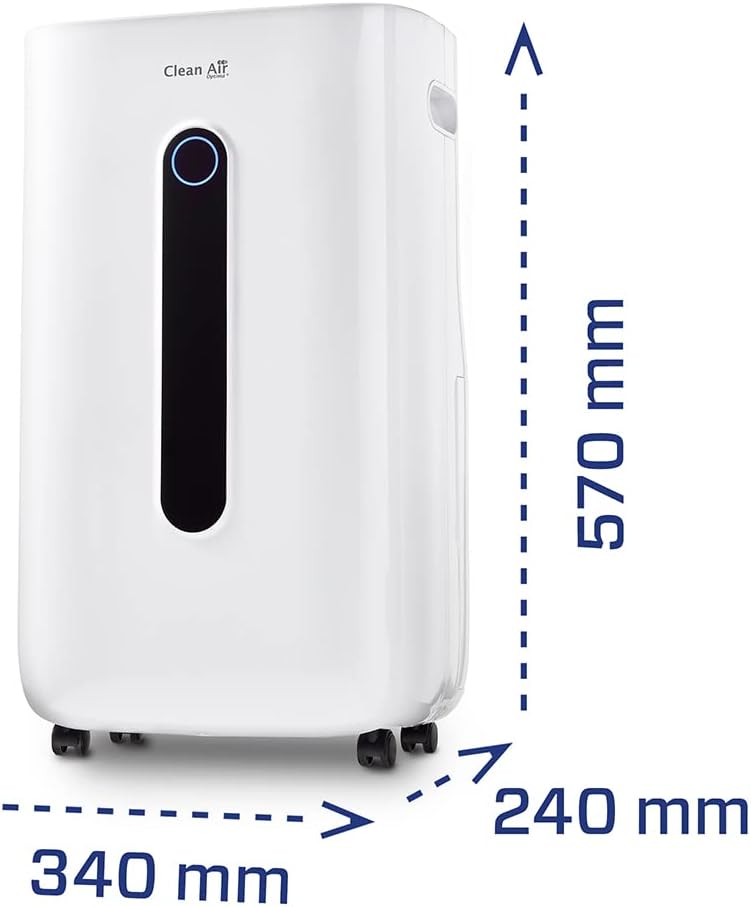
Image: Diagram showing the dimensions of the CA-705 Smart unit: 340 mm (width), 240 mm (depth), and 570 mm (height).
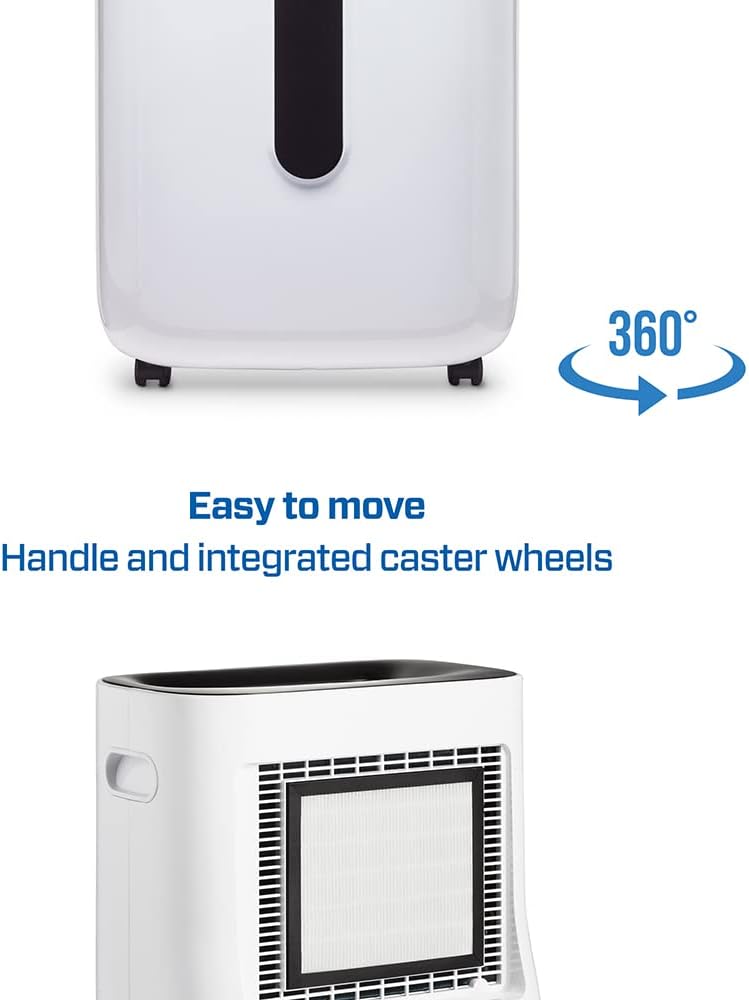
Image: The CA-705 Smart unit from the side, highlighting its integrated handle and caster wheels for easy movement. The rear filter cover is also visible.
Instruccions de funcionament
Tauler de control acabatview

Imatge: De dalt a baix view of the CA-705 Smart control panel with various buttons and a digital display showing "55". Next to it, a smartphone screen displays the "Clean Air Optima" app with a Wi-Fi icon, indicating remote control capability.
The control panel allows for manual operation, while the Clean Air Optima app provides remote control functionality via Wi-Fi.
Funcionament bàsic
- Encès/apagat: Premeu el botó Botó d'encesa (typically marked with a circle and vertical line) to turn the unit on or off.
- Configuració del nivell d'humitat: Utilitza el Humidity Setting buttons (usually Up/Down arrows or a dedicated button) to set the desired relative humidity (RH) level. The integrated hygrostat allows setting between 35% and 80% RH. The unit will automatically operate to maintain this level.
- Selecció del mode: Premeu el botó Botó de mode to cycle through available operating modes (e.g., Dehumidification, Air Purification, Auto, Continuous).
- Velocitat del ventilador: Ajusteu la velocitat del ventilador amb el Botó de velocitat del ventilador to select between different fan settings (e.g., Low, High).
- Funció de temporitzador: Utilitza el Botó del temporitzador to set an operating duration (e.g., 1-24 hours) after which the unit will automatically turn off.
- Bloqueig per a nens: Activa el Botó de bloqueig infantil to prevent accidental changes to settings.
Digital Hygrostat
The CA-705 Smart is equipped with an integrated digital hygrostat that measures, monitors, and automatically regulates the relative humidity of the air. You can set your desired humidity level between 35% and 80% RH. The unit will operate until the set humidity is reached, then pause, and restart if the humidity rises above the set point.

Image: Close-up of the CA-705 Smart's control panel showing the digital display set to "55" (indicating 55% relative humidity), with an icon representing humidity control and the text "Digital hygrostat setting 30 to 80%".
Llum indicador de qualitat de l'aire
The unit features an indicator light that changes color based on the detected air quality or humidity level, providing a quick visual reference.

Image: A close-up of the CA-705 Smart's vertical indicator light, showing examples of blue, green, and red colors, which typically correspond to different air quality or humidity levels.
Manteniment
Regular maintenance ensures the longevity and efficient operation of your CA-705 Smart unit.
Dipòsit d'aigua
- Buidat: When the water tank is full, the unit will automatically stop operating and an indicator light (or sound) will alert you. Carefully remove the water tank and empty it. Reinsert the tank securely.
- Neteja: Clean the water tank regularly (e.g., once a week) with mild soap and water to prevent mold and bacterial growth. Rinse thoroughly.
Neteja i substitució del filtre
- Prefiltre: The pre-filter should be cleaned every 2-4 weeks, depending on usage and air quality. Remove the filter cover, gently detach the pre-filter, and clean it with a vacuum cleaner or rinse it under lukewarm water. Ensure it is completely dry before reinserting.
- Activated Carbon Filter & HEPA H13 Filter: These filters are not washable and should be replaced periodically, typically every 6-12 months, depending on usage. Refer to the product manual or manufacturer's website for replacement filter models.
- UV-C Lamp: La UV-C lamp has a limited lifespan and may need replacement after a certain number of operating hours. Consult the full manual for specific replacement intervals and procedures.
Neteja exterior
Netegeu l'exterior de la unitat amb un damp cloth. Do not use abrasive cleaners or solvents. Ensure no water enters the air inlets or outlets.
Resolució de problemes
Abans de contactar amb l'atenció al client, consulteu la taula següent per veure els problemes habituals i les seves solucions.
| Problema | Causa possible | Solució |
|---|---|---|
| La unitat no s'encén. | No power supply; Power cord not properly connected; Water tank full or incorrectly inserted. | Check power outlet and cord connection; Empty and correctly reinsert water tank. |
| Dehumidification is weak. | Room temperature too low; Air filter clogged; Air inlets/outlets blocked; Room size too large. | Ensure room temperature is above 5°C; Clean or replace air filters; Ensure proper airflow around the unit; Verify unit is suitable for room size. |
| Soroll inusual. | Unit not on a level surface; Foreign object inside; Fan obstruction. | Place unit on a flat surface; Turn off and inspect for obstructions; Contact service if noise persists. |
| Bad odor from unit. | Dirty filters; Stagaigua abundant al dipòsit. | Clean or replace filters; Clean water tank thoroughly. |
Especificacions
| Característica | Detall |
|---|---|
| Marca | Clean Air Optima |
| Número de model | CA705Smart |
| Color | Blanc |
| Dimensions (L x A x A) | 25 x 25 x 48 cm (Product); 24P x 34l x 57H cm (Detailed) |
| Capacitat de deshumidificació | 16 Liters/day (at 30°C/80% RH) |
| Volum del dipòsit d'aigua | 3 litres |
| Mida recomanada de l'habitació | Up to 50m² / 125m³ (40 square meters also listed in specifications) |
| Material | Plàstic i Metall |
| Nombre de velocitats | 2 |
| Característiques especials | Continuous Air Purification, Automatic Defrost, Digital Hygrostat (35-80% RH), Wi-Fi Control |
| Tecnologia de filtració | 5-stage (Pre-filter, Activated Carbon, TRUE HEPA H13, UV-C Lamp, Ionizer) |
| Ús recomanat | Domèstic |
Garantia i Suport
For warranty information, technical support, or to purchase replacement parts and filters, please refer to the official Clean Air Optima weblloc web o contacteu directament amb el servei d'atenció al client. Conserveu el rebut de compra com a comprovant de compra per a reclamacions de garantia.
You can visit the Clean Air Optima store for more products and support: Clean Air Optima Store


