1. Introducció
The Raspberry Pi 4 Model B is a powerful, credit-card sized computer designed for a wide range of applications, from desktop computing to embedded projects. This 8GB RAM version offers enhanced performance for demanding tasks. It features a quad-core Cortex-A72 (ARM v8) 64-bit SoC, dual display support up to 4K@60Hz, true Gigabit Ethernet, 2.4 GHz and 5.0 GHz wireless LAN, Bluetooth 5.0, and upgraded USB 3.0 ports.
Aquest manual proporciona informació essencial per a la configuració, el funcionament, el manteniment i la resolució de problemes del vostre Raspberry Pi 4 Model B.

Imatge 1: De dalt a baix view of the Raspberry Pi 4 Model B (8GB) board, showing the main components and ports.
2. Configuració
2.1 Components Required
- Placa Raspberry Pi 4 Model B (8 GB)
- Official Raspberry Pi USB-C Power Supply (5.1V, 3A) or equivalent
- MicroSD card (minimum 8GB, Class 10 recommended) with Raspberry Pi OS installed
- Micro HDMI to HDMI cable (x2 for dual display)
- Teclat i ratolí USB
- Monitor o TV amb entrada HDMI
- (Optional) Ethernet cable for wired network connection
2.2 Preparació de la targeta MicroSD
- Baixeu el programari Raspberry Pi Imager des de la pàgina oficial de Raspberry Pi. weblloc.
- Insert your MicroSD card into a card reader connected to your computer.
- Open Raspberry Pi Imager, select your desired operating system (e.g., Raspberry Pi OS Full), and choose your MicroSD card.
- Click "Write" to install the operating system onto the MicroSD card. This process will erase all existing data on the card.
- Once the writing process is complete, safely eject the MicroSD card from your computer.
2.3 Connexió de perifèrics
Before applying power, connect all necessary peripherals:
- Targeta MicroSD: Insert the prepared MicroSD card into the card slot on the underside of the Raspberry Pi.
- Visualització: Connect one or two Micro HDMI to HDMI cables from the Raspberry Pi's Micro HDMI ports to your monitor(s).
- Teclat i ratolí: Connect your USB keyboard and mouse to the USB 2.0 or USB 3.0 ports.
- Xarxa (opcional): For a wired connection, plug an Ethernet cable into the Ethernet port.
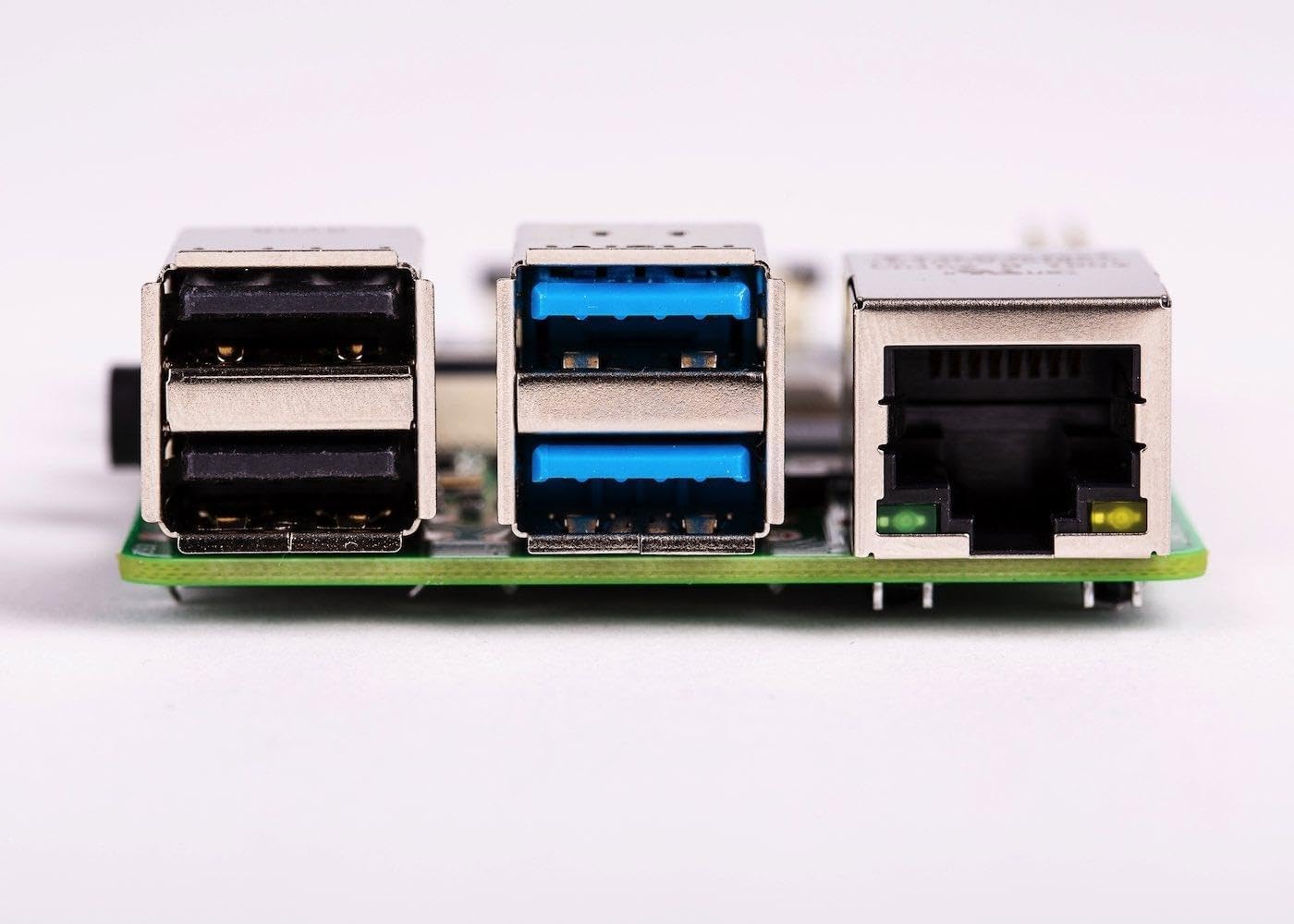
Imatge 2: Lateral view of the Raspberry Pi 4 Model B, highlighting the USB 2.0, USB 3.0, and Ethernet ports.
2.4 Encès
Once all peripherals are connected, plug the USB-C power supply into the Raspberry Pi's USB-C power port. The Raspberry Pi will automatically power on and begin the boot process. The red power LED will illuminate, and the green activity LED will flash during boot.
3. Instruccions de funcionament
3.1 Primer arrencada i configuració inicial
On the first boot, Raspberry Pi OS will guide you through an initial setup wizard. This includes setting your country, language, timezone, creating a new password, connecting to Wi-Fi, and updating software. Follow the on-screen prompts to complete the setup.
3.2 Desktop Environment
After initial setup, you will be presented with the Raspberry Pi OS desktop environment. This functions similarly to other desktop operating systems, allowing you to browse the web, edit documents, program, and more.
3.3 Connectivitat
- Wi-Fi: Connect to a wireless network using the network icon in the top-right corner of the desktop.
- Bluetooth: Pair Bluetooth devices via the Bluetooth icon in the top-right corner.
- Ethernet: If an Ethernet cable is connected, the Raspberry Pi will automatically establish a wired network connection.
3.4 Capçalera GPIO
The 40-pin GPIO (General Purpose Input/Output) header allows you to connect and control various electronic components and sensors. Refer to the official Raspberry Pi documentation for detailed information on GPIO programming and usage.

Imatge 3: Part superior view of the Raspberry Pi 4 Model B, showing the 40-pin GPIO header on the left side.
4. Manteniment
4.1 Actualitzacions de programari
Regularly update your Raspberry Pi OS to ensure optimal performance, security, and access to the latest features. Open a terminal and run the following commands:
sudo apt update
sudo apt full-upgrade -y
sudo reboot
4.2 Refrigeració
The Raspberry Pi 4 can generate significant heat under heavy load. For sustained performance, especially in enclosed spaces or demanding applications, consider using a heatsink or an active cooling solution (e.g., a fan) to prevent thermal throttling.

Imatge 4: Primer pla view of the main processor chip on the Raspberry Pi 4 Model B, which can benefit from cooling solutions.
4.3 Safe Shutdown
Always shut down your Raspberry Pi properly to prevent data corruption on the MicroSD card. You can do this via the desktop menu (Menu > Shutdown > Shutdown) or by opening a terminal and typing:
sudo shutdown -h nowWait for the green activity LED to stop flashing before disconnecting power.
5. Solució De Problemes
- Sense sortida de pantalla:
- Ensure Micro HDMI cables are securely connected to both the Raspberry Pi and the monitor.
- Verify the monitor is set to the correct input source.
- Try a different Micro HDMI cable or monitor.
- Ensure the MicroSD card has a valid operating system installed.
- Power Issues (No LEDs, No Boot):
- Confirm you are using a compatible 5.1V 3A USB-C power supply.
- Check the power cable and connection.
- Try a different power supply if available.
- Problemes de connectivitat Wi-Fi/Bluetooth:
- Ensure the Wi-Fi/Bluetooth module is enabled in the Raspberry Pi OS settings.
- Check for correct network credentials.
- Acosteu la Raspberry Pi al punt d'accés sense fil.
- Assegureu-vos que no hi hagi obstacles físics que bloquegin el senyal.
- Rendiment lent:
- Check for excessive heat and consider adding a cooling solution.
- Ensure your MicroSD card is a high-speed (Class 10 or higher) card.
- Tanca les aplicacions innecessàries.
- Realitzeu una actualització de programari.
For more detailed troubleshooting, visit the official Raspberry Pi documentation and community forums.
6. Especificacions
| Característica | Detall |
|---|---|
| Processador | Broadcom BCM2711, SoC de quatre nuclis Cortex-A72 (ARM v8) de 64 bits a 1.5 GHz |
| RAM | 8 GB LPDDR4-2400 SDRAM |
| Connectivitat | 2.4 GHz and 5.0 GHz IEEE 802.11b/g/n/ac wireless LAN, Bluetooth 5.0, BLE, Gigabit Ethernet |
| Ports USB | 2 ports USB 3.0, 2 ports USB 2.0 |
| Vídeo i so | 2 ports micro-HDMI (compatibles amb fins a 4Kp60), port de visualització MIPI DSI de 2 carrils, port de càmera MIPI CSI de 2 carrils, port d'àudio estèreo de 4 pols i port de vídeo compost |
| GPIO | Capçalera GPIO estàndard de 40 pins (totalment compatible amb les plaques anteriors) |
| Poder | 5V DC via USB-C connector (minimum 3A), 5V DC via GPIO header, Power over Ethernet (PoE) enabled (requires separate PoE HAT) |
| Dimensions | 2.76 x 1.97 x 0.39 polzades (70 x 50 x 10 mm) |
| Sistema operatiu | Raspberry Pi OS (formerly Raspbian) |

Imatge 5: Primer pla view of the dual Micro HDMI ports and the MIPI CSI camera port on the Raspberry Pi 4 Model B.
7. Garantia i Suport
Per obtenir informació sobre la garantia i assistència tècnica, consulteu la guia oficial de Raspberry Pi. weblloc web o poseu-vos en contacte amb el punt de compra. Conserveu el comprovant de compra per a reclamacions de garantia.
Raspberry Pi oficial Weblloc: www.raspberrypi.org


