1. Introducció
This manual provides detailed instructions for setting up, operating, and maintaining your VEIKK VK2200PRO Drawing Monitor. Please read this manual thoroughly before using the device to ensure proper functionality and a smooth creative experience.
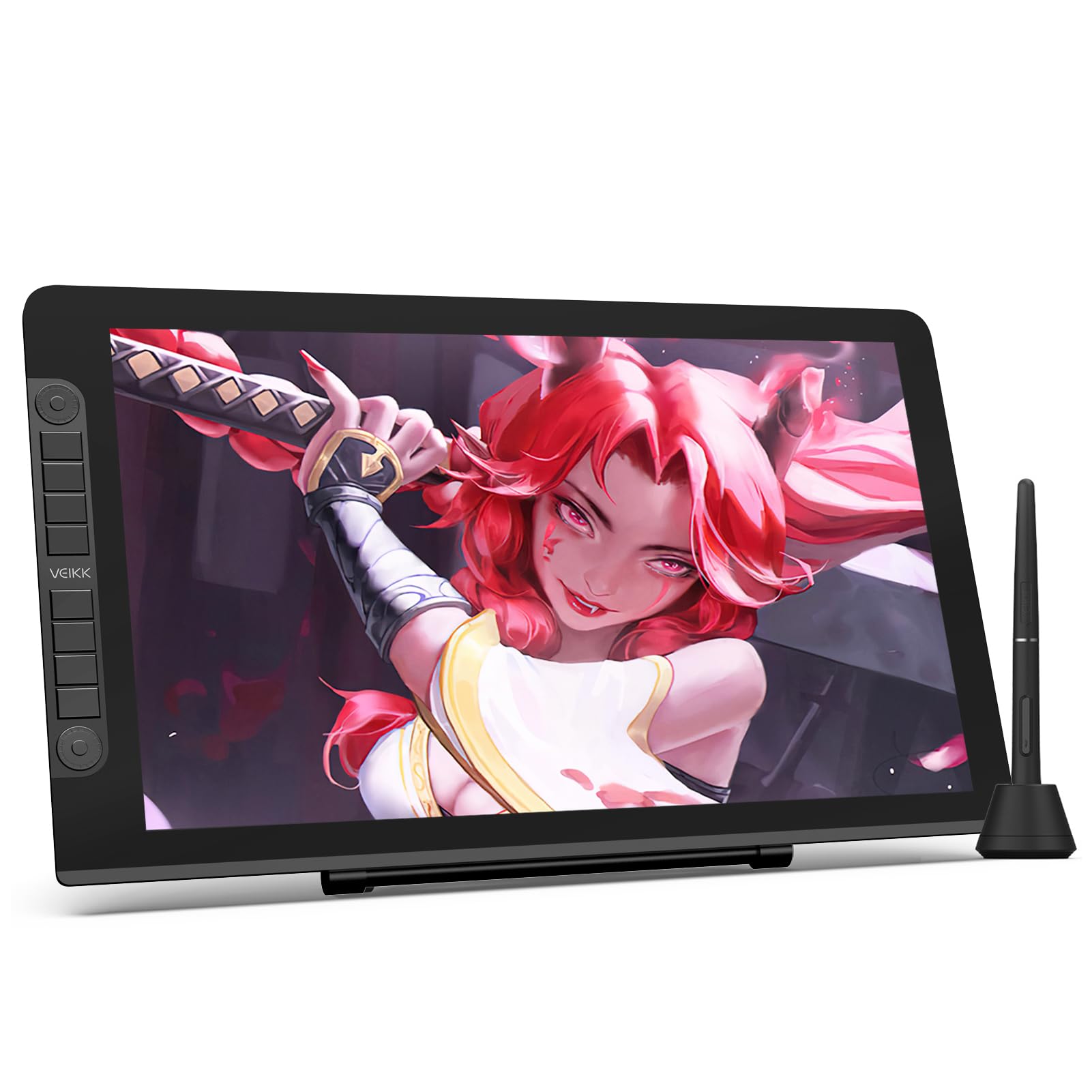
Image: The VEIKK VK2200PRO Drawing Monitor, showcasing its sleek design and included pen.
2. Contingut del paquet
Verifiqueu que tots els elements que s'enumeren a continuació s'inclouen al vostre paquet:
- VEIKK VK2200PRO Drawing Monitor
- P05 Battery-free Stylus Pen (x2)
- Pen Nibs (x28)
- Porta llapis
- Eliminador de puntes
- Guant d'artista
- Cable HDMI
- Cable USB
- Double C-C Cable (USB-C to USB-C)
- Adaptador d'alimentació
- Cable d'alimentació
- Drap de neteja
- Guia d'inici ràpid

Image: All components included in the VEIKK VK2200PRO retail package.
3. Producte acabatview
The VEIKK VK2200PRO is a 21.5-inch full-laminated drawing monitor designed for digital artists. It features a 1920x1080 Full-HD IPS screen with 16.7 million colors, 92% NTSC/120% sRGB color gamut, ensuring vibrant and accurate color representation. The full lamination reduces parallax and reflection for precise cursor positioning.
3.1 Característiques clau
- 21.5-inch Full Laminated IPS Screen: 1920x1080 resolution with reduced parallax.
- 2 Customized Quick Dials & 8 Shortcut Keys: Enhance workflow efficiency.
- Battery-free P05 Stylus Pen: 8192 levels of pressure sensitivity, 60° tilt support, 290PPS report rate.
- Dual-head USB-C Design: Allows connection to compatible devices without an adapter.
- Suport ajustable: Proporciona viewing angles from 15° to 85°.
- Compatibilitat del sistema operatiu: Windows 11/10/8/7, Mac OS 10.12 or later, and Linux.

Image: The monitor's screen displaying its FHD IPS technology, 1920x1080 resolution, and 120% sRGB color gamut.

Image: The two quick dials and eight shortcut keys on the side of the drawing monitor.

Image: The P05 battery-free pen, highlighting its pressure sensitivity, tilt support, and high report rate.
4. Configuració i instal·lació
4.1 Instal·lació del controlador
- Download the latest driver from the official VEIKK weblloc: www.veikk.com/support/download.
- Instal·leu el controlador seguint les instruccions de la pantalla.
- Reinicieu l'ordinador un cop finalitzada la instal·lació.
4.2 Connexió de maquinari
The VK2200PRO offers flexible connection options:
Method 1: Using Power, HDMI, and USB Cables
- Connect the power adapter to the power cable, then plug it into a power outlet.
- Connect the power cable to the Power Port on the VK2200PRO.
- Connect the HDMI cable from the VK2200PRO's HDMI Port to your computer's HDMI port.
- Connect the USB-C connector of the USB cable to the USB-C port on the VK2200PRO.
- Plug the USB-A connector of the USB cable into an available USB port on your computer.
Method 2: Using Power and USB-C Cable (for compatible devices)
This method requires your computer's USB-C port to support display output (Thunderbolt or DisplayPort Alt Mode).
- Connect the power adapter to the power cable, then plug it into a power outlet.
- Connect the power cable to the Power Port on the VK2200PRO.
- Connect the USB-C to USB-C cable from the VK2200PRO's USB-C port to your computer's compatible USB-C port.
Nota:
- If your PC lacks an HDMI port, an HDMI adapter may be required.
- When connecting to a desktop PC, ensure the HDMI cable is connected to the graphics card's port, not the motherboard's integrated port, for optimal performance.
4.3 Suport ajustable
The VK2200PRO includes an adjustable stand that allows you to set the monitor at angles from 15° to 85° for comfortable use. The stand is VESA supported for alternative mounting options.

Image: The adjustable stand, demonstrating its flexibility and VESA compatibility.
4.4 Connection Videos
Video: This video demonstrates the various connection methods for the VEIKK VK2200PRO Drawing Monitor to a PC, including USB/HDMI and USB-C connections.
5. Funcionament
5.1 Pen Usage
The VK2200PRO comes with two P05 battery-free stylus pens. These pens offer 8192 levels of pressure sensitivity and 60° tilt support, allowing for natural and precise drawing. The 290PPS report rate ensures minimal lag between pen movement and on-screen response.
5.2 Customizing Shortcut Keys and Dials
The two quick dials and eight shortcut keys on the monitor can be customized to suit your workflow. This allows you to assign frequently used functions, such as zoom in/out, brush size adjustment, undo/redo, and more, directly to the buttons.
- Ensure the driver is installed and the monitor is connected.
- Open the VEIKK driver software.
- Navigate to the 'Hot Key' section to configure the quick dials and shortcut keys.
- You can set general shortcuts or specific shortcuts for individual applications (e.g., Photoshop).
Video: A tutorial demonstrating how to customize the shortcut keys and quick dials on your VEIKK VK2200PRO Drawing Monitor for various applications.
5.3 Compatibilitat de programari
The VK2200PRO is compatible with a wide range of creative software, including but not limited to Adobe Photoshop, Illustrator, CorelDRAW, Sketchbook, Krita, and Clip Studio Paint.

Imatge: El monitor mostraasing its compatibility with popular creative software applications.
6. Manteniment
To ensure the longevity and optimal performance of your VEIKK VK2200PRO Drawing Monitor, follow these maintenance guidelines:
- Neteja: Use the provided cleaning cloth or a soft, lint-free cloth to gently wipe the screen and body. Avoid abrasive cleaners or solvents.
- Emmagatzematge: When not in use, store the monitor in a clean, dry place away from direct sunlight and extreme temperatures.
- Puntas de ploma: Replace pen nibs when they show signs of wear to maintain drawing accuracy and prevent scratching the screen. Use the nib remover tool for safe replacement.
- Gestió de cables: Keep cables organized and avoid sharp bends or kinks to prevent damage.
7. Solució De Problemes
If you encounter issues with your VK2200PRO, refer to the following common solutions:
- Sense pantalla/senyal:
- Ensure all cables (power, HDMI/USB-C, USB) are securely connected to both the monitor and your computer.
- Verify that your computer's display settings are configured to extend or duplicate the display to the VK2200PRO.
- If using USB-C, confirm your computer's USB-C port supports display output.
- El llapis no respon:
- Check if the VEIKK driver is correctly installed and running. Reinstall the driver if necessary.
- Ensure the pen is within the active drawing area of the monitor.
- Prova de substituir la punta del bolígraf.
- Incorrect Pressure Sensitivity:
- Adjust the pressure curve settings in the VEIKK driver software.
- Ensure your drawing software is configured to recognize pen pressure.
- Les tecles de drecera no funcionen:
- Verify that the shortcut keys are correctly configured in the VEIKK driver software.
- Check for conflicts with other software or system shortcuts.
For further assistance, please contact VEIKK customer support.
8. Especificacions
| Característica | Detall |
|---|---|
| Dimensions del producte | 21.85 x 12.99 x 0.04 polzades |
| Pes de l'article | 11 lliures |
| Número de model de l'article | VK2200PRO |
| Tecnologia de connectivitat | USB-C/HDMI & USB-A |
| Sensibilitat a la pressió | 8192 nivells |
| Sistema operatiu | Windows 7 or later, Mac OS 10.12 or later, Linux |
| Característiques especials | 2 Quick Dials and 8 Shortcut Keys, 21.5 Inch Full Laminated Screen, 60° Tilt Support, 120% sRGB |
9. Garantia i Suport
VEIKK provides a one-year hardware warranty for the VK2200PRO Drawing Monitor. Additionally, lifetime free driver updates are available to ensure your device remains compatible and performs optimally with the latest operating systems and software.
For technical support, warranty claims, or any product-related inquiries, please visit the official VEIKK weblloc web o contacteu directament amb el seu servei d'atenció al client.
VEIKK Official Weblloc: www.veikk.com


