1. Introducció
The FiiO JD10 Type-C In-Ear Monitors are designed to deliver high-quality audio performance through a dynamic driver system. This manual provides essential information for the proper setup, operation, and maintenance of your JD10 Type-C earphones, ensuring an optimal listening experience.
The JD10 Type-C features a 10mm polymer composite diaphragm, a dual-cavity structure for precise airflow control, and an ultra-fine CCAW voice coil. It incorporates N52 grade high-performance magnets for powerful driving. The Type-C version includes an independent DSP chip supporting 384 kHz/24 bit high-resolution sound playback and offers 6 built-in sound quality presets.
2. Contingut del paquet
Verifiqueu que tots els elements que s'enumeren a continuació siguin presents al vostre paquet:
- FiiO JD10 Type-C In-Ear Monitors
- 3 pairs of ear tips (sizes S/M/L; M size pre-installed)
- Guia d'inici ràpid
3. Producte acabatview
The FiiO JD10 Type-C In-Ear Monitors are engineered for comfort and audio fidelity. Key components include the earphone units, the integrated Type-C cable with remote control, and interchangeable ear tips.
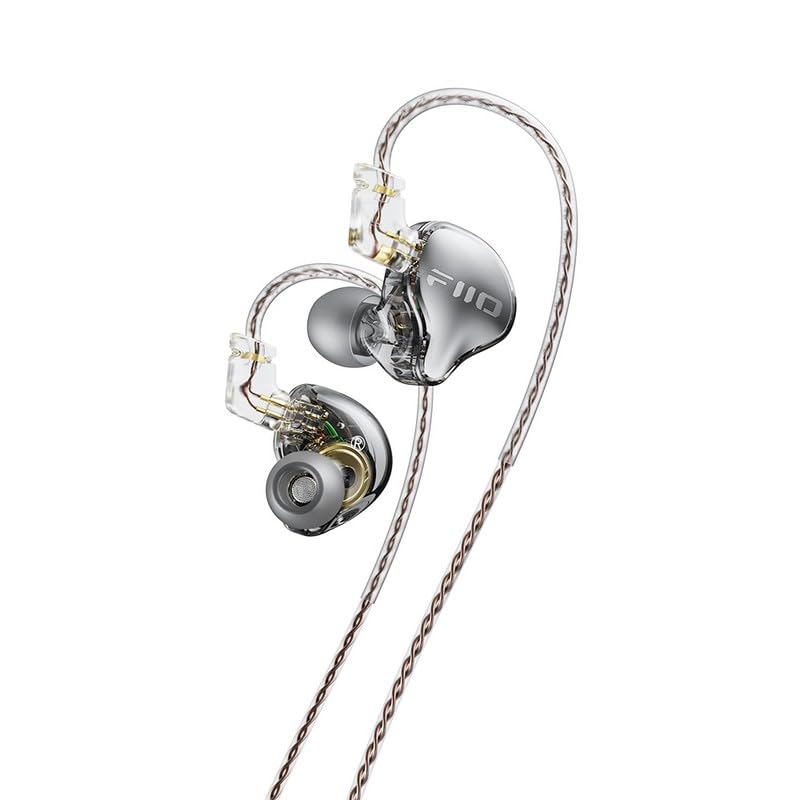
Figura 3.1: Mésview of the FiiO JD10 Type-C In-Ear Monitors, showcasing their transparent design and cable.

Figura 3.2: Detallada view of a single FiiO JD10 Type-C earphone unit, highlighting the FiiO branding and ear tip.

Figure 3.3: The FiiO JD10 Type-C earphones positioned on a laptop, illustrating their compact size and cable design.
4. Configuració
Follow these steps to set up your FiiO JD10 Type-C earphones:
- Seleccioneu els consells per a les orelles: Choose the ear tips that provide the best seal and comfort for your ears. The correct size ensures optimal sound quality and passive noise isolation. Gently pull off the pre-installed ear tips and push on the desired size.
- Connecta't al dispositiu: Insert the USB Type-C connector of the earphones into the Type-C port of your compatible smartphone, tablet, laptop, or other audio device.
- Porteu auriculars: Place the earphones into your ears. The cable is designed to loop over your ear for a secure and comfortable fit. Ensure the left (L) and right (R) indicators on the earphone units correspond to the correct ear.
5. Instruccions de funcionament
The FiiO JD10 Type-C earphones feature an in-line remote control for convenient operation and an independent DSP chip for enhanced audio processing.
5.1 Funcions de control remot
The integrated remote control allows for basic audio playback and call management:
- Reproduir/pausa: Premeu el botó central una vegada.
- Pista següent: Premeu el botó central dues vegades ràpidament.
- Pista anterior: Premeu el botó central tres vegades ràpidament.
- Respondre/Finalitzar la trucada: Press the center button once during an incoming call or active call.
- Rebutja la trucada: Mantingueu premut el botó central durant una trucada entrant.
- Control de volum: Feu servir els botons dedicats per pujar el volum (+) i baixar el volum (-).
5.2 DSP Chip and Sound Presets (Type-C Version Only)
The JD10 Type-C model includes an independent DSP chip that enables high-resolution audio playback and offers 6 pre-set sound quality profiles. The method for switching between these presets is typically controlled by the connected device's audio settings or a dedicated application, if available. Refer to your device's manual or FiiO's official website for specific instructions on accessing and utilizing these presets.
6. Manteniment
Proper care and maintenance will extend the lifespan of your FiiO JD10 Type-C earphones.
- Consells per netejar les orelles: Traieu regularment les puntes de les orelles i netegeu-les amb un drap suau iamp drap. Assegureu-vos que estiguin completament secs abans de tornar-los a enganxar.
- Cleaning Earphone Units: Use a dry, soft cloth to wipe the earphone units. Avoid using harsh chemicals or abrasive materials.
- Cura del cable: Avoid sharp bends or excessive pulling on the cable. Store the earphones neatly to prevent tangling.
- Emmagatzematge: When not in use, store the earphones in a clean, dry place, preferably in a protective pouch (if included or purchased separately) to prevent dust accumulation and physical damage.
- Eviteu la humitat: Do not expose the earphones to water or excessive moisture.
7. Solució De Problemes
If you encounter issues with your FiiO JD10 Type-C earphones, refer to the table below for common problems and solutions.
| Problema | Causa possible | Solució |
|---|---|---|
| Sense so ni volum baix |
|
|
| Distorsió del so |
|
|
| El comandament a distància no respon |
|
|
| Ajust incòmode |
|
|
8. Especificacions
Technical specifications for the FiiO JD10 Type-C In-Ear Monitors:
| Característica | Especificació |
|---|---|
| Nom del model | JD10 Type-C Black |
| Número de model de l'article | FIO-IEM-JD10TC-B |
| Tipus de controlador d'àudio | Conductor dinàmic |
| Forma de l'auricular | In-orella |
| Tecnologia de connectivitat | Amb cable |
| Interfície del maquinari | USB tipus C |
| Conector d'auriculars | USB-C |
| Resposta de freqüència | 40 kHz |
| Sensibilitat | 105 dB |
| Impedància | 32 ohms |
| Control de soroll | Cap |
| Mètode de control | Remot |
| Pes de l'article | 7.4 grams |
| Fabricant | FIIO |
| Admet tecnologia Bluetooth | No |
9. Garantia i Suport
Your FiiO JD10 Type-C In-Ear Monitors are covered by a standard manufacturer's warranty. For detailed warranty terms, conditions, and duration, please refer to the warranty card included in your product packaging or visit the official FiiO weblloc.
For technical support, service, or further inquiries, please contact FiiO customer service through their official weblloc web o distribuïdors autoritzats. Conserveu el rebut de compra com a comprovant de compra per a reclamacions de garantia.
FiiO oficial Weblloc: www.fiio.com


