Introducció
This manual provides comprehensive instructions for the setup, operation, maintenance, and troubleshooting of your Oversteel Invar Wireless Gaming Mouse. Designed for precision and comfort, this mouse features a 10000 DPI optical sensor, 8 programmable buttons, and customizable RGB lighting. Please read this manual thoroughly to ensure optimal performance and longevity of your device.

Image: Oversteel Invar Wireless Gaming Mouse, showcasinel seu disseny ergonòmic i la il·luminació RGB.
Contingut del paquet
- Oversteel Invar Wireless Gaming Mouse
- Receptor sense fil USB
- Cable de càrrega USB
- Manual d'usuari (aquest document)
Configuració
1. Càrrega del ratolí
Before initial use, it is recommended to fully charge the mouse.
- Connecteu l'extrem petit del cable de càrrega USB al port de càrrega de la part frontal del ratolí.
- Connect the larger end of the USB charging cable to an available USB port on your computer or a USB wall adapter.
- The battery indicator lights on the mouse will show charging status. A full charge provides up to 45 hours of gaming use.
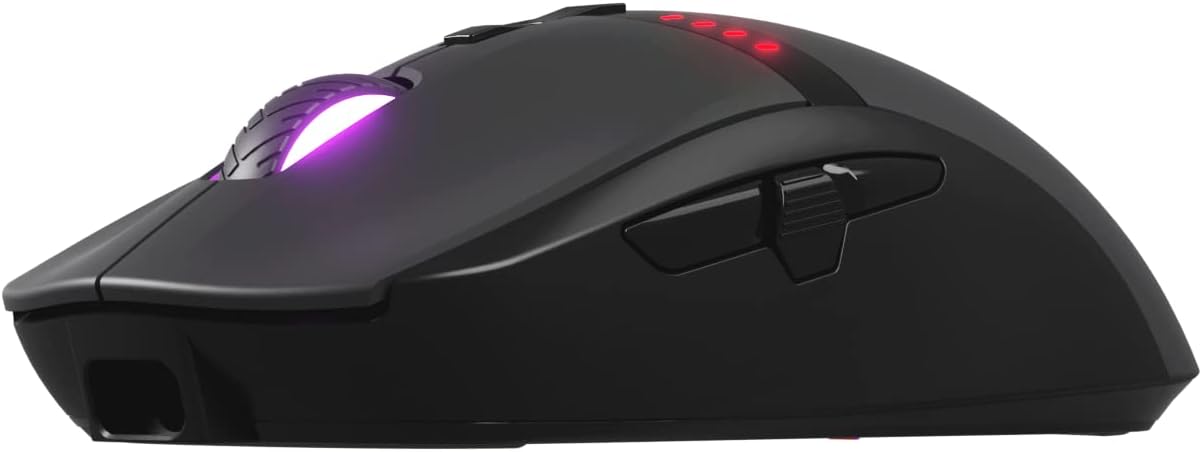
Imatge: Frontal view of the mouse, highlighting the USB charging port.
2. Connectar el ratolí
The Oversteel Invar mouse supports both wireless and wired modes.
Mode sense fil:
- Locate the USB wireless receiver, typically stored in a compartment on the underside of the mouse.
- Connecteu el receptor sense fil USB a un port USB disponible de l'ordinador.
- Enceneu el ratolí amb l'interruptor d'encesa situat a la part inferior.
- L'ordinador hauria de detectar i instal·lar automàticament els controladors necessaris.
Mode per cable:
To use the mouse in wired mode, simply connect the USB charging cable from the mouse to your computer's USB port. The mouse will function as a wired device and charge simultaneously.
Instruccions de funcionament
1. Funcions del botó
The Oversteel Invar mouse features 8 programmable buttons. Default functions are as follows:
- Clic esquerre: Acció primària estàndard.
- Clic dret: Acció secundària estàndard.
- Clic central (roda de desplaçament): Activates middle click function.
- Scroll Up/Down: Navigates content vertically.
- Botó Endavant: Navega cap endavant web navegadors o file exploradors.
- Botó enrere: Navega cap enrere web navegadors o file exploradors.
- Botó DPI+: Increases DPI sensitivity.
- Botó DPI: Decreases DPI sensitivity.

Image: Software interface illustrating programmable button assignments.
2. Ajust de DPI
The mouse features a Pixart 3325 optical sensor with adjustable DPI up to 10000. Use the dedicated DPI+ and DPI- buttons to cycle through sensitivity levels. The current DPI setting may be indicated by the RGB lighting or a specific indicator on the mouse.
3. Modes d'il·luminació RGB
The Oversteel Invar mouse offers up to 10 configurable RGB lighting modes. These modes can typically be cycled through using a combination of buttons (often the DPI button and another, or a dedicated button if available) or through the mouse's software. Refer to the software section for advanced customization.

Image: The mouse displaying its customizable RGB lighting effects.
4. Indicador de bateria
The mouse includes a battery indicator that illuminates red to show the remaining battery percentage. Monitor this indicator to know when recharging is necessary.
Manteniment
1. Neteja
- Desconnecteu el ratolí de l'ordinador abans de netejar-lo.
- Feu servir un drap suau i sec per netejar la superfície del ratolí.
- Per a la brutícia persistent, lleugerament dampRenta el drap amb aigua. Evita productes químics agressius o materials abrasius.
- Use compressed air to clear dust from around the scroll wheel and sensor area.
2. Cura de la bateria
- Eviteu exposar el ratolí a temperatures extremes.
- No intenteu substituir la bateria interna vosaltres mateixos. Poseu-vos en contacte amb el servei d'assistència si teniu problemes amb la bateria.
- Per a una durada òptima de la bateria, eviteu descarregar-la completament amb freqüència.
Resolució de problemes
El ratolí no respon:
- Assegureu-vos que el ratolí estigui encès.
- Comproveu el nivell de la bateria i carregueu-la si cal.
- For wireless mode, ensure the USB receiver is securely plugged into a working USB port. Try a different USB port.
- Per al mode amb cable, assegureu-vos que el cable USB estigui connectat correctament tant al ratolí com a l'ordinador.
- Proveu de reiniciar l'ordinador.
Problemes de DPI/sensibilitat:
- Use the DPI+ and DPI- buttons to adjust sensitivity.
- Ensure the mouse sensor is clean and free from obstructions.
- Check mouse settings in your operating system or gaming software.
La il·luminació RGB no funciona:
- Assegureu-vos que el ratolí estigui encès i connectat.
- Cycle through RGB modes using the designated buttons or software.
- Check for any software conflicts or updates.
Problemes de programari/controlador:
- If experiencing issues with button programming or macro functions, ensure you have the latest software/drivers installed from the official Oversteel weblloc.
- Some users have reported software bugs; ensure your software is up-to-date.
Especificacions
| Característica | Detall |
|---|---|
| Nom del model | Oversteel Invar Wireless Gaming Mouse |
| Número de model | NAT-OV-INVARW |
| Connectivitat | Wireless (USB Receiver), Wired (USB Cable) |
| Tipus de sensor | Sensor òptic Pixart 3325 |
| Rang de DPI | Fins a 10000 DPI (ajustable) |
| IPS (polzades per segon) | 100 IPS |
| Acceleració | Fins a 20G |
| Botons | 8 Botons programables |
| Tipus de canvi | Huano Switches (20 million click lifespan) |
| Il·luminació RGB | 10 Configurable Modes |
| Capacitat de la bateria | 800 mAh |
| Durada de la bateria | Up to 45 hours (gaming) |
| Dimensions | 20.1 x 14.2 x 6.2 cm (dimensions aproximades del paquet) |
| Pes | 104 grams (pes aproximat del paquet) |
| Compatibilitat | PC/Mac (Windows, macOS) |
Garantia i Suport
Oversteel products are designed for durability and performance. For specific warranty information, please refer to the warranty card included with your product or visit the official Oversteel weblloc.
For technical support, driver downloads, or further assistance, please visit the Oversteel support page or contact their customer service.
- Oficial Weblloc: www.oversteel.com (Nota: Això és un marcador de posició URL as no specific support link was provided in the product data.)
- Correu electrònic de suport: support@oversteel.com (Note: This is a placeholder email.)