1. Introducció
The Oversteel Tombac Wireless Game Controller is designed for multi-platform gaming, offering compatibility with PC, Nintendo Switch, smartphones, tablets, and Android TVs. This manual provides detailed instructions for setting up, operating, and maintaining your controller to ensure optimal performance and an enhanced gaming experience.
2. Contingut del paquet
- 1 x Oversteel Tombac Wireless Game Controller
- 1 x cable de càrrega USB
3. Disseny del controlador
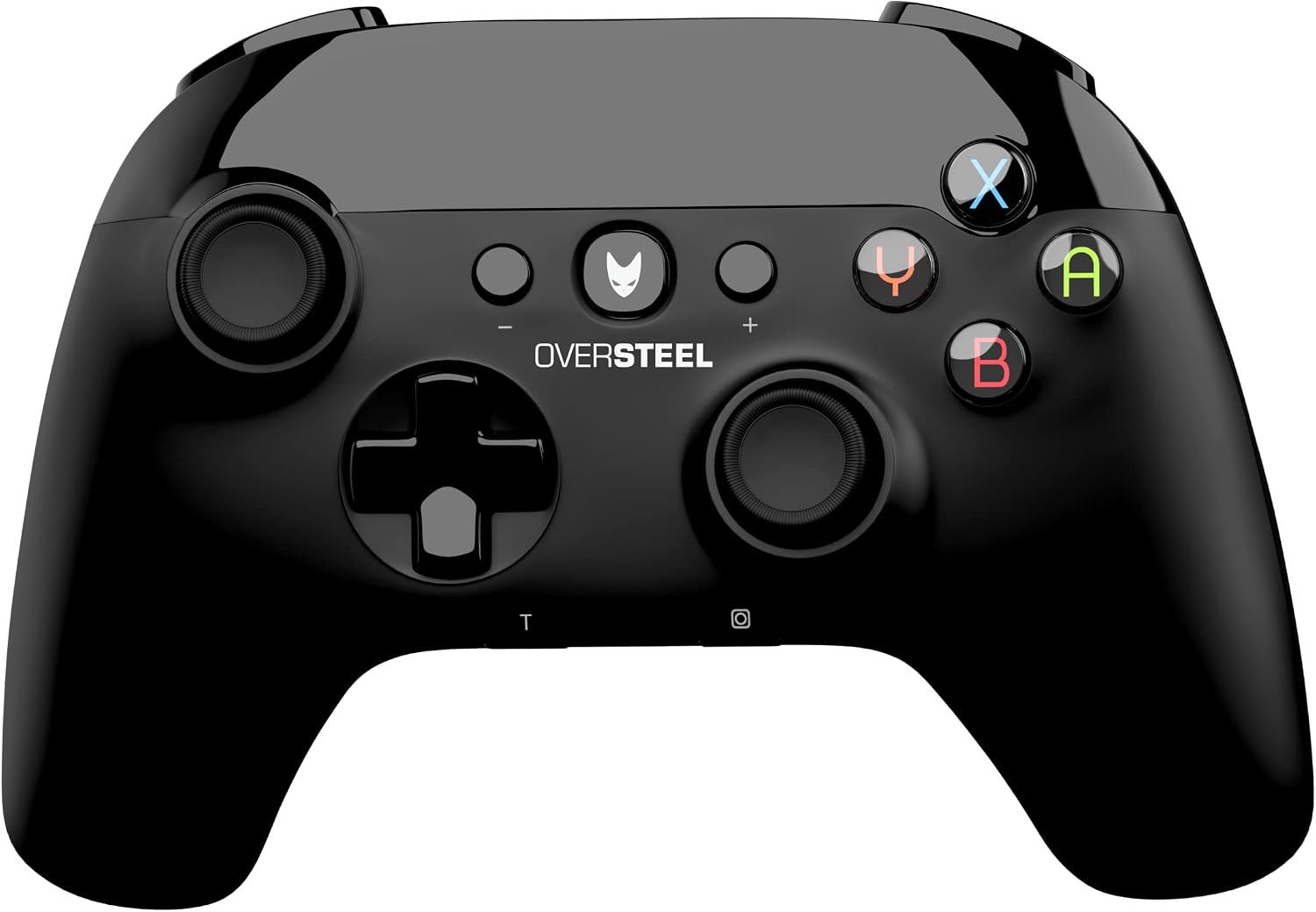
Imatge 3.1: Davant view of the Oversteel Tombac Wireless Game Controller, showing the dual analog sticks, D-pad, action buttons (A, B, X, Y), shoulder buttons, and central function buttons.

Imatge 3.2: A dalt view of the Oversteel Tombac Wireless Game Controller, highlighting the shoulder buttons (L1, R1) and triggers (L2, R2).
The Oversteel Tombac controller features a standard layout for intuitive gameplay:
- Costat esquerre: Left Analog Stick, Directional Pad (D-pad).
- costat dret: Right Analog Stick, Action Buttons (A, B, X, Y).
- Centre: Home/Power Button (Oversteel logo), Plus (+) Button, Minus (-) Button, Turbo (T) Button, Screenshot Button (Camera icon).
- A dalt: Left Shoulder Button (L1), Right Shoulder Button (R1), Left Trigger (L2), Right Trigger (R2).
- Indicadors: Player LED indicators at the bottom.
4. Configuració
4.1. Càrrega del controlador
Before initial use, fully charge the controller. Connect the provided USB charging cable to the controller's USB port and the other end to a USB power source (e.g., PC, USB wall adapter). The charging indicator will illuminate. A full charge typically takes approximately 2-3 hours and provides up to 8 hours of continuous gameplay.
4.2. Connexió a PC
4.2.1. Connexió amb cable USB
- Connect the controller to your PC using the USB charging cable.
- L'ordinador detectarà i instal·larà automàticament els controladors necessaris.
- El controlador està llest per al seu ús.
4.2.2. Connexió sense fil Bluetooth
- Assegureu-vos que el vostre ordinador tingui el Bluetooth habilitat.
- On the controller, press and hold the Home/Power button for 3 seconds to enter pairing mode (player LEDs will flash rapidly).
- On your PC, go to 'Bluetooth & other devices' settings.
- Select 'Add Bluetooth or other device' > 'Bluetooth'.
- Select 'Oversteel Tombac' from the list of available devices to pair.
- Once paired, the player LED(s) on the controller will remain lit.
4.3. Nintendo Switch Connection
- From the Nintendo Switch HOME Menu, select 'Controllers' > 'Change Grip/Order'.
- On the Oversteel Tombac controller, press and hold the Home/Power button for 3 seconds to enter pairing mode (player LEDs will flash rapidly).
- The Switch will detect the controller. Once paired, the player LED(s) on the controller will remain lit.
4.4. Smartphone/Tablet/Android TV Connection (Bluetooth)
- Enable Bluetooth on your smartphone, tablet, or Android TV.
- On the controller, press and hold the Home/Power button for 3 seconds to enter pairing mode (player LEDs will flash rapidly).
- In your device's Bluetooth settings, search for new devices and select 'Oversteel Tombac' to pair.
- Once paired, the player LED(s) on the controller will remain lit.
5. Instruccions de funcionament
5.1. Encendre/apagar
- Per encendre: Press the Home/Power Button (Oversteel logo).
- Per apagar: Press and hold the Home/Power Button for approximately 5 seconds until the controller shuts down.
5.2. Funció Turbo
The controller supports a Turbo function for rapid button presses.
- Per activar el Turbo: Manteniu premut el botó T (Turbo) button, then press the desired action button (e.g., A, B, X, Y, L1, R1, L2, R2). The button will now repeatedly input as long as it is held down.
- Per desactivar el Turbo: Repeat the activation process for the same button.
5.3. Funció de vibració
The Oversteel Tombac controller features dual vibration motors, providing immersive haptic feedback during compatible gameplay moments.
5.4. Gyroscope Function (Nintendo Switch)
When connected to a Nintendo Switch, the integrated gyroscope allows for motion control in compatible games, enhancing gameplay experiences like aiming or steering.
6. Manteniment
- Clean the controller regularly with a soft, dry cloth. Avoid using abrasive materials or harsh chemical cleaners.
- Do not expose the controller to extreme temperatures, direct sunlight, or high humidity.
- Store the controller in a dry, cool place when not in use.
- Eviteu deixar caure el controlador o sotmetre'l a impactes forts.
7. Solució De Problemes
7.1. Controller Not Connecting/Pairing
- Assegureu-vos que el controlador estigui prou carregat.
- Verify that Bluetooth is enabled on your device (PC, Switch, smartphone, etc.).
- Try re-pairing the controller by following the specific connection steps for your device.
- For PC wired connection, try a different USB port or cable.
- Assegureu-vos que el controlador estigui dins de l'abast sense fil de 10 metres del dispositiu.
7.2. Controller Not Charging
- Ensure the USB cable is securely connected to both the controller and the power source.
- Try using a different USB port or a different USB wall adapter.
- Verify that the USB cable is not damaged.
7.3. Retard d'entrada o desconnexions
- Ensure you are within the optimal 10-meter wireless range.
- Reduce potential interference from other wireless devices (e.g., Wi-Fi routers, other Bluetooth devices).
- Assegureu-vos que el sistema operatiu i els controladors Bluetooth del dispositiu estiguin actualitzats.
8. Especificacions
| Característica | Detall |
|---|---|
| Marca | Sobreacer |
| Model | Tombac (NAT-OV-TOMBAC) |
| Connectivitat | Bluetooth, USB |
| Tipus de bateria | Bateria de liti de 600 mA |
| Hora de jugar | Fins a 8 hores (amb una única càrrega) |
| Temps de càrrega | Aproximadament 2-3 hores |
| abast sense fils | Fins a 10 metres |
| Nombre de botons | 16 |
| Característiques especials | Vibration Feedback, Gyroscope (for Switch), Turbo Function, Ergonomic Design |
| Dimensions (L x A x A) | 17.3 x 13.2 x 7.5 cm |
| Pes | 320 grams |
9. Garantia i Suport
For detailed warranty information, technical support, or customer service inquiries, please refer to the official Oversteel website or contact your product retailer. Keep your proof of purchase for any warranty claims.


