1. Introducció
Thank you for choosing the AENO RC2S Robot Vacuum Cleaner. This intelligent device is designed to provide efficient and convenient cleaning for your home, combining vacuuming and mopping functionalities. Equipped with advanced laser scanning technology, it maps your living space for thorough and systematic cleaning. Please read this manual carefully before using the product to ensure proper operation and maintenance.
2. Informació de seguretat
Per reduir el risc de lesions o danys, llegiu atentament aquestes instruccions de seguretat i guardeu-les per a futures consultes.
- Aquest aparell el poden utilitzar nens a partir de 8 anys i persones amb capacitats físiques, sensorials o mentals reduïdes o amb manca d'experiència i coneixements si han rebut supervisió o instruccions sobre l'ús de l'aparell d'una manera segura i entenen els perills que comporta. .
- La neteja i el manteniment dels usuaris no els han de fer els nens sense supervisió.
- Do not use the robot in environments with high humidity or near heat sources.
- Ensure the charging station is placed on a flat surface against a wall, with adequate clear space around it.
- Do not allow the robot to pick up large objects, liquids, or burning/smoking materials.
- Netegeu regularment els raspalls i els sensors per mantenir un rendiment òptim.
- Use only the original power adapter and charging station provided with the robot.
3. Contingut del paquet
Verifiqueu que tots els components siguin presents al paquet:
- Robot aspirador AENO RC2S
- Estació de càrrega
- Adaptador d'alimentació
- Escombraria
- Dipòsit d'aigua (amb fregona)
- Pinzells laterals (x2)
- Eina de neteja
- Manual d'usuari
4. Producte acabatview
Familiarize yourself with the main components of your AENO RC2S robot vacuum cleaner.
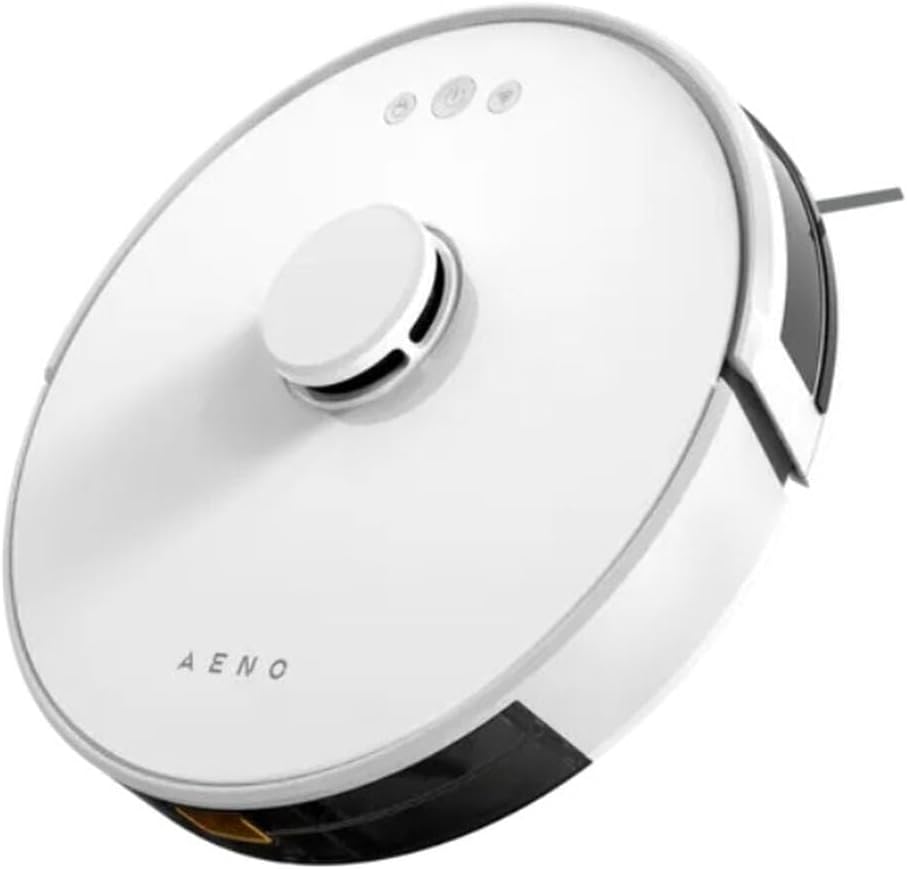
Figura 4.1: superior view of the AENO RC2S Robot Vacuum Cleaner. The image displays the sleek white circular design of the robot, featuring a central raised laser navigation turret and three control buttons on the top surface. The AENO logo is visible towards the front.
A dalt View:
- Laser Navigation Turret: Houses the LDS (Laser Distance Sensor) for precise mapping and navigation.
- Botons de control: Power/Clean, Home/Recharge, Spot Clean.
- Botó d'alliberament del cubell d'escombraries: Per treure el cubell de pols.
A baix View:
- Pinzell principal: Per a la neteja profunda de catifes i terres durs.
- Raspalls laterals: Sweep debris from edges and corners into the main brush path.
- Rodes motrius: Allow the robot to move across various surfaces.
- Contactes de càrrega: Connect with the charging station.
- Sensors de penya-segats: Evita que el robot caigui per les escales.
- Roda universal: Provides 360-degree movement.
5. Configuració
5.1 Col·locació de l'estació de càrrega
Place the charging station on a hard, level surface against a wall. Ensure there is at least 0.5 meters (1.6 feet) of clear space on both sides and 1.5 meters (4.9 feet) in front of the charging station. Connect the power adapter to the charging station and plug it into a power outlet. Ensure the indicator light on the charging station is on.
5.2 Càrrega inicial
Place the robot on the charging station, ensuring the charging contacts align. The robot will automatically begin charging. For first-time use, fully charge the robot for approximately 5 hours. The battery capacity is 3000 mAh, providing up to 130 minutes of runtime.
5.3 Instal·lació i connexió de l'aplicació
Download the "AENO" app from your mobile device's app store (iOS or Android). Follow the in-app instructions to connect your robot vacuum cleaner to your home Wi-Fi network. The app allows for advanced control, scheduling, and mapping features.
6. Funcionament
6.1 Inici d'un cicle de neteja
- Neteja automàtica: Press the Power/Clean button on the robot or in the app. The robot will automatically clean your home using its laser navigation system.
- Neteja de punts: Place the robot in a specific dirty area and press the Spot Clean button. The robot will clean a concentrated area.
- Neteja de vores: Select Edge Clean mode in the app. The robot will clean along the walls and edges of your rooms.
6.2 Funció de fregar
The AENO RC2S features a 0.35 L water tank for wet cleaning. Fill the water tank with clean water and attach the mop pad. Insert the water tank into the robot. You can control the water flow electronically via the app (low, medium, high) to suit different floor types and cleaning needs. The robot can clean up to 150 square meters at once.
6.3 Smart Room Mapping and Restricted Zones
The robot uses LiDAR technology to create detailed maps of your home. Through the AENO app, you can:
- View and Edit Maps: See the generated map of your home.
- Establir zones prohibides: Draw virtual boundaries on the map to prevent the robot from entering specific areas.
- Set No-Mop Zones: Define areas where the robot should vacuum but not mop (e.g., carpeted areas).
- Select Specific Room Cleaning: Choose which rooms to clean.
If the battery is low during a cleaning cycle, the robot will automatically return to the charging station, recharge, and then resume cleaning from where it left off.
7. Manteniment
Un manteniment regular garanteix un rendiment òptim i allarga la vida útil del teu robot aspirador.
7.1 Neteja de les escombraries i els filtres
- Cubell d'escombraries buit: Press the dustbin release button and remove the dustbin. Empty its contents after each cleaning cycle.
- Neteja el filtre: Remove the filter from the dustbin. Tap it gently to remove dust. The filter can be rinsed with water, but ensure it is completely dry before reinserting.
7.2 Raspall principal i raspalls laterals
- Pinzell principal: Traieu la coberta del raspall principal i aixequeu el raspall. Feu servir l'eina de neteja per eliminar els cabells i les restes enredades al voltant del raspall.
- Raspalls laterals: Check side brushes for tangled hair or debris. If damaged, replace them.
7.3 Sensors i contactes de càrrega
Wipe all sensors (cliff sensors, wall sensor) and charging contacts on both the robot and the charging station with a clean, dry cloth regularly to ensure proper functionality.
7.4 Dipòsit d'aigua i fregona
After each mopping session, empty any remaining water from the tank. Remove and clean the mop pad. The mop pad can be hand-washed or machine-washed. Allow it to air dry completely before reattaching.
8. Solució De Problemes
If you encounter issues with your AENO RC2S, refer to the following common problems and solutions:
| Problema | Causa possible | Solució |
|---|---|---|
| El robot no s'encén. | Bateria baixa; interruptor apagat. | Carregueu el robot; assegureu-vos que l'interruptor principal estigui encès. |
| El robot no pot trobar l'estació de càrrega. | Charging station obstructed; Robot too far. | Clear obstacles around the station; Manually place robot closer. |
| El rendiment de neteja és deficient. | Cubell de pols ple; filtre obstruït; raspalls enredats. | Buidar el contenidor de pols; netejar/substituir el filtre; netejar els raspalls principal i laterals. |
| El robot es queda encallat sovint. | Obstacles; Sensors bruts. | Remove cables/small objects; Clean cliff sensors. |
| Problemes de connexió de l'aplicació. | Incorrect Wi-Fi password; Router issues. | Verify Wi-Fi password; Restart router and robot; Ensure 2.4GHz Wi-Fi. |
9. Especificacions
| Nom del model | RC2S |
| Marca | AENO |
| Color | Blanc |
| Dimensions (Diàmetre x Alçada) | 33 cm x 9.6 cm |
| Pes | 2.7 kg |
| Capacitat del contenidor de pols | 0.6 L |
| Capacitat del dipòsit d'aigua | 0.35 L |
| Nivell de soroll | 65 dB |
| Capacitat de la bateria | 3000 mAh (ió de liti) |
| Temps d'execució | Fins a 130 minuts |
| Temps de càrrega | Aprox. 5 hores |
| Potència nominal | 28 watts |
| Àrea màxima de neteja | 150 m² |
| Característiques especials | Laser Navigation (LiDAR), App Control, Smart Room Mapping, Virtual Walls, Auto-resume cleaning |
10. Garantia i Suport
AENO products are manufactured to the highest quality standards. For warranty information and technical support, please refer to the warranty card included in your package or visit the official AENO weblloc web. Conserveu el rebut de compra com a comprovant de compra.
For further assistance, please contact AENO customer service.


