Introducció
Gràcies per la compraasing the Dolphin SP-2600RBT Portable Bluetooth Speaker. This manual provides essential information for the safe and efficient operation of your new speaker. Please read this manual thoroughly before using the product and retain it for future reference.

Image: The Dolphin SP-2600RBT speaker, showcasing its dual woofers with LED lights and a top-mounted control panel with a phone dock.
Informació de seguretat
Per garantir un funcionament segur i evitar danys, observeu les precaucions següents:
- No exposeu l'altaveu a l'aigua, la humitat ni a temperatures extremes.
- No intenteu desmuntar ni modificar l'altaveu. Això anul·larà la garantia.
- Mantingueu l'altaveu allunyat de fonts de calor com ara radiadors, registres de calor, estufes o altres aparells (inclosos amplificadors) que produeixen calor.
- Utilitzeu només l'adaptador d'alimentació subministrat amb la unitat.
- Assegureu-vos que hi hagi una ventilació adequada al voltant de l'altaveu. No bloquegeu cap obertura de ventilació.
- Netegeu només amb un drap sec.
- Eviteu col·locar objectes pesats sobre l'altaveu.
- Mantenir fora de l'abast dels nens.
Contingut del paquet
Si us plau, comproveu que tots els elements siguin presents al paquet:
- Dolphin SP-2600RBT Portable Bluetooth Speaker
- Micròfon per cable
- Control remot
- Adaptador de CA
- Corretja d'espatlla
- Manual d'usuari (aquest document)
Producte acabatview
Familiarize yourself with the various parts and controls of your Dolphin SP-2600RBT speaker.
Control Panel and Inputs
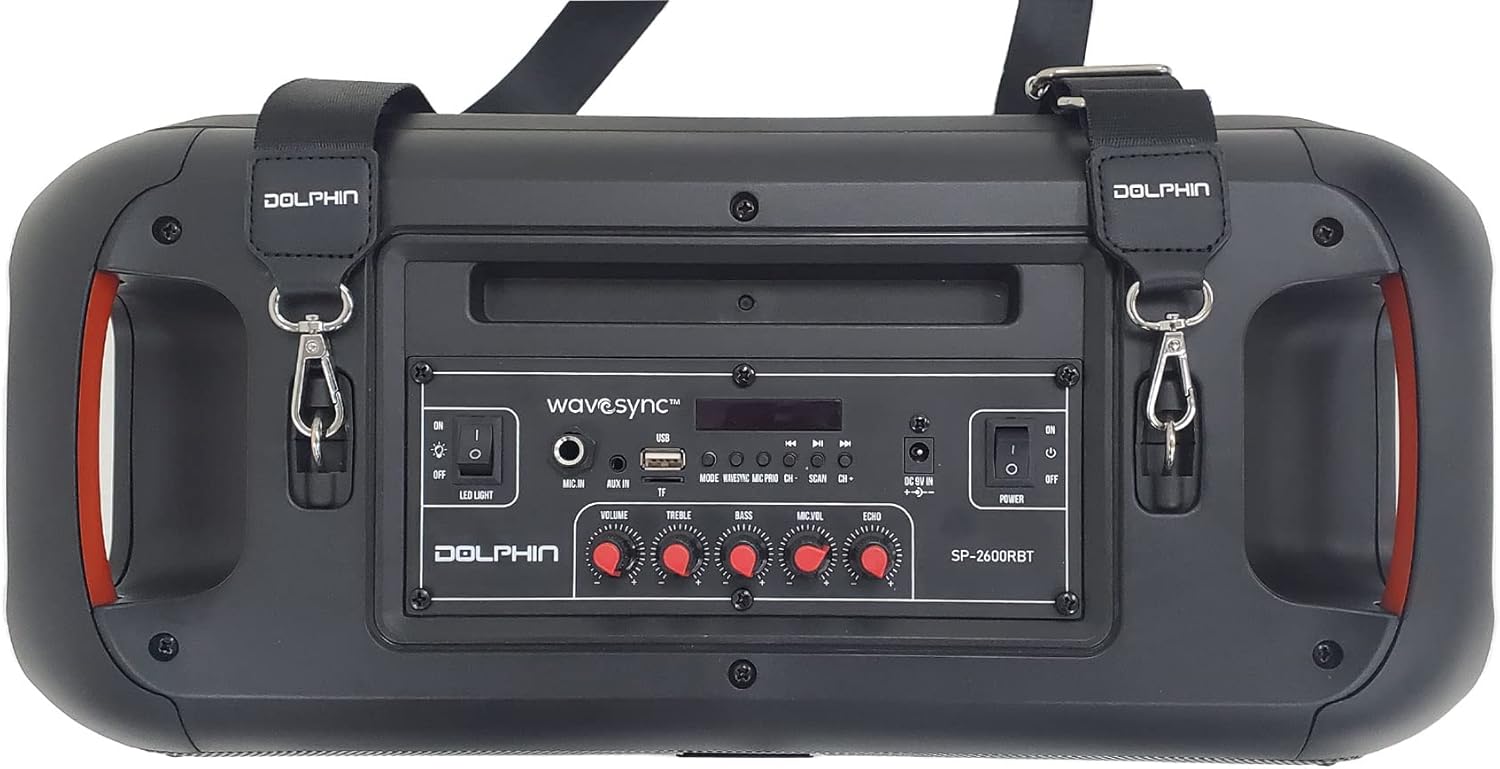
Imatge: Superior view of the speaker showing the control panel, various ports, and attachment points for the shoulder strap.
The top panel of the speaker houses all the main controls and input ports for easy access.
- Interruptor de llum LED: Toggles the rhythmic LED lights on/off.
- Entrada de micròfon: 6.35mm jack for connecting the wired microphone.
- Pom de volum: Ajusta el volum general.
- Pom treble: Ajusta la sortida de so d'alta freqüència.
- Pom de baix: Ajusta la sortida de so de baixa freqüència.
- Botó de volum del micròfon: Ajusta el volum del micròfon.
- Botó d'eco: Ajusta l'efecte d'eco del micròfon.
- Botó de mode: Switches between input modes (Bluetooth, USB, MP3, Micro SD, FM Radio, AUX).
- Botons anterior/següent: Navigates tracks or FM radio stations.
- Botó Reproduir/Pausa: Controla la reproducció de suports.
- Port USB: Per a unitats flaix USB.
- Ranura per a targetes Micro SD: Per a targetes de memòria Micro SD.
- Entrada AUX: Entrada auxiliar de 3.5 mm.
- DC 9V In: Power input for the AC adaptor.
- Interruptor d'alimentació: Activa o desactiva l'altaveu.
- WaveSync™ Button: Initiates pairing with another SP-2600RBT speaker.

Imatge: Detallada view of the control panel highlighting the various media input options available on the speaker.
Speaker Design and Features

Image: The speaker emphasizing its dual 6.5-inch woofers and 2000W PMPO power output, with vibrant LED lighting.
The SP-2600RBT features dual 6.5-inch woofers and a 1-inch tweeter for powerful and clear audio. It also includes integrated handles for portability and a shoulder strap for easy transport.

Imatge: Frontal view of the speaker with the shoulder strap attached, demonstrating its portability and active blue LED lights.
Configuració
Carregant l'altaveu
Before first use, it is recommended to fully charge the speaker's internal battery. The speaker is equipped with a 3600 mAh Li-ion battery providing up to 5 hours of music playback.
- Connect the supplied AC Adaptor to the "DC 9V In" port on the speaker's control panel.
- Plug the AC Adaptor into a standard wall outlet.
- The charging indicator light (if present) will illuminate. The speaker is fully charged when the indicator changes color or turns off (refer to specific indicator behavior on the device).
- Disconnect the adaptor once charging is complete.

Image: Visual representation of the speaker's long battery life, indicating over 5 hours of playtime on a single charge.
Fixació de la corretja d'espatlla
For enhanced portability, attach the included shoulder strap to the designated loops on the speaker.
- Locate the metal rings on both sides of the speaker's top panel.
- Attach the clips of the shoulder strap to these rings.
- Ensure the clips are securely fastened before carrying the speaker.
Instruccions de funcionament
Encès/Apagat
- Per encendre l'altaveu, feu lliscar el Interruptor d'alimentació a la posició "ON".
- Per apagar l'altaveu, feu lliscar el botó Interruptor d'alimentació a la posició "OFF".
Emparellament Bluetooth
- Turn on the speaker. It will automatically enter Bluetooth pairing mode, indicated by a flashing Bluetooth indicator.
- Al dispositiu mòbil (telèfon intel·ligent, tauleta, etc.), activeu el Bluetooth i cerqueu els dispositius disponibles.
- Select "Dolphin SP-2600RBT" from the list of devices.
- Un cop emparellat, l'altaveu emetrà un so de confirmació i l'indicador Bluetooth deixarà de parpellejar.
- Ara pots reproduir àudio des del teu dispositiu a través de l'altaveu.
USB/Micro SD Card Playback
- Insert a USB flash drive or Micro SD card into the respective port/slot on the control panel.
- L'altaveu canviarà automàticament al mode USB/SD i començarà a reproduir àudio files. Si no, premeu la tecla Botó de mode to select the correct input.
- Utilitza el Botons anterior/següent per saltar pistes i Botó Reproduir/Pausa per controlar la reproducció.
Entrada auxiliar (AUX)
- Connect an external audio device (e.g., MP3 player, laptop) to the Entrada AUX port using a 3.5mm audio cable (not included).
- Premeu el botó Botó de mode until "AUX" mode is selected.
- Controla la reproducció des del dispositiu d'àudio connectat.
Ràdio FM
- Premeu el botó Botó de mode until "FM" mode is selected.
- Manteniu premut el botó Botó Reproduir/Pausa to initiate an automatic scan for FM radio stations. The speaker will save all found stations.
- Utilitza el Botons anterior/següent per navegar entre les estacions desades.
Ús del micròfon
- Connecteu el micròfon amb cable a la Mic In port.
- Ajusteu el volum del micròfon amb el botó Mic Vol Knob.
- Ajusteu l'efecte d'eco del micròfon amb el botó Pom d'eco.
WaveSync™ Technology (Pairing Two Speakers)
The WaveSync™ technology allows you to wirelessly connect two Dolphin SP-2600RBT speakers for a true stereo sound experience.
- Ensure both SP-2600RBT speakers are powered on and in Bluetooth mode (not connected to any device yet).
- En un dels altaveus, premeu el botó WaveSync™ Button. The speaker will emit a sound indicating it's searching for another speaker.
- The two speakers will automatically connect to each other. A confirmation sound will indicate successful pairing.
- Once connected via WaveSync™, pair your mobile device to one of the speakers via Bluetooth as described above. Audio will now play through both speakers in stereo.

Image: Illustration of the WaveSync™ feature, showing how two SP-2600RBT speakers can be wirelessly paired for enhanced audio output.
Control de llums LED
The speaker features rhythmic LED lights that can be controlled independently.
- To turn the LED lights on or off, use the dedicated Interruptor de llum LED al panell de control.

Imatge: El programa del ponentasing its sound-activated rhythmic spinning LED lights, emphasizing the dedicated switch for control.
Sound Controls (Treble, Bass, Echo)
Adjust the audio output to your preference using the dedicated knobs:
- Gira el Maneta d'aguts to increase or decrease the high-frequency sounds.
- Gira el Pom de baix to increase or decrease the low-frequency sounds.
- Gira el Pom d'eco to adjust the echo effect, primarily for microphone use.
Manteniment
Proper maintenance ensures the longevity of your speaker:
- Neteja: Use a soft, dry cloth to wipe the exterior of the speaker. Do not use liquid cleaners, aerosols, or abrasive chemicals.
- Emmagatzematge: Quan no l'utilitzeu durant períodes prolongats, guardeu l'altaveu en un lloc fresc i sec, allunyat de la llum solar directa i de temperatures extremes.
- Cura de la bateria: To maintain battery health, avoid fully discharging the battery frequently. If storing for a long time, charge the battery to about 50% every few months.
Resolució de problemes
If you encounter issues with your Dolphin SP-2600RBT speaker, refer to the following common problems and solutions:
| Problema | Causa possible | Solució |
|---|---|---|
| Sense poder | Battery is drained; Power switch is off; AC adaptor not connected properly. | Charge the speaker; Ensure power switch is ON; Check AC adaptor connection. |
| Sense so | Volume is too low; Incorrect input mode selected; Device not paired (Bluetooth); Cable not connected (AUX). | Increase volume; Press Mode button to select correct input; Re-pair Bluetooth device; Check AUX cable connection. |
| Bluetooth no connectat | Speaker not in pairing mode; Device Bluetooth is off; Speaker too far from device; Interference. | Ensure speaker is in pairing mode; Turn on device Bluetooth; Move device closer to speaker (within 10m); Avoid strong interference sources. |
| El micròfon no funciona | Microphone not plugged in; Mic Vol knob is too low. | Ensure microphone is securely plugged into "Mic In"; Increase Mic Vol knob. |
| WaveSync™ pairing fails | Speakers are too far apart; One speaker already connected to a Bluetooth device. | Ensure speakers are within close proximity; Disconnect any Bluetooth devices from both speakers before initiating WaveSync™. |
Especificacions
| Característica | Detall |
|---|---|
| Número de model | SP-2600RBT |
| Marca | Dofí |
| Potència de sortida màxima dels altaveus | 2000 watts |
| Tecnologia de connectivitat | Bluetooth, Auxiliar, USB |
| Mode de sortida d'àudio | estèreo |
| Tipus de muntatge | Tabletop Mount, Freestanding Plug Mount |
| Dimensions del producte | 22.86 x 46.99 x 24.13 cm |
| Pes de l'article | 3.06 kg (6.75 lliures) |
| Bateria | 3600 mAh Li-ion (up to 5 hours playtime) |
Garantia i Suport
This Dolphin SP-2600RBT speaker comes with a manufacturer's warranty. Please refer to the warranty card included in your package for specific terms and conditions, including warranty period and coverage.
For technical support, service, or warranty claims, please contact the retailer where you purchased the product or visit the official Dolphin brand weblloc web per obtenir informació de contacte. Conserveu el comprovant de compra per validar la garantia.
Manufacturer: General Sound Co