Introducció
Gràcies per la compraasing the Naxa NT-1400 Portable 14.1-inch TV and Digital Multimedia Player. This device is designed to provide portable entertainment, featuring a built-in ATSC tuner for over-the-air HD TV reception and multimedia playback capabilities via USB. This manual provides essential information for the proper setup, operation, and maintenance of your device. Please read it thoroughly before use and retain it for future reference.
Informació de seguretat
- Font d'alimentació: Use only the provided AC adapter or DC car cord. Ensure the voltage coincideix amb els requisits del dispositiu.
- Seguretat de la bateria: The device contains a rechargeable lithium battery. Do not expose to extreme temperatures, puncture, or disassemble. Dispose of batteries according to local regulations.
- Aigua i humitat: Do not expose the unit to rain, moisture, or immerse it in water.
- Ventilació: Assegureu-vos que hi hagi una ventilació adequada al voltant de la unitat. No bloquegeu les obertures de ventilació.
- Neteja: Disconnect power before cleaning. Use a soft, dry cloth. Avoid liquid cleaners.
- Manteniment: No intenteu fer el manteniment de la unitat vosaltres mateixos. Encarregueu totes les tasques de manteniment a personal qualificat.
Contingut del paquet
Verifiqueu que tots els elements que s'enumeren a continuació s'inclouen al vostre paquet:
- Naxa NT-1400 Portable TV Unit
- Control remot
- ETL AC Adapter
- Cable de cotxe de CC
- Antena externa
- Cable d'àudio/vídeo
- Suport de sobretaula
- Manual d'usuari (aquest document)

Image: Included accessories for the Naxa NT-1400.
Producte acabatview
The Naxa NT-1400 features a 14.1-inch LCD screen with 1280 x 800 resolution, a built-in ATSC tuner for digital TV, and various input options for multimedia playback.

Imatge: Frontal view of the Naxa NT-1400 Portable TV.

Image: Naxa NT-1400 in a portable setting, such as an RV.
Ports i controls
Familiarize yourself with the various ports and controls located on the unit:
- FORMIGA: Connect the external antenna for TV reception.
- HD-IN: HDMI input for connecting external high-definition devices.
- VGA: VGA input for connecting to computers or other compatible devices.
- AV-IN/AV-OUT: Audio/Video input and output for connecting to older devices or external displays.
- Presa d'auriculars (3.5 mm): Per a una escolta privada.
- Port USB: For playing multimedia files d'una unitat USB.
- DC 12V ON/OFF: Power input for the AC adapter or DC car cord, with a power switch.
- Controls del panell frontal: Volume, Channel, Menu, Input Source, Power.

Imatge: Lateral view of the Naxa NT-1400 showing input/output ports.
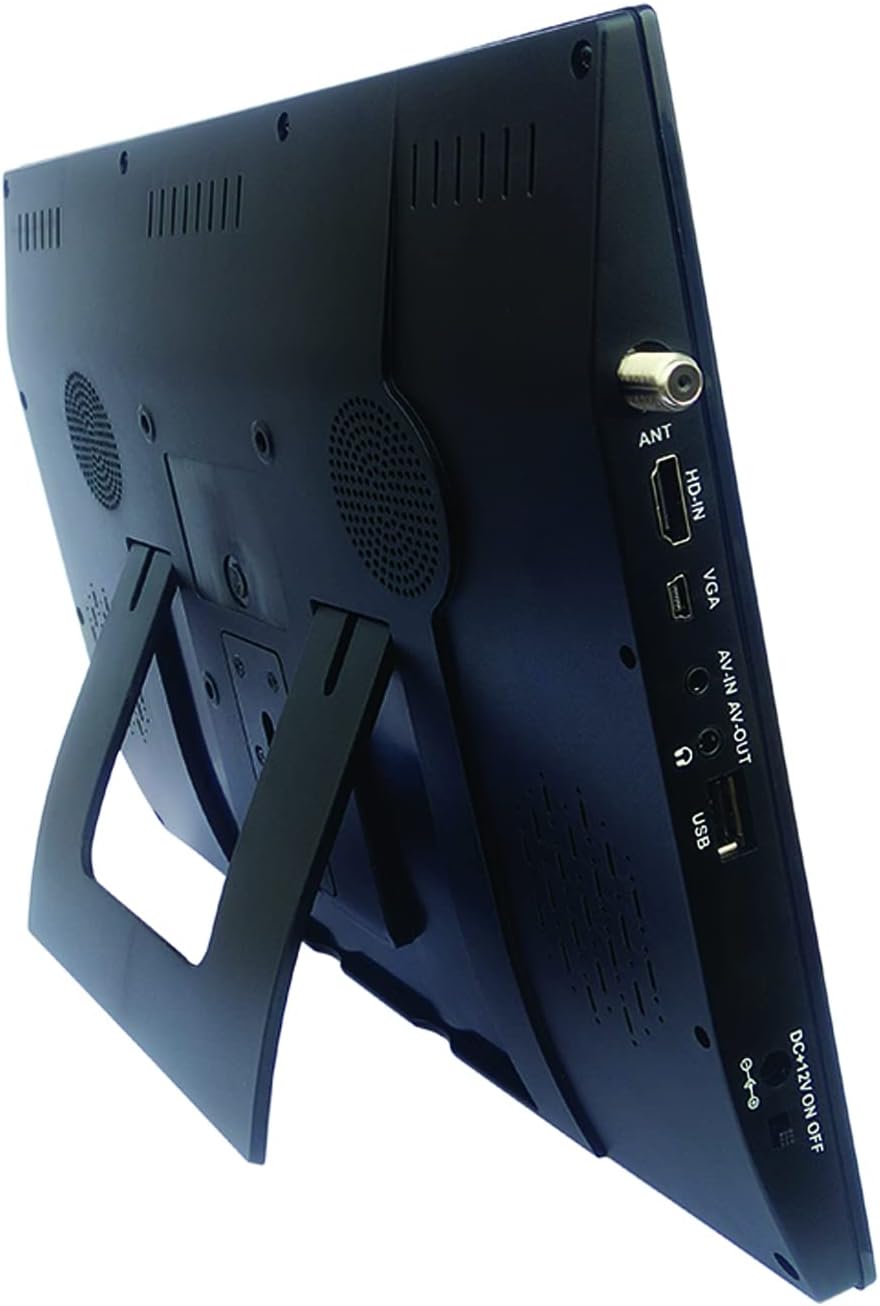
Image: Naxa NT-1400 with the integrated kickstand.
Configuració
1. Alimentació del dispositiu
- Alimentació CA: Connect the ETL AC adapter to the DC 12V input on the unit and plug it into a standard wall outlet.
- Alimentació de CC per a cotxes: Connect the DC car cord to the DC 12V input on the unit and plug it into your vehicle's 12V accessory socket.
- Bateria interna: The unit has a built-in rechargeable lithium battery. Ensure it is charged before portable use. The battery charges automatically when connected to AC or DC power.
2. Fixació del suport
- The unit includes an integrated flip-out kickstand for quick setup.
- For more stable placement, attach the provided tabletop stand to the back of the unit using the designated mounting points.
3. Connexió de l'antena
For optimal over-the-air TV reception, connect the external antenna to the ANT port on the side of the unit. Position the antenna in an area with good signal strength.
4. Escaneig inicial de canals
After powering on the device for the first time, navigate to the 'Channel Setup' or 'Auto Scan' option in the main menu to scan for available digital TV channels. This process may take several minutes.
Instruccions de funcionament
1. Encendre/apagar
Press the 'POWER' button on the unit or the remote control to turn the device on or off.
2. Selecció de la font d'entrada
Press the 'MODE' or 'INPUT' button on the unit or remote control to cycle through available input sources: TV, USB, HDMI, VGA, AV.
3. Funcionament del televisor
- Selecció de canals: Use the 'CH+' / 'CH-' buttons on the unit or the remote control to change channels. You can also enter channel numbers directly using the remote's numeric keypad.
- Control de volum: Use the 'VOL+' / 'VOL-' buttons on the unit or the remote control to adjust the volume.
- Navegació del menú: Press the 'MENU' button to access settings. Use arrow keys and 'OK' on the remote to navigate and confirm selections.
4. Ús d'auriculars
Plug standard 3.5mm headphones into the headphone jack for private audio listening. The internal speakers will automatically mute.
Reproducció multimèdia
The Naxa NT-1400 supports playback of various multimedia files d'una unitat USB.
1. Connexió d'una unitat USB
Insert your USB flash drive into the USB port on the side of the unit.
2. Accessing USB Media
Switch the input source to 'USB'. The device will display a file browser. Navigate through your folders and select the desired media file.
3. Admet File Formats
- Vídeo: MPEG, XVID, AVC, MP4, H.264, HEVC (H.265), FLV, MKV
- Àudio: MP3
- Imatge: JPEG
- Text: TXT
Manteniment
Neteja
Ensure the unit is powered off and unplugged before cleaning. Use a soft, dry, lint-free cloth to wipe the screen and exterior surfaces. Do not use liquid cleaners, aerosols, or abrasive materials.
Cura de la bateria
To prolong battery life, avoid fully discharging the battery frequently. If storing the unit for an extended period, charge the battery to approximately 50% and store in a cool, dry place.
Emmagatzematge
Quan no estigui en ús, guardeu la unitat en un lloc net i sec, allunyat de la llum solar directa i de temperatures extremes.
Resolució de problemes
- Sense energia: Ensure the AC adapter or DC car cord is securely connected and the power switch is in the 'ON' position. Check if the internal battery is charged.
- No TV Signal: Verify the external antenna is properly connected and positioned. Perform an 'Auto Scan' for channels. Signal strength can vary by location.
- Sense so: Check the volume level. Ensure headphones are not plugged in unless intended. Verify the audio settings in the menu.
- Problemes de reproducció per USB: Ensure the USB drive is formatted correctly (FAT32 is generally recommended). Verify that the media files estan en formats compatibles.
- El control remot no funciona: Check the battery in the remote control. Ensure there are no obstructions between the remote and the unit's IR sensor.
Especificacions
| Característica | Especificació |
|---|---|
| Marca | Naxa |
| Número de model | NT-1400 |
| Mida de la pantalla | 14.1 polzades |
| Tecnologia de visualització | LCD |
| Resolució | 1280 x 800 |
| Relació d'aspecte | 16:9 |
| Freqüència d'actualització | 50/60 Hz |
| Tipus de sintonitzador | Built-in Digital ATSC TV Tuner |
| Connectivitat | HDMI, USB, VGA, AV-IN/AV-OUT |
| Tipus d'altaveu | Integrat |
| Bateria | 1 ió de liti (inclòs) |
| Font d'alimentació | AC Adapter, DC Car Cord, Internal Battery |
| Dimensions del producte | 1.5 "P x 13.45" W x 9.2" H |
| Pes de l'article | 2.2 lliures |
Garantia i Suport
For warranty information, technical support, or service inquiries, please visit the official Naxa Electronics weblloc web o poseu-vos en contacte amb el seu departament d'atenció al client. Conserveu el rebut de compra com a comprovant de compra per a reclamacions de garantia.
Naxa Electronics: Visita la botiga Naxa a Amazon


