1. Introducció
The Audizio Metz Stereo System is a versatile micro-set designed to provide a rich audio experience through various sources. It features DAB+ and FM radio for digital and analog broadcasts, Bluetooth connectivity for wireless streaming, a CD player for your disc collection, and a USB port for MP3 playback. Equipped with two Hi-Fi speakers featuring a bass-reflex system, it delivers clear and powerful sound. The included remote control offers convenient operation, and additional features like a headphone jack, AUX input, alarm, and sleep timer enhance its functionality for any room in your home.
2. Instruccions de seguretat importants
Please read these safety instructions carefully before operating the unit and retain them for future reference. Incorrect use may result in electric shock, fire, or other hazards.
- Font d'alimentació: Assegureu-vos que la font d'alimentació voltage matches the rating label on the unit. Only use the provided power adapter.
- Aigua i humitat: No exposeu la unitat a la pluja, la humitat, les goteges o les esquitxades. No col·loqueu objectes plens de líquids, com ara gerros, a sobre de la unitat.
- Ventilació: Ensure adequate ventilation. Do not block any ventilation openings. Maintain a minimum distance around the unit for sufficient ventilation.
- Calor: No col·loqueu la unitat a prop de fonts de calor com ara radiadors, registres de calor, estufes o altres aparells (inclosos amplificadors) que produeixen calor.
- Neteja: Desendolleu la unitat de la presa de corrent abans de netejar-la. Feu servir només un drap suau i sec. No utilitzeu netejadors líquids ni netejadors en aerosol.
- Manteniment: No intenteu atendre aquest producte vosaltres mateixos. Consulteu tots els serveis a personal de servei qualificat.
- Col·locació: Place the unit on a stable, flat surface. Avoid placing it in direct sunlight or in environments with extreme temperatures or humidity.
3. Contingut del paquet
Carefully unpack your Audizio Metz Stereo System and ensure all items are present and in good condition:
- Audizio Metz Main Unit
- 2 x Hi-Fi Speakers
- Control remot
- Adaptador d'alimentació
- Manual d'usuari (aquest document)
4. Producte acabatview
Familiarize yourself with the components and controls of your Audizio Metz Stereo System.

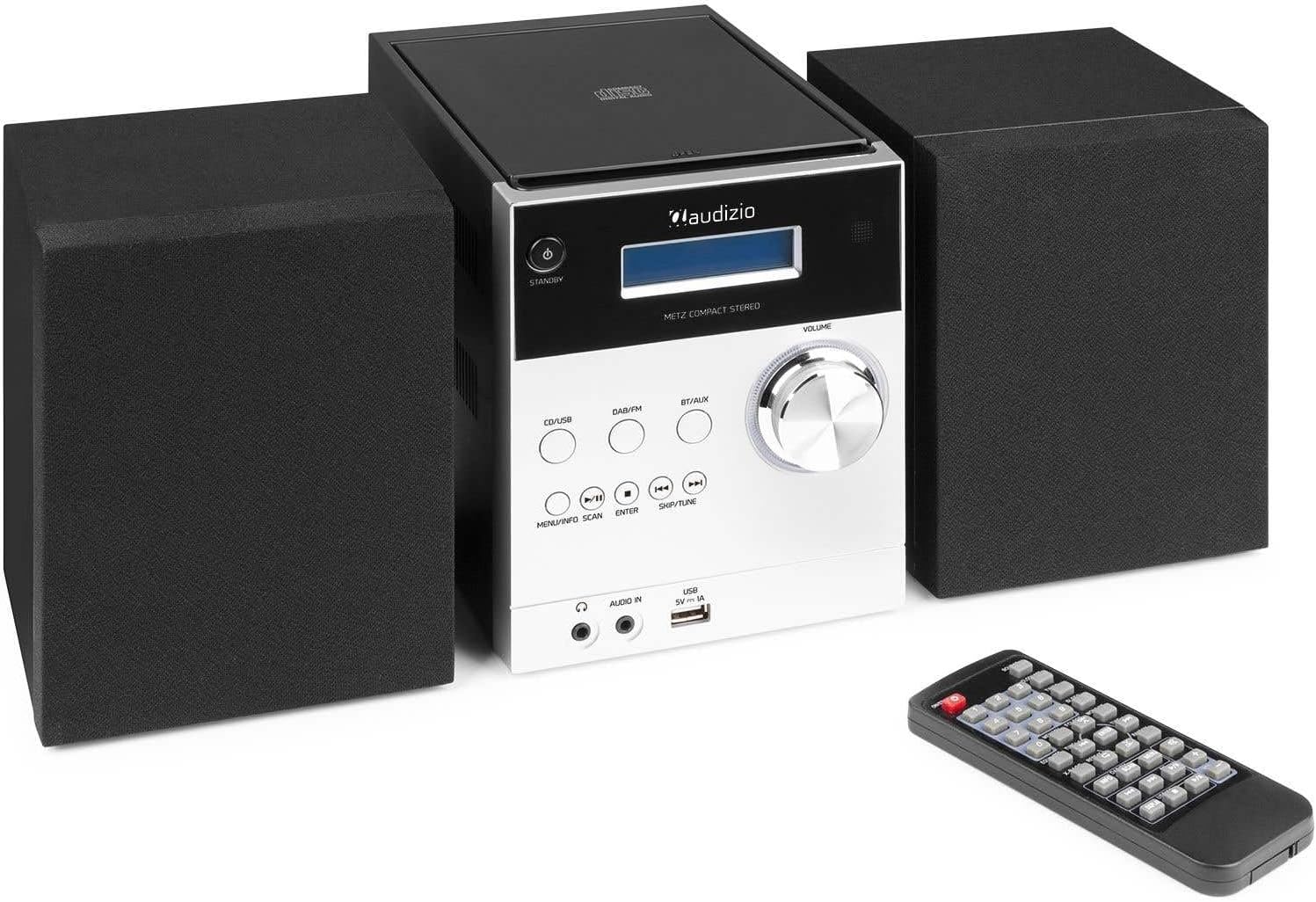
Imatge 4.1: The Audizio Metz Stereo System, including the main unit, two speakers, and the remote control.
4.1. Main Unit Front Panel

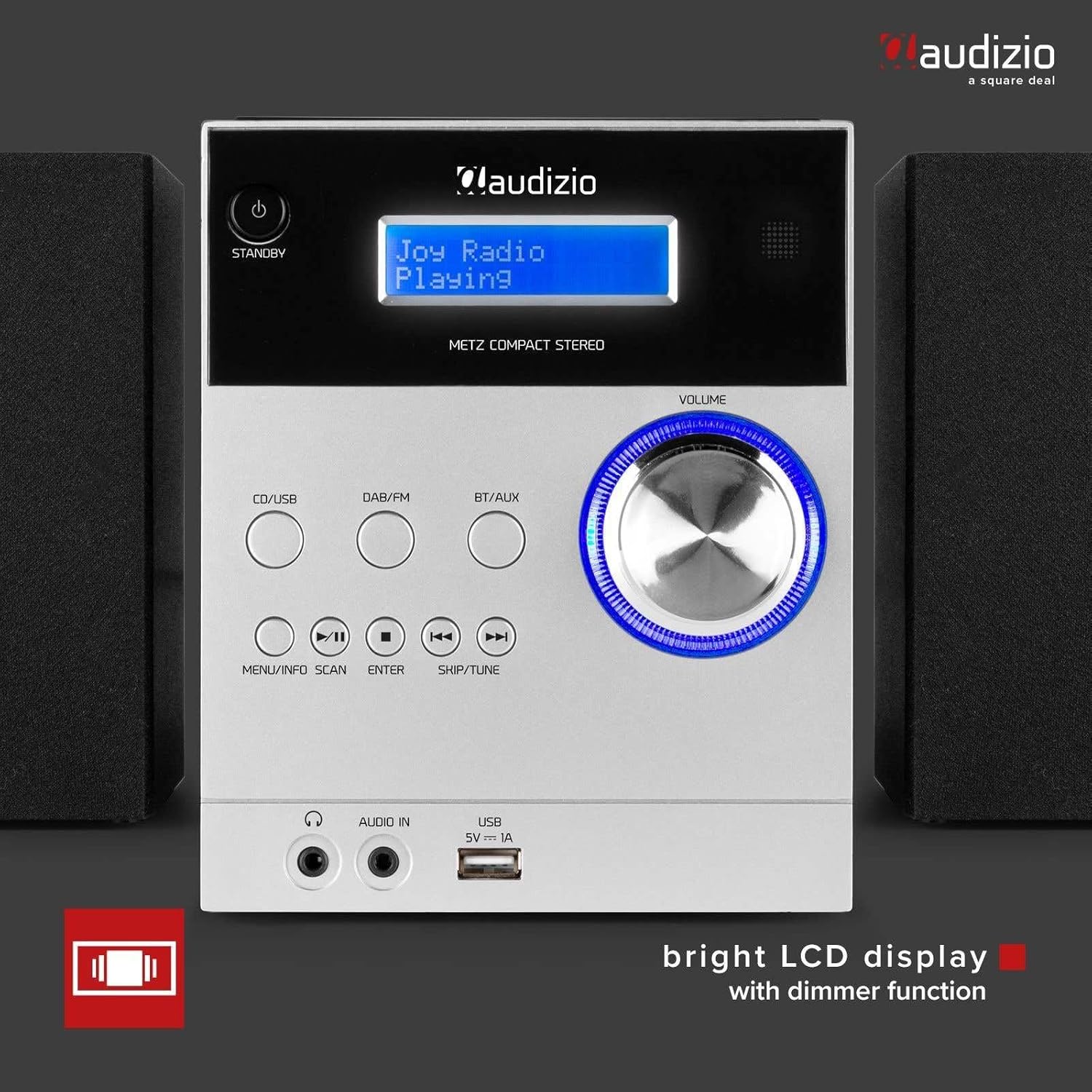
Imatge 4.2: Front panel of the main unit, showing the bright LCD display and control buttons.
- Botó STANDBY: Encén o apaga la unitat.
- CD/USB Button: Selects CD or USB source.
- Botó DAB/FM: Selects DAB+ or FM radio source.
- BT/AUX Button: Selects Bluetooth or AUX input source.
- MENU/INFO/SCAN Button: Accesses menu, displays information, or initiates scan.
- Botó ENTER: Confirma les seleccions.
- Botons SKIP/TUNE (◀◀ / ▶▶): Navigates tracks/stations or tunes frequency.
- PLAY/PAUSE Button (▶/██): Reprodueix o posa en pausa la reproducció.
- STOP Button (█): Atura la reproducció.
- Botó de VOLUM: Ajusta el nivell de volum.
- Pantalla LCD: Shows current status, track information, radio station, etc.
- Presa per a auriculars: Sortida de 3.5 mm per a auriculars.
- AUDIO IN (AUX) Jack: Entrada de 3.5 mm per a dispositius d'àudio externs.
- Port USB: Per connectar dispositius d'emmagatzematge USB per a la reproducció d'MP3.
4.2. Main Unit Rear Panel & Connections
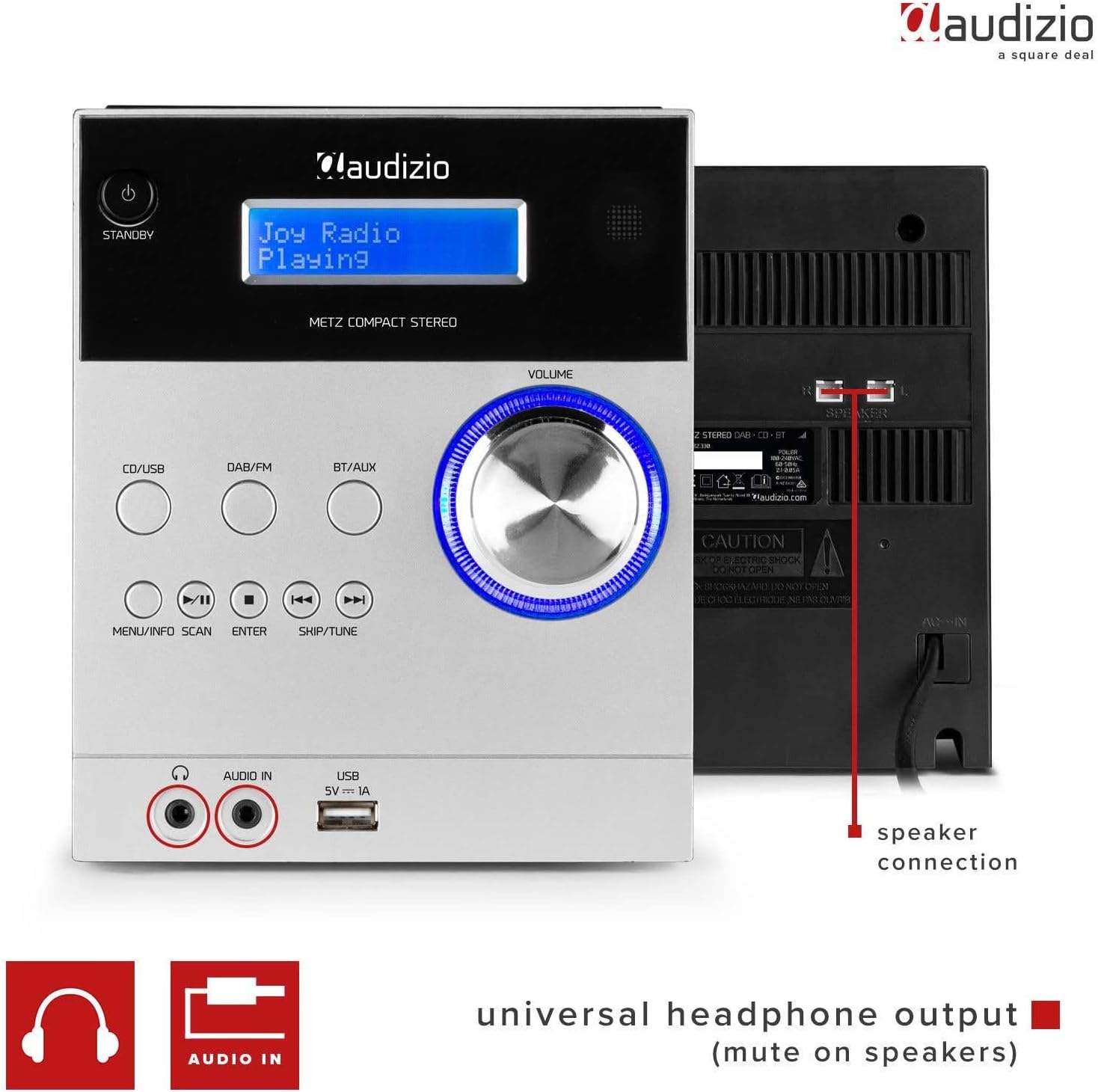
Imatge 4.3: Rear panel showing speaker connections and power input, along with front panel ports.
- Terminals d'ALTAVEUS: Connect the included Hi-Fi speakers.
- Entrada POWER: Connecteu l'adaptador de corrent proporcionat.
4.3. Top-Loading CD Player

Imatge 4.4: The top-loading CD compartment for disc playback.
The CD player is located on the top of the main unit. Gently open the lid to insert or remove a CD.
4.4. Control remot
Imatge 4.5: The remote control for convenient operation of the stereo system.
The remote control provides full functionality for operating the stereo system from a distance. Refer to the remote control diagram in the quick start guide for specific button functions.
5. Configuració
Follow these steps to set up your Audizio Metz Stereo System:
- Col·locació: Place the main unit and speakers on a stable, flat surface. For optimal stereo sound, position the speakers to the left and right of the main unit, facing the listening area.
- Connexió de l'altaveu: Connect the speaker wires from each speaker to the corresponding SPEAKER terminals on the rear of the main unit. Ensure correct polarity (+ to + and - to -).
- Connexió d'antena: For optimal DAB+ and FM radio reception, extend the telescopic antenna fully. If reception is poor, try repositioning the antenna or the unit.
- Connexió d'alimentació: Connect the power adapter to the DC IN port on the rear of the main unit, then plug the adapter into a wall outlet.
- Encesa inicial: Premeu el botó ESPERA button on the front panel or remote control to turn on the unit. The LCD display will light up.
6. Instruccions de funcionament
6.1. Funcionament general
- Encès/apagat: Premeu el botó ESPERA botó.
- Ajust de volum: Gira el VOLUM botó o feu servir el VOL +/- botons del comandament a distància.
- Selecció de la font: Premeu CD / USB, DAB/FM, o BT/AUX buttons on the front panel or remote to switch between input sources.
6.2. Ràdio DAB+
- Premeu el botó DAB/FM button to select DAB+ mode.
- The unit will automatically scan for available DAB+ stations upon first use. To initiate a manual scan, press and hold the ESCANEAR botó (o MENU/INFO/SCAN).
- Utilitza el SALTAR/SINTONITZAR botons per navegar per la llista d'emissores disponibles.
- Premeu ENTRAR per seleccionar una estació.
- Emmagatzematge de valors predeterminats: Tune to your desired station, then press and hold the MEMÒRIA button on the remote. Use the SALTAR/SINTONITZAR botons per seleccionar un número preestablert (1-10) i, a continuació, premeu ENTRAR per confirmar.
- Recordant presets: En mode DAB+, premeu el botó PRESET button on the remote, then use the number buttons or SALTAR/SINTONITZAR to select your desired preset.
6.3. Ràdio FM
- Premeu el botó DAB/FM botó repetidament per seleccionar el mode FM.
- Escaneig automàtic: Manteniu premut el botó ESCANEAR botó (o MENU/INFO/SCAN) to automatically scan and store available FM stations.
- Sintonització manual: Premeu el botó SALTAR/SINTONITZAR buttons briefly to fine-tune the frequency. Press and hold to auto-seek the next strong station.
- Emmagatzematge de valors predeterminats: Tune to your desired station, then press and hold the MEMÒRIA button on the remote. Use the SALTAR/SINTONITZAR botons per seleccionar un número preestablert (1-10) i, a continuació, premeu ENTRAR per confirmar.
- Recordant presets: En mode FM, premeu el botó PRESET button on the remote, then use the number buttons or SALTAR/SINTONITZAR to select your desired preset.
6.4. Mode Bluetooth

Imatge 6.1: The system ready for Bluetooth streaming from a mobile device.
- Premeu el botó BT/AUX button repeatedly to select Bluetooth mode. The display will show "Bluetooth" or "BT Pairing".
- On your mobile device (smartphone, tablet, etc.), enable Bluetooth and search for new devices.
- Select "Audizio Metz" from the list of available devices.
- Once paired, the unit will confirm the connection. You can now play music from your device, and it will stream wirelessly to the stereo system.
- Use your device or the system's controls (Play/Pause, Skip) to manage playback.
6.5. Reproductor de CD
- Premeu el botó CD / USB Premeu el botó repetidament per seleccionar el mode CD.
- Gently open the CD compartment lid on top of the main unit.
- Place a CD (label side up) onto the spindle and close the lid. The unit will read the CD.
- La reproducció normalment començarà automàticament. Si no, premeu el botó REPRODUCCIÓ/PAUSA botó.
- Utilitza el SALTAR/SINTONITZAR botons per saltar pistes.
- Premeu REPRODUCCIÓ/PAUSA fer una pausa, i STOP per aturar la reproducció.
- Repetició/Aleatori: Use the corresponding buttons on the remote control to activate repeat (single track/all) or random playback modes.
6.6. USB MP3 Player
- Inseriu una unitat flash USB que contingui MP3 files al port USB del panell frontal.
- Premeu el botó CD / USB button repeatedly to select USB mode. The unit will automatically scan and begin playing MP3 files.
- Utilitza el SALTAR/SINTONITZAR botons per navegar entre pistes.
- Premeu REPRODUCCIÓ/PAUSA fer una pausa, i STOP per aturar la reproducció.
- Navegació per carpetes: If your USB drive has folders, use the CARPETA buttons on the remote to navigate between them.
6.7. Entrada AUX
- Connecteu un dispositiu d'àudio extern (per exemple, un telèfon intel·ligent o un reproductor MP3) al ENTRADA D'ÀUDIO (AUX) connector del panell frontal mitjançant un cable d'àudio de 3.5 mm (no inclòs).
- Premeu el botó BT/AUX botó repetidament per seleccionar el mode AUX.
- Start playback on your external device. The audio will be routed through the stereo system.
- Adjust the volume using the system's VOLUM knob or the external device's volume control.
6.8. Sortida d'auriculars
Connecteu els auriculars al AURICULAR jack on the front panel. When headphones are connected, the speakers will automatically mute, allowing for private listening.
6.9. Clock, Sleep Timer & Alarm Function
Imatge 6.2: The system displaying clock information, indicating alarm and sleep timer capabilities.
- Configuració del rellotge: Refer to the detailed instructions in the full manual for setting the time. This is typically done via the MENÚ botó.
- Temporitzador de son: Premeu el botó DORMIR button on the remote repeatedly to cycle through sleep timer options (e.g., 15, 30, 60, 90 minutes, OFF). The unit will automatically turn off after the selected duration.
- Funció d'alarma: The unit features an alarm function. Consult the full manual for detailed steps on setting and activating the alarm, including alarm source (radio/buzzer) and volume.
7. Manteniment
7.1. Neteja de la unitat
- Desconnecteu sempre la unitat de la presa de corrent abans de netejar-la.
- Feu servir un drap suau, sec i sense borrissol per netejar les superfícies exteriors.
- No utilitzeu netejadors abrasius, ceres o dissolvents, ja que poden danyar l'acabat.
7.2. CD Lens Care
If the CD player experiences reading errors, the lens may be dirty. Use a commercially available CD lens cleaner disc to clean the lens. Do not touch the lens directly.
8. Solució De Problemes
If you encounter any issues with your Audizio Metz Stereo System, please refer to the following table for common problems and solutions.
| Problema | Causa possible | Solució |
|---|---|---|
| Sense poder | Power adapter not connected; Power outlet not working. | Assegureu-vos que l'adaptador de corrent estigui connectat correctament a la unitat i a una presa de corrent que funcioni. |
| Sense so | Volume too low; Speakers not connected; Headphones connected; Incorrect source selected. | Increase volume; Check speaker connections; Disconnect headphones; Select the correct input source. |
| Poor radio reception (DAB+/FM) | Antena no estesa; Senyal feble; Interferències. | Extend the telescopic antenna fully; Try repositioning the unit or antenna; Move away from other electronic devices. |
| Error de vinculació de Bluetooth | Bluetooth no habilitat al dispositiu; La unitat no està en mode d'emparellament; El dispositiu és massa lluny. | Ensure Bluetooth is enabled on your device; Select BT mode on the unit; Keep devices within 10 meters. |
| El CD/USB no es reprodueix | CD inserted incorrectly/dirty/scratched; USB format not supported; USB drive corrupted. | Reinsert CD correctly, clean it; Ensure USB is FAT32 format and contains MP3 files; Try a different USB drive. |
| El comandament a distància no funciona | Piles esgotades; Obstrucció entre el comandament a distància i la unitat; Comandament a distància no apuntat al sensor. | Replace remote control batteries; Remove any obstructions; Point remote directly at the unit's sensor. |
9. Especificacions
| Marca | Audizio |
| Model | Metz |
| Color | Alumini |
| Potència de sortida | 30W |
| DAB+ Presets | 10 |
| Presets FM | 10 |
| Versió Bluetooth | Yes (Bluetooth compatible) |
| Compatibilitat amb CD | CD, CD-R, CD-RW |
| Reproducció USB | Suport de format MP3 |
| Conector d'auriculars | 3.5 mm |
| Entrada de línia AUX | 3.5 mm |
| Font d'alimentació | 230Vac/50Hz |
| Dimensions de la unitat principal (amplada x alçada x profunditat) | 140 x 210 x 175 mm |
| Speaker Dimensions (per speaker, W x H x D) | 130 x 125 x 175 mm |
| Total Weight (set) | 2.5 kg |
10. Garantia i Suport
The Audizio Metz Stereo System comes with a standard manufacturer's warranty. For specific warranty terms and conditions, please refer to the warranty card included with your product or visit the official Audizio website. For technical support, troubleshooting assistance beyond this manual, or spare parts inquiries, please contact your retailer or the Audizio customer service department.
Disponibilitat de peces de recanvi: 2 Anys


