Introducció
This manual provides instructions for the Smartby Replacement Remote Control, designed for use with various RCA LED LCD HDTV models. This remote control requires no programming or pairing; simply install the batteries, and it is ready for immediate use.
Compatible RCA TV models include: LED42C45RQ, LED46C45RQ, LED50B45RQ, LED24G45RQ, LED28G45RQ, LED32G30RQ, LED40G45RQ, LED55C55R120Q, LED55G55R120Q.
Instruccions de configuració
Instal·lació de la bateria
The remote control operates on two (2) AAA alkaline batteries (not included).
- Localitzeu la tapa del compartiment de la bateria a la part posterior del comandament a distància.
- Premeu la pestanya i feu lliscar la tapa cap avall per obrir el compartiment.
- Insert two new 1.5V AAA alkaline batteries, ensuring the positive (+) and negative (-) terminals align correctly with the markings inside the compartment.
- Feu lliscar la tapa del compartiment de la bateria fins que faci clic de manera segura.
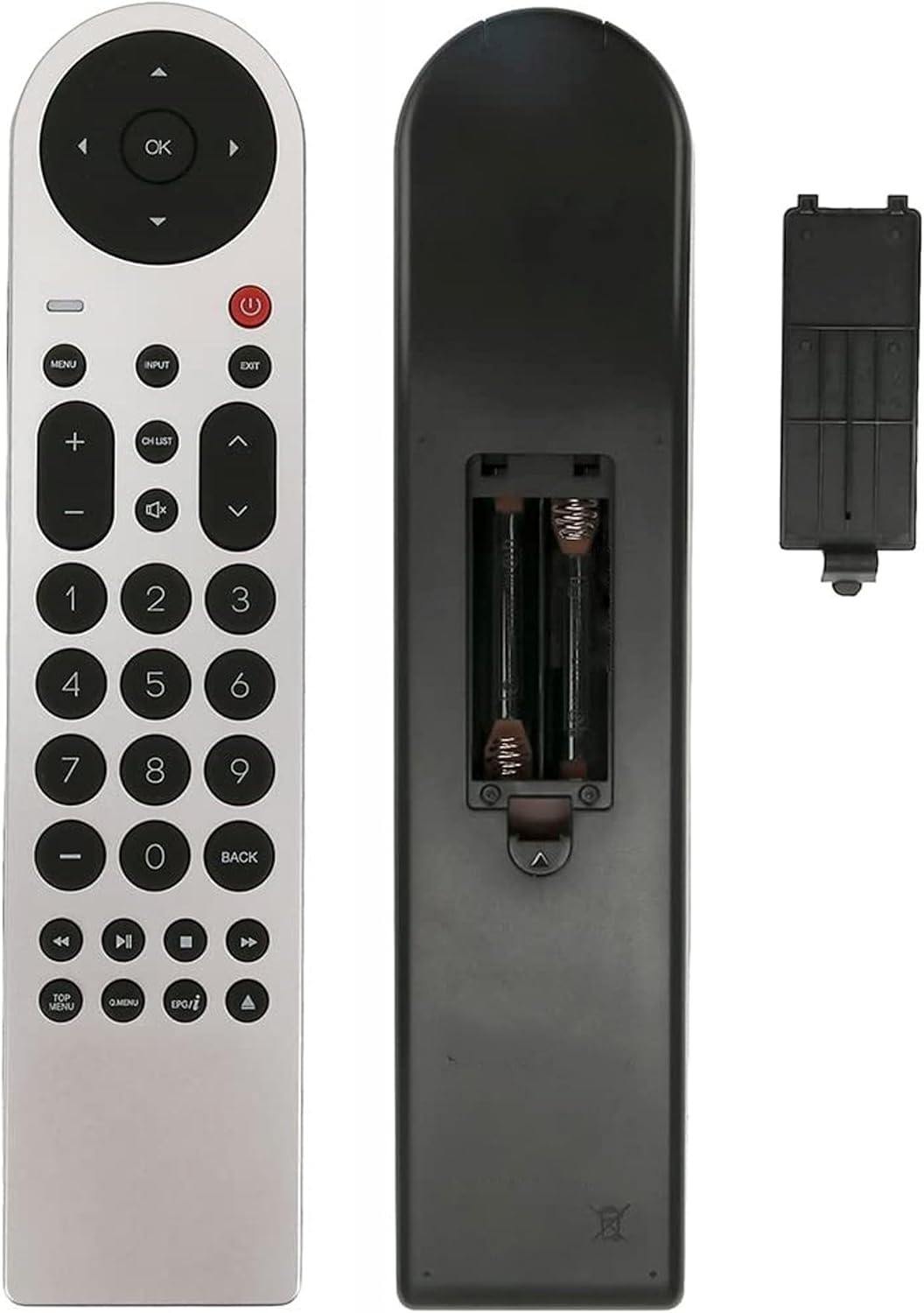
Imatge: Part posterior view of the Smartby remote control with the battery cover removed, revealing the two AAA battery slots. This illustrates the correct orientation for battery insertion.
Once batteries are installed, the remote control is ready for use with your compatible RCA TV without any additional programming.
Instruccions de funcionament
This section details the primary functions of the buttons on your Smartby remote control.

Imatge: Front complet view of the Smartby replacement remote control, displaying the layout of all buttons from the navigation cluster to the number pad and media controls.
S'han acabat les funcions del botóview
- Botó d'encendre (⏻): Encén o apaga el televisor.
- D'acord / Botons de navegació: The central circular pad for menu navigation. OK confirms selections. Up, Down, Left, Right arrows navigate.
- MENÚ: Accedeix al menú principal del televisor.
- ENTRADA: Selecciona la font d'entrada (per exemple, HDMI 1, AV).
- SORTIDA: Surt del menú actual o de la visualització en pantalla.
- Volum (+/-): Augmenta o disminueix el volum.
- Silencia (🔇): Silencia o activa l'àudio del televisor.
- Channel (CH LIST / ▲ / ▼): LLISTA CH displays the channel list. Up/Down arrows change channels.
- Teclat numèric (0-9): Introdueix directament els números de canal.
- ESQUENA: Torna a la pantalla o menú anterior.
- Media Playback Controls (◀◀, ▶▶, ■, ▶): Control playback functions like rewind, fast forward, stop, and play/pause.
- MENÚ PRINCIPAL: Accesses the top menu of a DVD/Blu-ray player (if connected).
- Q.MENU: Quick menu access.
- EPG / ▲: Electronic Program Guide (EPG) or additional function.
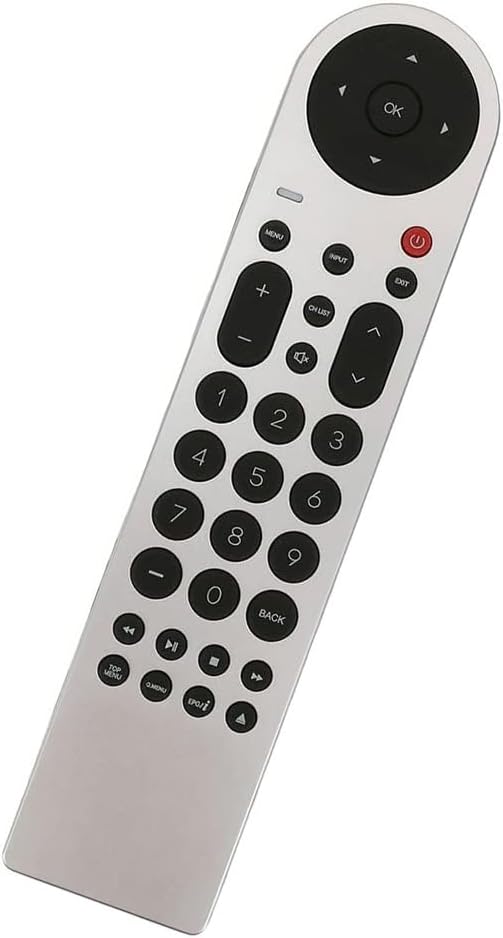

Image: Left: A detailed view of the upper control cluster, including power, menu, input, exit, volume, and channel buttons. Right: A detailed view of the lower control cluster, featuring media playback controls and special function buttons like TOP MENU, Q.MENU, and EPG.
Manteniment
- Neteja: Feu servir un drap suau i sec per netejar el comandament a distància. No utilitzeu netejadors líquids ni materials abrasius.
- Substitució de la bateria: Replace batteries when the remote control becomes unresponsive or its range decreases. Always replace both batteries at the same time with new 1.5V AAA alkaline batteries.
- Emmagatzematge: Si no feu servir el comandament a distància durant un període prolongat, traieu-ne les piles per evitar fuites i possibles danys.
Resolució de problemes
| Problema | Possible causa/solució |
|---|---|
| El control remot no funciona. |
|
| Els botons no responen o tenen retard. |
|
| Remote control only works at close range. |
|
Especificacions
| Característica | Detall |
|---|---|
| Número de model | SMTB-RCA-LE45RQ |
| Marca | Smartby |
| Dispositius compatibles | RCA LED LCD HDTVs (Specific models listed in Introduction) |
| Tecnologia de connectivitat | Infrarojos (IR) |
| Font d'alimentació | 2 piles alcalines AAA d'1.5 V |
| Dimensions del producte | 8.5 x 1.8 x 0.7 polzades (aproximadament) |
| Pes de l'article | 2.89 ounces (approximately, without batteries) |
Informació de garantia i suport
This product is a replacement remote control. For specific warranty details or technical support, please refer to the original purchase documentation or contact the retailer where the product was acquired. As a general guideline, ensure proper battery installation and usage as described in this manual for optimal performance.
For further assistance, please contact Smartby customer support through their official channels, if available.


