1. Introducció
Thank you for choosing the USX MOUNT TV Wall Mount. This manual provides essential information for the safe and correct installation, operation, and maintenance of your new TV wall mount. Please read these instructions thoroughly before installation and retain them for future reference.
2. Informació de seguretat
ADVERTIMENT: Failure to read and follow these instructions may result in serious personal injury, property damage, or voiding of your warranty. If you have any questions, please contact customer service.
- Assegureu-vos que la superfície de muntatge pugui suportar amb seguretat el pes combinat del suport i del televisor.
- No supereu la capacitat de càrrega màxima de 35 kg (77 lliures).
- This product is designed for installation on wood studs or solid concrete walls only. Do not install on drywall alone.
- Feu servir sempre un localitzador de muntants de fusta per localitzar-los amb precisió.
- Feu servir l'equip de seguretat adequat durant la instal·lació, inclosa la protecció ocular.
- Es recomana la instal·lació per dues persones per garantir la seguretat.
3. Contingut del paquet
Verify that all components are present and undamaged before beginning installation. If any parts are missing or defective, contact customer service.
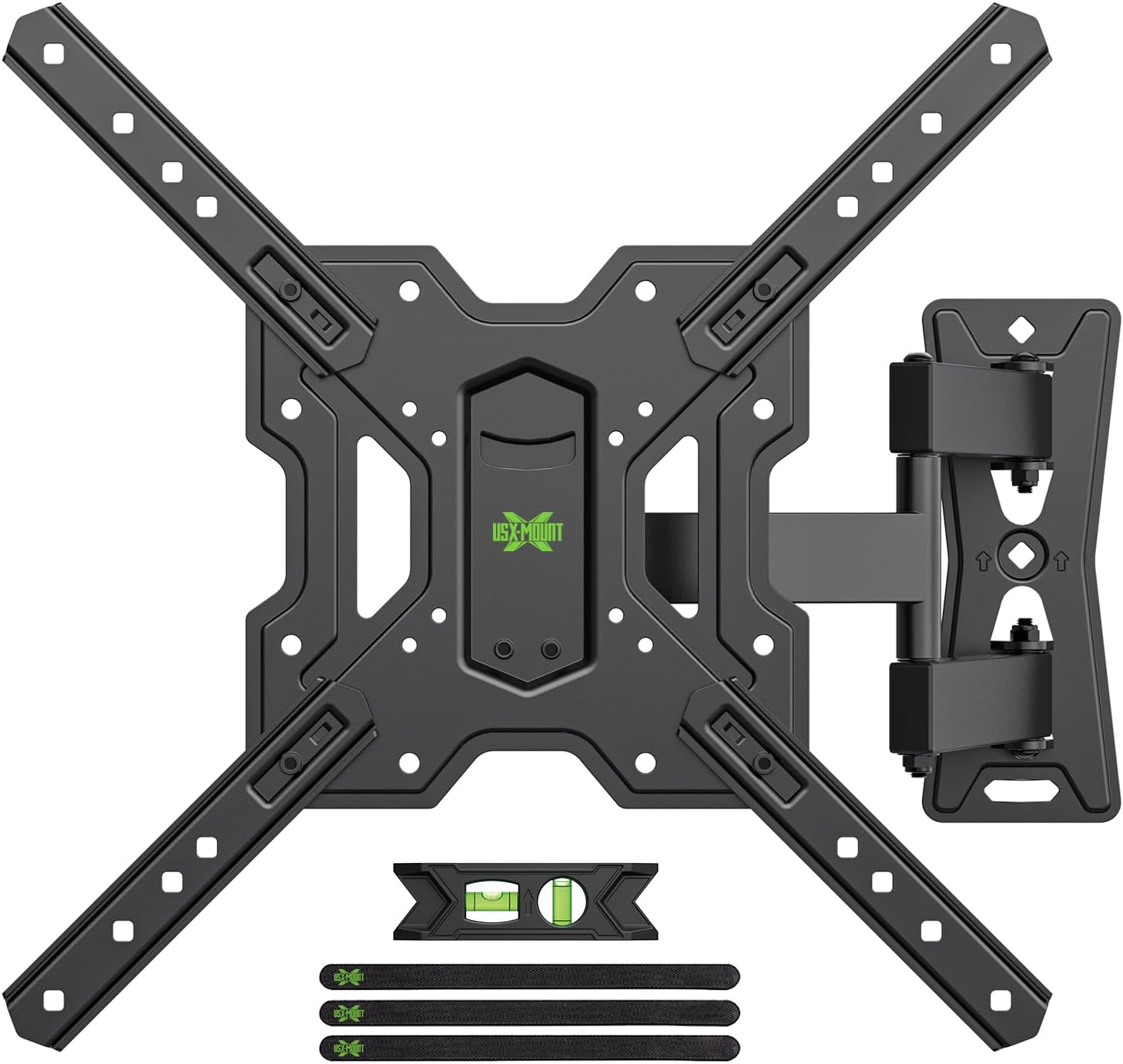
Figura 3.1: Acabatview of the USX MOUNT TV Wall Mount and all included accessories, such as the main mount assembly, VESA extension arms, bubble level, and cable ties.
Maquinari inclòs:
- Muntatge de la placa de paret
- TV Plate (VESA Adapter)
- Various screws, washers, and spacers for TV attachment
- Lag bolts and concrete anchors for wall attachment
- Nivell de bombolla
- Brides de cable
- Clau hexadecimal
4. Especificacions
| Característica | Especificació |
|---|---|
| Mides de TV compatibles | 26-55 polzades |
| Capacitat de càrrega màxima | 35 kg (77 lliures) |
| Compatibilitat VESA | 75x75mm, 100x100mm, 100x200mm, 200x100mm, 200x200mm, 150x150mm, 200x300mm, 200x400mm, 300x200mm, 300x300mm, 400x200mm, 400x300mm, 400x400mm |
| Angle d'inclinació | +5° a -15° |
| Angle de gir | ±90° (segons la mida del televisor) |
| Ajust de nivell | ±4° |
| Distància a la paret | 70 mm (mínim) a 480 mm (màx.) |
| Material | Acer |
| Color | Negre |

Figura 4.1: VESA compatibility chart and maximum load capacity for the mount. Always check your TV's VESA pattern before installation.

Figura 4.2: Visual representation of various VESA mounting patterns supported by the mount, indicating horizontal and vertical screw hole distances.
5. Instruccions d'instal·lació
Step 1: Attach TV Plate to TV
- Col·loqueu amb cura el televisor cara avall sobre una superfície suau i neta per evitar que es facin malbé la pantalla.
- Identifiqueu els forats de muntatge VESA a la part posterior del vostre televisor.
- Seleccioneu els cargols, les volanderes i els separadors adequats del kit de maquinari proporcionat que s'adaptin als forats de muntatge del televisor.
- Attach the TV plate (VESA adapter) to the back of your TV using the selected hardware. Ensure it is securely fastened but do not overtighten.
Pas 2: enganxeu la placa de paret a la paret
IMPORTANT: Determine your wall type before proceeding. This mount is suitable for wood stud walls and solid concrete walls.

Figura 5.1: Illustration of compatible wall types for installation: wood stud and solid concrete. Ensure your wall matches one of these types.
Per a parets amb entramats de fusta:
- Use a stud finder to locate the edges and center of the wood stud. Mark the center of the stud.
- Position the wall plate at your desired height and use the integrated bubble level to ensure it is perfectly horizontal. Mark the pilot hole locations.
- Drill pilot holes into the center of the stud at the marked locations. The drill bit size should be 5/32" (4 mm) and the depth approximately 2.36" (60 mm).
- Attach the wall plate to the wall using the provided lag bolts. Tighten securely with a wrench.
For Solid Concrete Walls:
- Position the wall plate at your desired height and use the integrated bubble level to ensure it is perfectly horizontal. Mark the pilot hole locations.
- Drill pilot holes into the concrete at the marked locations. The drill bit size should be 3/8" (10 mm) and the depth approximately 2.36" (60 mm).
- Introduïu els ancoratges de formigó als forats perforats. Colpegeu-los suaument amb un martell fins que quedin a ras de la superfície de la paret.
- Attach the wall plate to the wall using the provided lag bolts. Tighten securely with a wrench.
Step 3: Hang and Secure TV to Wall Plate
- With assistance, carefully lift the TV (with the TV plate attached) and hook it onto the wall plate.
- Ensure the TV is properly seated and centered on the wall plate.
- Fixeu el televisor a la placa de paret amb els cargols de seguretat o els mecanismes de bloqueig proporcionats. Això evita que es desprengui accidentalment.
Vídeo 5.1: A short demonstration of the installation process, including attaching the TV plate, mounting the wall plate, and hanging the TV. This video also briefly shows the leveling and tilting adjustments.
6. Instruccions d'ús (ajustos)
Your USX MOUNT TV Wall Mount offers various adjustments for optimal viewing.
Ajust d'inclinació:
The mount allows for a tilt range of +5° to -15°. To adjust the tilt:
- Locate the tilt adjustment knobs on the TV plate.
- Loosen the knobs to allow the TV to tilt freely.
- Adjust the TV to your desired vertical angle.
- Tighten the knobs to secure the TV in place.
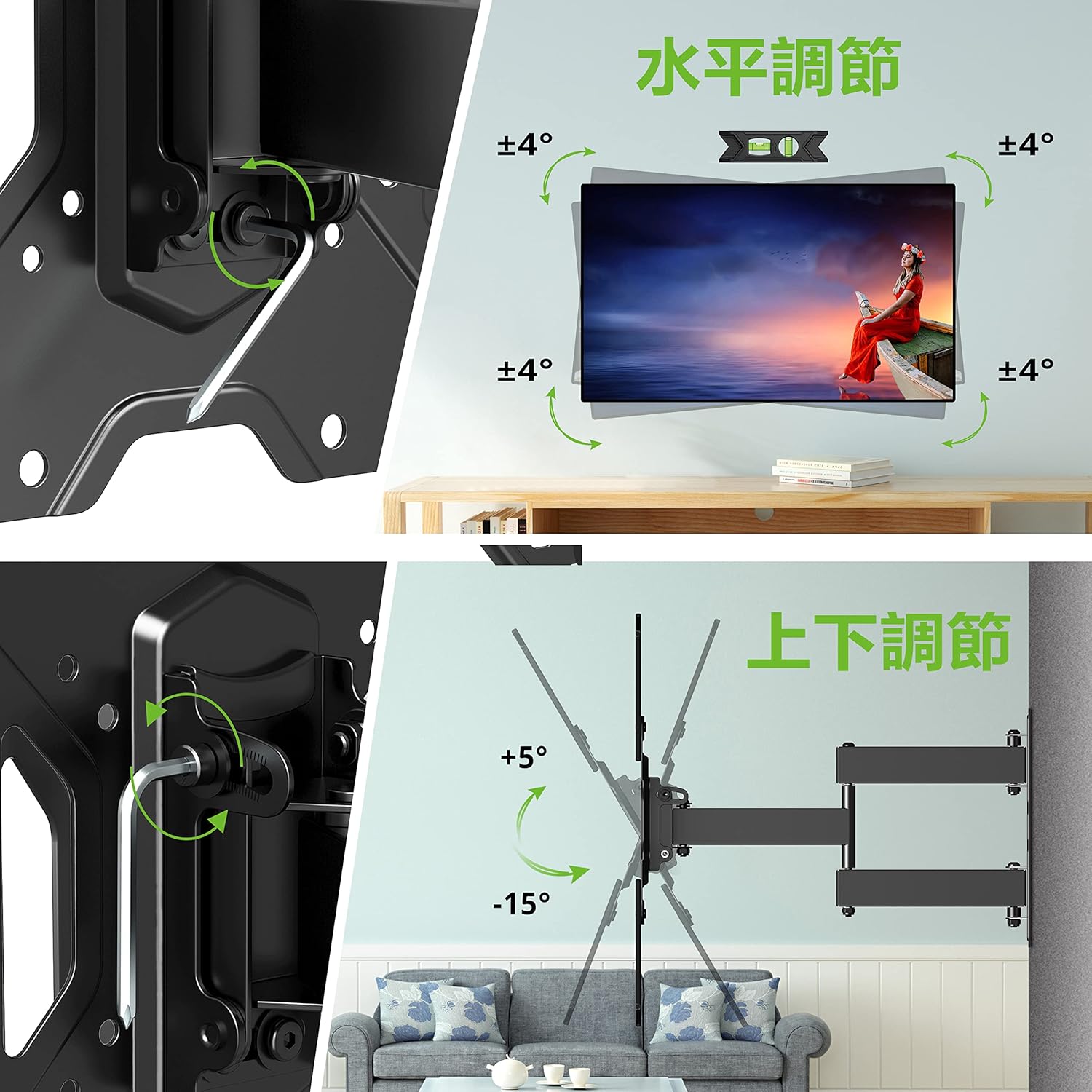
Figura 6.1: Visual guide for adjusting the horizontal level and vertical tilt of the TV. The top panel shows ±4° leveling, and the bottom panel shows +5° to -15° tilt.

Figura 6.2: This image illustrates the adjustable distance from the wall (70mm to 426mm) and the tilt angles (+5° backward, -15° forward) of the TV mount.
Ajust de gir:
The mount allows for a swivel of up to ±90° (left/right), depending on the size of your TV. To adjust the swivel:
- Gently push or pull the TV to the desired left or right angle.
- The friction joints will hold the TV in position.

Figura 6.3: This diagram demonstrates the ±90° swivel capability of the TV mount, allowing for flexible viewing angles from various positions in a room.
Ajust de nivell:
The mount allows for a level adjustment of ±4° after installation. To adjust the level:
- Use the provided hex key to loosen the leveling screws on the TV plate.
- Adjust the TV until it is perfectly level using the bubble level.
- Tighten the leveling screws to secure the TV in the desired horizontal position.
7. Manteniment
- Reviseu periòdicament tots els cargols i perns per assegurar-vos que romanen ajustats. Torneu a apretar-los si cal.
- Netegeu el suport amb un drap suau i sec. Eviteu netejadors o dissolvents abrasius.
- Ensure cables are managed neatly using the provided cable ties to prevent strain or damage.
8. Solució De Problemes
If you encounter any issues during or after installation, please refer to the following common solutions:
- Televisor no anivellat: Use the level adjustment feature as described in Section 6.
- La muntura se sent fluixa: Recheck all wall and TV attachment points and tighten any loose fasteners. Ensure the wall type is appropriate for installation.
- Dificultat per ajustar la inclinació/gir: Ensure all adjustment knobs/screws are sufficiently loosened before attempting to move the TV.
If the problem persists, contact USX MOUNT customer support.
9. Garantia i Suport
USX MOUNT provides a 10-year quality guarantee from the date of purchase. This warranty covers manufacturing defects and ensures the product's structural integrity under normal use.
For any questions, missing parts, or support needs, please contact USX MOUNT customer service. Our team is dedicated to providing assistance and ensuring your satisfaction.
Informació de contacte: Please refer to the contact details provided with your purchase or visit the official USX MOUNT weblloc.


