1. Introducció
This manual provides essential information for the installation, operation, and maintenance of your NVIDIA GeForce RTX 3090 Ti Founders Edition graphics card. Please read this manual thoroughly before proceeding with installation to ensure proper functionality and to prevent damage.
2. Què hi ha a la caixa
Verifiqueu que tots els components siguin presents i en bon estat en desembalar-los:
- NVIDIA GeForce RTX 3090 Ti Founders Edition Graphics Card
- Cable d'adaptador d'alimentació
3. Producte acabatview
The NVIDIA GeForce RTX 3090 Ti Founders Edition is a high-performance graphics processing unit designed for demanding computing tasks, including gaming, content creation, and professional applications. It features advanced cooling solutions and multiple display outputs.

Figura 3.1: Angle view of the NVIDIA GeForce RTX 3090 Ti Founders Edition graphics card, showcasinel seu disseny de doble ventilador i l'elegant acabat negre.

Figura 3.2: posterior view of the graphics card, showing the multiple display output ports (HDMI and DisplayPort) and the ventilation grille.
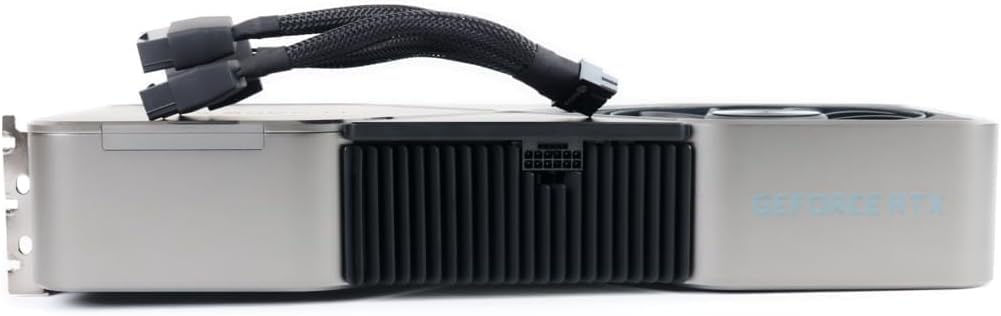
Figura 3.3: lateral view of the graphics card with the 12-pin power adapter cable connected, illustrating the power input location.
4. Configuració i instal·lació
Before installation, ensure your system's power supply unit (PSU) meets the recommended wattage for the RTX 3090 Ti. It is recommended to consult your motherboard's manual for PCIe slot compatibility and proper installation procedures.
- Sistema d'apagada: Apagueu completament l'ordinador i desconnecteu el cable d'alimentació de la presa de corrent.
- Obriu la carcassa del PC: Traieu el panell lateral de la caixa de l'ordinador per accedir a la placa base.
- Localitza la ranura PCIe: Identify an available PCIe x16 slot on your motherboard.
- Treure les cobertes de les ranures: Traieu les cobertes de les ranures d'expansió necessàries de la part posterior de la carcassa de l'ordinador que s'alineen amb la ranura PCIe escollida.
- Inseriu la targeta gràfica: Carefully align the graphics card with the PCIe slot and press down firmly until it is securely seated. Ensure the retention clip on the PCIe slot locks into place.
- Targeta segura: Secure the graphics card to the PC case using screws or the case's retention mechanism.
- Connectar l'alimentació: Connect the included power adapter cable to the graphics card's 12-pin power connector. Then, connect the other end(s) of the adapter cable to your PSU's PCIe power connectors (typically 8-pin or 6+2-pin). Ensure all connections are firm.
- Tanca la carcassa del PC: Substitueix el panell lateral de la caixa de l'ordinador.
- Connecta la pantalla: Connect your monitor(s) to the display output ports (HDMI or DisplayPort) on the graphics card.
- Engegar i instal·lar els controladors: Reconnect the power cable and power on your system. Once the operating system loads, download and install the latest graphics drivers from the official NVIDIA weblloc (nvidia.com/drivers).
5. Instruccions de funcionament
Once installed and drivers are updated, your NVIDIA GeForce RTX 3090 Ti Founders Edition is ready for use. The card will automatically manage its performance based on the demands of applications and games. For optimal performance, ensure your operating system and games are up-to-date.
- Tauler de control d'NVIDIA: Access the NVIDIA Control Panel (usually found in your system tray or desktop right-click menu) to customize display settings, 3D settings, and other graphics-related preferences.
- Experiència GeForce: Install NVIDIA GeForce Experience for automatic driver updates, game optimization, and features like ShadowPlay for recording gameplay.
- Monitorització de la temperatura: Monitor the GPU temperature using third-party software to ensure it operates within safe limits, especially during prolonged high-load activities.
6. Manteniment
Un manteniment regular ajuda a garantir la longevitat i el rendiment òptim de la targeta gràfica.
- Eliminació de pols: Periodically clean dust from the fans and heatsink using compressed air. Ensure the system is powered off and unplugged before cleaning. Hold the fan blades gently to prevent them from spinning rapidly during cleaning.
- Actualitzacions de controladors: Keep your graphics drivers updated to the latest version from the official NVIDIA weblloc.
- Flux d'aire del sistema: Assegura't d'un bon flux d'aire dins de la carcassa del teu PC per evitar l'acumulació de calor.
7. Solució De Problemes
Si teniu problemes, consulteu els passos habituals següents per a la resolució de problemes:
- Sense sortida de pantalla:
- Assegureu-vos que la targeta gràfica estigui completament col·locada a la ranura PCIe.
- Verifiqueu que tots els cables d'alimentació estiguin connectats correctament a la targeta gràfica i a la font d'alimentació.
- Check that the monitor cable is connected to the graphics card, not the motherboard's integrated graphics port.
- Prova un altre cable de pantalla o monitor.
- Problemes / accidents del controlador:
- Perform a clean installation of the latest NVIDIA drivers. Use Display Driver Uninstaller (DDU) in Safe Mode to remove old drivers before installing new ones.
- Comproveu si hi ha conflictes amb altres programes.
- Sobreescalfament:
- Ensure proper case airflow and fan operation.
- Clean dust from the graphics card's heatsink and fans.
- Verify ambient room temperature is not excessively high.
- Problemes de rendiment:
- Ensure your system meets the minimum requirements for the applications/games you are running.
- Comproveu si hi ha processos en segon pla que consumeixen recursos del sistema.
- Verify that the graphics card is running at its expected clock speeds (can be monitored with third-party tools).
8. Especificacions
Key technical specifications for the NVIDIA GeForce RTX 3090 Ti Founders Edition:
| Característica | Detall |
|---|---|
| Marca | NVIDIA |
| Número de model | 9001G1362505000 |
| Coprocessador gràfic | NVIDIA GeForce RTX 3090 |
| Mida de la RAM de la targeta gràfica | 24 GB |
| Resolució de pantalla màxima | 3840 x 2160 |
| Interfície de sortida de vídeo | HDMI (and DisplayPort, implied by images) |
| Pes de l'article | 7.08 lliures |
| Dimensions del producte (LxWxH) | 12 x 4 x 0.1 polzades |
9. Garantia i Suport
Per obtenir informació sobre la garantia i assistència tècnica, consulteu la pàgina oficial de NVIDIA. weblloc web o poseu-vos en contacte amb el servei d'atenció al client. Conserveu el comprovant de compra per a reclamacions de garantia.
- Plans de protecció: Additional protection plans may be available from your retailer. For example, a 4-Year Protection Plan or a monthly Complete Protect plan.
- Política de devolució: Standard return policies typically allow for refund/replacement within 30 days of purchase, subject to retailer terms.
- Suport oficial: Visita nvidia.com/support for drivers, FAQs, and contact options.


