1. Introducció
This manual provides essential instructions for setting up, operating, and maintaining your Xiaomi Redmi 10C smartphone. Please read this manual thoroughly to ensure proper usage and to maximize the device's capabilities.

Imatge 1.1: Davant i darrere view of the Xiaomi Redmi 10C smartphone.
2. Informació de seguretat
- Do not use the device in environments with extreme temperatures.
- Eviteu exposar el dispositiu a l'aigua o a una humitat excessiva.
- Utilitzeu només carregadors i accessoris aprovats pel fabricant.
- No intenteu desmuntar o reparar el dispositiu vosaltres mateixos.
- Mantingueu el dispositiu allunyat de dispositius mèdics per evitar interferències.
- Dispose of batteries and electronic waste responsibly according to local regulations.
3. Guia de configuració
3.1. Què hi ha a la caixa
Your Xiaomi Redmi 10C package includes the following items:
- Telèfon intel·ligent Xiaomi Redmi 10C
- Carregador de paret de 10 W
- Cable USB-C
- Eina d'expulsió de la safata SIM
- Fast Car Charger (as part of bundle)
3.2. Inserció de la targeta SIM i la targeta MicroSD
- Localitza la safata de la targeta SIM al lateral del dispositiu.
- Introduïu l'eina d'expulsió de la safata de la SIM al forat petit que hi ha al costat de la safata i premeu suaument fins que la safata surti.
- Place your Nano-SIM cards (up to two) and/or a microSD card into the designated slots on the tray. Ensure the gold contacts face downwards.
- Torneu a inserir la safata amb cura al dispositiu fins que quedi alineada amb el lateral.

Image 3.2.1: Location of the SIM card tray on the left side of the device.
3.3. Engegada i càrrega inicials
- To power on, press and hold the Power button located on the right side of the device until the Xiaomi logo appears.
- Seguiu les instruccions que apareixen a la pantalla per completar la configuració inicial, inclosa la selecció d'idioma, la connexió Wi-Fi i la configuració del compte de Google.
- To charge the device, connect the USB-C cable to the charging port at the bottom of the phone and the other end to the 10W wall charger. Plug the charger into a power outlet.
- The device supports up to 18W fast charging, but the included charger is 10W. For faster charging, an 18W compatible charger (not included) can be used.
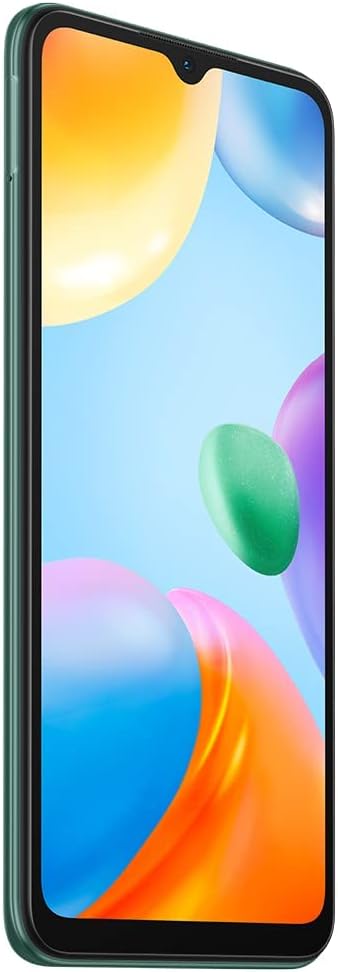
Image 3.3.1: Power and volume buttons located on the right side of the device.

Image 3.3.2: Bottom of the device with USB-C charging port and 3.5mm audio jack.
4. Instruccions de funcionament
4.1. Navegació bàsica
- Pantalla tàctil: Interact with the device by tapping, swiping, pinching, and spreading on the 6.71-inch display.
- Botó d'encesa: Premeu per activar/reposar la pantalla. Mantingueu premut per apagar-la o reiniciar-la.
- Botons de volum: Ajusta el volum multimèdia, el volum de les trucades i el volum de les notificacions.
4.2. Ús de la càmera
The Redmi 10C features a 50MP main camera, a 2MP depth camera, and a 5MP front camera.
- Obriu l'aplicació Càmera des de la pantalla d'inici o des del calaix d'aplicacions.
- Seleccioneu el mode desitjat (Foto, Retrat, Vídeo, etc.).
- Toqueu el botó de l'obturador per capturar una foto o iniciar/aturar la gravació de vídeo.
- Canvia entre la càmera frontal i la posterior amb la icona de commutació de la càmera.

Image 4.2.1: Rear camera module with 50MP main camera and fingerprint sensor.
4.3. Connectivitat
- Dades mòbils: Access 4G LTE networks. Ensure your SIM card is active and mobile data is enabled in Settings.
- Wi-Fi: Connecteu-vos a xarxes sense fil mitjançant Configuració > Wi-Fi.
- Bluetooth: Emparella amb dispositius Bluetooth com ara auriculars o altaveus a través de Configuració > Bluetooth.
- GPS: El dispositiu admet GPS, AGPS, GLONASS, Beidou i Galileo per als serveis de localització.
4.4. Característiques de seguretat
- Sensor d'empremtes dactilars posterior: Register your fingerprints in Settings > Password & Security to unlock the device or authorize purchases. The sensor is integrated into the rear camera module.
- Desbloqueig facial amb IA: Set up face recognition in Settings > Password & Security for convenient unlocking.
5. Manteniment
5.1. Neteja del dispositiu
Feu servir un drap suau i sense borrissol per netejar suaument la pantalla i la carcassa del telèfon. Eviteu utilitzar productes químics agressius o materials abrasius.
5.2. Actualitzacions de programari
Regularly check for system updates to ensure optimal performance and security. Go to Settings > About phone > MIUI version to check for updates.
5.3. Cura de la bateria
- Avoid fully discharging the 5000mAh battery frequently.
- Do not expose the device to high temperatures, as this can degrade battery life.
- Use the provided charger or a certified 18W fast charger for efficient charging.
5.4. Gestió de l'emmagatzematge
The device comes with 64GB of internal storage and supports expandable storage up to 1TB via a microSD card. Regularly manage your files i aplicacions per alliberar espai i mantenir el rendiment.
6. Solució De Problemes
6.1. Problemes comuns i solucions
| Problema | Possible solució |
|---|---|
| El dispositiu no s'encén | Assegureu-vos que la bateria estigui carregada. Premeu i manteniu premut el botó d'engegada durant almenys 10 segons. |
| Senyal de xarxa pobre | Check SIM card insertion. Restart the device. Verify network settings in Settings > SIM cards & mobile networks. |
| La bateria s'esgota ràpidament | Close unused apps. Reduce screen brightness. Check for background app activity in battery settings. |
| Les aplicacions es bloquegen o es bloquegen | Esborra la memòria cau de l'aplicació (Configuració > Aplicacions > Gestiona aplicacions > [Nom de l'aplicació] > Esborra dades). Actualitza les aplicacions. Reinicia el dispositiu. |
6.2. Restabliment de fàbrica
Si es produeixen problemes persistents, pot ser necessari restablir les dades de fàbrica. Avís: Això esborrarà totes les dades del dispositiu. Fes una còpia de seguretat de les dades importants abans de continuar.
- Ves a Configuració > Quant al telèfon > Restabliment de fàbrica.
- Seguiu les indicacions de la pantalla per confirmar el restabliment.
7. Especificacions
| Característica | Detall |
|---|---|
| Model | Redmi 10C |
| Processador | Snapdragon® 680 (6nm, Octa-core, up to 2.4GHz) |
| Mostra | 6.71" Dot Drop display, 1650 x 720 HD+ |
| RAM | 4 GB |
| Emmagatzematge intern | 64 GB (UFS 2.2) |
| Emmagatzematge ampliable | Up to 1 TB via microSD |
| Càmera posterior | 50MP main (f/1.8), 2MP depth (f/2.4) |
| Càmera frontal | 5MP |
| Bateria | 5000 mAh (tipus) |
| Carregant | Supports 18W fast charging (10W charger included) |
| Sistema operatiu | MIUI 13 basat en Android 11 |
| Connectivitat | 4G LTE, Wi-Fi, Bluetooth, GPS, AGPS, GLONASS, Beidou, Galileo |
| Jack d'àudio | 3.5 mm |
| Seguretat | Sensor d'empremta digital posterior, desbloqueig facial amb IA |
| Dimensions | 6.68 x 3.01 x 0.33 polzades |
| Pes | 6.7 unces (190 grams) |
8. Garantia i Suport
Per obtenir informació sobre la garantia, consulteu la targeta de garantia inclosa amb el producte o visiteu el lloc web oficial de Xiaomi. website. For technical support, contact Xiaomi customer service through their official channels.
Botiga oficial de Xiaomi: Botiga Xiaomi a Amazon


