Introducció
Gràcies per la compraasing the Ysametp Mini Projector M10. This portable video projector is designed to provide a high-quality home theater experience with its 1080P Full HD support and 10000 Lux LED light source. It features dual built-in stereo speakers with an SRS sound system for immersive audio. Its compact size and multi-connection capabilities make it ideal for various entertainment and presentation needs. Please read this manual thoroughly before operating the projector to ensure proper use and maintenance.
Informació de seguretat
To ensure safe operation and prolong the lifespan of your projector, please observe the following safety precautions:
- No bloquegeu les obertures de ventilació. Assegureu-vos que hi hagi un flux d'aire adequat al voltant del projector per evitar el sobreescalfament.
- Do not expose the projector to rain or moisture to avoid electric shock or fire.
- No obriu el projector casing. Demaneu totes les tasques de manteniment a personal de servei qualificat.
- Feu servir només l'adaptador de corrent que s'inclou amb el projector.
- Col·loqueu el projector sobre una superfície estable i plana per evitar que caigui.
- Eviteu l'exposició directa dels ulls a la lent del projector quan elamp està activat.
- Desendolleu el projector de la presa de corrent durant tempestes o quan no l'utilitzeu durant períodes prolongats.
Contingut del paquet
Si us plau, comproveu el contingut del paquet en desempaquetar-lo:
- 1 x Ysametp Mini Projector M10
- 1 x cable HDMI
- 1 x 3-in-1 AV Line
- 1 x cable d'alimentació
- 1 x trípode
- 1 x Drawstring Backpack
- 1 x comandament a distància (piles no incloses)
- 1 x Manual d'usuari

Producte acabatview
Familiarize yourself with the projector's components and connection ports.

Ports d'entrada/sortida:
- Port HDMI: Connect to devices like TV sticks, laptops, gaming consoles.
- Port USB: Connecteu unitats USB per a la reproducció de contingut multimèdia.
- Ranura per a targetes TF: Insert TF cards for media playback.
- Port VGA: Connect to computers or laptops.
- Port AV: Connect to older devices like DVD players using the 3-in-1 AV cable.
- Conector d'àudio de 3.5 mm: Connecteu auriculars o altaveus externs.
Configuració
1. Col·locació i mida de la pantalla
Position the projector on a flat, stable surface. The projection size can range from 32 inches to 200 inches, with an optimal projection distance between 3.6 feet and 16.4 feet.

2. Connexió d'alimentació
Connect the supplied power cord to the projector's power input and then plug it into a power outlet.
3. Ajust de l'enfocament i la distorsió trapezoidal
After powering on, adjust the focus and keystone knobs located on top of the projector to achieve a clear and rectangular image. The focus ring adjusts image sharpness, while the keystone correction corrects trapezoidal distortion if the projector is not perfectly perpendicular to the screen.
Instruccions de funcionament
1. Encendre/apagar
- Encendre: Premeu el botó d'encesa del projector o del comandament a distància.
- Apagar: Press the power button again. The projector will go through a shutdown sequence.
2. Selecció de la font d'entrada
Use the "Source" button on the remote control or the projector's control panel to select the desired input source (HDMI, USB, TF, VGA, AV).
3. Dispositius de connexió
- HDMI: Connect an HDMI cable from your device (e.g., TV Stick, laptop, game console) to the projector's HDMI port.
- Targeta USB/TF: Insert a USB drive or TF card into the respective port. The projector will automatically detect the media or prompt you to select it.
- VGA: Connect a VGA cable from your PC/laptop to the projector's VGA port.
- DE: Use the provided 3-in-1 AV cable to connect to devices with AV output.
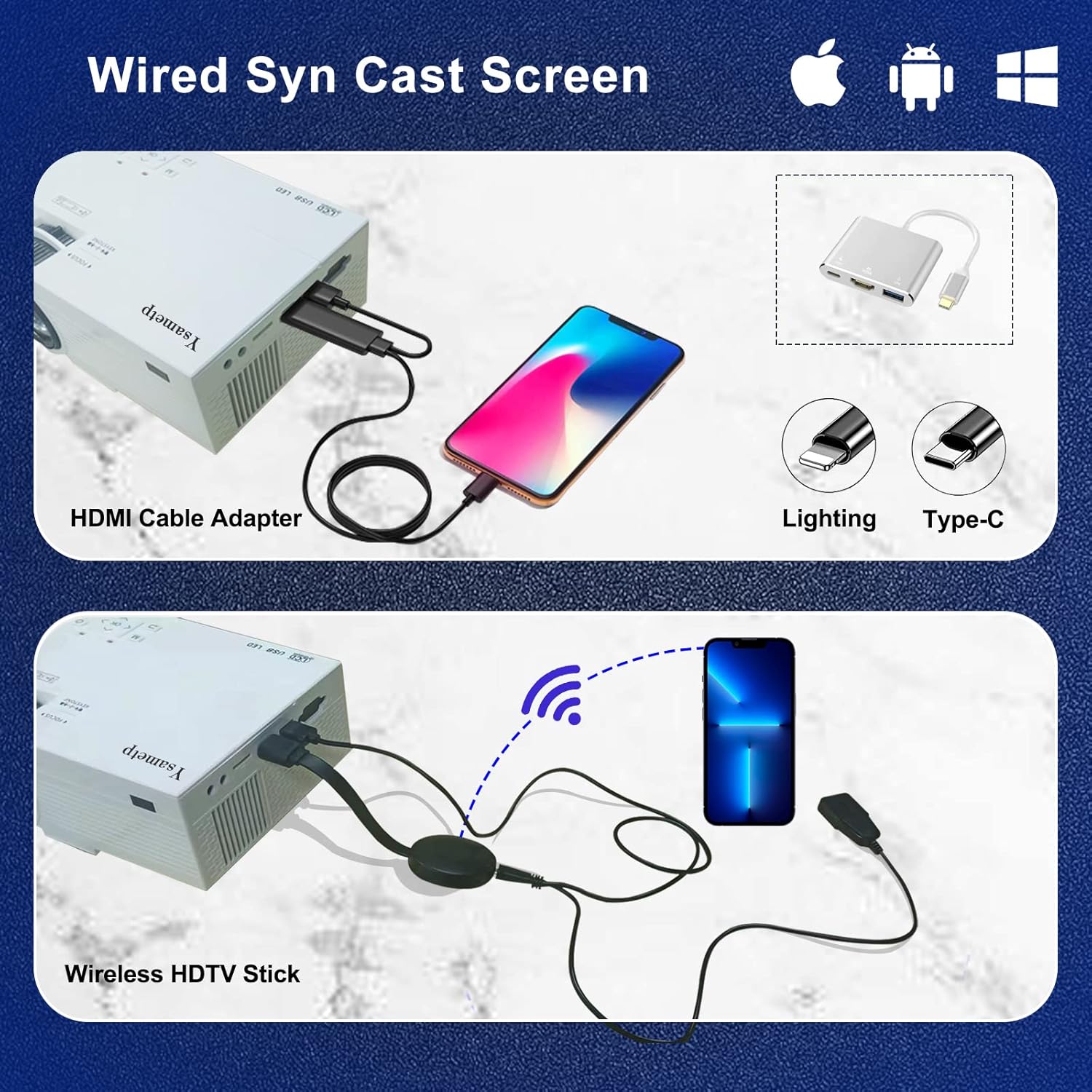
4. Wired Screen Mirroring (for Smartphones)
To mirror your smartphone screen, you will need an HDMI adapter (e.g., Lightning to HDMI for iPhone, USB-C to HDMI for Android) or a Miracast dongle/TV stick (like Roku, Fire TV Stick).

5. Sortida d'àudio
The projector has dual built-in stereo speakers. For external audio, connect headphones or external speakers to the 3.5mm audio jack.

Manteniment
1. Neteja
- Lent: Feu servir un drap suau i sense borrissol dissenyat específicament per a lents òptiques. No utilitzeu productes de neteja abrasius.
- Casing: Wipe the projector's exterior with a soft, dry cloth. Do not use liquid or aerosol cleaners.
- Ventilació: Regularly check and clean the ventilation openings to prevent dust buildup, which can affect cooling performance.
2. Emmagatzematge
When not in use, store the projector in a cool, dry place, away from direct sunlight and extreme temperatures. Use the provided drawstring backpack for protection during storage or transport.
3. LED Lifespan
The built-in LED light source is designed to support up to 55,000 hours of use, providing long-lasting performance.
Resolució de problemes
| Problema | Possible causa/solució |
|---|---|
| Cap imatge a la pantalla. |
|
| La imatge és borrosa. |
|
| Image is trapezoidal. |
|
| Sense so. |
|
| El comandament a distància no funciona. |
|
Especificacions
| Característica | Detall |
|---|---|
| Marca | Ysametp |
| Model | M10 |
| Tecnologia de visualització | LCD |
| Resolució nativa | 1920 x 1080 Pixels (Full HD Supported) |
| Brillantor de la imatge | 11000 lux |
| Relació de contrast de la imatge | 10000:1 |
| Relació d'aspecte | 4:3 |
| Mida de projecció | 32 - 200 polzades |
| Distància de projecció | 3.6 m - 16.4 m |
| Vida útil del LED | 55,000 hores |
| Nivell de soroll | 31 dB |
| Wattage | 60 watts |
| Interfície del maquinari | VGA, USB, HDMI, 3.5mm Audio, TF Card |
| Dimensions (L x A x A) | 23.88 x 15.49 x 8.13 cm |
| Pes | 975.22 g (aprox. 2.15 lliura) |
Garantia i Suport
Ysametp provides a 3 anys de garantia del producte for the Mini Projector M10.
If you encounter any problems or have questions regarding your projector, please do not hesitate to contact our customer support. Refer to the contact information provided on the product packaging or the official Ysametp weblloc d'assistència.


