1. Introducció
This manual provides detailed instructions for the setup, operation, and maintenance of your KECAG 10.1 Inch Digital Picture Frame. Please read this manual thoroughly before using the device to ensure proper functionality and to maximize your user experience. Keep this manual for future reference.
2. Producte acabatview
2.1 Característiques clau
- 10.1 Inch 1080P HD IPS Screen: Features a 1920x1080 resolution with a 180° wide-angle IPS display for clear viewdes de diversos angles.
- Reproducció multimèdia: Supports photo slideshows, video playback, and music playback.
- Sensor de moviment: Automatically turns the frame on/off based on detected movement to conserve energy.
- Timing On/Off Function: Allows scheduled power on and off times.
- Versatile Media Support: Compatible with SD cards and USB flash drives.
- Interfície fàcil d'utilitzar: Simple main menu for easy navigation.
- Comandament a distància: Provides convenient operation from a distance.
- Funcions addicionals: Includes calendar and alarm features.
2.2 Contingut del paquet
- KECAG 10.1 Inch Digital Picture Frame
- Unitat flash USB de 32 GB
- Control remot
- Adaptador d'alimentació
- Manual d'usuari

Figura 2.2.1: The KECAG 10.1 Inch Digital Picture Frame displaying a family photo, accompanied by its remote control.
3. Configuració
3.1 Connexió d'alimentació
- Locate the power adapter included in the package.
- Connect the small end of the power adapter cable to the DC IN port on the back of the digital picture frame.
- Connecteu l'altre extrem de l'adaptador de corrent a una presa de corrent estàndard.
- The frame will automatically power on or enter standby mode.
3.2 Inserting Media (USB Drive or SD Card)
The digital picture frame supports both USB flash drives and SD cards for media playback.
- Identify the USB port and SD card slot on the side or back of the frame.
- For a USB drive: Carefully insert the USB flash drive into the USB port.
- For an SD card: Insert the SD card into the SD card slot with the metal contacts facing down, until it clicks into place.
- Ensure the media is inserted correctly to avoid damage.

Figura 3.2.1: Illustrated steps for connecting media (USB/SD card) and power to the digital picture frame.
3.3 Initial Power On and Language Settings
- Once powered on, the frame may display a language selection screen.
- Use the remote control's navigation buttons (Up/Down/Left/Right) to select your preferred language.
- Premeu el botó ENTRAR botó per confirmar la selecció.
4. Instruccions de funcionament
4.1 Funcions de control remot
The remote control allows for convenient navigation and setting adjustments. Ensure the remote is aligned with the infrared sensor on the frame during use.
- MENÚ: Access the main menu or return to the previous menu.
- FOTO: Directly enter photo playback mode.
- MÚSICA: Directly enter music playback mode.
- PEL·LÍCULA: Directly enter video playback mode.
- SORTIDA: Exit current function or menu.
- ENTRAR: Confirm selection or play/pause media.
- CONFIGURACIÓ: Accedir a la configuració del sistema.
- Botons de navegació (amunt/avall/esquerra/dreta): Navegueu pels menús i opcions.
- VOL + / VOL-: Adjust volume during video or music playback.
4.2 Navegació al menú principal
From the main menu, you can select different functions:
- Imatge: View photos in a slideshow.
- Música: Reprodueix àudio files.
- Calendari: Display calendar and set alarms.
- Configuració: Configure device preferences.

Figura 4.2.1: The digital picture frame's interface showing options for Calendar, Photo/Video, and Music playback.
4.3 Photo Playback
- Al menú principal, seleccioneu Imatge o premeu el botó FOTO botó del comandament a distància.
- The frame will automatically start a slideshow of photos found on the inserted media.
- Ordre de reproducció: In settings, you can choose between Shuffle, Sequential, or Repeat All.
- Efectes de transició: Select from various effects like Up/Down, Mosaic, Left/Right, or Random.
- Imatge Preview: Access a thumbnail view of your photos.
- Rotació de la imatge: Adjust the orientation of images (vertical/horizontal).
- Brillantor de la pantalla: Adjust the display brightness in the settings menu.
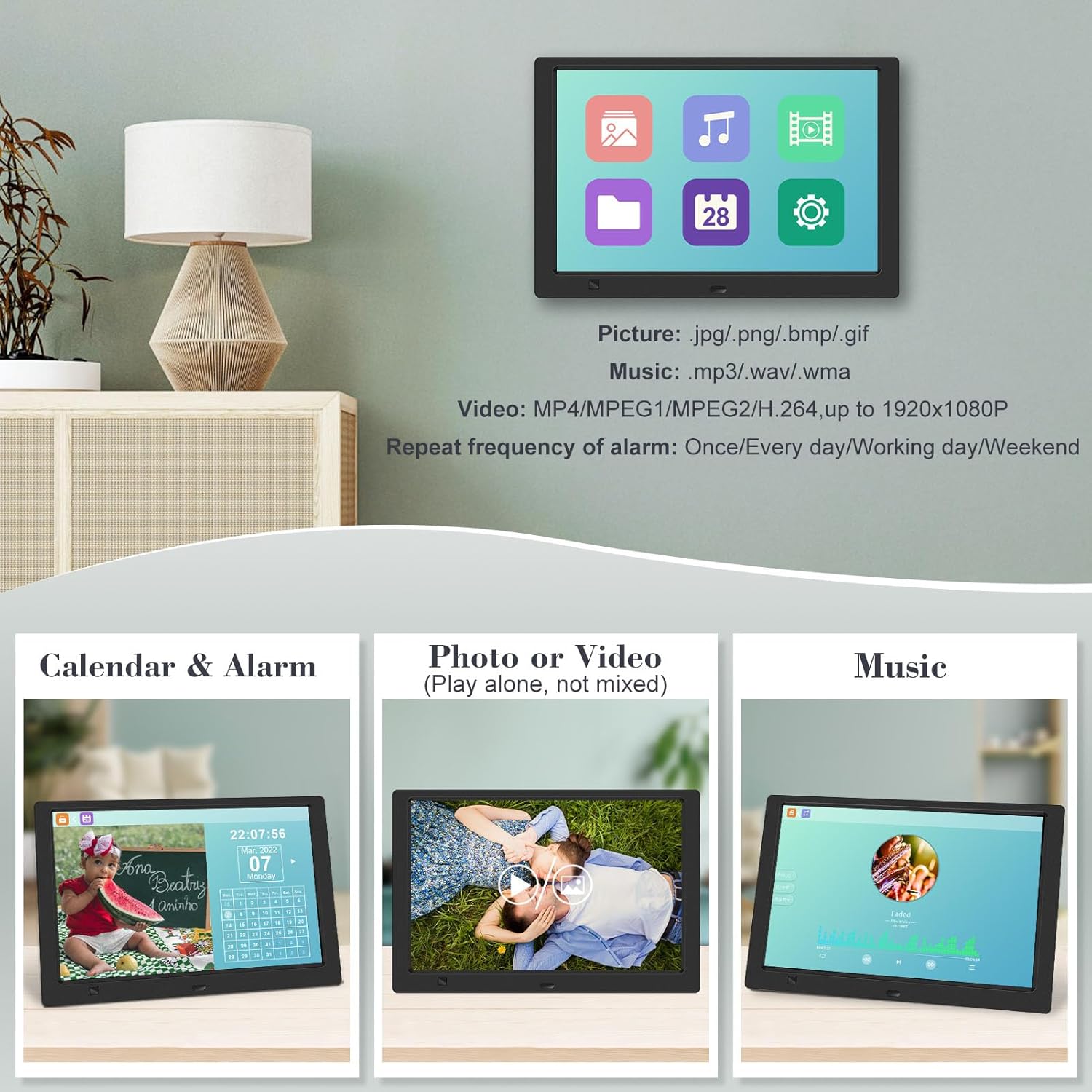
Figura 4.3.1: The digital picture frame displaying a photo slideshow with background music and various image transition options.

Figura 4.3.2: Visual representation of slideshow and image preview options, including settings for playback order, display scale, picture rotation, time window, and screen brightness adjustment.
4.4 Video and Music Playback
- Al menú principal, seleccioneu Pel·lícula or Música, or use the corresponding buttons on the remote.
- Navegueu fins al que desitgeu file using the remote control and press ENTRAR per jugar.
- Supported video formats: MP4/MPEG1/MPEG2/H.264 up to 1920x1080.
- Supported music formats: MP3/WAV/WMA.
4.5 Funció del sensor de moviment
The motion sensor helps save energy by automatically turning the frame on or off.
- To enable/disable the motion sensor, go to the Configuració menú.
- Select the motion sensor option and toggle it On or Off.
- When enabled, the frame will power on when movement is detected and turn off after a period of inactivity.
4.6 Timing On/Off Function
Set specific times for the frame to automatically power on and off.
- Accedeix al Configuració menú.
- Locate the Timing On/Off function.
- Set your desired power-on time and power-off time. You can also configure this for specific days (e.g., weekdays, weekends, every day).

Figura 4.6.1: Demonstrates the smart motion sensor turning on the frame when movement is detected and the timing on/off function for scheduled operation.
5. Manteniment
5.1 Neteja de la pantalla
Per netejar la pantalla, netegeu-la suaument amb un drap suau, sec i sense borrissol. Per a marques difícils, netegeu-la lleugerament.ampNetegeu el drap amb aigua o una solució de neteja segura per a pantalles. Eviteu utilitzar productes químics agressius o materials abrasius.
5.2 Atenció general
- Keep the frame away from direct sunlight, heat sources, and excessive moisture.
- Eviteu deixar caure el dispositiu o sotmetre-lo a forts impactes.
- Do not attempt to disassemble the frame; this will void the warranty.
- Assegureu-vos una ventilació adequada al voltant del dispositiu.
6. Solució De Problemes
If you encounter issues with your digital picture frame, please refer to the following common problems and solutions:
| Problema | Causa possible | Solució |
|---|---|---|
| El marc no s'encén. | L'adaptador de corrent no està connectat o la presa de corrent està defectuosa. | Ensure the power adapter is securely connected to the frame and a working electrical outlet. Try a different outlet. |
| No photos/videos/music displayed. | No media inserted, media not recognized, or unsupported file format. | Ensure a USB drive or SD card is properly inserted. Check if files are in supported formats (JPG/PNG/BMP/GIF for photos; MP4/MPEG1/MPEG2/H.264 for video; MP3/WAV/WMA for music). Try reformatting the media (backup data first). |
| El comandament a distància no funciona. | Battery depleted, remote not aimed correctly, or sensor obstructed. | Replace the remote control battery. Ensure the remote is pointed directly at the frame's infrared sensor. Remove any obstructions between the remote and the frame. |
| La pantalla està en blanc o congelada. | Error temporal de programari. | Unplug the power adapter, wait 10 seconds, then plug it back in to restart the frame. |
7. Especificacions
| Característica | Especificació |
|---|---|
| Mida de la pantalla | 10.1 polzades |
| Resolució | 1920 x 1080 (1080p HD IPS) |
| Relació d'aspecte | 16:9 |
| Viewangle ing | 180° |
| Dispositius compatibles | Targeta SD, unitat USB |
| Formats de fotos compatibles | JPG, PNG, BMP, GIF |
| Formats de vídeo compatibles | MP4, MPEG1, MPEG2, H.264 (up to 1920x1080) |
| Formats de música compatibles | MP3, WAV, WMA |
| Sensor de moviment | Sí |
| Número de model de l'article | KECAG-CA-001 |
| Dimensions del producte | 6.4 x 9.7 x 0.99 polzades |
| Pes de l'article | 1.59 lliures |
| Piles (comandament a distància) | 1 bateria de metall de liti (inclosa) |
| Fabricant | KECAG |
8. Garantia i Suport
For warranty information, please refer to the documentation included with your product packaging. KECAG provides 24-hour customer service to assist with any issues or questions you may have regarding your digital picture frame. Please contact customer support for assistance.


