1. Introducció
Welcome to the user manual for your new XIAOMI F2 43" Smart TV Fire TV. This manual provides essential information for setting up, operating, and maintaining your television. The XIAOMI F2 Fire TV offers a seamless entertainment experience with its integrated Fire TV platform, stunning 4K Ultra HD resolution, HDR10 support, and convenient Alexa voice control.

Figura 1.1: Frontal view of the XIAOMI F2 43" Smart TV displaying a vibrant landscape.
2. Guia de configuració
2.1. Desembalatge i components
Traieu amb cura tots els components de l'embalatge. Assegureu-vos que hi hagi tots els elements que s'enumeren a continuació:
- XIAOMI F2 43" Smart TV
- Moble per a TV (2 peces)
- Cable d'alimentació
- Remote Control with Alexa Voice
- Piles AAA (2x)
- Manual d'usuari (aquest document)

Figure 2.1: The included remote control with dedicated buttons for streaming services and Alexa voice control.
2.2. Muntatge de l'estand
Per connectar el suport del televisor:
- Col·loqueu la pantalla del televisor amb la pantalla cap avall sobre una superfície suau i plana per evitar ratllades.
- Alineeu cada peça del suport amb les ranures corresponents de la part inferior del televisor.
- Fixeu els suports amb els cargols proporcionats. Assegureu-vos que estiguin ben fixats.
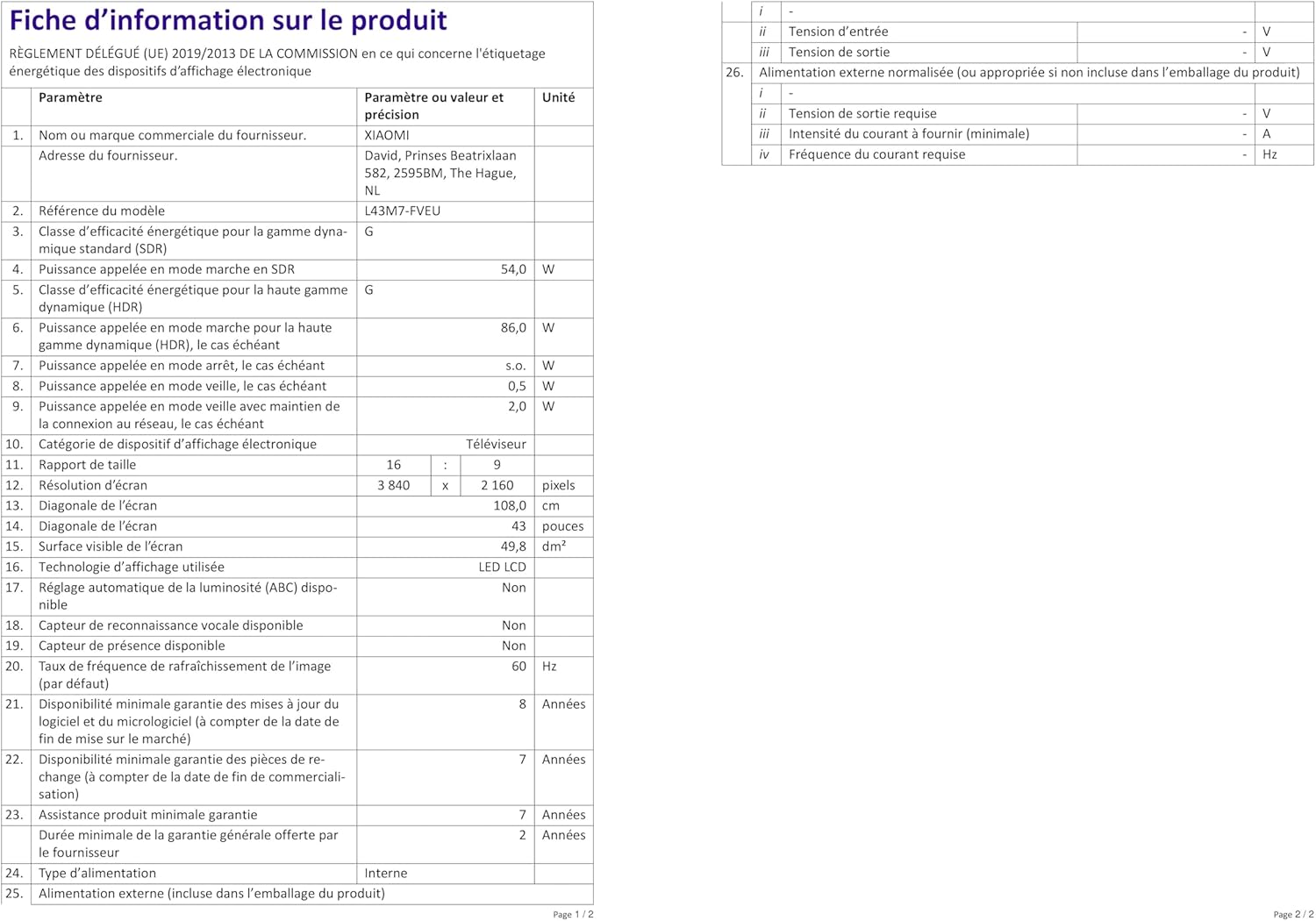
Figura 2.2: Detall del punt de fixació del suport de TV.
2.3. Connecting Your TV
Connect your devices to the TV using the available ports.
- Potència: Connecteu el cable d'alimentació a l'entrada d'alimentació del televisor i després a una presa de corrent.
- HDMI: Use HDMI 2.1 ports for high-quality video and audio from devices like gaming consoles, Blu-ray players, or set-top boxes.
- USB: Connect USB drives for media playback. Note that the USB port is 2.0.
- Antena/cable: Connect your antenna or cable TV feed for broadcast channels.
- Ethernet: Per a una connexió a Internet estable, connecteu un cable Ethernet des del router al port LAN del televisor.
- Wi-Fi: The TV supports Wi-Fi for wireless internet connectivity.
- Bluetooth: Connect Bluetooth devices such as headphones or speakers.

Figure 2.3: Rear panel of the TV with connection ports.
2.4. Initial Setup and Fire TV Integration
En engegar-lo per primera vegada, el televisor us guiarà pel procés de configuració inicial. Això inclou:
- Selecció de la llengua.
- Connexió de xarxa (Wi-Fi o Ethernet).
- Amazon account login for Fire TV. An Amazon account is required to access all functionalities and streaming services.
- Channel scan for broadcast TV.
- Alexa voice remote pairing.

Figure 2.4: The Fire TV interface on the XIAOMI F2 Smart TV, showing popular streaming applications.
3. Funcionament del televisor
3.1. Basic Controls and Remote Functions
The included remote control allows full navigation and control of your TV.
- Botó d'encesa: Encén o apaga el televisor.
- Botó de veu (Alexa): Mantingueu premut per activar les ordres de veu d'Alexa.
- Anell de navegació: S'utilitza per desplaçar-se pels menús i seleccionar elements.
- Botó d'inici: Torna a la pantalla d'inici del Fire TV.
- Botó enrere: Torna a la pantalla anterior.
- Botó de menú: Accesses context-sensitive options.
- Botons de volum: Ajusta el volum del televisor.
- Botons de canal: Canvia els canals de televisió.
- Botons de drecera d'aplicacions: Quick access to popular streaming services like Netflix, Prime Video, and Disney+.
3.2. Smart TV Features and Voice Control
Your XIAOMI F2 TV is powered by Fire TV, offering a wide range of smart features:
- Aplicacions de streaming: Access thousands of apps and channels including Netflix, Prime Video, Disney+, YouTube, DAZN, and more. Subscription charges may apply for certain services.
- Control de veu d'Alexa: Use the voice remote to easily control your TV. Say commands like "Open Netflix," "Cerca action movies," "Change to HDMI 1," or "Turn off the TV." You can also control compatible smart home devices.
- Airplay: Stream content from your Apple devices directly to the TV.
3.3. Configuració d'imatge i so
Personalitza el teu viewexperiència d'escolta i escolta:
- Navega a Configuració on the Fire TV home screen.
- Seleccioneu Pantalla i so to adjust picture modes (Standard, Movie, Sport, etc.), brightness, contrast, color temperature, and sound modes (Standard, Music, Clear Voice, etc.).
- The TV supports HDR10 and Wide Color Gamut (WCG) for enhanced color depth and brightness.
3.4. Mode de joc
For an optimized gaming experience, the TV features a dedicated gaming mode.
- The 4x HDMI 2.1 connectors support ALLM (Auto Low Latency Mode), which automatically reduces input lag when a compatible gaming console is connected.
- This ensures a short response time, making the TV ideal for gaming.
4. Manteniment
4.1. Neteja del televisor
Per mantenir la claredat i l'aspecte del televisor:
- Desendolla sempre el televisor abans de netejar-lo.
- Feu servir un drap suau, sec i sense borrissol per netejar suaument la pantalla i el marc.
- Per a marques difícils, esbandiu lleugeramentampNetegeu el drap amb aigua o una solució de neteja específica per a pantalles. No ruixeu mai líquid directament sobre la pantalla.
- Eviteu utilitzar netejadors abrasius, ceres o dissolvents.
4.2. Actualitzacions de programari
Your TV may receive software updates to improve performance and add new features.
- Assegureu-vos que el vostre televisor estigui connectat a Internet.
- Updates are typically downloaded and installed automatically. You may receive a notification when an update is available or when it has been installed.
- No desendolleu el televisor durant una actualització de programari.
5. Solució De Problemes
Si teniu problemes amb el televisor, consulteu els problemes i solucions més comuns següents:
| Problema | Possible solució |
|---|---|
| Sense poder | Check if the power cable is securely connected to both the TV and the wall outlet. Ensure the outlet is working. |
| Sense imatge / Pantalla negra | Verifiqueu que s'ha seleccionat la font d'entrada correcta. Comproveu totes les connexions de cable (HDMI, antena). Intenteu reiniciar el televisor. |
| Sense so | Check the volume level and ensure mute is not activated. Verify audio cable connections. If using external speakers, check their power and connections. |
| El control remot no respon | Replace the batteries (2x AAA). Ensure there are no obstructions between the remote and the TV. Re-pair the remote if necessary (follow on-screen instructions during initial setup or in TV settings). |
| Problemes de connexió de xarxa | Restart your router and modem. Check Wi-Fi password. If using Ethernet, ensure the cable is connected properly. Try connecting to a different network if available. |
| USB Drive Not Recognized | Ensure the USB drive is formatted to FAT32. The TV may not recognize other formats or USB 3.0/3.2 drives. |
5.1. Restabliment de fàbrica
If problems persist, a factory reset can resolve many software-related issues. Avís: A factory reset will erase all your settings, installed apps, and personal data.
- Vés a Configuració on the Fire TV home screen.
- Seleccioneu El meu Fire TV.
- Tria Sobre.
- Seleccioneu Restableix els valors predeterminats de fàbrica i confirmar.
6. Especificacions
| Característica | Detall |
|---|---|
| Número de model | L43M7-FVEU |
| Mida de la pantalla | 43 polzades (108 cm) |
| Resolució | 4K Ultra HD (3840 x 2160 píxels) |
| Tecnologia de visualització | LED |
| Freqüència d'actualització | 60 Hz |
| Suport HDR | HDR10 |
| Connectivitat | 4x HDMI 2.1 (with ALLM), USB 2.0, Bluetooth, Wi-Fi, RF, Ethernet |
| Dimensions (amb suport) | 95.72 x 24.14 x 60.71 cm (L x A x A) |
| Pes (amb suport) | 6.95 kg |
| Consum d'energia (SDR) | 54.0 W |
| Consum d'energia (HDR) | 86.0 W |
| Classe d'eficiència energètica | G |
| Components inclosos | TV, Stand, Power Cable, Remote Control, Batteries, User Manual |
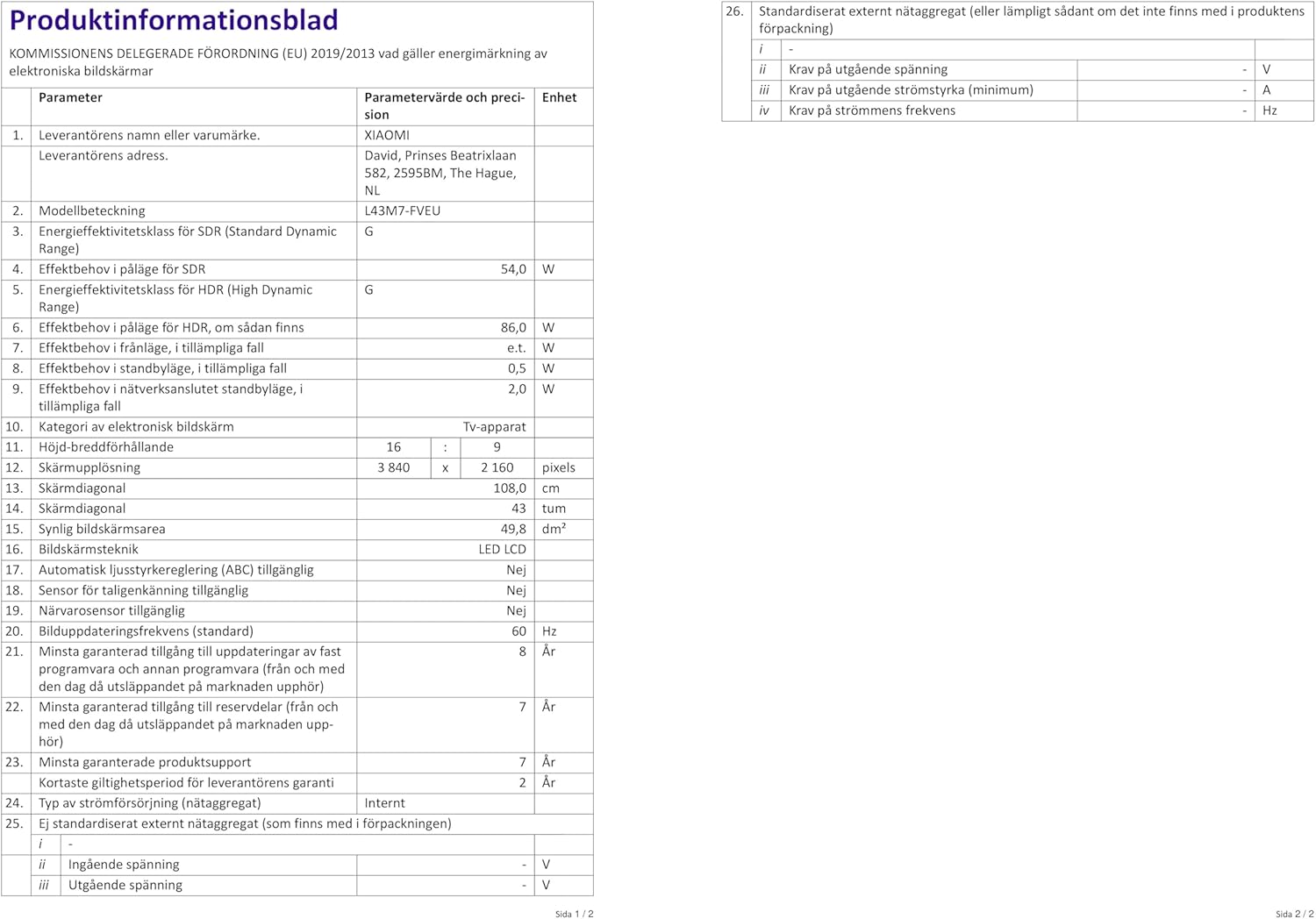
Figure 6.1: Dimensions of the XIAOMI F2 43" Smart TV with stand.
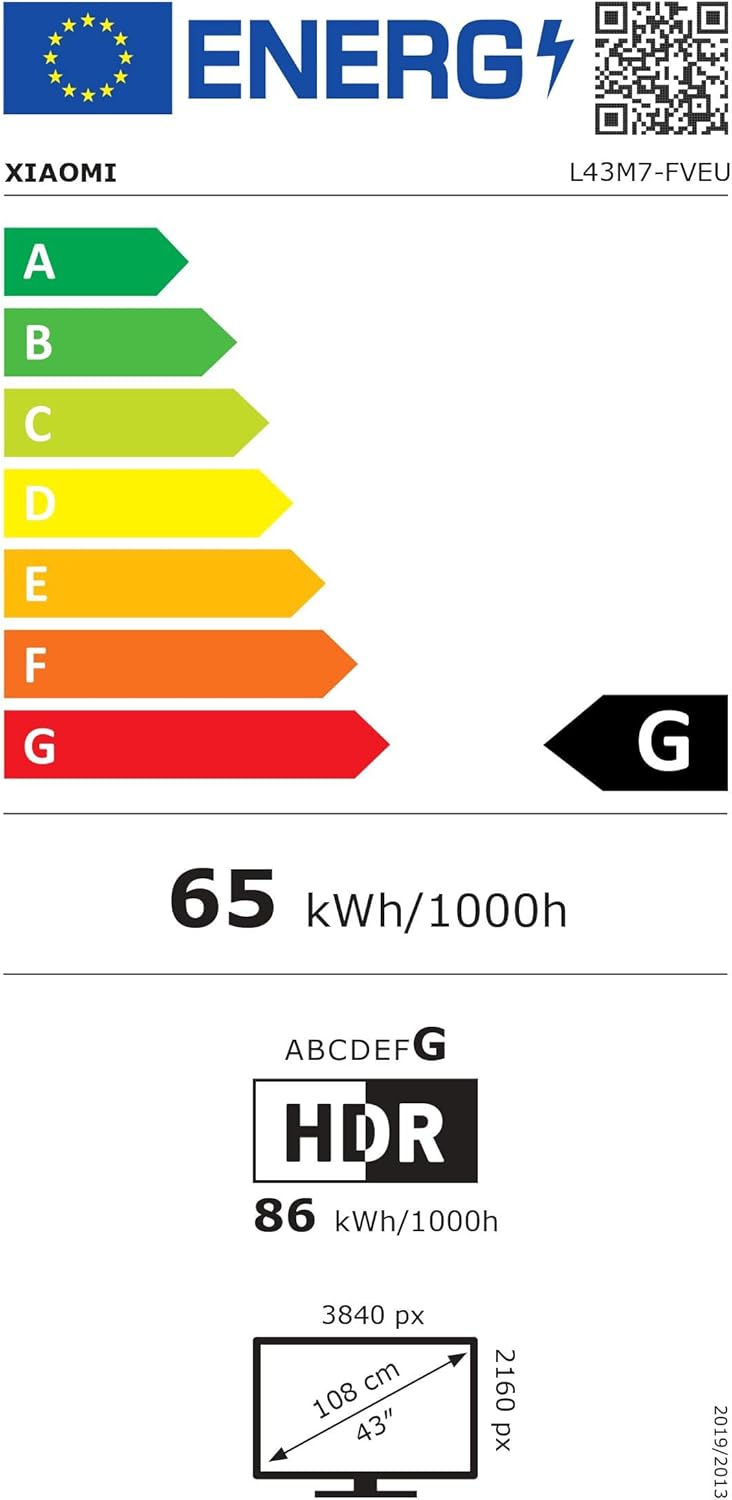
Figure 6.2: EU Energy Label for the XIAOMI F2 43" Smart TV. For more details, visit the Base de dades EPREL.
7. Garantia i Suport
Your XIAOMI F2 43" Smart TV comes with a manufacturer's warranty.
- Suport de producte mínim garantit: 7 Anys
- Disponibilitat mínima garantida d'actualitzacions de programari i firmware: 8 Anys
- Disponibilitat mínima garantida de recanvis: 7 Anys
- Minimum Duration of the General Guarantee Offered by the Supplier: 2 Anys
For technical assistance, warranty claims, or further inquiries, please contact XIAOMI customer support through their official website or authorized service centers. Please have your model number (L43M7-FVEU) and purchase information ready.


