1. Introducció
The zidoo Z1000Pro is a high-performance 4K Media Player designed to deliver an exceptional home theater experience. Equipped with the Realtek RTD1619DR hexa-core 64bit processor and Android 9.0 OS, it supports advanced video and audio technologies including HDR10+, Dolby Vision, and high-definition audio pass-through.
This manual provides essential information for setting up, operating, maintaining, and troubleshooting your Zidoo Z1000Pro media player. Please read it thoroughly before use to ensure optimal performance and longevity of your device.
2. Contingut del paquet
Si us plau, verifiqueu que tots els elements següents estiguin inclosos al vostre paquet:
- Zidoo Z1000Pro 4K Media Player
- Control remot
- Adaptador d'alimentació
- Cable SATA
- Cable HDMI 2.0
- Manual d'usuari (aquest document)
3. Producte acabatview
Familiarize yourself with the physical components and ports of your Zidoo Z1000Pro.
3.1 Tauler frontal

Figura 3.1: Frontal view of the Zidoo Z1000Pro, showing the display, power button, and status indicators.
The front panel features a digital display showing time and status, along with a power button and various indicator lights.
3.2 Panell posterior

Figura 3.2: posterior view of the Zidoo Z1000Pro, highlighting AC power input, RS232, Coaxial, Optical, RCA Audio L/R, RCA CVBS, HDMI In, HDMI Out, and Gigabit LAN ports.
The rear panel provides a comprehensive set of connectivity options for audio, video, and network connections.
- Entrada d'alimentació de CA: Connecteu l'adaptador de corrent proporcionat.
- RS232: For intelligent control systems.
- Coaxial: Sortida d'àudio digital.
- SPDIF (Òptic): Sortida d'àudio digital.
- RCA Audio L/R: Sortida d'àudio estèreo analògic.
- RCA CVBS: Analog composite video output.
- Entrada HDMI: HDMI 2.0 input, supports 4K@60p, PCM audio.
- Sortida HDMI: HDMI 2.0a output, supports up to 4K@60p, HDR, 12Bit, YCbCr 4:4:4, and audio pass-through.
- Xarxa LAN Gigabit: RJ-45 Ethernet jack (10/100/1000Mbps) for wired network connection.
- Antena externa d'alt guany: Two ports for Wi-Fi antennas.
3.3 Side Panel and Internal HDD Bay
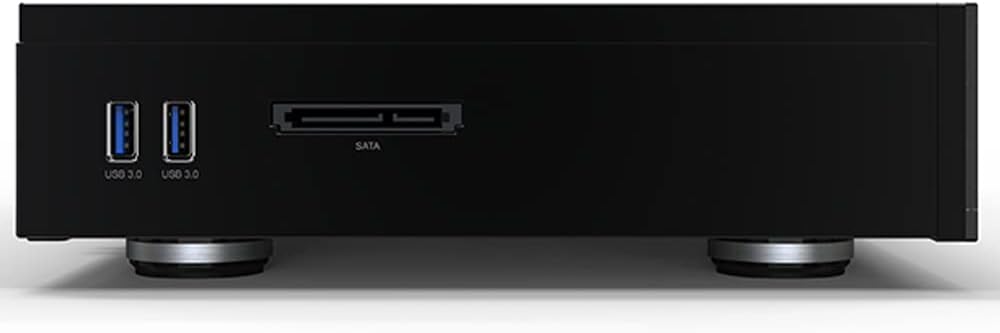
Figura 3.3: lateral view of the Zidoo Z1000Pro, showing USB 3.0 ports and an external SATA port.

Figure 3.4: Zidoo Z1000Pro with the hidden HDD bay cover open, revealing the internal drive slot.
The Z1000Pro includes multiple USB ports and a hidden internal HDD bay for storage expansion.
- USB 3.0: Two ports for connecting external storage devices or peripherals.
- USB 2.0: Two ports (location not explicitly shown in images, typically on side or rear).
- SATA 3.0: One external SATA port.
- Hidden HDD Bay: Supports one 3.5-inch or 2.5-inch SATA hard drive (up to 16TB).
4. Guia de configuració
Follow these steps to set up your Zidoo Z1000Pro media player:
- Connecta a la pantalla: Connect one end of the provided HDMI 2.0 cable to the Sortida HDMI port on the Z1000Pro and the other end to an HDMI input on your TV or AV receiver.
- Connectar-se a la xarxa (opcional):
- Amb cable: Connecteu un cable Ethernet des del vostre encaminador al LAN Gigabit port on the Z1000Pro.
- Sense fil: Screw in the two external high-gain antennas to the antenna ports on the rear panel. You will configure Wi-Fi settings later in the system menu.
- Instal·leu el disc dur intern (opcional):
- Open the hidden HDD bay cover on the side of the device.
- Gently slide your 3.5-inch or 2.5-inch SATA hard drive into the bay until it clicks into place.
- Tanqueu la coberta de la badia del disc dur.
- Connectar l'alimentació: Connecteu l'adaptador d'alimentació a Entrada d’alimentació de CA. on the Z1000Pro, then plug the adapter into a wall outlet.
- Encès: Press the power button on the front panel of the Z1000Pro or on the remote control to turn on the device.
- Configuració inicial: Follow the on-screen instructions to complete the initial setup, including language selection, network configuration, and display settings.
5. Instruccions de funcionament
This section covers basic operation and key features of your Zidoo Z1000Pro.
5.1 Navegació i interfície d'usuari
The Z1000Pro runs on Android 9.0 OS with a custom Zidoo interface. Use the provided remote control to navigate through menus and select options. The main screen provides access to various applications and settings.
5.2 Reproducció multimèdia
The Z1000Pro supports a wide range of audio and video formats. You can play media from:
- Disc dur intern: Media stored on the installed hard drive.
- External USB Devices: USB flash drives or external hard drives connected to the USB 3.0/2.0 ports.
- Emmagatzematge en xarxa: Stream media from NAS (Network Attached Storage) or PC via NFS, SMB V1/V2/V3, or UPnP protocols.
Use the built-in media player applications to browse and play your content. The device is optimized for 4K HDR content, including HDR10+ and Dolby Vision.
Reproducció d'àudio 5.3
The Z1000Pro supports high-definition audio pass-through and decoding, including master-level DSD (SACD ISO, DFF, DSF) and lossless CD formats (WAV, APE, FLAC) up to DSD256/PCM 192KHZ sampling rate. Connect to your audio system via HDMI, Coaxial, Optical, or RCA L/R outputs for optimal sound quality.
5.4 Android Applications
As an Android 9.0 device, you can install various applications from the Android ecosystem. The ZIDOO Controller app is available for mobile device control.
5.5 Funcions avançades
- Entrada HDMI: Connect another HDMI source (e.g., game console, set-top box) to the HDMI In port.
- Control intel·ligent: Supports Mobile APP control, RS-232, TCP/IP control, and WOL (Wake-on-LAN).
- Actualitzacions de l'OTA: The device supports Over-The-Air (OTA) firmware updates to ensure you have the latest features and bug fixes. Check for updates periodically in the system settings.
6. Manteniment
Proper care and maintenance will extend the life of your Zidoo Z1000Pro.
- Neteja: Feu servir un drap suau i sec per netejar l'exterior del dispositiu. No utilitzeu netejadors líquids ni aerosols.
- Ventilació: Assegureu-vos que el dispositiu estigui col·locat en una zona ben ventilada. No bloquegeu les obertures de ventilació.
- Temperatura: Feu funcionar el dispositiu dins dels rangs de temperatura recomanats. Eviteu la calor o el fred extrems.
- Apagar: Quan no s'utilitza durant períodes prolongats, es recomana apagar el dispositiu i desendollar-lo de la presa de corrent.
- Actualitzacions de firmware: Comproveu i instal·leu regularment si hi ha actualitzacions de firmware per garantir un rendiment i una seguretat òptims.
7. Solució De Problemes
If you encounter issues with your Zidoo Z1000Pro, refer to the following common problems and solutions:
| Problema | Causa possible | Solució |
|---|---|---|
| Sense poder | Cable d'alimentació no connectat; Presa de corrent defectuosa | Ensure power adapter is securely connected to the device and a working power outlet. |
| Sense sortida de vídeo | HDMI cable loose/faulty; Incorrect HDMI input selected on TV; Display resolution issue | Check HDMI cable connections. Select the correct HDMI input on your TV/receiver. Try a different HDMI cable. Restart the device and TV. |
| Sense sortida d'àudio | Audio cables loose/faulty; Incorrect audio output selected in settings; Volume too low | Check all audio cable connections. Verify audio output settings in the device menu. Increase volume on the device and connected audio system. |
| No es pot connectar a la Wi-Fi | Incorrect password; Antennas not connected; Router issue; Signal interference | Double-check Wi-Fi password. Ensure antennas are securely attached. Restart your router. Try moving the device closer to the router or reducing interference. |
| El dispositiu es bloqueja o falla | Error de programari; Sobreescalfament; Suport corrupte file | Restart the device. Ensure proper ventilation. Try playing a different media file. Check for and install the latest firmware updates. If persistent, perform a factory reset (backup data first). |
| El comandament a distància no funciona | Piles gastades; Obstrucció; Comandament a distància no emparellat | Replace batteries. Ensure no obstructions between remote and device. Re-pair the remote if necessary (refer to device settings for pairing instructions). |
If the problem persists after trying these solutions, please contact Zidoo customer support or visit their official forum for further assistance.
8. Especificacions tècniques
| Característica | Descripció |
|---|---|
| Model | Z1000Pro |
| Xassís | Aliatge d'alumini |
| Sistema operatiu | Android 9.0 |
| CPU | Realtek RTD1619DR ARM Cortex-A55 (Hexa-core) |
| GPU | ARM Mali-G51 MP3 |
| RAM | 2 GB DDR4 |
| Emmagatzematge intern | eMMC de 32 GB |
| Bluetooth | BT 4.2 |
| Wi-Fi | 2.4G + 5G dual-band WiFi, 802.11 a/b/g/n/AC 2T2R MIMO 867Mbps |
| Ethernet | RJ-45 Ethernet jack (10/100/1000Mbps) |
| Sortida HDMI | HDMI 2.0a, up to 4K@60p, HDR, 12Bit, YCbCr 4:4:4, audio pass-through |
| Entrada HDMI | HDMI 2.0, supports 4K@60p, PCM audio |
| Descodificació de vídeo | 4K@60p HEVC/H.265 12Bit HDR10, HDR10+, Dolby Vision |
| Descodificació d'àudio | High-definition audio pass-through and decode (DSD, WAV, APE, FLAC) |
| SATA | SATA 3.0 * 1, HDD Bay * 1 (supports up to 16TB) |
| Ports USB | USB 3.0 * 2, USB 2.0 * 2 |
| Altres interfícies | IR Receiver, RCA Cvbs, RCA Audio L/R, Coaxial, SPDIF, RS232, External High-Gain Antenna * 2 |
| Font d'alimentació | 100-240V ~ 50/60Hz, màxim 1.3A |
| Dimensions (L x A x A) | 350 mm x 240 mm x 60 mm (13.78 x 9.45 x 2.36 polzades) |
| Pes | 3.83 kg (8.44 lliures) |
9. Garantia i Suport
Zidoo is committed to providing quality products and customer service.
9.1 Informació de la garantia
For detailed warranty terms and conditions, please refer to the warranty card included with your product or visit the official Zidoo weblloc. La garantia normalment cobreix els defectes de fabricació durant un període especificat a partir de la data de compra.
9.2 Atenció al client
If you have any questions, encounter issues, or require technical assistance, please utilize the following resources:
- Official Zidoo Weblloc: Visit the official Zidoo website for FAQs, firmware downloads, and support contact information.
- Fòrum en línia: Zidoo maintains a home theater forum on their official website where users can find solutions, share experiences, and get assistance from the community and Zidoo representatives.
- Suport per correu electrònic: You can email the seller or Zidoo support directly for specific issues.
When contacting support, please have your product model (Z1000Pro) and serial number ready.


