1. Introducció
The Autel MaxiSys MS906 Pro is an advanced diagnostic scanner designed for comprehensive vehicle system analysis. This device offers a wide range of functions including OE-level diagnostics, ECU coding, bi-directional control, and numerous special services. It is engineered to provide efficient and accurate automotive repair and maintenance solutions for professional technicians.

Image 1.1: The Autel MaxiSys MS906 Pro diagnostic tablet and its VCI (Vehicle Communication Interface) module, presented within a durable protective case. The tablet's screen displays various service icons.
2. Característiques clau
The MaxiSys MS906 Pro incorporates several advanced features and hardware upgrades to enhance diagnostic capabilities and user experience:
- Enhanced Configuration: Operates on Android 10.0 OS with an Exynos Octa-Core Processor, 4GB RAM, and 128GB storage. Features 5MP front and 16MP rear cameras, an 8-inch 1920x1200 HD touchscreen, and an 11600mAh battery for extended operation.
- FCA AutoAuth Support: Provides direct access to 2017 and later FCA vehicles for diagnostics and bi-directional functions, bypassing the SGW module without a bypass cable.
- Advanced ECU Coding & Adaptation: Supports high-end online coding and offline programming for various vehicle brands, including BMW F & E chassis, Porsche, VW, and Ford. Allows for module replacement matching, activation of hidden features, customization of OE-settings, and VAG guided functions.
- Bi-Directional Control: Enables active tests on various vehicle components to quickly pinpoint system issues and verify repairs.
- 40+ Special Services: A comprehensive suite of maintenance and reset functions, including Oil Reset, ABS Bleed, EPB, SAS, Injector Coding, Throttle, DPF, Gear Learning, Headlamp, SRS, A/F Setting, Trans Adaptation, Cylinder, Odometer, and Crankshaft position sensor relearn.
- Diagnòstic complet del sistema a nivell OE: Offers extensive vehicle coverage (99% of global car models) with support for D-PDU, RP1210, DoIP, and CAN FD protocols. Includes full OBD2 capabilities, Auto VIN, Auto Scan, and Wi-Fi printing.
- Smart Cloud Services: Integrates cloud-based services such as Remote Expert, Report Management, AccuFix (coming soon), and Repair Data for streamlined repair and diagnosis.

Image 2.1: A comparison chart highlighting the upgraded configurations and new features of the Autel MaxiSys MS906 Pro compared to the previous MS906BT model, including operating system, memory, battery, and supported protocols.
3. Guia de configuració
3.1. Contingut del paquet
Before starting, verify that all components are present in your package:

Imatge 3.1: Un sobreview of the Autel MaxiSys MS906 Pro package contents, including the main tablet, VCI module, various cables, power adapter, and documentation, all neatly arranged in the protective case.
3.2. Càrrega inicial
Upon first use, fully charge the MaxiSys MS906 Pro tablet. Connect the power adapter to the tablet's charging port and plug it into a power outlet. The charging indicator will illuminate.
3.3. Engegada i configuració inicial
- Press and hold the Power button on the tablet until the Autel logo appears.
- Follow the on-screen instructions to select your language, region, and Wi-Fi network.
- Register your device with Autel to activate warranty and receive software updates.
3.4. VCI Connection
The MaxiSys MS906 Pro communicates with the vehicle via the MaxiVCI V200 module. Ensure the VCI is charged or connected to the vehicle's OBDII port.
- Plug the MaxiVCI V200 into the vehicle's OBDII port, usually located under the dashboard.
- On the tablet, navigate to the VCI Manager application.
- Select Bluetooth as the connection method and pair with the MaxiVCI V200. The VCI status indicator on the tablet should show a stable connection.
4. Funcionament del dispositiu
4.1. Vehicle Diagnostics
The primary function of the MS906 Pro is to perform comprehensive vehicle diagnostics.
- Connect the VCI to the vehicle and ensure it is paired with the tablet.
- From the main menu, select 'Diagnostics'.
- Choose 'Auto Scan' for automatic vehicle identification or manually select the vehicle make, model, and year.
- The system will scan all available modules and display any Diagnostic Trouble Codes (DTCs).
- Tu pots view live data, freeze frame data, and clear DTCs as needed.
4.2. Special Services
Access a wide array of maintenance and reset functions from the 'Service' menu.
- Select 'Service' from the main menu.
- Choose the desired service function (e.g., Oil Reset, EPB, DPF).
- Follow the on-screen prompts to execute the service.
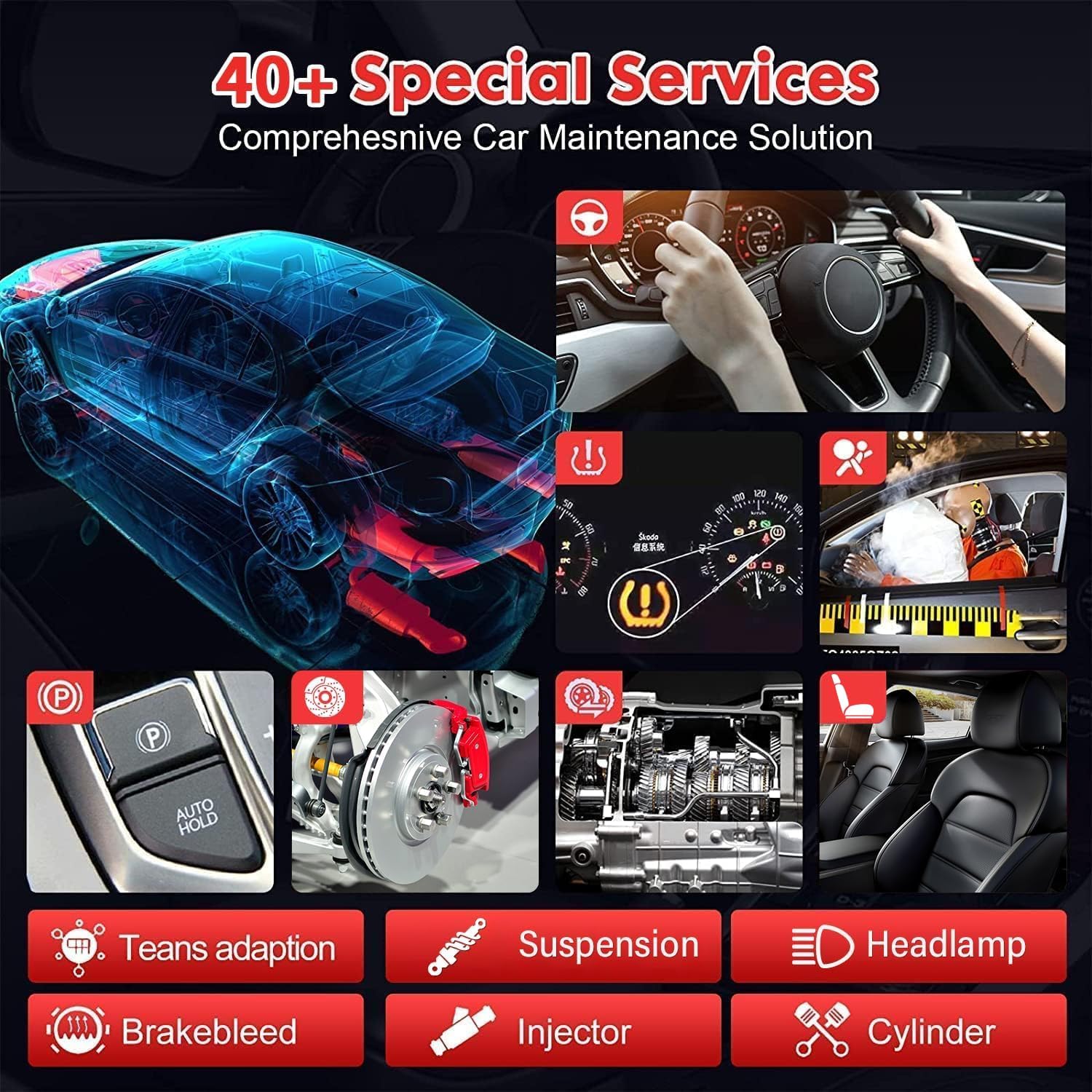
Image 4.1: The tablet interface showing a selection of over 40 special service functions available on the Autel MaxiSys MS906 Pro, including oil reset, ABS bleed, EPB, and injector coding.
4.3. Control bidireccional (proves actives)
Perform active tests to command vehicle components and verify their functionality.
- After selecting the vehicle, navigate to the 'Active Test' section within the diagnostic menu.
- Select the component you wish to test (e.g., fuel pump, wipers, headlamps).
- Activate the component and observe its response to diagnose issues.

Image 4.2: An illustration demonstrating the bi-directional control capabilities of the Autel MaxiSys MS906 Pro, showing how the tool can send commands to and receive feedback from various vehicle systems like the engine, ABS, and headlamps.
4.4. ECU Coding and Adaptation
Utilize advanced coding functions to customize vehicle settings or replace modules.
- Access the 'Coding' or 'Adaptation' function for the specific vehicle system.
- Follow the guided procedures for online coding, offline programming, or module matching.
- Ensure stable internet connection for online coding functions.

Image 4.3: A visual representation of the online ECU coding and offline programming features, illustrating functions such as replacement module matching, activating hidden features, and customizing OE-settings.
4.5. Serveis al núvol
Leverage Autel's cloud services for enhanced support and data management.
- Remote Expert: Connect with remote technicians for assistance.
- Report Management: Store and manage diagnostic reports in the cloud.
- Repair Data: Access a vast database of repair information.

Image 4.4: The Autel MaxiSys MS906 Pro displaying its Smart Cloud Services interface, which includes options for Remote Expert, AccuFix, Repair Data, and Report Management.
5. Manteniment
5.1. Neteja del dispositiu
Regularly clean the tablet and VCI module to ensure optimal performance.
- Utilitzeu un suau, damp cloth to wipe the screen and exterior surfaces.
- Eviteu utilitzar netejadors abrasius o dissolvents que puguin danyar el dispositiu.
- Keep the charging ports and connectors free of dust and debris.
5.2. Cura de la bateria
Per allargar la durada de la bateria:
- Eviteu descarregar completament la bateria amb freqüència.
- Guardeu el dispositiu en un lloc fresc i sec quan no el feu servir durant períodes prolongats.
- Carregueu el dispositiu regularment, fins i tot si no l'esteu fent servir, per mantenir la bateria en bon estat.
5.3. Actualitzacions de programari
Ensure your device's software is always up-to-date to access the latest vehicle coverage and features.
- Connect the tablet to a stable Wi-Fi network.
- Navigate to the 'Update' application on the main menu.
- Download and install available updates.
6. Solució De Problemes
This section addresses common issues you might encounter with your MaxiSys MS906 Pro.
6.1. El dispositiu no s'encén
- Comproveu la bateria: Ensure the device is sufficiently charged. Connect it to the power adapter and allow it to charge for at least 30 minutes before attempting to power on again.
- Botó d'encesa: Confirm you are pressing and holding the Power button for the required duration (typically 3-5 seconds).
6.2. VCI Connection Issues
- VCI Power: Ensure the VCI module is properly plugged into the vehicle's OBDII port and receiving power (indicated by LED lights).
- Emparellament Bluetooth: Re-check the Bluetooth connection in the VCI Manager on the tablet. Ensure the VCI is discoverable and paired.
- Distància: Maintain a close proximity between the tablet and the VCI module for a stable Bluetooth connection.
6.3. Communication Errors with Vehicle
- Encès: Ensure the vehicle's ignition is in the ON position (engine off or running, as required by the diagnostic procedure).
- Compatibilitat de vehicles: Verify that the selected vehicle make, model, and year are correct.
- Actualització de programari: Ensure the diagnostic software for the specific vehicle brand is up-to-date.
- OBDII Port: Inspect the vehicle's OBDII port for any damage or obstructions.
6.4. Software Freezing or Slow Performance
- Reinicieu el dispositiu: Restart the tablet to clear any temporary software glitches.
- Tanca les aplicacions: Close any unnecessary background applications to free up system resources.
- Esborra la memòria cau: Periodically clear the application cache through the Android settings.
7. Especificacions
Technical specifications for the Autel MaxiSys MS906 Pro:
| Característica | Especificació |
|---|---|
| Sistema operatiu | Android 10.0 |
| Processador | Exynos Octa-Core |
| Memòria | 4 GB de RAM, 128 GB d'emmagatzematge |
| Mostra | 8-inch LCD with 1920x1200 Resolution Touchscreen |
| Bateria | 11600 mAh Lithium-Polymer Battery |
| Càmeres | Rear: 16MP, Front: 5MP |
| Connectivitat | Bluetooth (MaxiVCI V200), Wi-Fi |
| Protocols compatibles | D-PDU, RP1210, DoIP, CAN FD |
| Pes de l'article | 6.8 lliures |
| Dimensions del producte | 3.15 x 3.94 x 2.36 polzades |
| Número de peça del fabricant | MS906 PRO |
8. Informació de la garantia
The Autel MaxiSys MS906 Pro comes with a manufacturer's warranty. For detailed information regarding warranty terms, duration, and coverage, please refer to the warranty card included in your product package or visit the official Autel weblloc web. Conserveu el comprovant de compra per a reclamacions de garantia.
9. Atenció al client
For technical assistance, product inquiries, or support, please contact Autel customer service through the following channels:
- Oficial Weblloc: Visita www.autel.com for FAQs, software downloads, and support resources.
- Assistència integrada a l'aplicació: Utilize the 'Remote Expert' feature within the MaxiSys MS906 Pro for direct assistance from Autel technicians.
- Correu electrònic/Telèfon: Refer to the contact information provided in your product documentation or on the official Autel weblloc web per a opcions d'assistència per correu electrònic i telèfon.
Note: No official product videos were provided in the source data for embedding in this manual.


