1. Introducció
This manual provides comprehensive instructions for the setup, operation, and maintenance of your REACHER Small Digital Rainbow LED Alarm Clock, Model N188C-Black. Please read this manual thoroughly to ensure proper use and to maximize the functionality of your device.
2. Producte acabatview
Característiques principals:
- Large, colorful LED numbers for clear visibility day or night.
- Compact design (5.6" x 2.9" x 1.9") suitable for various spaces.
- Full range 0-100% brightness dimmer slider for personalized display intensity.
- Adjustable alarm volume from 30dB to 85dB.
- Easy-to-use snooze function by pressing any part of the top surface.
- Outlet powered with included DC adapter.
- Battery backup (2x AAA batteries, not included) to retain time and alarm settings during power outages.
Què hi ha a la caixa:
- Small Colorful LED Alarm Clock
- Cable USB
- Adaptador d'alimentació
- Manual d'usuari

Figura 2.1: Frontal view of the REACHER Small Digital Rainbow LED Alarm Clock.

Figure 2.2: The alarm clock's compact size, shown held in a hand.
3. Configuració
3.1 Connexió d'alimentació
- Connect the provided USB cable to the DC 5V port on the back of the alarm clock.
- Plug the other end of the USB cable into the included power adapter.
- Insert the power adapter into a standard electrical outlet. The clock display will illuminate.
3.2 Battery Backup Installation (Optional)
Per a la funcionalitat de còpia de seguretat de la bateria, que conserva l'hora i la configuració de l'alarma durant una apagadatage (display will be off to conserve power):
- Localitza el compartiment de la bateria a la part inferior del rellotge.
- Obriu la tapa del compartiment de la bateria.
- Introduïu dues (2) piles AAA (no incloses), assegurant-vos de la polaritat correcta (+/-).
- Tanqueu bé la tapa del compartiment de la bateria.
4. Instruccions de funcionament

Figure 4.1: Rear controls of the alarm clock.
4.1 Configuració de l'hora
- Manteniu premut el botó HORA CONFIGURADA button located on the back of the clock. The hour digits will begin to flash.
- Utilitza el + or - buttons to adjust the hour. Pay attention to the PM indicator if using 12-hour format.
- Premeu el botó HORA CONFIGURADA button again to confirm the hour and move to minute adjustment. The minute digits will flash.
- Utilitza el + or - botons per ajustar els minuts.
- Premeu el botó HORA CONFIGURADA premeu el botó una vegada més per desar la configuració de l'hora.
4.2 Configuració de l'alarma
- Manteniu premut el botó CONJUNT D'ALARMES button on the back of the clock. The alarm hour digits will begin to flash, and an alarm icon will appear on the display.
- Utilitza el + or - botons per ajustar l'hora de l'alarma.
- Premeu el botó CONJUNT D'ALARMES button again to confirm the alarm hour and move to alarm minute adjustment. The alarm minute digits will flash.
- Utilitza el + or - botons per ajustar els minuts de l'alarma.
- Premeu el botó CONJUNT D'ALARMES button one more time to save the alarm setting.
4.3 Turning Alarm On/Off
Premeu breument ALARMA ON / OFF button on the back of the clock to toggle the alarm function. The alarm icon on the display indicates if the alarm is active.
4.4 Ajust de la brillantor de la pantalla
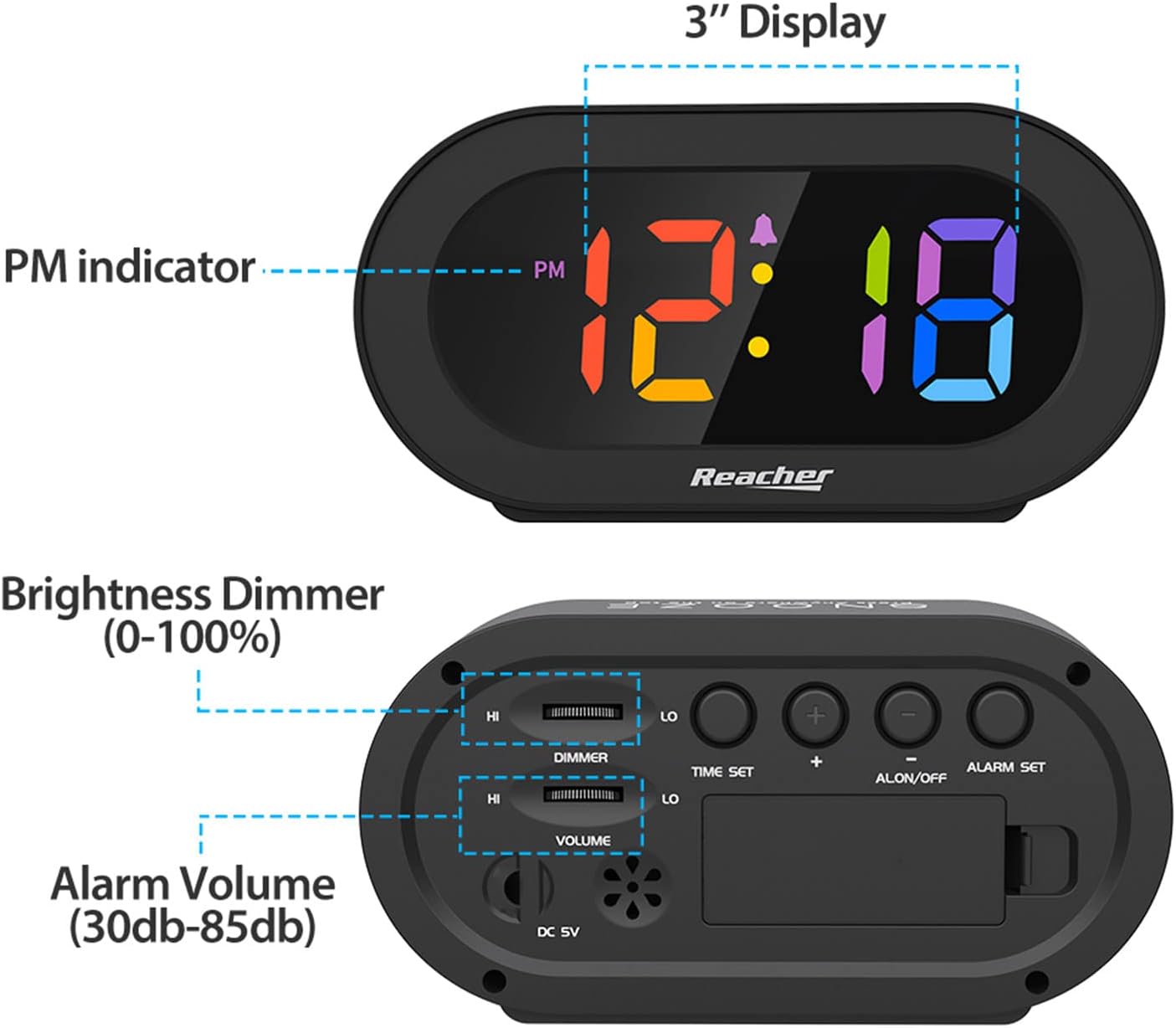
Figure 4.2: Dimmer slider control.
Utilitza el DIMMER slider located on the back of the clock to adjust the display brightness from 0% (off) to 100% (maximum brightness). Slide towards 'HI' for brighter, and 'LO' for dimmer.
4.5 Ajust del volum de l'alarma

Figure 4.3: Volume slider control.
Utilitza el VOLUM slider located on the back of the clock to adjust the alarm sound level from 30dB (low) to 85dB (high). Slide towards 'HI' for louder, and 'LO' for quieter.
4.6 Funció de repetició
When the alarm sounds, press any part of the top surface of the clock to activate the snooze function. The alarm will temporarily pause and sound again after a set interval (typically 9 minutes).
4.7 Aturar l'alarma
To stop the alarm completely after it sounds (not just snooze), press the ALARMA ON / OFF button on the back of the clock. The alarm icon will disappear from the display.
5. Manteniment
Per mantenir el despertador en condicions òptimes:
- Wipe the clock surface with a soft, dry cloth.
- Eviteu utilitzar netejadors o dissolvents abrasius, ja que poden danyar l'acabat.
- Keep the device away from excessive moisture, direct sunlight, and extreme temperatures.
- If using battery backup, replace AAA batteries annually or if the clock frequently experiences power outages.
6. Solució De Problemes
| Problema | Causa possible | Solució |
|---|---|---|
| Clock display is off or dim. | No power, dimmer set to 0%, or battery backup active during power outage. | Ensure power adapter is securely plugged in. Adjust the DIMMER slider. If on battery backup, the display is intentionally off; it will return when main power is restored. |
| L'alarma no sona. | Alarm is not set, alarm is turned off, or volume is too low. | Verify alarm time is set correctly. Ensure the alarm icon is visible on the display (alarm is ON). Adjust the VOLUME slider to an audible level. |
| Time/Alarm settings are lost after power outage. | No battery backup installed or batteries are depleted. | Install two fresh AAA batteries for battery backup. |
| Els botons no responen. | Error temporal de programari. | Unplug the power adapter, remove backup batteries (if installed), wait 30 seconds, then reconnect power. |
7. Especificacions
- Model: N188C-Black
- Tipus de visualització: Digital LED (Rainbow Digits)
- Dimensions del producte: 5.6" (Width) x 2.9" (Height) x 1.9" (Depth)
- Font d'alimentació: Corded Electric (DC 5V adapter included)
- Còpia de seguretat de la bateria: 2 piles AAA (no incloses)
- Material: Acrilonitril butadiè estirè (ABS), acrílic
- Pes de l'article: 5.5 unces
- Tipus d'habitació: Bedroom, Bedside, Desk, Shelf
8. Garantia i Suport
REACHER is committed to providing high-quality products and excellent customer service. While specific warranty periods may vary by region, we strive to address any product-related concerns promptly.
For technical support, warranty inquiries, or any questions regarding your REACHER Small Digital Rainbow LED Alarm Clock, please contact our customer service team:
- Correu electrònic: client@reachershop.com
Please provide your model number (N188C-Black) and a detailed description of the issue when contacting support.


